A Foundry VTT v13 module that replaces the default playlist sound controls with a modern, full-featured audio player interface — directly in the sidebar.

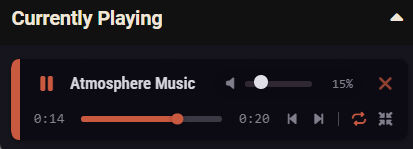
Modern player design — each playing track gets a sleek, compact player card embedded in the playlist sidebar Native Foundry styling — uses Foundry's CSS custom properties, automatically adapts to any theme (dark, light, custom) Album art extraction — automatically reads cover images from MP3 ID3 tags (APIC frames) with graceful fallback Smooth transitions — cover art fades in when loaded, no jarring image swaps
Custom seek bar — draggable progress bar with a handle that appears on hover Real-time position — current time updates every 250ms while playing Time display toggle — click the duration label to switch between total duration and remaining time (e.g. 3:15 ↔ -1:42) Precise seeking — drag anywhere on the track to jump to that position
Volume slider — colored fill that visually indicates the current level Mute/Unmute — click the volume icon to toggle mute (remembers previous volume)
Play/Pause — central play button with pause toggle Previous/Next — skip tracks or restart current track (restarts if >2s in, otherwise goes to previous) Repeat toggle — per-track loop mode with visual indicator Playlist mode cycling — click to cycle through Disabled → Sequential → Shuffle → Simultaneous
Ownership-based hiding — track names are automatically hidden from players whose permission level on the playlist is below Observer Channel type display — instead of the track name, players see the localized audio channel type (Music, Environment, Interface) Full localization support — uses Foundry's built-in localization keys (AUDIO.CHANNELS.MUSIC.label, etc.), works in any language Real-time updates — names are hidden dynamically, including in the custom EAR player and the "Now Playing" section GM always sees everything — hiding only affects non-GM users without sufficient permissions
Hides the default Foundry sound header, playback controls, and timer — replaced entirely by EAR Close button (✕) on each player to stop and dismiss the track Seek handle hidden by default, appears on hover for a cleaner look All controls are click-safe — no accidental interactions with the sidebar behind them
- In Foundry VTT, go to Settings → Manage Modules → Install Module
- Paste the manifest URL: https://raw.githubusercontent.com/SweetyHake/EAR/refs/heads/main/module.json