-
Which driver are you using and version of it (Ex: PostgreSQL 10.0):
Postgres 9.6.8
-
Which TablePlus build number are you using (the number on the welcome screen, Ex: build 81):
3.8.0 (138)
-
The steps to reproduce this issue:
Double-click on a table to edit it.
Double-click on a field in the table view to edit its value.
Right-click within the field.
At this point "Set Value" is greyed out. This is the bug.
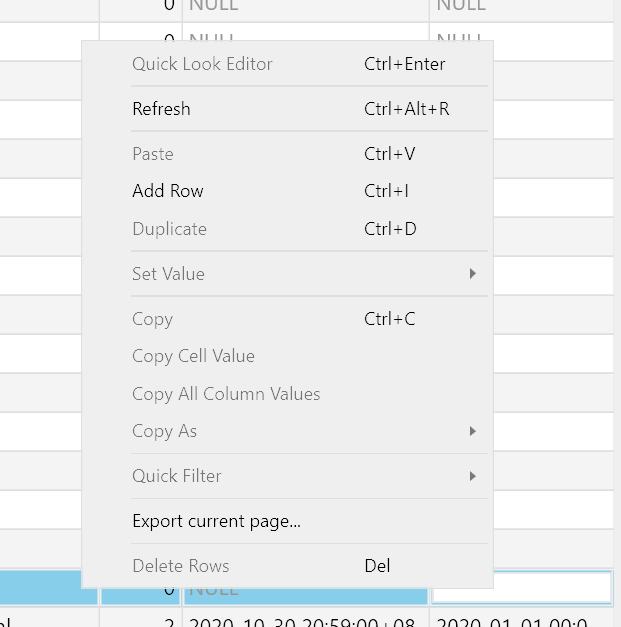
I realise I can press Escape and then the "Set Value" menu item becomes available again, but this is not optimal.
Also, this feature should be available when editing in the detail sidebar too.
Also, entering in nulls is so fundamental that the "Set Value, Null" deserves its own keyboard shortcut. Could you please add one?
I realise that in many cases I can just enter an empty string and get the same result. That's a great feature, but many users will not be aware of it.

Which driver are you using and version of it (Ex: PostgreSQL 10.0):
Postgres 9.6.8
Which TablePlus build number are you using (the number on the welcome screen, Ex: build 81):
3.8.0 (138)
The steps to reproduce this issue:
Double-click on a table to edit it.
Double-click on a field in the table view to edit its value.
Right-click within the field.
At this point "Set Value" is greyed out. This is the bug.
I realise I can press Escape and then the "Set Value" menu item becomes available again, but this is not optimal.
Also, this feature should be available when editing in the detail sidebar too.
Also, entering in nulls is so fundamental that the "Set Value, Null" deserves its own keyboard shortcut. Could you please add one?
I realise that in many cases I can just enter an empty string and get the same result. That's a great feature, but many users will not be aware of it.