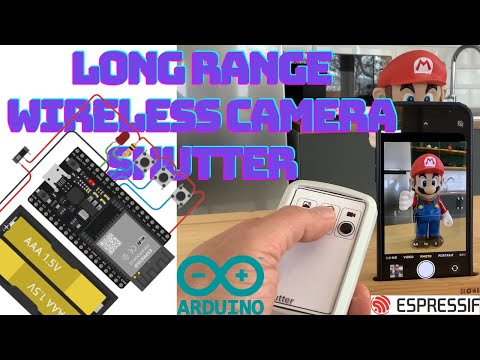
How to make a long-distance remote control with the ESP32 module, which will enable you to remotely control the mobile phone camera and record nature and wildlife photos and videos.
To download software: https://github.com/TanjuDuygu/camera_Shutter/
Arduino and ESP Module installation video: https://www.youtube.com/watch?v=RB5MyQtHghU
Remote test video: https://www.youtube.com/watch?v=eIAQwfVq5PU&t=104s
- (Make sure you can use the ESP32 with the Arduino IDE. Instructions can be found here.)
- Download the latest release of this library from the release page.
- In the Arduino IDE go to "Sketch" -> "Include Library" -> "Add .ZIP Library..." and select the file you just downloaded.
- You can now go to "File" -> "Examples" -> "Remote_Camera" and select any of the examples to get started.
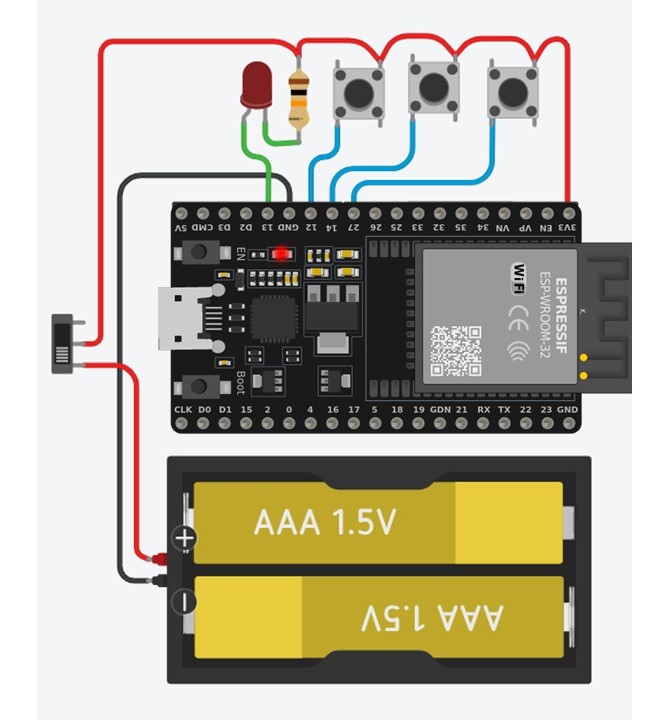
#include <Shutter.h>
#include <BLEDevice.h>
//#include <Arduino.h>
//#include <BLEScan.h>
//#include <BLEAdvertisedDevice.h>
//Se the name of the bluetooth keyboard (that shows up in the bluetooth menu of your device)
BleKeyboard bleKeyboard("Shutter");


const int OneShut = 12;
const int LongShut = 14;
const int Video = 27;
const int StatusLed = 13;
//Set the old button state to be LOW/false; which means not pressed
boolean oldPinState = LOW;


void setup() {
 esp_ble_tx_power_set(ESP_BLE_PWR_TYPE_SCAN, ESP_PWR_LVL_P9);
  //Start the Serial communication (with the computer at 115200 bits per second)
  Serial.begin(115200);
  //Send this message to the computer
  Serial.println("Starting BLE work!");

  //Begin the BLE keyboard/start advertising the keyboard (so phones can find it)
  bleKeyboard.begin();
  //Make the button pin an INPUT_PULLDOWN pin, which means that it is normally LOW, untill it is pressed/ connected to the 3.3V
  pinMode(OneShut, INPUT_PULLDOWN);
pinMode(LongShut, INPUT_PULLDOWN);
pinMode(Video, INPUT_PULLDOWN);
pinMode(StatusLed, OUTPUT);
digitalWrite (StatusLed, HIGH);
}

void loop() {

  if (bleKeyboard.isConnected()) {
    //if the keyboard is connected to a device
digitalWrite (StatusLed, LOW);
     if (digitalRead(LongShut) == HIGH) {
           bleKeyboard.press(KEY_MEDIA_VOLUME_UP);
           delay(50);

           }else{
            bleKeyboard.release(KEY_MEDIA_VOLUME_UP);
           delay(50);
            }

    if (digitalRead(Video) == HIGH) {
           bleKeyboard.press(KEY_MEDIA_VOLUME_DOWN);
           delay(50);

           }else{
            bleKeyboard.release(KEY_MEDIA_VOLUME_DOWN);
           delay(50);
            }

    if (digitalRead(OneShut) == HIGH) {
      //If the button pin is pressed (since it is pulled down, it is pressed when it is high
      if (oldPinState == LOW) {
        //if the old Pin state was LOW and the button pin is HIGH than...
        //send the spacebar
       bleKeyboard.write(KEY_MEDIA_VOLUME_UP);
    delay(100);
      }
      oldPinState = HIGH;
    } else {
      oldPinState = LOW;
      digitalWrite (StatusLed, HIGH);
    }

  }
  //delay(10);

Credits to [chegewara](https://github.com/chegewara) and [the authors of the USB keyboard library](https://github.com/arduino-libraries/Keyboard/) as this project is heavily based on their work!
Also, credits to [duke2421](https://github.com/T-vK/ESP32-BLE-Keyboard/issues/1) who helped a lot with testing, debugging and fixing the device descriptor!
And credits to [sivar2311](https://github.com/sivar2311) for adding NimBLE support, greatly reducing the memory footprint, fixing advertising issues and for adding the `setDelay` method.