Developer's Notes
A pyinstaller spec file is provided for generating an .exe for Windows. The one-folder option is used for speed. Generate and .exe using the command pyinstaller MainWindow.spec. The debug version (comes with the console for logging) can be generated using the CompileDebug specfile.
The program should theoretically compile for Linux/Mac as well, I just never tried it.
(metadata table not filled out, but it's the metadata of the DICOM files like the manufacturer name, etc)
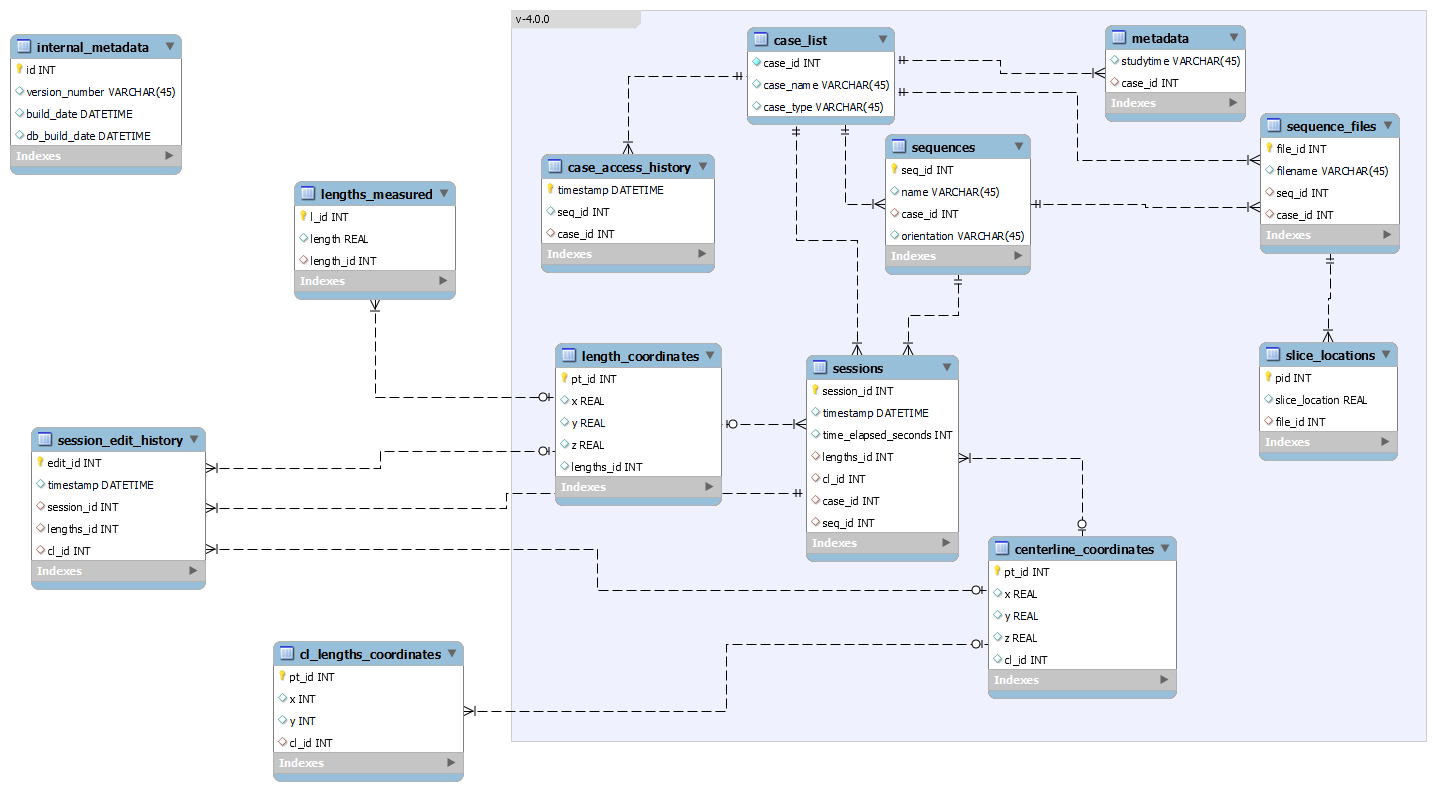
- Add button to
gui.display.toolbar.pywith aclicked.connect(lambda: function(model)) - Create function in
gui.display.toolbar_connect.pythat refers to the desired functionality inapp.gui_data_handling.case_model.py - If the function also needs to interact with the centerline, check if
self.centerline_modelexists incase_model.pyand add the function inapp.gui_data_handling.centerline_model.py
- Create a new folder under
app.file_reader - Create a new reader class, overloading
AbstractReader - TODO
Note that running any of the test will cause a vtkOutputWindow afterwards with several warnings. It will either crash by itself or finish showing the warnings. This is a known issue.
The currently available tests (find these under MRICenterline/testing) are as follows:
- Loads a previously annotated case from the database and tries to calculate the centerline
- Depending on the
TESTINGflag in the beginning of the file, the test tries to run a full cycle of possible angles from 0 to 180, or tries to change the height of the centerline image from 10 to 100.
- Creates a set of points on the images, moves the slices a few times, creates more points, with a 50msec delay per point/simulated mouse movement. The specifics are in the code itself.
- The points are then saved to the database and also copied to memory
- The saved points are loaded from the database.
- The loaded points (coordinates and slice indices) are compared to the points in the memory
In sequence_viewer, there would be cases when the next calculated slice index is not correct - e.g., when moving forward from slice 20, sometimes the slice would be calculated as slice 20 again instead of properly showing 21. This test checks if the next calculated slice index is the number after the previous one. If the slice number moves forward, this is labeled as 'case 2' and if not, it is labeled as 'case 1.' For this test to pass, all slice movements must be 'case 2.'
The current fix is to round off the value of the recalculated center before calculating the current slice index.
The rest of the tests in the folder are intended for comparing the the v3 and v4 releases of the software and are now obsolete.
Can only be configured before building
see app.config.log.py
Currently set to DD.MM.YY HH:MM:SS. Timestamps are saved to the database as UTC and displayed according to local time
Change in app.config.internal_config.py
Default: (204 / 255, 204 / 255, 204 / 255)
Change in app.config.internal_config.py