
This is a library for handling the AXML file format. "AXML" is the informal
common name for the compiled binary XML data format used in Android app files.
The Android Open Source Project does not seem to have named the format, other
than referring to is as "binary XML" or "compiled XML". So AXML stands for
Android XML. The file format is based on compiling XML source into a binary
format based on protobuf. There are a number of different Android XML file
types that are compiled to AXML, these are generically known as Android
Resources.
All of these files are included in the APK's ZIP package with the file extension
.xml even though they are actually AXML and not XML.
Some specific data files, like String Resources and Style Resources, are instead
compiled into a single file resources.arsc in its own data format, known as
ASRC. AXML files often refer to values that are in resources.arsc.
The entry point for an app is the "app
manifest"
defines the essential data points that every app must have, like Package Name
and Version Code, and includes lots of other metadata that describe the
app. Every Android app file (APK) must include
AndroidManifest.xml,
which in the APK is the compiled binary AXML format, not XML, despite the file
extension. The source code files for the binary app manifest file are also
called AndroidManifest.xml, but they are actually XML. There can be
multiple source files,
but there is only ever one single compiled binary AndroidManifest.xml that is
valid in the APK.
https://developer.android.com/guide/topics/manifest/manifest-intro#reference
💢 Requirement PKG 💢
termux-setup-storage && pkg update -y && pkg upgrade -y && pkg install python libxslt -y && pip install click pygments rich lxml
👉🏻 To install ARParser, Run only any one cmd from the Installation Method
💢 PYPI ( Just Testing ) 💢
pip install ARParser
1st. Method
💢 For Latest Commit ( From Main Branch ) 💢
pip install --force-reinstall https://github.com/TechnoIndian/ARParser/archive/refs/heads/main.zip
Or
pip install --force-reinstall https://github.com/TechnoIndian/ARParser/archive/refs/heads/main.tar.gz
Or
curl -Ls https://github.com/TechnoIndian/Tools/releases/download/Tools/ARParser.sh | bash
2nd. Method
pkg install python git && pip install --force-reinstall git+https://github.com/TechnoIndian/ARParser.git
pip uninstall ARParser
├➢ AXMLPrinter ( Support APK & XML )
ARParser axml -i AndroidManifest.xml
Or
ARParser axml AndroidManifest.xml
With APK
ARParser axml Apk_Path.apk
├➢ ID2Name, Default is ID ( @7F140004 𒁍 @xml/network_security_config | _attr_01010003 𒁍 android:name )
ARParser axml Apk_Path.apk -n
├➢ ResParser ( Res AXML Parse )
ARParser axml Apk_Path.apk -r res/xml/xyz.xml
ID2Name
ARParser axml Apk_Path.apk -r res/xml/xyz.xml -n
Mode Help ( --help )
ARParser axml --help
├➢ Public XML ( Default )
ARParser arsc Apk_Path.apk
├➢ hex ID ( Resolve 𒁍 locale and package )
ARParser arsc Apk_Path.apk -id 7f060008
├➢ Locale ( en-rIN, en-rGB, zh-rCN etc. )
ARParser arsc Apk_Path.apk -l en-rIN
├➢ Type [string|strings|bool|id|color|dimen|integer|public]
ARParser arsc Apk_Path.apk -t string
Mode Help ( --help )
ARParser arsc --help
- Passing androguard tests for axml and arsc.
axml/
├── axml/
│   ├── __init__.py       # Expose the public API (parse_axml, AXMLParser, AXMLPrinter)
│   ├── apk.py            # input APK_Path.apk, AndroidManifest.xml, resources.arsc
│   ├── cli.py            # Command Helper
│   ├── main.py           # Script Execution
│   ├── constants.py      # All constants (chunk types, flag values...)
│   ├── exceptions.py     # Custom exceptions (like ResParserError)
│   ├── stringblock.py    # The StringBlock class and its helper functions (_decode8, _decode16...)
│   ├── parser_arsc.py    # The resources parser class and related parsing functions
│   ├── parser_axml.py    # The AXMLParser class and related parsing functions
│   ├── printer.py        # The AXMLPrinter class for converting parsed AXML into an ElementTree
│   └── formatters.py     # Helper functions like format_value and any formatting utilities
│   ├── resources
│   │   ├── __init__.py
│   │   ├── public.json
│   │   ├── public.py
│   │   └── public.xml
├── tests/
│   └── test_*.py    # Unit tests for each module
├── setup.py              # Packaging file
├── pyproject.toml        # Build configuration
└── README.md             # Project description and usage instructions
- Write tests early approach, so we can immediately verify breaking changes.
- Expose a clean public API
- Standalone capabilities for axml parsing
- Provide basic documentation
- Follow PEP 257 guidelines using the reStructuredText (reST) format for all docstrings.
Some references about the binary AXML format:
- aapt2 compiles XML to protobuf-based AXML
- aapt2 source code
- aapt source code
- The binary format for
AndroidManifest.xmlis defined inApkInfo.proto.
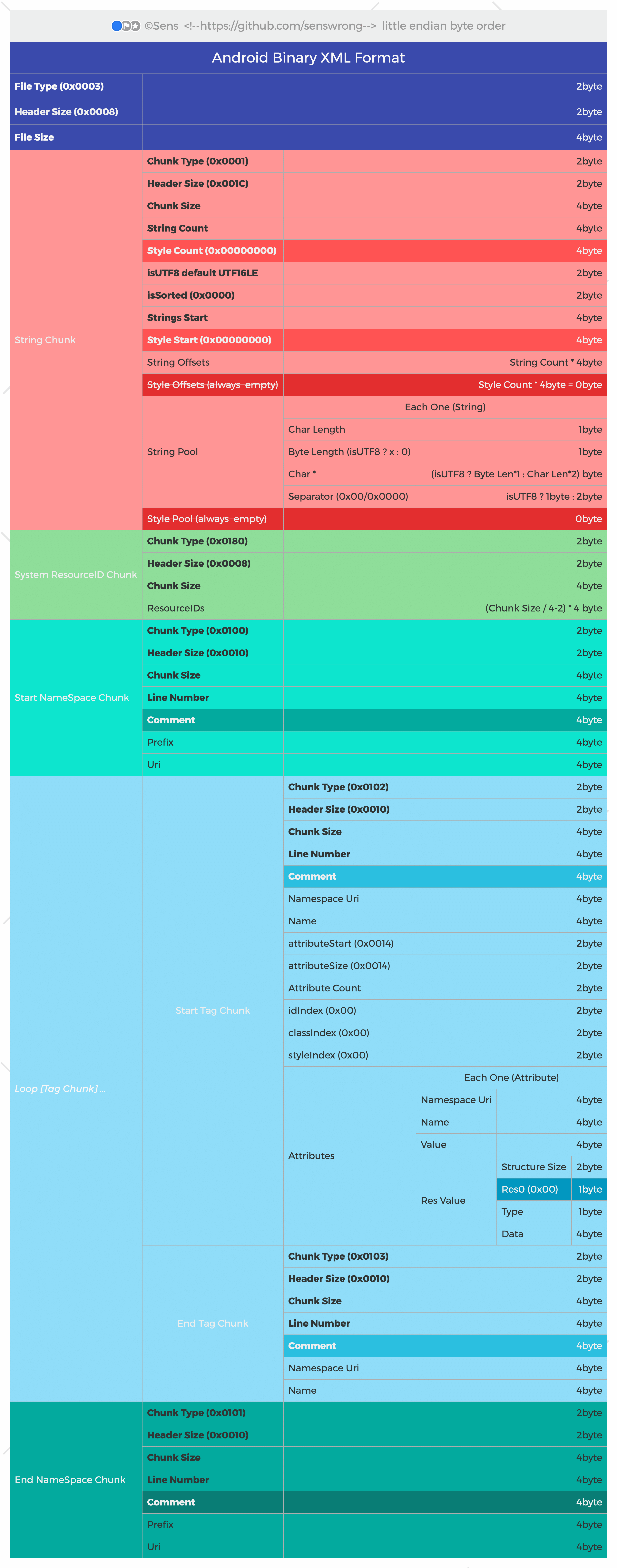
Credit
- axml compiles XML to protobuf-based AXML
- androguard compiles XML to protobuf-based AXML

