

The subscription-based alternative to API frameworks like OpenCode. Coordinate all your AI subscriptions, local LLMs, and CLI agents into a single team without a single API key.
Switchboard adds a sidebar panel to VS Code where you create, manage, and dispatch plans to AI agents. It bridges IDE-based agents (Antigravity, Windsurf, Copilot Chat) and CLI agents (Copilot CLI, Qwen, Codex, Gemini CLI) so they can collaborate on the same plans inside your repo.
Instead of paying for expensive all-in-one API tiers, you get dramatically more AI usage by load-balancing your existing consumer subscriptions (e.g., Google Pro, Copilot, Codex) from the sidebar.
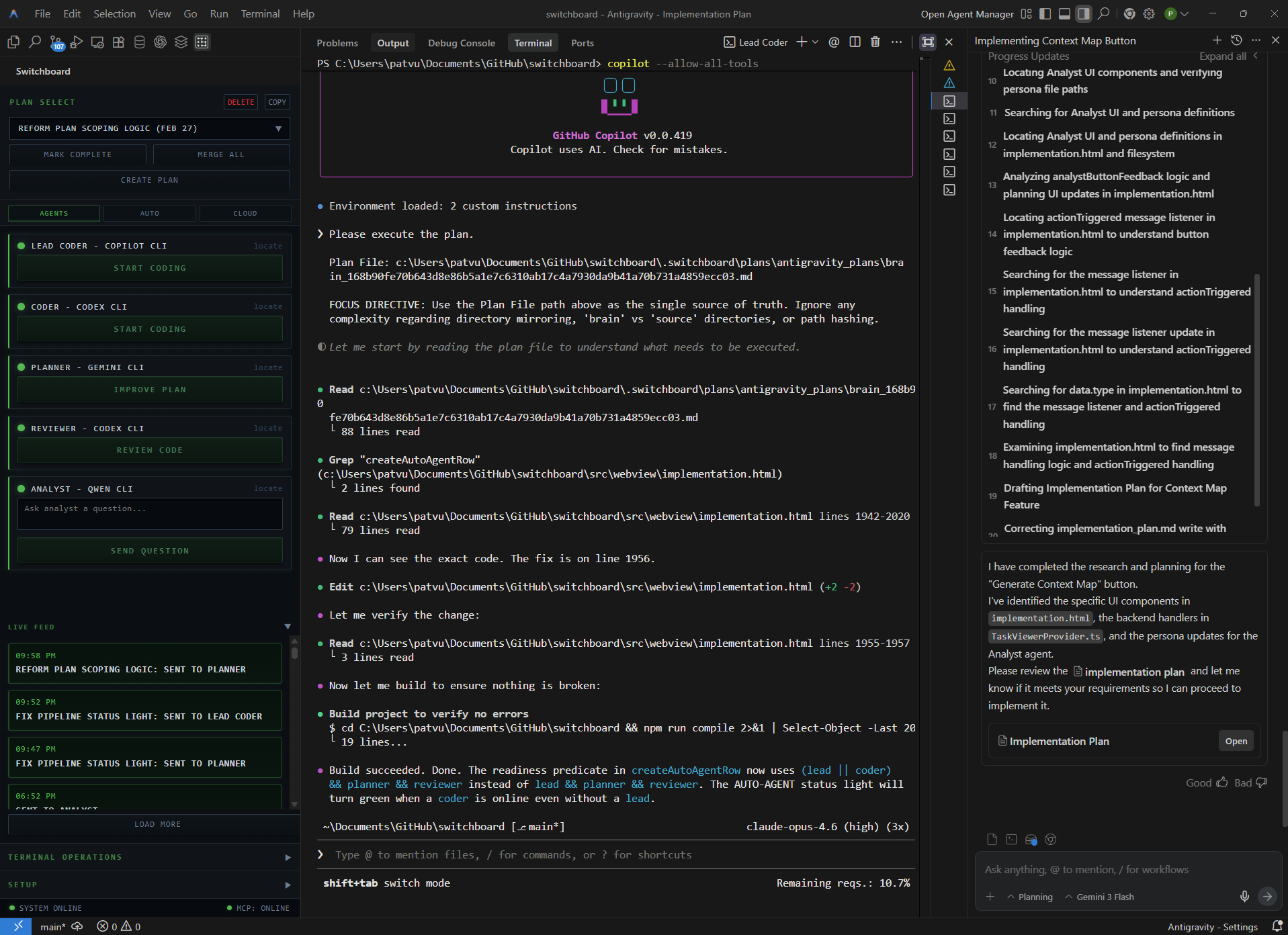
Different AI subscriptions have wildly different pricing and limit structures. Switchboard lets you exploit these differences:
- Avoid Fair Use Penalties: Stop thrashing a single subscription's hidden compute budget and getting hit with week-long lockouts. Plan with Antigravity, improve the plan with Codex, then implement with Copilot.
- Extend Premium Models: Tell Antigravity Opus to offload routine boilerplate to a cheaper CLI agent so your high-tier message limits last longer.
- Exploit Per-Prompt Pricing: Plan a massive feature epic in Antigravity. Then, send it to Copilot Opus to execute using their per-prompt pricing (which has no upper work limit per session), rather than burning your Antigravity token quota.
Due to recent ToS bans hitting proxy services like OpenCode, Switchboard was built to be completely local. There are no proxy servers, no external API keys, and no ToS violations.
The coordination layer is strictly file-based. Switchboard uses the official VS Code terminal.sendText API to automate the agents running in your own terminals, under your own standard authentication. It happens entirely on your machine. Read the architectural analysis here.
- Antigravity Brain Mirroring: Automatically copies plans from the Antigravity brain into your workspace so any external CLI agent can read them.
- Cross-IDE Workflows: Since it uses standard VS Code APIs, you can install it in any fork. Have Antigravity on one monitor and Windsurf on another; they seamlessly share the same plan files.
- State-Tracking: Logs the current state of your active plans, knowing exactly which agents have or haven't worked on them.
- Open the Switchboard sidebar (click the icon in the activity bar).
- Click Setup → Initialise. This auto-configures the MCP for Antigravity, Windsurf, and VS Code-compatible IDEs in one click.
- Enter your CLI startup commands in Setup (e.g.,
copilot --allow-all-tools,qwen,codex --full-auto), save, then click Open Terminals in the Terminal Operations panel. - Authenticate in each terminal and choose your models.
- Draft a plan using
/chatin your AI chat, refine it, or click Create Plan. - Use the sidebar Send buttons to dispatch the plan to your agents.
| Role | Recommended tool | Purpose |
|---|---|---|
| Lead Coder | Copilot CLI (Opus 4.6) | Large feature implementation |
| Coder | Qwen, Gemini Flash 3, Codex 5.3 Low | Boilerplate and routine work |
| Planner | Codex 5.3 High, Gemini 3.1 CLI | Plan hardening and edge cases |
| Reviewer | Codex 5.3 High | Bug finding and verification |
| Analyst | Qwen, Gemini Flash 3 | Research and investigation |
Note: The handoff workflows are secondary controls to the sidebar buttons.
| Command | What it does |
|---|---|
/chat |
Ideation mode — discuss requirements before any plan is written. |
/enhance |
Deepen and stress-test an existing plan. |
/challenge |
Adversarial review — a grumpy persona finds flaws, then synthesizes fixes. |
/handoff |
Route sanity-checking for micro-specs to a CLI agent; ends at spec decomposition. |
/handoff-lead |
Send everything to your Lead Coder agent in one shot. |
/handoff-chat |
Copy the plan to the clipboard for pasting into Windsurf or another IDE. |
/handoff-relay |
Current model does the complex work, then pauses for a model switch. |
/accuracy |
High-precision implementation mode with mandatory self-review gates. |
Use
--allwith any handoff to skip complexity splitting and send the whole plan.
The sidebar includes a panel for "dumb but effective" asynchronous team automation, removing the mental load of managing a backlog.
| Command | What it does |
|---|---|
Pipeline |
A state-tracking loop. Every 10 minutes, it picks an open plan and blindly passes it to the next agent in your chain (Planner → Coder → Reviewer). |
Auto Agent |
Sends the active plan to the Planner, Lead Coder, and Reviewer agents on a 7-minute timer between stages. |
Lead + Coder |
Reads your enhanced plan's complexity split (low, medium, or lazy). Routes the lazy/medium work to the standard Coder, and the rest to the Lead Coder. |
Coder + Reviewer |
Sends the plan to the Coder, and asks them to notify the Reviewer once done — lifts cheap coding quality without needing Opus 4.6. |
- VS Code Extension: Manages terminals, sidebar UI, plan watcher, and inbox watcher.
- Bundled MCP Server: Exposes tools to agents (
send_message,check_inbox,start_workflow,run_in_terminal, etc.). - File Protocol: All coordination happens via
.switchboard/in your workspace — transparent, auditable, and entirely local.
No telemetry. No external servers. All coordination data is workspace-local. MIT License.