
Wavebox is a next-generation desktop browser engineered specifically to consolidate your digital workflow into a single, distraction-free environment. Unlike traditional browsers that fragment attention across multiple tabs and windows, Wavebox provides a dedicated space for all your essential web applications, including email clients, project management tools, calendars, and communication platforms.
With Wavebox, professionals can significantly reduce cognitive load by grouping accounts (such as multiple Google Workspace or Microsoft 365 profiles) into focused collections. The architecture of Wavebox is built on a modern, performance-oriented engine that minimizes system resource usage while maintaining real-time notifications and background synchronization. Whether you manage complex SaaS ecosystems, handle extensive customer support queues, or oversee development operations, Wavebox offers the structural integrity needed to maintain high productivity.
The Wavebox experience is defined by its deep integration capabilities. It allows users to unlock features like quick account switching, unified search across all connected apps, and granular control over privacy settings. By adopting Wavebox, teams can standardize their digital workspace, ensuring that every member operates from a consistent, organized interface. This makes Wavebox an indispensable tool for IT administrators, creative agencies, and remote-first organizations looking to streamline their operational overhead.

- Begin by securing your copy of Wavebox through the official portal.
- Once the Wavebox package is prepared, launch the setup to integrate it into your system environment.
- Upon first launch, Wavebox will guide you through connecting your primary accounts, such as email, calendar, and cloud storage.
- Configure your Wavebox workspace by organizing applications into distinct groups or containers to separate work, personal, and project-based activities.
- Explore the Wavebox settings panel to customize notification behavior, privacy rules, and appearance to align with your workflow preferences.
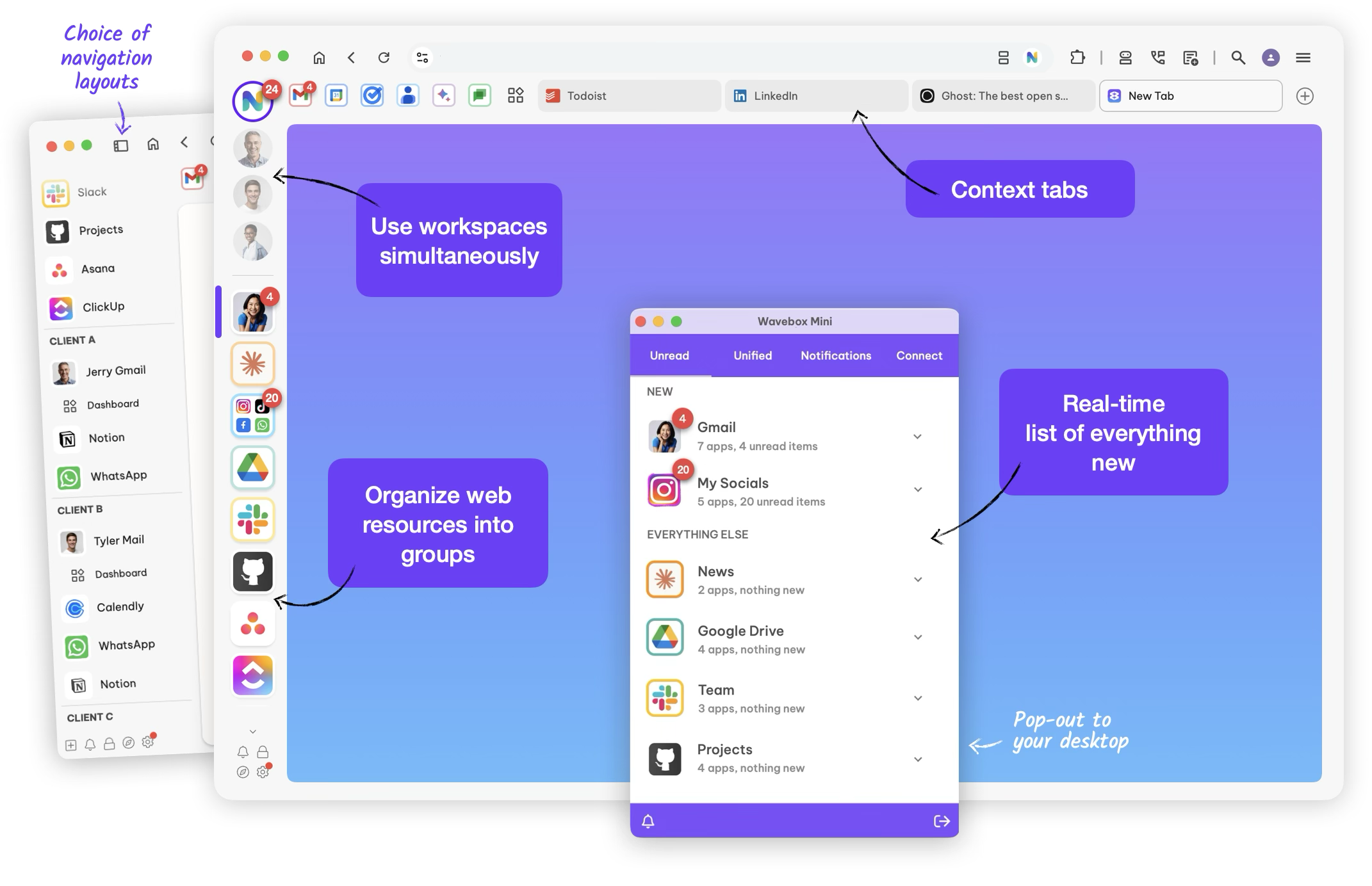
- Unified Workspace Architecture – Wavebox centralizes all your web tools into a single, tab-free interface, eliminating the chaos of traditional browsing.
- Advanced Account Grouping – Manage multiple identities simultaneously within Wavebox, switching between clients or roles without logging in and out repeatedly.
- Intelligent Notifications – Wavebox aggregates alerts from all connected applications, allowing you to view and respond without leaving the primary interface.
- Resource Optimization – By isolating processes efficiently, Wavebox consumes less memory and CPU compared to standard browsers, extending battery life on portable devices.
- Customizable Privacy Controls – Wavebox empowers users with per-container cookie policies, strict tracker blocking, and detailed site permission management.
- Automation and Workflow Scripting – Automate repetitive tasks within Wavebox using native tools that interact with your web applications programmatically.
- Cross-Platform Synchronization – Your Wavebox layout, settings, and account associations remain consistent across all devices in your ecosystem.
- Secure Data Handling – Wavebox implements end-to-end encryption for session data and supports enterprise-grade single sign-on (SSO) protocols.
- Integrated Search Capabilities – The universal search in Wavebox allows you to query across emails, documents, and tasks simultaneously, surfacing results instantly.
- Background App Synchronization – Wavebox keeps your critical applications updated in real-time without requiring manual refreshes.
- Quick Access Menus – Navigate your Wavebox workspace using keyboard-centric shortcuts designed for speed and efficiency.
- Dynamic Tagging and Filtering – Organize applications within Wavebox using a custom tagging system that reflects your operational priorities.
- Multi-Session Support – Run isolated sessions for different projects or clients within the same Wavebox window without cross-contamination of data.
- Shared Workspace Templates – Deploy standardized Wavebox configurations across team members to ensure uniform tool access and layout.
- Real-Time Collaboration Layers – Integrate communication tools within Wavebox so that team discussions remain contextual to the applications being used.
- Cloud Configuration Backup – Your Wavebox settings are securely stored, enabling rapid deployment on new machines or recovery after system changes.
- Annotation and Feedback Tools – Capture notes directly within the Wavebox interface to document workflows or share insights with colleagues.
| Component | Minimum Specification | Recommended Specification |
|---|---|---|
| Operating System | Windows 10 / Linux / macOS 11 | Windows 11 / macOS 13+ / Ubuntu 22.04 LTS |
| Processor | Dual-core CPU (x64 architecture) | High-performance multi-core CPU |
| RAM | 4 GB | 8 GB or higher |
| Graphics | DirectX 10 / OpenGL 3.0 compatible | Dedicated GPU for enhanced rendering |
| Storage | 250 MB available space | Solid-state drive (SSD) for faster launch times |
• Wavebox browser • Wavebox productivity • Wavebox workflow • Wavebox email client • Wavebox unified workspace • Wavebox account manager • Wavebox professional tools • Wavebox group management • Wavebox efficiency • Wavebox organization • Wavebox digital hub • Wavebox cross-platform • Wavebox integration • Wavebox secure browser • Wavebox automation • Wavebox team collaboration • Wavebox container technology • Wavebox session isolation • Wavebox configuration • Wavebox deployment