Repository navigation
Clean Comms
Clean Comms is four features for user chat messages, the ones people type, as opposed to the chat messages the system posts. Each one is its own setting, and each person chooses for themselves.
 |
 |
A row above the chat buttons shows who your next message comes from. Left on Selected, it follows your selected token, and falls back to you when no token, or more than one, is selected. Click it to speak as yourself, as any token you own on the scene, or as a hero you own who isn't on the scene. Heroes come first in that list.
Rolls, macros and abilities ignore it and keep the speaker Foundry would have given them.
Foundry builds a typed message in ChatLog#processMessage. It takes the speaker from the selected token, fires the chatMessage hook with the message data, then hands that data to the handler for the command. Two things in that chain get in the way:
- The handler for out of character messages deletes the speaker outright.
- The emote and
/ichandlers refuse to run without a character speaker, and the emote writes the speaker's name into its text right there.
So the module sets the speaker twice. Once on the data in chatMessage, which is what the emote check and the emote's text read, and again in preCreateChatMessage with updateSource, which puts it back after the out of character handler has deleted it. A message spoken as a character becomes in character, and one spoken as yourself becomes out of character.
I only did the second half at first, and an emote as a picked character then failed with "You cannot chat in-character without an identified speaker" whenever no token was selected.
When the sidebar collapses, Foundry moves the chat input and its buttons out of the sidebar and into the notification area, and back again when it opens. It fires renderChatInput after every move, so the row re-seats itself in that hook. renderChatLog is too early, because it fires before the input is there.
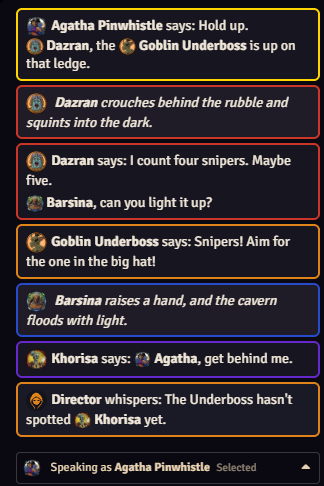
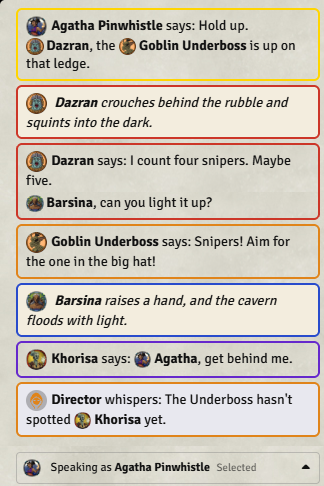
A typed message fits on one line: the speaker's portrait, their name, "says:" or "whispers:", and the text. Emotes drop the label and are set in italics, since the speaker's name already starts the sentence. /em, /me and /emote all count as emotes.
A whisper doesn't say who it went to.
The portrait is the speaker's token, then their actor's token art, then the player's avatar. A player with no avatar gets Foundry's silhouette tinted in their player colour. The tint is a mask over the silhouette, and its url() is written into the element's own style rather than a CSS variable, because a url() inside a variable resolves against the stylesheet that uses it, not against the page.
Click a portrait to ping that token. Hovering one highlights the token on the board.
Foundry outlines an out of character message in its author's colour and leaves everything else grey. Here a message spoken as a character is outlined in the colour of that character's player: the user it is assigned to, then a player who owns it, then whoever sent it. So a hero's lines carry their player's colour even when the Director types them, and a monster's carry the Director's.
Only plain messages change. Anything with a roll, a flavor line, an embed, a table or a button is left as it is.
When the same speaker sends several messages in a row, less than ten minutes apart, they share one box and only the first shows the name and portrait. Emotes always start a box of their own, and a whisper never joins a spoken line.
The theme draws a 2px coloured border around every message, and its rule outranks a plain one, so the join removes that border at the seam with !important.
When a typed message names somebody in the party, the name turns bold with their portrait in front. Click the portrait to find their token.
The names it looks for:
- Players.
- Heroes and player owned tokens on the current scene, except hidden ones, so a companion or retainer counts.
- Hero actors.
- The first names of heroes on the scene, so "Agatha" finds Agatha Pinwhistle.
Monsters are left alone. Most of them are unlinked and come in groups, so "Goblin Sniper" in a sentence can't say which of the four on the board is meant, and highlighting every monster name would mostly be noise.
To mention a monster, target it. The crosshair beside the Speaking As row puts a link to each of your targets into the message at the cursor, and typing @targets anywhere in a message does the same when it is sent. The crosshair is greyed out while you have no targets.
Each link is Foundry's own @UUID[Scene.<id>.Token.<id>]{Name}, so the message stores the exact token, not just its name. The links are drawn as mentions like any other name, and clicking one pings that very token, even with four Goblin Snipers on the board. A link to a token that has since been deleted stays a plain broken link.
The chat input is a ProseMirror editor whose editor object is private, so the crosshair keeps the editor focused on mousedown and inserts the links as typed text. @targets is swapped for the links in preCreateChatMessage, which is why it works in any kind of typed message.
First names come from the heroes' tokens rather than the hero actors, because an actor's name doesn't have to be the character's name and a token's usually is.
A first name two heroes share is left alone. Two tokens with the same name still get highlighted, but without a token to ping. Names under three letters are skipped, matching is whole words only and ignores case, and longer names are tried first. Text that is already bold, a link or code is left alone, which is also how the speaker's own name at the start of an emote is kept from being highlighted as well.
After a reload the chat draws before the board, so there are no tokens to match yet. The names are marked again once the board is ready.