Repository navigation
Effect Log
The Effect Log puts a line in chat when a condition or effect starts on a creature, and another when it ends, so you can see what was on whom, who put it there, and why it went away.
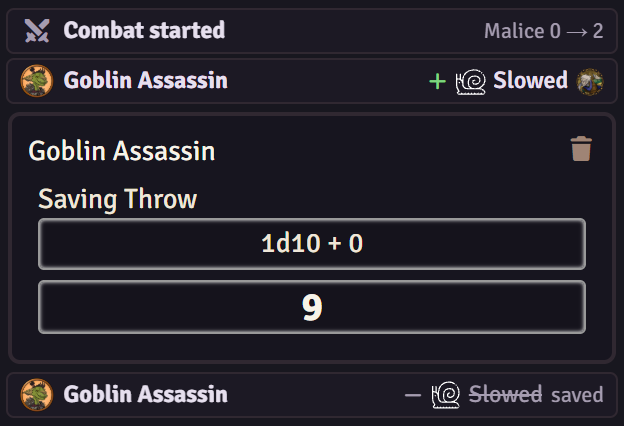 |
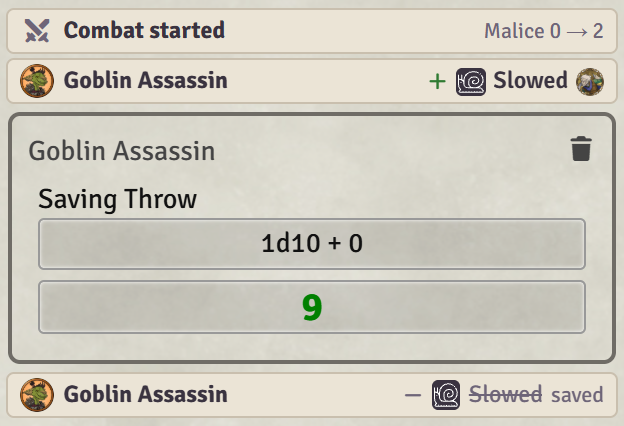 |
- Conditions and effects placed on a creature. Passive effects that come from a creature's own items are not logged.
- Winded, on heroes and on monsters that aren't minions.
- Dying, on heroes only.
- Forced movement and falls, with Draw Steel: Combat Tools 1.2.7 or later. See below.
- Moves other modules log through Battle Log's API.
Dead is never logged, since Draw Steel: Death Tracker announces deaths, and minions never get Winded lines.
Only during combat, unless the Director turns on Log Outside of Combat, the same setting the Resource Log uses.
With Draw Steel: Triggers, the Trigger Log setting turns declined triggers into lines too, in place of their Trigger Declined chat messages. Triggers declined at the same moment, such as several heroes passing on the same strike, share one line with each owner's face, and the tooltip lists who declined what. Each person sees only the declines they could see before: the Director sees all of them, and a player sees their own heroes'. Turn it off and the chat messages come back.
A plus starts an effect and a minus ends it. From left to right: the creature's portrait and name, the effect's icon and name, and on an end line, why it ended.
A start line shows a small token of whoever applied the effect, when that is known. Hovering it shows the ability and who used it, for example "Judgment, from Khorisa".
The same effect from the same source landing on several minions of the same type at once is one line, read in the plural: "Darts". Anything else gets a line of its own. Every portrait is shown, overlapping. Hovering the effect lists every name.
- saved: the creature made its saving throw.
- end of turn, start of turn, end of round, end of combat, respite: its duration ran out.
- removed: somebody deleted it.
- cleansed: an ability cleansed it, through Draw Steel: Combat Tools.
- turned off: it was disabled. Turning it back on starts a new line marked turned back on.
Forced movement and falls from Combat Tools get a line each, and the chat message they come from is hidden behind it.
A forced movement line shows the creature, an arrow for the kind of move, the move's name and distance, for example "Push 3", and a small token of whoever moved it. A vertical move shows an up arrow and the vertical name. When one move shifts several creatures they share a line, and different distances read "Slide 2 / 3". Hovering the line shows what the chat message said.
The Undo the Move button on the line undoes the move the same way the chat message's own Undo button does. It is there for the Director and for whoever made the move, and works while that chat message is loaded in the chat. Undoing adds a second line marked undone.
A fall reads Fall and the distance, with a down arrow. Hovering it lists what changed the fall, such as the Agility reduction, taken from the fall's chat message. With Combat Tools 2.2.2 or later, a fall line also has an edit button, which opens the system's Modify Fall, and an Undo button, since the falling chat message is hidden behind the line.
An effect added and removed again within two seconds leaves no lines at all, so a misclick and its correction disappear.
Re-applying something that was just removed reads as one start line, not an end and a new start.
Effects on the heroes are shown to everyone.
On monsters, players see conditions, and effects that came from an ability. Anything else on a monster, like a custom effect the Director made, is shown to the Director only.
Effects a module keeps for its own bookkeeping, like Combat Tools' expiry reminders, are logged for the Director only.
Lines about a hidden creature start hidden from the players, as in the Resource Log, and hovering a line gives the Director the same two buttons: hide it from the players, or delete it.
The chat tabs choose whether you see the lines, for you only: the Logs tab shows only log lines, and the Chat tab hides them.
It is stored and drawn the same way as the Resource Log: the Director records each line into a world setting, capped at the last 600, and every client draws them into its own chat log, mixed in with Resource Log lines in the order they happened.
Who applied an effect comes from wherever the system or a module left it: the ability the effect came from for the system's Apply Effect buttons, the source the system writes on a condition imposed on a target, and Combat Tools' own records for its effects.
Effects a module uses for its own bookkeeping would clutter the log. Set this flag on them and Battle Log skips them:
flags: { "draw-steel-ctlib": { noLog: true } }flags["draw-steel-battle-log"].noLog works too, but CTLib's scope is the safe choice, since Foundry only accepts flags for packages that are active.
To log an effect for the Director only, set gmOnly instead. Its lines start hidden from the players:
flags: { "draw-steel-ctlib": { gmOnly: true } }To give an end line a reason, pass it when deleting:
effect.delete({ ctlib: { endReason: "cleansed" } });Battle Log's API is at game.modules.get('draw-steel-battle-log').api. It is set during init, so use it from setup or later. Its four functions give another module's movement log lines with tooltips and an Undo the Move button. Like every Effect Log line, they only show while the Effect Log is on, and are only logged during combat unless Log Outside of Combat is on.
Moves that post a chat message. registerMoveSource tells Battle Log how to read your messages. The line then hides the message, as it does for Combat Tools.
api.registerMoveSource({
  flags: (message) => null,  // the move on this message, or null when the message isn't yours
  undone: (changes) => false, // optional: true when this update to the message marks the move undone
  html: (message) => "",      // optional: the HTML shown when hovering the line
  undo: (message) => {},      // optional: undoes the move when the line's Undo the Move is clicked
  edit: (message) => {},      // optional: opens your editor for the move when the line's edit button is clicked
});
flags returns the move in the shape Combat Tools writes on its own messages:
// one or more creatures moved
{ isFmUndo: true, isUndone: false, isCombined: true, entries: [
  { targetTokenId, targetSceneId, fmLog: { movement: "push", moved: 3, vertical: false, source: { src, tokenId, sceneId } } },
] }

// a fall
{ fallLog: { fell: 4, targetTokenId, targetSceneId, lines: [] } } // lines: optional, shown when hovering the line
source is the token shown for whoever made the move, and can be left out. The line's Undo the Move button calls your undo. The button shows for the Director and the message's author.
Moves without a chat message. logMove adds a line and returns whether it did. Call it on the Director's client, since the log is kept in a world setting.
api.logMove({ key, tokenUuid, action: "walk", moved: 5, strikes: [], blueprint: null });-
key: your own id for the move, used again to undo it. -
tokenUuid: the token that moved. -
action: the movement action, which picks the word:walkreads "Moved", thenshift,fly,climb,swim,burrow,crawl,jumpandteleport. Anything else reads "Moved". -
moved: the distance in squares. -
strikes: free strikes the move provoked, each{ name, damage, src, tokenId, sceneId }. The line counts them and shows each striker's token, and the tooltip lists them. -
blueprint: anything you want handed back when the line is hovered.
registerMoveLog({ undo, html }) sets the two callbacks for these lines. undo({ key, tokenUuid }) runs on the client of whoever clicks Undo the Move, which is shown to the Director and the token's owners, and only once undo is registered. html(entry) returns the tooltip's HTML for a line logged with a blueprint, which it finds in entry.blueprint.
markMoveUndone(key) adds the undone line for that move. Call it on the Director's client. It returns false when there is no such move or it is already undone.
- A successful save doesn't delete the effect. The system marks it expired and keeps it until the fight ends, and the saving throw's chat message arrives just after. So an end line waits a few seconds for that message, turns into "saved" if one comes, and moves below it so it reads in order. The message is meant to say which effect it was for, but that link is lost when the roll is posted, so Battle Log matches it by the creature who rolled, and only against effects that end on a save.
- Expired effects are deleted at the end of combat with no explanation. Those deletes would read as a second end for something that already ended, so an effect that already expired is never logged again when it's deleted.
- Re-applying a condition is a delete followed by a create. Without catching that, re-applying Slowed read as "Slowed removed" then "Slowed" straight after.