Home
Cyborg Elements was created as a simple tool to make sci-fi filmmaking more accessible. I designed and animated over 52 components in Adobe After Effects (AE) which can be dragged and dropped as composition templates, or used individually. There are thousands of different combinations to use creatively! I even used a combinations calculator (nCr) to make sure. Hopefully, I did that right. 😅
There are no plug-ins required for this kit, as it was made fully within AE using their built-in tools and controllers. It would be a dream to "pluginize" this kit someday but, for now, it's here as-is to hopefully help scrappy filmmakers and even seasoned professionals save time in post-production for sci-fi storytelling.
Let's get to the basics.
- FX Controllers
- Pre-Animated Elements
- Futuristic UI Presets
- Animated HUD Presets
- Transition FX
This is a SOLO BAR, which is an element that has been made using AE’s built-in shape masking tools and trim paths. I’ve added effects to them in the AE file to help you customize them more easily.
If you can't see your Effect Controls window, which should typically be a tab next to your Project window on the left in AE, you can access the Effect Controls by selecting Window > Effect Controls.

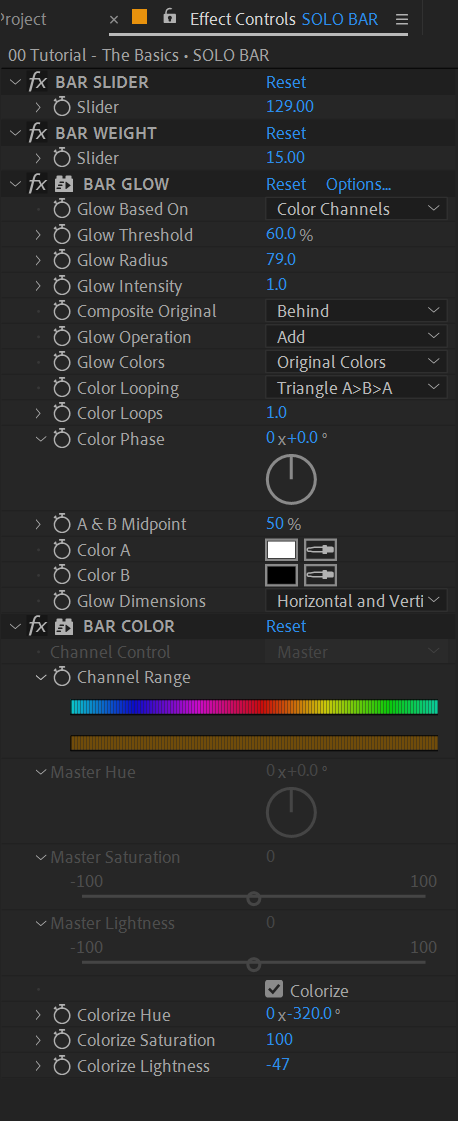
BAR SLIDER - Changes the stroke length of the bar
BAR WEIGHT - Changes the stroke weight of the bar
BAR GLOW - Toggle the glow effect ON/OFF or adjust it
BAR COLOR - Change the hue or saturation of the stroke