


Latest release: v0.9.5
TideWise is a Home Assistant dashboard (Lovelace) custom card for tide predictions, current tide height, next high/low tides, and optional fishing bite-window scoring. The default provider is NOAA CO-OPS, with early Canada CHS/DFO support and UK support through the UKHO Tides Home Assistant integration.
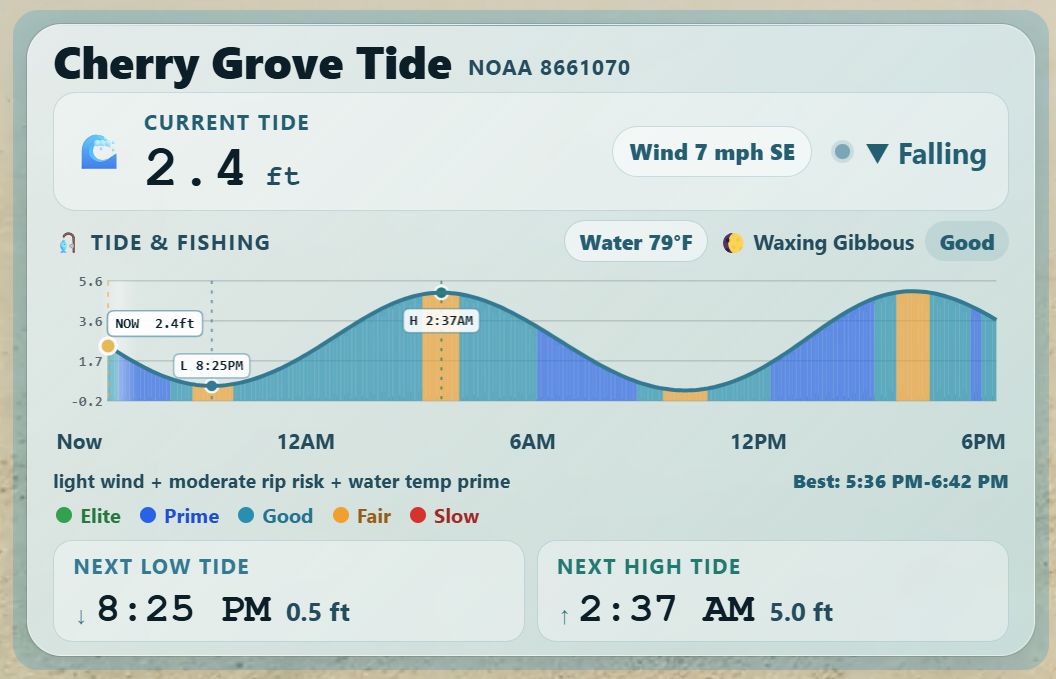
TideWise keeps its ocean-glass style by default. It can also follow Home Assistant theme colors more closely with theme_mode: auto.
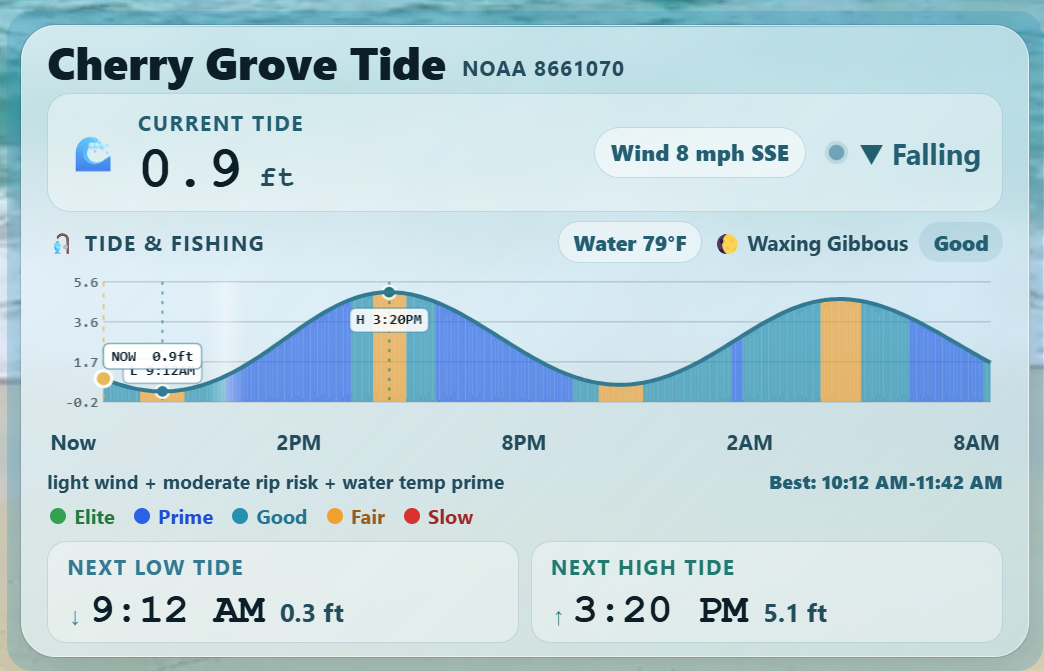
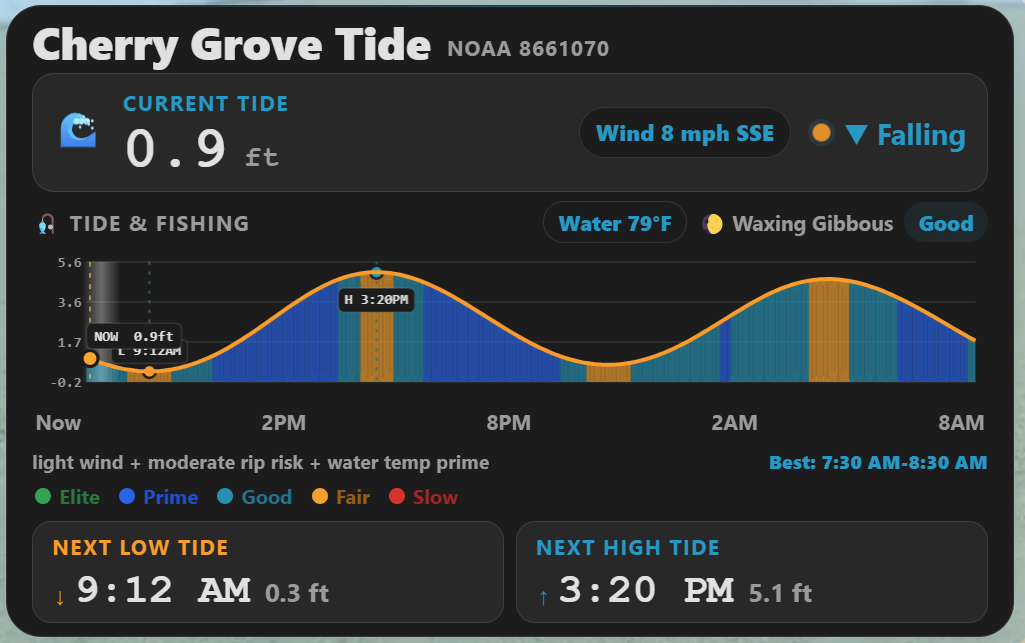
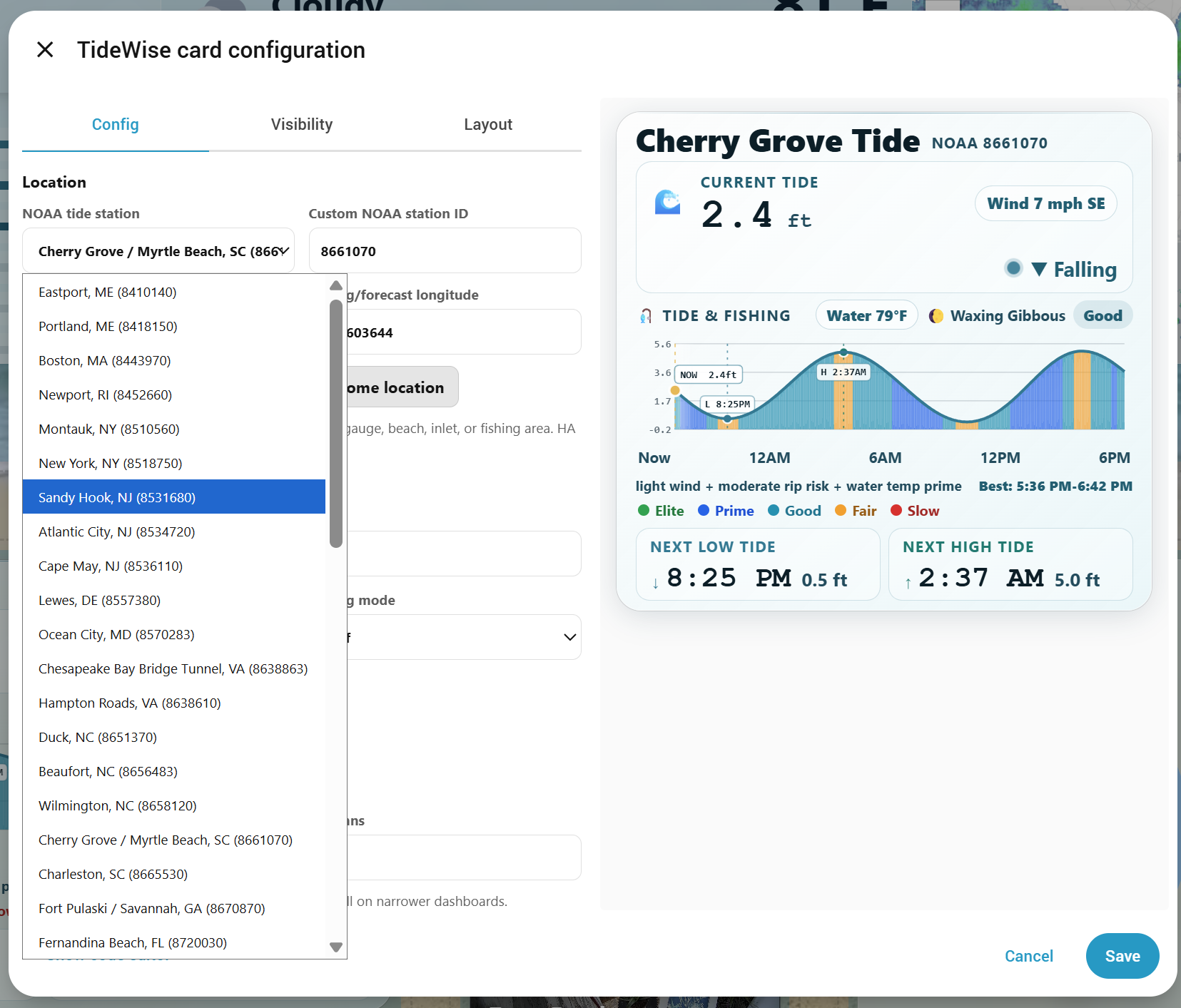
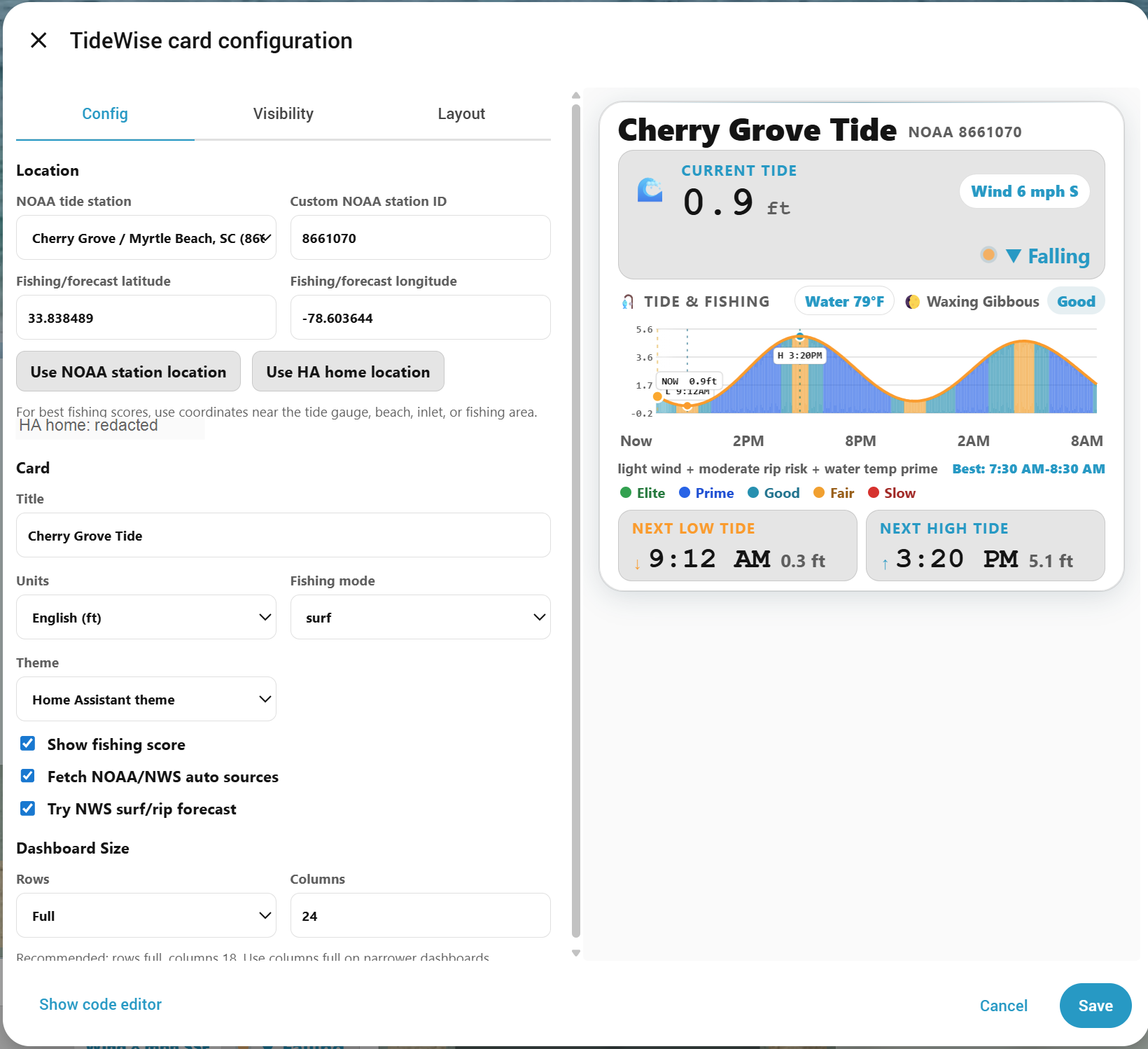
It combines tide data with local Home Assistant entities such as weather, wind, water temperature, surf height, pressure, rain, and rip current risk. Missing optional entities are allowed; TideWise falls back to neutral scoring where possible.
Beta notice: TideWise is still early beta software. Please expect occasional layout issues, missing-data fallbacks, and station-specific quirks while testing.
UK tide support requires a separate Home Assistant integration first. TideWise is a dashboard card, so it cannot reliably call the UKHO Admiralty API directly from the browser because UKHO/Azure may block browser-side requests.
For UK tides, install and configure the UKHO Tides Home Assistant integration, add your UKHO API key and station there, then select the created UKHO Tides sensor in TideWise.
In short:
- NOAA/US: TideWise can fetch NOAA tide data directly.
- Canada: TideWise can fetch CHS/DFO water-level data directly where available.
- UK: TideWise needs the UKHO Tides Home Assistant integration sensor.
The UK option in TideWise is intentionally named UK UKHO Tides integration sensor because TideWise reads an existing Home Assistant sensor. It does not ask for, store, or call a UKHO API key directly.
UKHO integration event times are displayed in UK local time (Europe/London), including British Summer Time. If a UK card is still exactly one hour off, check the UKHO Tides integration sensor attributes and your Home Assistant/browser timezone.
TideWise is in beta. If it works for your setup, please consider starring the repo so I can gauge interest and so you can follow development:
If you run into issues or want to confirm your station works, please open one of these quick reports:
Helpful details include Home Assistant version, HACS version, TideWise version, browser/device, provider, station ID or UKHO entity ID, and a screenshot or console error if something broke.
TideWise has no telemetry, ads, popups, tracking pixels, or in-card donation prompts. If it helps you and you want to support development, you can buy me a coffee.
The visual editor is the recommended setup path. Start with Tide provider, then work down the form.
| Editor area | What it controls | Notes |
|---|---|---|
| Tide provider | Chooses the tide data source. | Use US NOAA CO-OPS for NOAA stations, Canada CHS / DFO for Canadian CHS/IWLS stations, or UK UKHO Tides integration sensor for a sensor created by the separate UKHO Tides Home Assistant integration. |
| Station / sensor picker | Chooses the source used for the tide curve, current height, and next high/low tides. | This is the most important field. It is separate from weather, surf, or fishing coordinates. |
| Manual station/entity field | Fallback when the dropdown does not show what you need. | NOAA uses a station ID, Canada uses a CHS station object ID/code, and UK uses a Home Assistant entity ID such as sensor.london_bridge_tower_pier_tide. |
| Fishing / beach latitude and longitude | Used for NWS weather lookup, moon/solunar timing, and fishing-score context. | These coordinates do not have to be the tide gauge. For best fishing scores, use the beach, inlet, pier, or fishing area you actually care about. |
| Fishing point picker | OpenStreetMap picker for the fishing/beach point. | Drag to pan, zoom in/out, click or tap to set the point, or paste exact coordinates from Maps when precision matters. Map tiles load only while the visual editor is open. |
| Beach / Surf Forecast | Scopes US NWS surf/rip-current data. | This does not change the tide station. Pick a State, then a nearby Coastal county / beach area. |
| Card settings | Title, units, fishing mode, theme, and optional data toggles. | These change display and scoring behavior, not the tide source itself. |
| Wind units | Controls only the displayed wind speed unit. | Use this when tide height should be metric but wind should remain MPH or Beaufort. |
| Dashboard Size | Home Assistant grid sizing. | Recommended: rows: full, columns: 18. Use columns: full on narrower dashboards. |
| Provider | Best for | What TideWise needs | API key location |
|---|---|---|---|
| US NOAA CO-OPS | United States NOAA tide stations. | NOAA station ID. Presets are provided, and custom station IDs are supported. | No TideWise API key needed. |
| Canada CHS / DFO | Canadian CHS/IWLS water-level stations, including early Great Lakes support. | Canadian region plus CHS station from the editor. | No TideWise API key needed. |
| UK UKHO Tides integration sensor | UK tides through the separate UKHO Tides Home Assistant integration. | A Home Assistant sensor created by the UKHO Tides integration. | Add the UKHO API key to the UKHO Tides integration, not TideWise. |
Common setup rule: the station/sensor controls the tide chart; the forecast coordinates and beach/surf area control fishing context. TideWise does not assume your Home Assistant home is the fishing spot.
- NOAA tide predictions using a configurable station ID
- Early Canada CHS/DFO water-level prediction and forecast support
- UK tide support through a UKHO Tides Home Assistant sensor
- Current interpolated tide height
- Water temperature display when available
- Wind display when available, with optional MPH, km/h, knots, or Beaufort display
- Next high and low tide
- 24-hour tide chart
- High/low fallback for NOAA stations without full interval predictions
- Visual editor support
- Visual-editor fishing point picker for the weather/surf/scoring coordinates
- Opt-in Home Assistant theme color support with
theme_mode: auto - 50-station NOAA preset picker plus custom NOAA station ID
- Canada region picker with CHS station discovery
- UKHO Tides integration sensor picker for UK tide support
- Optional fishing bite-window score
- Fishing modes for general, surf, inlet, flounder, trout/redfish, and sheepshead use
- Optional NOAA/NWS public data fetching
- Optional Home Assistant entity overrides for weather, wind, water temperature, surf height, pressure, rain, and rip current risk
- Safety-aware fishing display that can cap the current score without globally flattening future bite windows
- Hidden YAML-only debug panel for troubleshooting fishing inputs, score components, caps, and data sources
- Legacy support for
custom:cherry-grove-tides-card


TideWise is not yet listed in the default/searchable HACS store. Until it is accepted into the default HACS list, install it as a custom HACS repository.
- Open HACS in Home Assistant.
- Open the three-dot menu in the top right.
- Choose Custom repositories.
- Add this repository URL:
https://github.com/TheWillMiller/tide-wise
-
For category, choose Dashboard.
If your HACS version uses older wording, choose the dashboard/card/frontend/plugin-style option.
-
Install TideWise.
-
Refresh Home Assistant.
A hard browser refresh is recommended after installing or updating:
- Windows/Linux:
Ctrl + F5 - Mac:
Cmd + Shift + R
Then add the card from your dashboard editor:
- Edit your dashboard.
- Add a new card.
- Search for TideWise.
- Open the visual editor.
- Choose the tide provider.
- Select a station or UKHO Tides sensor.
- Save.
- Download or copy
tidewise-card.js. - Place it in your Home Assistant
wwwdirectory. - Add it as a dashboard resource:
url: /local/tidewise-card.js
type: module- Refresh Home Assistant and hard-refresh your browser.
- Add the card to a dashboard.
For quick testing before installing locally, you can add this dashboard resource:
url: https://cdn.jsdelivr.net/gh/TheWillMiller/tide-wise@v0.9.5/tidewise-card.js
type: module
After changing resources, refresh Home Assistant and hard-refresh the browser tab.
CDN testing is not the preferred long-term install method. HACS is recommended for normal use.
type: custom:tidewise-card
title: Local Tides
station: "8661070"
units: english
mode: general
auto_sources: true
auto_surf_forecast: true
grid_options:
  rows: full
columns: 18type: custom:tidewise-card
title: Local Tides
station: "8661070"
units: english
mode: generaltype: custom:tidewise-card
title: Cherry Grove Tides
station: "8661070"
units: english
mode: inlet
auto_sources: true
auto_surf_forecast: true
water_temp_entity: sensor.noaa_surf_water_temperature
wave_height_entity: sensor.noaa_surf_surf_height
rip_current_risk_entity: sensor.noaa_surf_rip_current_risk
wind_speed_entity: sensor.noaa_weather_wind_speed
wind_direction_entity: sensor.noaa_weather_wind_direction
pressure_entity: sensor.noaa_weather_barometric_pressure
grid_options:
rows: full
columns: 18type: custom:tidewise-card
title: Local Tides
station: "8661070"
units: english
show_fishing_score: false
grid_options:
rows: full
columns: 18Canada support uses the Canadian Hydrographic Service / DFO IWLS API. The visual editor can load Canadian regions and station lists, so most users should choose a station from the editor instead of writing the object ID by hand.
type: custom:tidewise-card
title: Pointe-du-Chene Tides
provider: chs_iwls
ca_region: atlantic
ca_station: "64b6e5ec8027cb190816a0c0"
ca_station_code: "01804"
units: metric
mode: general
auto_sources: false
grid_options:
  rows: full
  columns: 18
Canadian tide predictions can render the tide chart and high/low times. NOAA/NWS auto sources are US-focused, so Canadian fishing inputs such as weather, wind, surf, water temperature, and pressure should come from Home Assistant entities when available.
Recommended UK support uses the UKHO Tides Home Assistant integration. TideWise alone does not fetch UKHO tides reliably from the browser. Configure your UKHO Admiralty API key and station in that Home Assistant integration first, then point TideWise at the created sensor.
type: custom:tidewise-card
title: Portsmouth Tides
provider: ukho_entity
ukho_entity: sensor.portsmouth_tide
units: metric
wind_units: mph
ukho_time_mode: uk_local
time_offset_minutes: 0
height_offset: 0
mode: general
auto_sources: false
auto_surf_forecast: false
grid_options:
  rows: full
  columns: 18
UKHO tide heights are provided in metres. TideWise displays them as metres with units: metric, or converts them to feet with units: english. When the UKHO Tides integration exposes high/low events, TideWise builds a smooth tide curve between those events.
UKHO key note: TideWise does not store or use a UKHO API key. Put the key and station in the UKHO Tides Home Assistant integration, then select that integration's sensor in TideWise.
UK time note: TideWise displays UKHO integration-sensor tide events in UK local time (
Europe/London), including British Summer Time. If your integration already exposes local clock times, useukho_time_mode: as_is.
For UK cards that use metric tide heights but prefer MPH wind, add:
units: metric
wind_units: mph
For UK secondary stations that need a consistent correction, use:
ukho_time_mode: uk_local
time_offset_minutes: 0
height_offset: 0
time_offset_minutes moves all UKHO tide events forward or backward in time. Positive values make events later; negative values make events earlier.
height_offset adjusts all UKHO tide heights by a fixed amount. It uses the selected display unit: metres with units: metric, feet with units: english. Use a negative value if TideWise needs to lower all displayed heights.
TideWise is a dense chart card. In Home Assistant section/grid dashboards, give it enough horizontal space:
grid_options:
  rows: full
  columns: 18
On narrower dashboards, use:
grid_options:
  rows: full
columns: fullTideWise defaults to its built-in ocean-glass styling:
theme_mode: tidewiseTo make the card follow Home Assistant theme colors more closely, use:
theme_mode: autoThe visual editor includes a Theme dropdown for this setting. Theme mode only changes the card styling; it does not change tide fetching, NOAA/NWS data, or fishing score behavior.
TideWise includes a Home Assistant visual editor. When adding the card from the dashboard editor, you can:
- Choose 50 common NOAA tide stations from a dropdown
- Enter a custom NOAA station ID
- Switch to Canada CHS / DFO and choose a region-fed station dropdown
- Switch to UK UKHO Tides integration sensor and choose a UKHO Tides sensor entity
- Set fishing / beach latitude and longitude
- Fill coordinates from the selected NOAA station
- Pick a US beach/surf forecast state and area for NWS rip-current and surf context
- Select English or metric units
- Select wind units separately from tide height units
- Select fishing mode
- Choose TideWise styling or Home Assistant theme colors
- Enable or disable fishing score
- Enable or disable public NOAA/NWS auto sources
- Enable or disable NWS surf/rip forecast parsing
- Set the recommended dashboard size
The station dropdown is a 50-station starter list, not a complete NOAA station database. If your station is not listed, choose Custom station ID and paste the NOAA CO-OPS station ID.
Latitude and longitude are used for fishing-score context such as NWS forecast lookup, surf/rip forecast lookup, and moon/solunar timing. For best results, use coordinates near the beach, pier, inlet, or fishing area you actually care about.
The visual editor includes a Fishing point picker that writes directly to those latitude/longitude fields. It uses OpenStreetMap tiles while the visual editor is open so you can drag, zoom, and click/tap the actual beach, pier, inlet, or fishing area. The dashboard card itself does not load map tiles. You can still paste exact coordinates from Google Maps/Apple Maps for the most precise setup.
Map picker controls:
- Drag the map to pan.
- Use
+and-to zoom. - Click or tap the map to set the fishing / beach point.
- Use Center on pin to return the map view to the saved point.
The Beach / Surf Forecast controls US NWS surf/rip-current parsing only. It does not change the tide station. A Myrtle Beach tide station can still use a Grand Strand beach area, and a different NOAA tide station can use whatever nearby beach area best matches the place being fished.
For NOAA/US cards, TideWise can fetch extra public NOAA/NWS data directly from the browser when auto_sources is enabled:
- NOAA CO-OPS water temperature, wind, and air pressure where the selected station supports those products
- NWS hourly forecast weather and wind from the configured fishing / beach latitude and longitude
- NWS Surf Zone Forecast text for surf height, rip current risk, and water temperature where the local forecast office issues an SRF product
Manual Home Assistant entities take priority. If a manual entity is configured, TideWise uses it instead of the auto-fetched value. For example, an explicit weather_entity overrides TideWise's NWS point forecast.
Surf Zone Forecasts are text products and vary by NWS office. TideWise parses common formats such as:
high rip current risksurf height 2 to 4 feetwater temperature in the mid 80s
Some locations may still show unknown surf or rip data. Manual entities or dedicated integrations remain the most reliable override.
Recent rainfall totals are not yet reliably auto-filled. If you configure rain_today_entity, use a sensor that represents the beach/fishing area or nearby runoff conditions. A home rain sensor can be misleading when your house is inland or far from the water.
The fishing score is advisory only. It is intended to give a quick glance at likely better and worse bite windows.
Depending on available data, TideWise may consider:
- Tide movement
- Tide direction
- Time to next high/low tide
- Current tide height
- Moon/solunar timing
- Time of day
- Weather condition
- Wind speed
- Wind direction
- Water temperature
- Surf/wave height
- Rip current risk
- Pressure
- Pressure trend
- Rainfall/runoff
When optional data is missing, TideWise falls back to the data it has available.
Current safety conditions such as high rip current risk can cap the Now score while still allowing the future curve to show improving bite potential. This is why a card may show Slow now with a better bite window later in the day.
Hidden Debug Panel
For troubleshooting, TideWise includes a YAML-only debug panel. It is hidden from normal users and is not exposed in the visual editor.
Enable it manually only when diagnosing a station, data source, or fishing score:
debug:
  enabled: true
  panel: true
The debug panel is collapsed by default and scrolls internally when expanded. It shows the current/Now score target, future curve mode, source availability, component weights, moon multiplier, safety caps, final current score, display score, and whether the future curve is globally capped.
| Option | Required | Default | Description |
|---|---|---|---|
type |
Yes | Use custom:tidewise-card. The legacy custom:cherry-grove-tides-card alias also works. |
|
title |
No | TideWise |
Card title. |
provider |
No | noaa_coops |
Tide data provider. Use noaa_coops for US NOAA CO-OPS, chs_iwls for early Canada CHS/DFO support, or ukho_entity for UKHO Tides integration support. |
station |
Required for NOAA | NOAA tides and currents station ID. | |
ca_region |
No | atlantic |
Canada station picker region: atlantic, great_lakes, quebec, pacific, or arctic. |
ca_station |
Required for Canada | Canadian CHS/DFO IWLS station object ID. Prefer choosing it from the visual editor. | |
ca_station_code |
No | Optional Canadian CHS display code. | |
ukho_entity |
Required for ukho_entity |
Home Assistant sensor from the UKHO Tides integration. The sensor must expose a predictions attribute. |
|
ukho_time_mode |
No | uk_local |
UKHO integration-sensor time handling. Use uk_local to convert GMT/UTC events to UK local time including BST, or as_is when the sensor already exposes local clock times. |
time_offset_minutes |
No | 0 |
Manual minute offset applied to UKHO integration-sensor tide events. Useful for secondary-station timing corrections. |
height_offset |
No | 0 |
Manual height offset applied to all UKHO integration-sensor tide heights. Uses the selected display unit: metres with metric, feet with english. |
units |
No | english |
Display units. Usually english or metric. Canadian CHS and UKHO data are metric and are converted to feet when english is selected. |
wind_units |
No | auto |
Wind display units. Use auto, mph, kmh, knots, or beaufort. auto follows the tide unit choice, so metric cards show km/h unless overridden. |
mode |
No | general |
Fishing score mode: general, surf, inlet, flounder, trout_redfish, or sheepshead. |
theme_mode |
No | tidewise |
Visual style mode. Use tidewise for the default ocean-glass look or auto to follow Home Assistant theme colors more closely. |
show_fishing_score |
No | true |
Set to false for a tide-only card. |
auto_sources |
No | true |
Fetch public NOAA/NWS weather and marine observations directly where available. US-focused; non-US providers should use Home Assistant entities for fishing context. |
auto_surf_forecast |
No | true |
Try to parse NWS Surf Zone Forecast text for surf height, rip current risk, and water temperature. US-focused. |
srf_region |
No | Optional internal grouping for NWS-listed Surf Zone Forecast offices. Usually set by the visual editor. | |
nws_office |
No | Auto from NWS point metadata | Optional NWS office code such as ILM, CHS, or SGX for Surf Zone Forecast products. |
beach_state |
No | Optional beach forecast state used by the visual editor. | |
beach_area |
No | Optional NWS beach/surf area preset used for rip risk and surf context. | |
surf_zone |
No | Auto from NWS point metadata | Optional NWS surf/beach forecast zone such as SCZ054; overrides coordinate-derived zone for SRF parsing. |
latitude |
No | Beach/surf area or station preset, then Cherry Grove fallback | Fishing / beach latitude for NWS lookup and moon/solunar scoring. |
longitude |
No | Beach/surf area or station preset, then Cherry Grove fallback | Fishing / beach longitude for NWS lookup and moon/solunar scoring. |
weather_entity |
No | NWS point forecast, then Home Assistant weather fallback | Optional weather condition override. Leave blank to use the configured fishing / beach point when available. |
water_temp_entity |
No | Water temperature sensor. Fahrenheit and Celsius are supported. | |
wave_height_entity |
No | Wave/surf height sensor. Feet and meters are supported. | |
rip_current_risk_entity |
No | Rip current risk sensor. | |
unsafe_to_swim_entity |
No | Boolean or text entity for unsafe surf/swim conditions. | |
wind_speed_entity |
No | Weather attribute fallback | Wind speed sensor. mph, km/h, m/s, and knots are supported. |
wind_direction_entity |
No | Weather attribute fallback | Wind bearing in degrees. |
pressure_entity |
No | Weather attribute fallback | Barometric pressure. hPa and inHg are supported. |
pressure_trend_entity |
No | Pressure trend entity. | |
rain_today_entity |
No | Optional rainfall override for the fishing / beach area. Inches and mm are supported; avoid using an inland home rain sensor unless it represents the spot being fished. | |
debug |
No | disabled | Hidden troubleshooting object. Use debug: { enabled: true, panel: true } only when diagnosing score/data issues. Not available in the visual editor. |
Use a NOAA tides and currents station ID near your location. TideWise uses the NOAA CO-OPS data API, so station IDs must support tide predictions.
If your station does not work, try a nearby NOAA station that supports tide predictions.
Set Tide provider to Canada CHS / DFO in the visual editor, choose a Canadian region, then choose a CHS water-level station from the station dropdown. Canadian Great Lakes stations are under Great Lakes / Ontario.
Canada support uses CHS/DFO IWLS water-level predictions where available. Some Great Lakes stations publish water-level forecasts instead, so TideWise falls back from wlp predictions to wlf forecasts when needed. The Great Lakes picker includes a small official CHS seed list because those stations may not appear in the CHS bulk station API. Selected stations may still need testing because CHS availability can vary by station and forecast window.
NOAA/NWS auto sources are US-focused. For Canadian fishing context, configure Home Assistant entities for weather, wind, pressure, water temperature, surf, rain, or safety/rip-risk data when available.
Required UK setup:
- Install and configure the UKHO Tides Home Assistant integration.
- Add your UKHO Admiralty API key and station in that integration.
- Confirm Home Assistant created a UKHO Tides sensor entity.
- In TideWise, set Tide provider to UK UKHO Tides integration sensor.
- Choose the UKHO Tides sensor from the visual editor, or paste the entity ID into Manual UKHO entity ID.
If no UKHO Tides sensor appears in TideWise, the UKHO Tides integration is not installed, not configured, or has not created a sensor yet. TideWise cannot create the UKHO sensor by itself.
TideWise reads the integration sensor's high/low prediction attribute and builds a smooth chart curve from those events. Weather, wind, water temperature, surf, rain, pressure, and fishing safety context should come from Home Assistant entities for UK cards.
TideWise displays UKHO integration-sensor event times in UK local time (Europe/London). This handles British Summer Time when the integration exposes GMT/UTC prediction times.
TideWise does not support direct browser calls to the UKHO API. That keeps UKHO API keys out of dashboard YAML/browser config and avoids UKHO/Azure browser CORS limitations.
Default UK setup:
ukho_time_mode: uk_local
time_offset_minutes: 0
height_offset: 0
Use ukho_time_mode: uk_local when the UKHO integration exposes GMT/UTC prediction times. TideWise converts those events to UK local time, including British Summer Time. If the sensor already exposes local clock times and TideWise appears one hour late or early, use ukho_time_mode: as_is.
Use time_offset_minutes when a secondary station needs a consistent timing correction. Positive values move displayed tide events later and negative values move them earlier.
Use height_offset when all displayed heights are consistently high or low. The value is in the selected display unit: metres for units: metric, feet for units: english.
Example secondary-station correction:
provider: ukho_entity
ukho_entity: sensor.cardiff_tide
units: metric
wind_units: mph
ukho_time_mode: uk_local
time_offset_minutes: 0
height_offset: 0.7
Use a negative height_offset if TideWise needs to lower all displayed heights.
UK troubleshooting quick checks:
- The TideWise provider should be
ukho_entity, not an API-key/browser mode. - The UKHO API key belongs in the UKHO Tides integration setup, not in TideWise.
- The TideWise YAML should point to the created sensor, for example
ukho_entity: sensor.london_bridge_tower_pier_tide. - If TideWise says the entity is missing, verify the exact entity ID under Settings -> Devices & services -> Entities.
- If the sensor exists but TideWise has no tide curve, check whether the sensor exposes a
predictionsattribute from the UKHO Tides integration. - If UK times are exactly one hour early, leave or set
ukho_time_mode: uk_local. - If UK times become one hour late, the integration may already be exposing local clock times; try
ukho_time_mode: as_is. - If all UK tide heights are consistently high or low, use
height_offset. - If a secondary station needs a consistent timing correction, use
time_offset_minutes.
For US surf and rip-current context, TideWise can use a beach forecast area instead of relying only on latitude/longitude. The tide station still controls the tide curve, but the beach area controls NWS Surf Zone Forecast scoping for rip risk and surf height.
TideWise includes a guided list of NWS-listed SRF offices for areas where the National Weather Service publishes Surf Zone Forecast products. This is not the same as every U.S. coastal county; some coastal offices may handle beach hazards through other products such as Hazardous Weather Outlooks.
The visual editor keeps this simple: choose a State, then choose the closest Area. Where TideWise has an exact beach/surf-zone preset, that area is used. Otherwise, the area maps to the closest NWS-listed SRF office and TideWise still uses your coordinates for local forecast context.
The first built-in precise beach-area set covers the NWS Wilmington, NC office beaches for the Grand Strand and nearby NC/SC beaches. Broader NWS-listed SRF offices are available for other supported states/regions, and more precise beach-zone presets can be added as confirmed.
Use this section when the rip-risk or surf-height context should follow a beach/county area instead of the tide gauge. This is especially useful when the tide station is inland, across a bay, or many miles from the actual beach.
Example:
srf_region: Atlantic/Gulf/Caribbean
beach_state: SC
beach_area: sc-horry
nws_office: ILM
surf_zone: SCZ054If TideWise works for you after troubleshooting, please consider starring the repo or opening a Works For Me / Confirmed Station report. If it breaks, a Beta Install Report with your versions and station ID helps a lot.
- Confirm TideWise is installed in HACS.
- Hard-refresh the browser.
- Restart Home Assistant if needed.
- Check that the card resource exists.
- Open the browser console and look for TideWise errors.
HACS may cache repository metadata.
Try:
- Open HACS.
- Open TideWise.
- Open the three-dot menu.
- Select Redownload.
- Choose the latest version.
- Hard-refresh your browser.
If HACS still shows an old README, the installed card file may still be current while the HACS display cache is stale.
If HACS shows a short value like 214b6c2 instead of v0.9.5, that is a GitHub commit hash. HACS shows commit hashes when a repository has tags but no full GitHub Release yet. Publishing a full GitHub Release makes HACS show the release version instead.
- Confirm TideWise is installed.
- Confirm the dashboard resource exists.
- Hard-refresh the browser.
- Redownload the latest release in HACS.
- Restart Home Assistant if needed.
- Check the browser console for
tidewise-card.jsloading errors.
- Confirm the latest TideWise JS is loaded.
- Hard-refresh the browser.
- Redownload the latest HACS release.
- Check the browser console for custom element errors.
- Verify the selected provider.
- Verify the station ID, CHS station, or UKHO entity ID.
- Try a known preset station or sensor.
- Confirm your browser/Home Assistant can reach the provider data source.
- Open the browser console and check for network or station errors.
For UK cards, TideWise requires the separate UKHO Tides Home Assistant integration. If the integration sensor is missing or does not expose predictions, TideWise cannot render UK tides.
This usually means optional weather, wind, water temperature, surf, pressure, rain, or rip current data is unavailable.
The card should still work, but the score may be based on fewer inputs.
For deeper troubleshooting, temporarily enable the hidden debug panel in YAML:
debug:
  enabled: true
  panel: true
Remove it again after testing.
TideWise does not include telemetry, tracking pixels, external analytics, or phone-home behavior.
When auto_sources or auto_surf_forecast are enabled, the card fetches the public NOAA/NWS data needed to render the configured dashboard card. The visual editor's map picker loads OpenStreetMap tiles only while the editor is open. Adoption tracking is based only on GitHub-native signals such as stars, issues, release activity, and tester reports.
Maintainer notes for GitHub-native adoption signals are in PROJECT_INSIGHTS.md.
The full checklist is also available in BETA_TESTER_CHECKLIST.md.
If you are testing TideWise, please report:
- Home Assistant version
- HACS version
- TideWise version
- Browser/device
- Provider and station/entity ID used
- Whether you installed from HACS custom repository, manual resource, or CDN
- Screenshot of any layout issue
- Browser console errors, if any
- Whether the issue happens after a hard refresh
Basic test steps:
- Install TideWise from HACS custom repository.
- Add the card from the dashboard card picker.
- Open the visual editor.
- Select a preset station.
- Save.
- Refresh the dashboard.
- Confirm the card still loads.
- Change fishing mode.
- Save and refresh again.
- Test on desktop and phone.
- Test with missing optional entities.
- Screenshot or copy any errors.
TideWise is informational. It is not a marine safety, navigation, emergency, or surf safety tool.
Always check official local forecasts, marine advisories, beach warnings, and on-site conditions before entering the water or boating.
Do not use TideWise for navigation, hazardous surf decisions, boating safety, swimming safety, or life-safety decisions.
Free for personal and non-commercial use under PolyForm Noncommercial License 1.0.0.
Commercial use requires separate written permission.
The distributable card is:
tidewise-card.js
For HACS default repository submission, TideWise is a dashboard/custom card. HACS validation/submission uses the plugin category internally for dashboard plugins.
Run the local syntax check before opening a pull request:
npm run checkPlanned areas for future releases:
- Map-based fishing/forecast coordinate picker
- More station presets and station discovery improvements
- International tide-provider research for non-NOAA regions
- Further fishing outlook calibration based on tester feedback
- Additional mobile layout polish
TideWise uses explicit provider adapters instead of stretching NOAA-specific code paths. NOAA CO-OPS remains the default provider, Canada CHS/DFO is available for early testing, and recommended UK support reads a UKHO Tides Home Assistant integration sensor.
The Environment Agency flood-monitoring API can be useful for rivers, flood gauges, and some observed level stations, but it should not be treated as the main UK tide-prediction source for TideWise.
The National Tidal and Sea Level Facility is a stronger UK research candidate because it documents the UK National Tide Gauge Network and publishes tidal predictions for selected UK and Ireland ports. It still needs licensing, CORS, and data-shape validation before TideWise can depend on it.
Likely future shape:
provider: noaa_coops
station: "8661070"
Other providers should get their own station picker and validation rules. For example, Canadian or UK support may need separate station IDs, units, datum notes, and availability checks.
Bug reports, confirmed-station reports, and focused feature requests are welcome through GitHub Issues.
For code changes:
- Keep TideWise as a dashboard/custom card, not an integration.
- Preserve existing HACS custom repository install behavior.
- Keep changes scoped and update
CHANGELOG.mdwhen behavior changes. - Run
npm run check. - Include screenshots for visible UI changes when practical.