Simple Offline Flutter App to Manage Driver's Ed students and lessons. (Currently, only Portuguese and metric is supported. Support for English and imperial units planned, as well as, potentially, other languages)
-
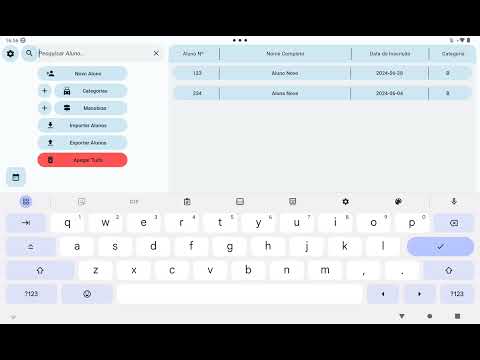
A global view of all currently registred students, with global options, such as the creation of new students, manoeuvres, or categories, or purging the database. It is also possible to check existing manoeuvres and categories, which will display a pop-up dialog containing their respective list, where the instructor can edit or delete them, or view additional details by pressing them. Additionally, there is a search bar where the instructor can search for a student's name OR registration number.
-
A calendar view, accessible through the action button in the global view, that displays the current week, as well as the next, in the form of two rows of squares, one for each day. If there's a lesson or an exam on one day, its hour and corresponding student will appear inside the square, and will swiftly scroll. For further information regarding daily events, pressing a square will display an additional pop-up, with additional information regarding that day's events.
-
For each student, an individual view of their lessons, with a details window displaying student registration details, as well as total time, distance, lessons, exams, and the date of their next exam. Additionally, the instructor has access to a set of options that allow them to schedule a new lesson, a new exam, view student's exams, edit student details, or delete the student altogether. Editing or deleting lessons can be done by pressing the corresponding action button next to it. Pressing a lesson will display a pop-up dialog containing all information regarding it. By pressing the "Exams" button, the instructor can view the student's exams, in a more compact list, as well as edit and delete them in a similar fashion to lessons.
- Different license classes and categories.
- Different manoeuvres, specific to each class or category.
- Student profiles, consisting of their Registration Number, Full Name, Registration Date (defaults to the current date), and student class/category.
- Lessons and Exams for each student, given a date and time.
- When a student completes a lesson or an exam, the instructor will edit that lesson or exam in its respective list. This will bring up a more comprehensive dialog where the instructor can provide further imformation upon their completion, such as manoeuvres performed, distance driven, time spent, or if the student passed their exam.
If device is connected to a PC:
- Paste the .apk file inside your Android device, preferably in an accessible location. I suggest your Downloads folder.
If device is standalone:
- Download the file straight from your mobile browser. It should be in your preferred download location.
Due to being an open source app downloaded from GitHub, Android might take an issue with installing it. You might have to enable sideloading permissions for your file manager.
See the following link for a tutorial on how do to this: https://www.airdroid.com/app-management/sideload-apps/
After enabling sideloading, press the apk file to bring up the Installation Dialog.