You signed in with another tab or window. Reload to refresh your session.You signed out in another tab or window. Reload to refresh your session.You switched accounts on another tab or window. Reload to refresh your session.Dismiss alert
Get the API key from OpenWeathermap.org to use the weather API from the service
Authorization
Go to Discord portal, application, and add a bot to the discord server where you have permission to add a bot
Brief Explantion
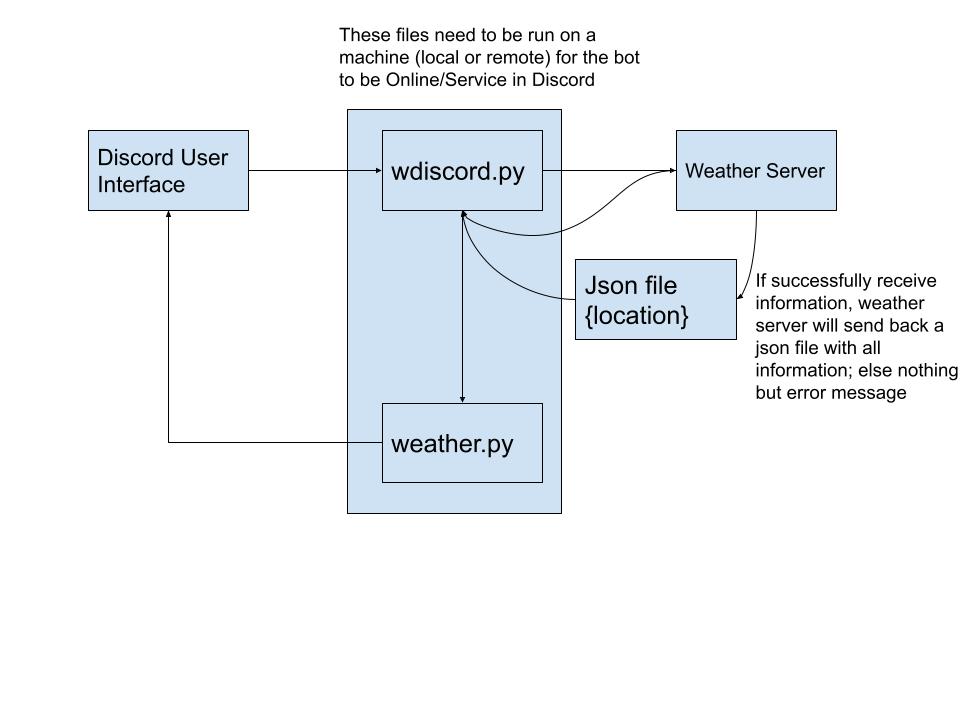
wdiscord.py -> This python file mainly handle the first part where we receive user input from the discord user interface and send it to the weather server.
First copy discord bot token from the discord portal so the file know which discord bot to retrive information.
The user interface shown in this example is "Weather.[location]" where user would input this given string with the location they want to search.
This file then receives the information from the discord user interface and send it to the open weather server by inserting the given location name and the API key to an URL get/request.
If data is successfully received, we run the weaather_message method else run the error_message method which are both defined in the weather.py
weather.py
This python file mainly handle reading and parsing all the information from the retrieved JSON file or the error message and send back the message to the discord user interface.
This part is up to the coder to select what information to shown and to neglect. As for right now, tempurature(Fahrenheit), how it feels_like, minimum tempurature, maximum tempurature, wind speed, and wind direction
are included not others are neglected.