Edit and Apply YAML
Use this flow to change one selected Kubernetes resource. It is not a manifest runner: the edited document must remain the selected resource.
Related: Resource Details · Guarded Operations · RBAC and Permissions
- Open the resource's YAML tab and confirm the visible target: context, namespace or cluster scope, kind, and name.
- Use an identity allowed to read and apply that resource in the selected scope. Server dry-run needs the same authorization.
- Check whether a GitOps or Helm owner manages the resource. A live apply does not update its declared source and may be reconciled away.
- Do not use this workflow for a
v1Secret. Secret data is redacted and apply is blocked to prevent overwriting live values.
- In YAML, inspect the target badge before editing.
- Choose YAML shape for inspection: Kubectl view omits
metadata.managedFields; Apply clean also removes server-owned metadata and rootstatus. - Choose YAML or KYAML encoding if needed. Edit YAML always loads the selected resource as Apply clean.
- Select Edit YAML. The editor is scoped to the selected resource.
Keep apiVersion, kind, metadata.name, and, for namespaced resources, metadata.namespace identical to the selected target. A cluster-scoped resource must not contain metadata.namespace.
apiVersion: apps/v1
kind: Deployment
metadata:
  name: api
  namespace: payments
spec:
  replicas: 3
Use Format to reformat the one document in the selected encoding. Editor diagnostics cover YAML syntax, selected-resource identity, and server-owned fields. Schema validation also uses kubeconform when its bundled sidecar is available; unavailable schemas or sidecar problems appear as status notes.
- Select Dry run.
- Correct any YAML, identity, schema, admission, or authorization error. The request accepts exactly one non-empty YAML document; remove
---and any additional document. - Review the server-side dry-run diff. It compares the live Apply clean resource with Kubernetes' dry-run result. Use Show full diff when the compact view omits relevant context.
- Confirm by selecting the now-enabled Apply button. It is unavailable until a successful dry run; changing the draft clears the preview and requires another dry run.
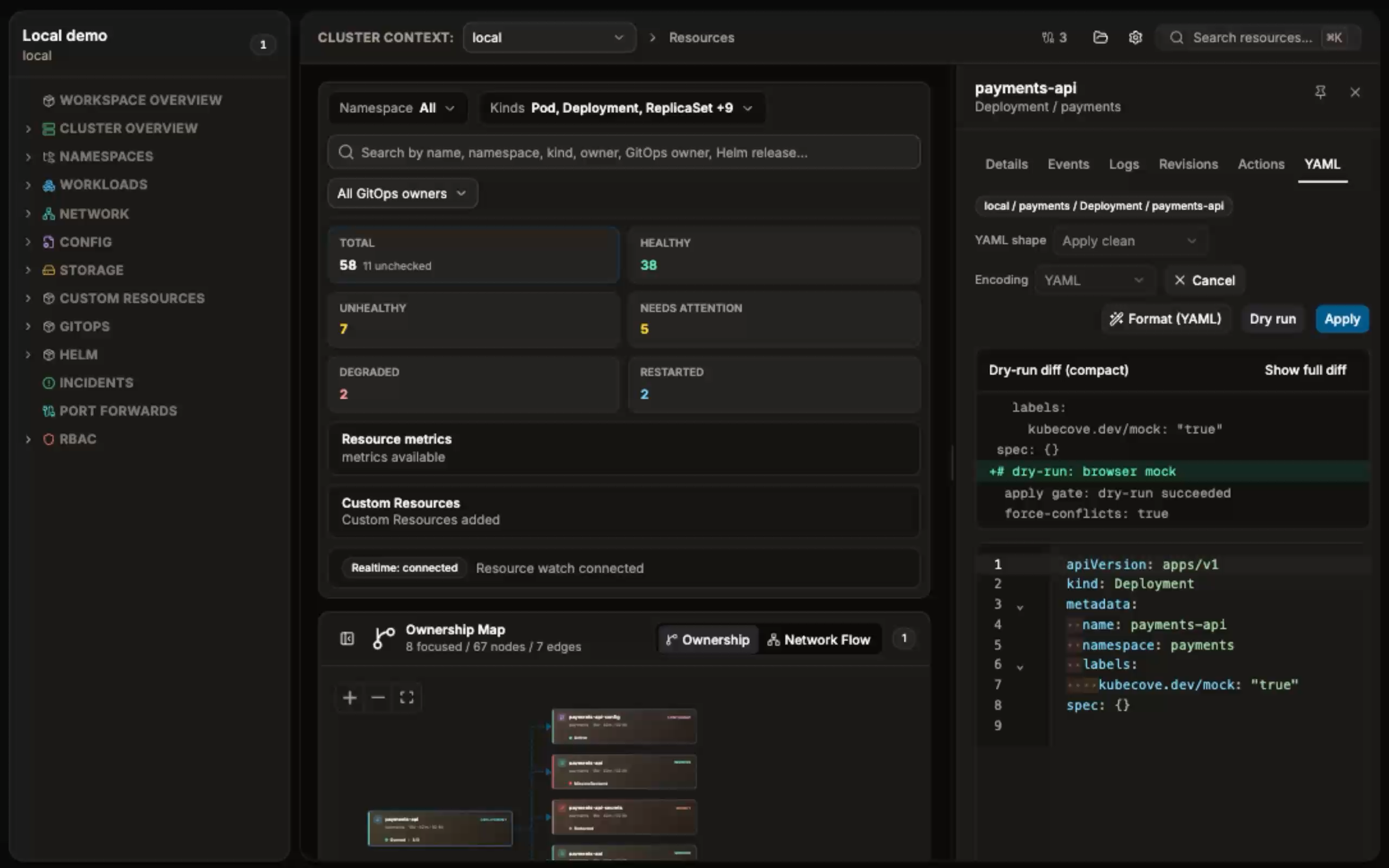
The operation uses server-side apply with field manager kubecove. Apply performs the same request without dry-run.
The Allow YAML force-conflicts setting controls whether dry-run and Apply may take ownership of fields managed by another actor.
- Leave it off for normal edits. A field-manager conflict stops the dry run.
- After that conflict, Allow force-conflicts for this resource appears. Selecting it reruns the dry run with force enabled; review the new diff before selecting Apply.
- When the global setting is on, both dry run and Apply use force-conflicts. Turn it off before editing resources whose existing manager should remain authoritative.
Force-conflicts can replace another manager's field ownership. It is not a way to bypass RBAC, admission, immutable fields, or invalid manifests.
After Apply succeeds, the editor closes and the selected resource details and YAML refresh. Verify the returned state, then check the workload or controller behavior that the field affects. For a GitOps- or Helm-managed resource, verify the owner has accepted the intended desired state or make the durable change in its source.
- Lint or identity failure: restore the selected resource identity and use one YAML document, then dry-run again.
- Forbidden, admission, or schema failure: no apply was sent. Correct access or the manifest before retrying.
- Field-manager conflict: identify the owning manager; use force-conflicts only if taking that field is intentional.
- Immutable field: create or replace through the appropriate Kubernetes workflow instead of retrying the same apply.
- Error after selecting Apply: the final state may be unknown. Reload the selected resource and verify live state before retrying or reverting.