Resource Browser
The Resource browser lists Kubernetes objects inside the workspace's saved contexts, namespaces, and kinds. Opening or filtering a row is read-only. Changes live behind the separate guarded-operation flows.
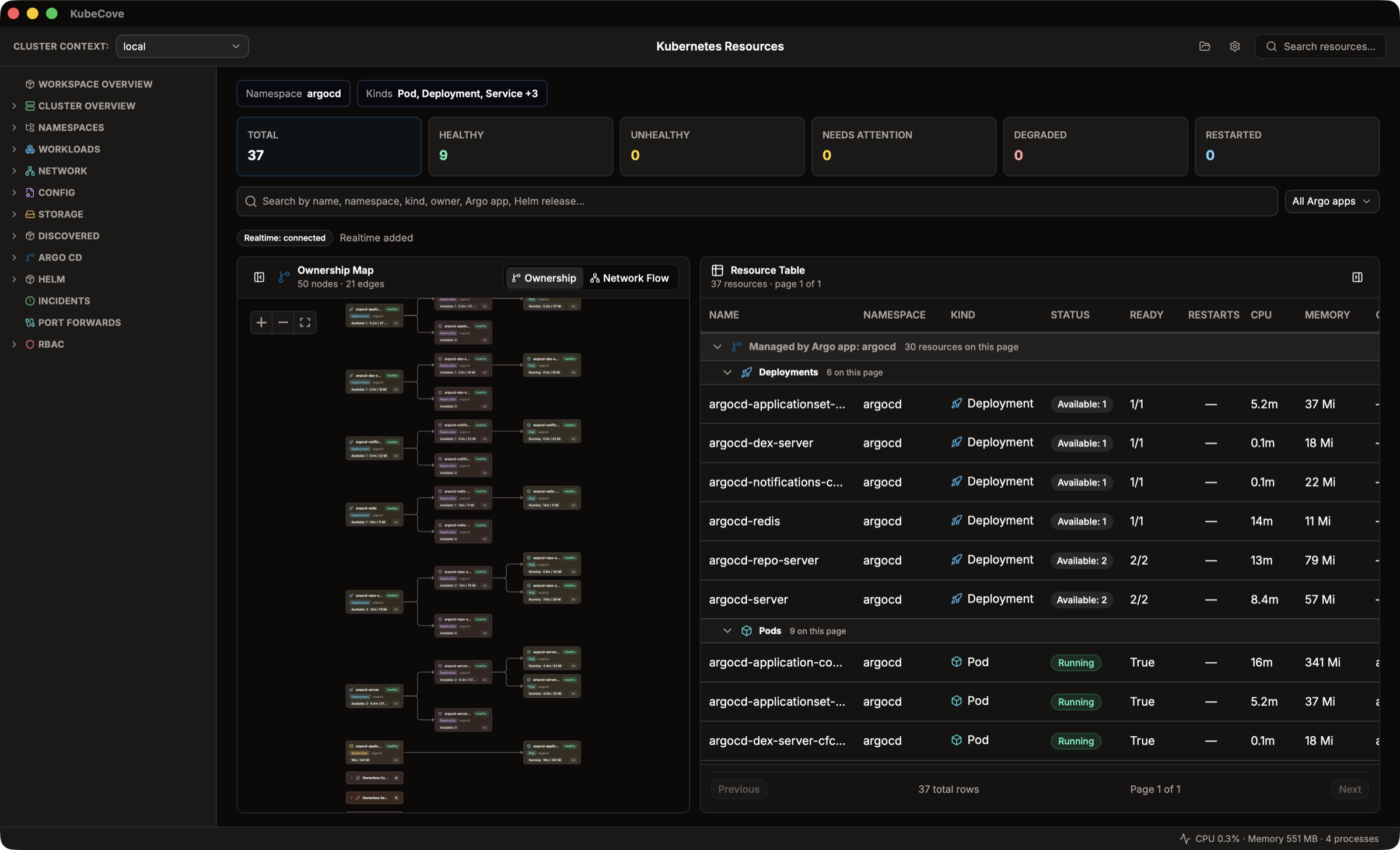
- Open Resources from the workspace.
- Use Namespace and Kinds to narrow the saved scope.
- Search by name, namespace, kind, owner, GitOps owner, or Helm release.
- Select a health summary or All GitOps owners when you need a narrower result.
- Sort or group the table, then select a row to open its details.
- Select Clear to remove active filters.
The table can show Name, Namespace, Kind, Status, Ready, Restarts, CPU, Memory, Owner, and Age. Available columns depend on the object and APIs returned by the cluster.
| Filter | Meaning |
|---|---|
| Total | All objects collected for the current scope. |
| Healthy | Objects whose observed state matches KubeCove's healthy rules. |
| Unhealthy | Objects with a clear unhealthy state. |
| Needs attention | Objects with warning or incomplete signals that deserve inspection. |
| Degraded | Objects whose available condition or workload signals indicate degradation. |
| Restarted | Objects associated with container restart signals. |
These labels summarize available evidence. They are not Kubernetes authorization decisions, root-cause diagnoses, or proof that unlisted objects are healthy.
Resource Table is the quickest path to filtering and row details. You can sort results, collapse groups, page through larger result sets, and pin frequently inspected resources.
Map visualizes ownership relationships for the loaded objects. Use it to follow a workload toward its controllers or related objects. Metrics and topology are supplementary: either can be missing when the API, scope, or access does not provide enough data.
Custom Resources appear when their discovery and loading setting is enabled. KubeCove discovers the kinds exposed by the selected cluster rather than assuming every cluster has the same APIs.
| Message | Meaning and next check |
|---|---|
| No cluster context | Choose an available context or edit the workspace. |
| No resource scope | Add usable contexts or kinds to the workspace. |
| Failed to load resources | Check cluster reachability, kubeconfig source, and list permissions. |
| No resources match current scope and filters | Clear filters or widen namespace and kind scope. |
| Loading ownership map | Resource rows may be ready while topology is still loading. |
| Failed to load ownership map | Select Retry; table inspection can remain available. |
Realtime watches refresh supported resource data while connected. A disconnected or restricted watch does not make the last rendered state an authoritative live view; refresh and compare with the Kubernetes API before acting.