Workspaces and Scope
A workspace is a locally saved inspection scope: context or cluster group, namespaces, resource kinds, shortcuts, saved Service port-forward presets, and layout. It is not a kubeconfig copy.
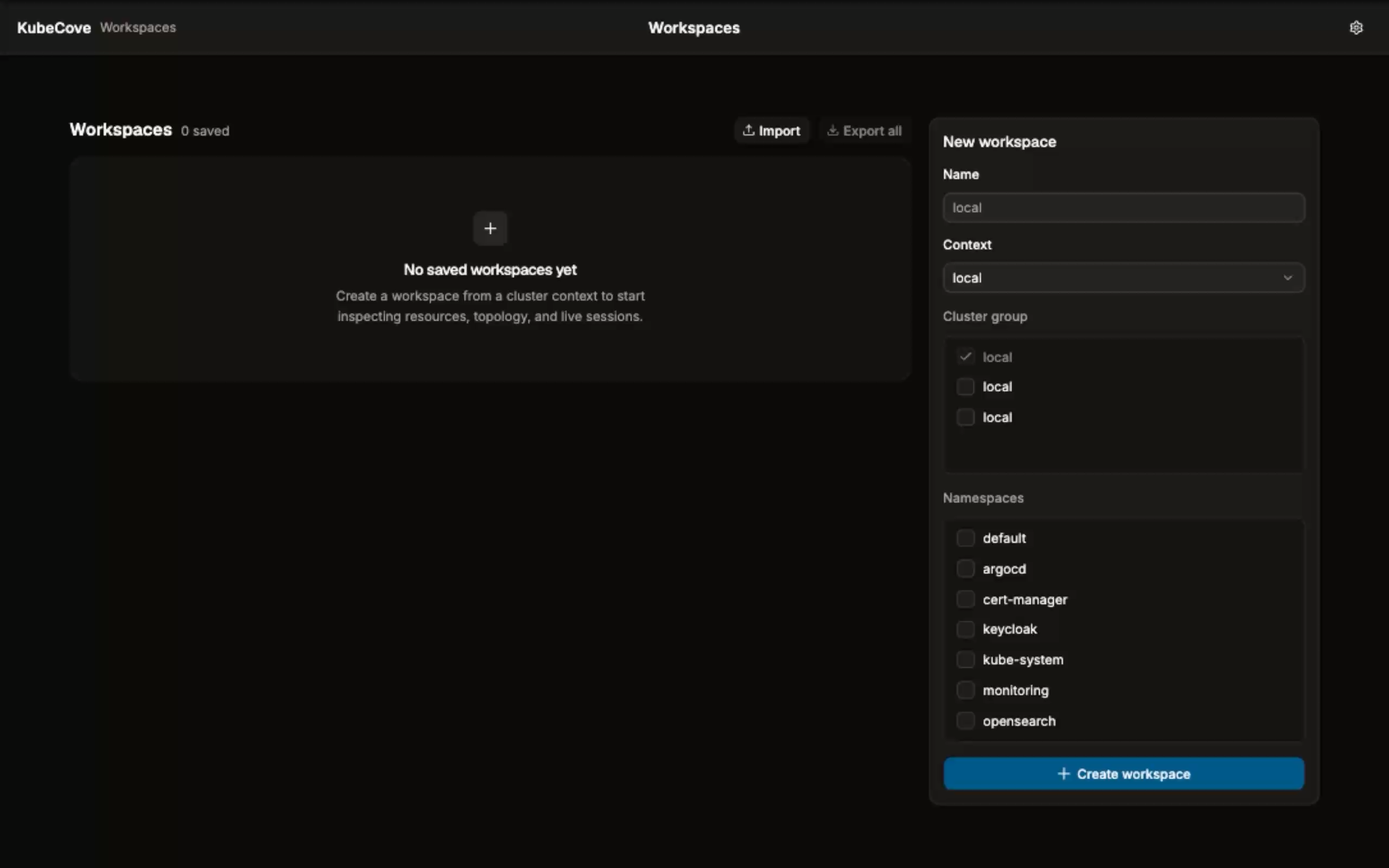
At launch, the app reads $KUBECONFIG when set; otherwise it follows Kubernetes default discovery at ~/.kube/config or %USERPROFILE%\.kube\config. Settings can select a valid environment variable and add kubeconfig paths.
The frontend receives safe summaries such as configured source labels, paths, warnings, and context names. It does not receive raw kubeconfig contents, tokens, client keys, or certificate data.
- On Workspaces, select a context. The current context is selected first when available.
- Enter a name or leave it blank to use the context name.
- Select namespaces. No selection means all namespaces.
- Select Create workspace. Open a saved workspace with Open.
- Use Edit to change its name, primary context, cluster-group members, or namespaces. Use Delete to remove the local saved workspace.
A workspace may display Context unavailable when its primary saved context is absent from the discovered kubeconfig. You can still edit or delete it. On open, the overview identifies unavailable contexts, group members, namespaces, and kinds; available scope remains usable.
- Context is the primary cluster context used for context-specific discovery and GitOps detection.
- Cluster group adds one or more contexts to the workspace's resource scope. It is local navigation metadata, not a Kubernetes cluster group.
- Namespaces restrict namespaced resource requests. Leave them empty for all namespaces.
- Kinds restrict resource collection. New workspaces use the built-in inspection kinds; editing preserves the existing kind selection.
For example, an operations workspace can use primary context prod-eu, group prod-us, and namespaces payments and platform. Resource health and comparisons then use the saved multi-context scope.
Use Export for one workspace or Export all for the saved set. The JSON contains workspace scope, shortcuts, and saved Service port-forward definitions. It deliberately excludes local runtime state and credentials: kubeconfig data, tokens, certificates, timestamps, active session IDs, last-started values, and port-forward errors are not exported.
Use Import to load a workspace JSON file, review the preview, then choose an action for every item:
- Add imports a new workspace.
- Add copy imports a collision with a distinct local name and key.
- Replace replaces the matching local workspace.
- Skip leaves it unchanged; this is the default for a collision.
A collision matches the shared key first, then the display name. Imports validate the document shape before applying it. Imported saved Service forwards start with idle runtime state; they do not restore an active connection.
A workspace can save a Service port-forward target and local-port preference. On opening a workspace with saved forwards, the app shows a restore notice. Choose Start saved, Review, or Skip. Auto-start is an explicit setting. Saved forwards are removed when you edit the workspace so their context falls outside the new scope.
Next: use the workspace overview.