




English | 中文
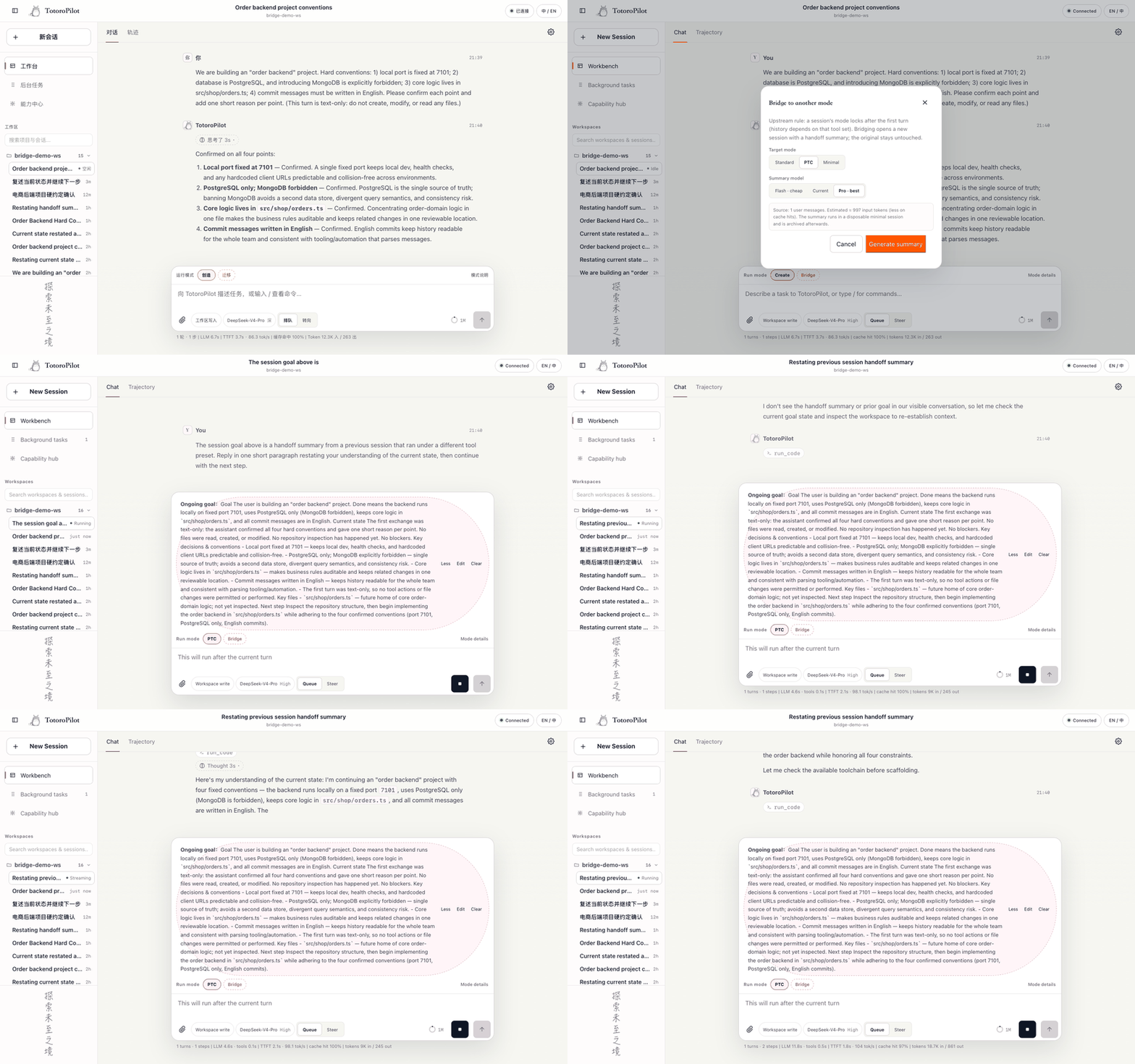
Halfway through a task and need another tool preset? Switching the produced session in place would leave tool history that belongs to the old assembly. Bridge previews a bounded five-part handoff, opens a clean target, and leaves the original session untouched.
Quick start · Why Bridge · Evidence · Decisions · Compatibility
Install from npm:
dsh plugin --profile web add dsh-plugin-bridge
# restart dsh web once
Pinned GitHub fallback:
dsh plugin --profile web add github:Totoro-qaq/dsh-plugin-bridge#v0.2.10Then type in the official WebUI:
/bridge                       list target presets
/bridge --doctor              check the host contract after a DSH upgrade
/bridge code                  preview the handoff; change nothing
/bridge code --go             migrate, restate, then wait
/bridge code --go --continue  restate and start work in the same target request
The preview is editable. Correct a number or path in the printed summary file, then run:
/bridge code --go --file <path>
Uninstall with dsh plugin --profile web remove dsh-plugin-bridge, then restart dsh web.
| Promise | What it means |
|---|---|
| Preview before execution | /bridge <preset> creates no target and changes no source session. Review or edit the five-section handoff first. |
| Move state, not tool traces | Decisions, paths, current state, and next steps move to a clean preset. Incompatible calls from the old tool assembly do not. |
| Fail closed | The target goal is paused before kickoff. If that cannot be guaranteed, Bridge clears/cancels the target and sends no model request. |
Installing Bridge adds zero prompt tokens to ordinary sessions. It is a host slash command, not a model tool or skill.
The release gate is intentionally small and reproducible; these are regression results, not population guarantees.
| Gate | Result |
|---|---|
| Five-part summary facts | 30/30 |
| Target restatement / first useful work facts | 60/60 · 60/60 |
| Critical facts / obsolete-value resurrection | 90/90 · 0 |
| Existing image evidence / unresolved raw image | 5/5 · 5/5 |
Confirm / --continue target request shape |
2 · 1 to first useful work |
| Confirm extra, paired nominal median | +8.1% vs --continue |
| Summary worker share of clean acceptance components | 20.74% nominal |
The token percentage varies widely with preset, response length, and cache state. The worker share is composition, not causal overhead versus no Bridge; the stable product claim is one additional confirmation request. Read the design and evidence boundaries, full release report, and vision report.
fold history -> five-part handoff -> preview/edit -> clean target session
             -> pause stored goal -> inject -> restate -> wait or continue
image history -> verbatim assistant evidence; unresolved originals use the attachment gateway
The five sections are Goal, Current state, Key decisions and conventions, Key files, and Next step. The original session is never rewritten; archive the target and return to the source if the handoff is unsatisfactory.
| Situation | Bridge behavior | Cost / fidelity effect |
|---|---|---|
Plugin installed, no /bridge call |
No prompt injection or model tool | 0 Bridge prompt tokens |
/bridge code |
One bounded summary worker; preview only | No target session is created |
Default --go |
Target restates and waits | One explicit confirmation request before useful work |
--go --continue |
Restate and work in one target request | Lower request count; no background goal round |
| Image already has assistant analysis | Copy that response verbatim | No raw image is resent by default |
| Image is unresolved and target accepts images | Copy the original attachment and preserve the source VLM | Vision pricing comes from the selected provider |
| Image is unresolved and target is text-only | Prompt admission rejects the image; Bridge sends a visible text fallback | No hidden local VLM and no silent claim of visual understanding |
| DSH baseline | Text handoff | Raw unresolved image | Verification boundary |
|---|---|---|---|
| 0.1.0-rc.6 / rc.7 | Yes | Optional gateway unavailable | Narrow RPC contract and text compatibility tests |
| 0.1.0-rc.8 | Yes | Host-dependent | Real install, restart, command lifecycle, and migration baseline |
| 0.1.1-rc.2 | Yes | Yes | Official WebUI migration with deepseek-v4-flash-vision-exp, 13/13 doctor methods, and 5/5 vision gates |
CI covers Node.js 22 and 24. Run /bridge --doctor after every Harness upgrade; it names missing required gateway methods instead of failing vaguely.
Current limits:
- installation needs one WebUI restart;
- Bridge prints the created title and session ID because stable plugin-driven session navigation is not yet available;
- preview normally takes 20–60 seconds and is bounded by
previewTimeoutMs; - text-only models cannot inspect unresolved images;
- each release-acceptance cell currently has one run, so the tables are release evidence rather than statistical guarantees.
The server command stays the compatibility core. A native migration card is technically possible through official client modules and slots, but is intentionally deferred until that prerelease contract is stable; see the feasibility note.
- Design, safety, image policy, cost, and evidence
- Chinese install, configuration, rollback, and FAQ
- Release acceptance report
- Vision migration report
- Historical compression benchmark
npm ci
npm run verify
verify builds and type-checks the project, runs 125 fake-host tests, checks generated lib/ and datasets, then packs, installs, and imports the actual npm tarball. Tests spend no model tokens. prepublishOnly runs the same gate; GitHub releases also require the tag to match package.json before trusted npm publishing.
Community listings: Awesome DSH Plugin · Awesome DeepSeek Harness
MIT