轻量、快速、原生的 macOS 菜单栏 AI 助手。
A lightweight, fast, native AI assistant for your macOS menu bar.




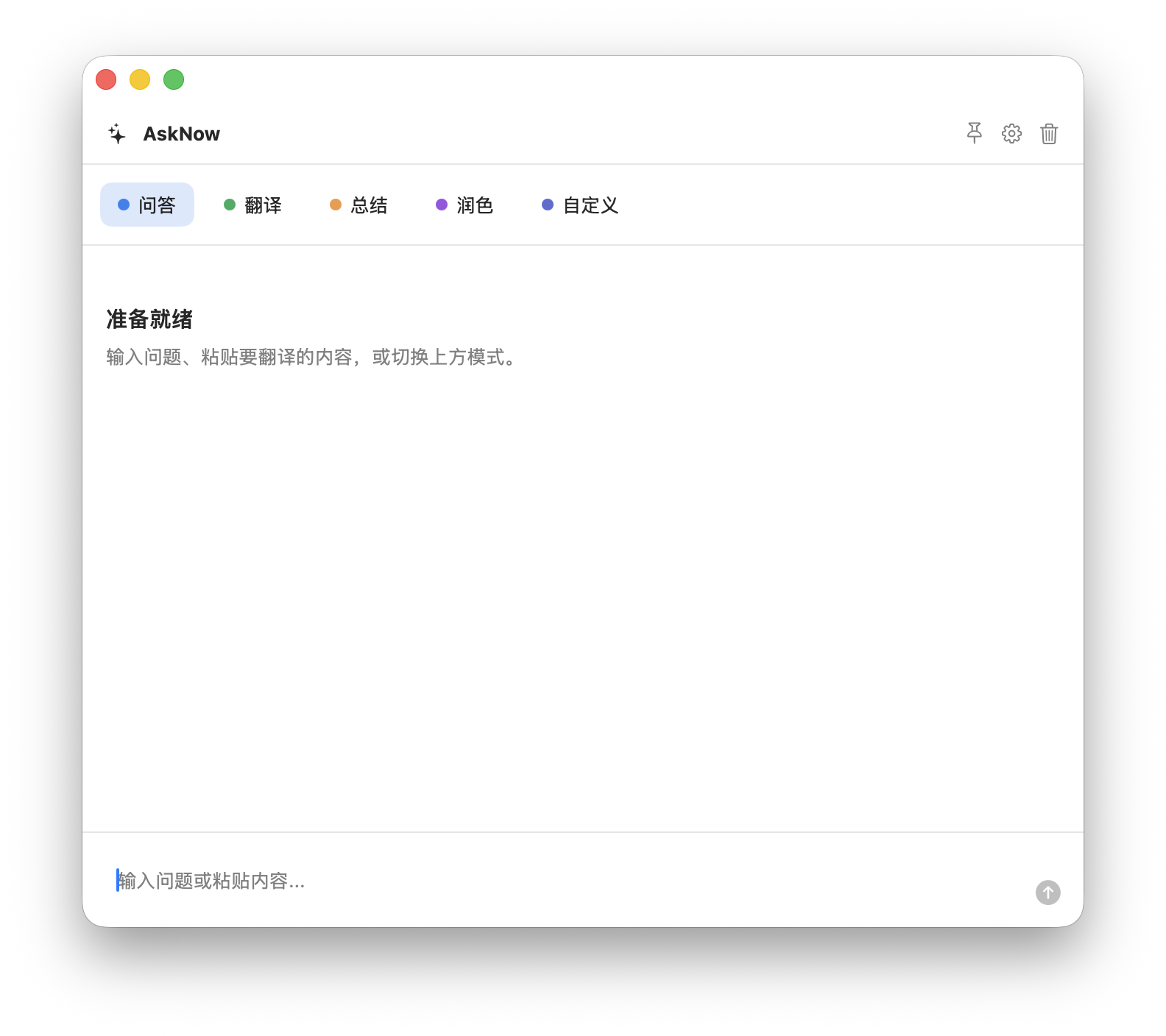
AskNow 是一个面向 macOS 的轻量 AI 助手,不到2MB。它常驻在菜单栏中,通过快捷键或菜单栏图标呼出居中浮窗,让用户在当前工作流里快速完成问答、翻译、总结、润色、代码解释等高频任务。
项目包含两个实现:
Sources/AskNow/:原生 macOS 应用,使用 Swift、AppKit 和 SwiftUI 构建。web/:浏览器版 PWA 客户端,使用 React、TypeScript 和 Vite 构建。
核心能力:
- 菜单栏常驻,默认快捷键为
Option + Space。 - 支持中文、英文和跟随系统语言。
- 支持问答、翻译、总结、润色和自定义提示词模式。
- 每个提示词模式可以单独配置颜色、模型、温度和上下文轮次。
- 不同提示词模式的会话相互隔离。
- 支持多个模型配置和 API Key。
- 内置 OpenAI、DeepSeek、Google Gemini、Qwen、Moonshot、Mistral、OpenRouter、Ollama、LiteLLM 等常用供应商预设。
- 支持自定义 OpenAI-compatible Base URL。
- API Key 在 macOS 端存入系统 Keychain,在 Web 端存入当前浏览器 IndexedDB。
- 构建或安装 AskNow 后启动应用。
- 应用会出现在 macOS 菜单栏,不会占用 Dock。
- 点击菜单栏图标,或按
Option + Space打开助手窗口。 - 在窗口顶部选择问答、翻译、总结、润色或自定义模式。
- 打开设置,选择语言、供应商、Base URL、模型名称、API Key、温度和上下文轮次。
- 输入问题或粘贴内容,按发送获取回答。
- 可在设置中录入新的全局快捷键,也可以为不同模式指定不同模型和提示词。
常见使用场景:
- 快速询问一个问题。
- 翻译剪贴板或选中的文本。
- 总结笔记、邮件、网页摘录。
- 润色中文或英文表达。
- 解释代码片段、报错信息或命令输出。
- 为重复任务创建固定提示词模式。
推荐使用项目目录docker-compose.yaml直接部署 或参考以下内容:
Web 客户端位于 web/ 目录,适合在浏览器中使用或部署为静态站点。
cd web
npm install
npm run dev
开发服务器默认地址为 http://localhost:5173。
使用 Web 版时,在设置中配置供应商、Base URL、模型和 API Key。请求会从浏览器直接发送到配置的模型供应商。部分供应商可能因为 CORS 策略拒绝浏览器直连,此时可以使用支持 CORS 的供应商、本地代理、Ollama 或 LiteLLM。
- macOS 13 或更高版本。
- Xcode Command Line Tools。
- Swift 5.9 或更高版本。
- Node.js 和 npm,用于构建 Web 客户端。
安装 Xcode Command Line Tools:
xcode-select --installswift buildRelease 构建:
swift build -c releaseScripts/build_app.sh构建产物:
.build/AskNow.app
启动应用:
open .build/AskNow.appScripts/package_dmg.sh构建产物:
.build/AskNow.dmg
当前脚本会进行 ad-hoc 签名,但不会进行 Developer ID 签名或 notarization。分发给其他用户时,可能需要额外的正式签名和公证流程。
cd web
npm install
npm run build
构建产物:
web/dist/
本地预览生产构建:
cd web
npm run previewmacOS Swift 包构建检查:
swift buildWeb 单元测试:
cd web
npm run test
Web 代码检查:
cd web
npm run lint
Web 端到端测试:
cd web
npm run test:e2e.
├── Package.swift Swift Package 配置
├── Sources/AskNow/ macOS 原生应用源码
│ ├── AskNowMain.swift 应用入口
│ ├── AppDelegate.swift 应用生命周期和菜单栏集成
│ ├── AssistantView.swift 助手聊天界面
│ ├── SettingsView.swift 设置界面
│ ├── HotkeyManager.swift 全局快捷键
│ ├── OpenAICompatibleProvider.swift
│ └── ProviderCatalog.swift 模型供应商预设
├── Scripts/
│ ├── build_app.sh 构建 .app
│ └── package_dmg.sh 打包 DMG
└── web/ Web/PWA 客户端
├── package.json
├── src/
└── vite.config.ts
AskNow is a lightweight AI assistant for macOS. It lives in the menu bar and opens as a centered floating panel, so users can quickly ask questions, translate text, summarize notes, polish writing, or explain code without leaving their current workflow.
The project contains two implementations:
Sources/AskNow/: native macOS app built with Swift, AppKit, and SwiftUI.web/: browser-based PWA client built with React, TypeScript, and Vite.
Key features:
- Menu bar app with the default global shortcut
Option + Space. - Chinese, English, and system-language UI modes.
- Prompt modes for Ask, Translate, Summarize, Polish, and custom workflows.
- Per-mode color, model, temperature, and context-turn settings.
- Isolated conversations for different prompt modes.
- Multiple model profiles and API keys.
- Built-in provider presets for OpenAI, DeepSeek, Google Gemini, Qwen, Moonshot, Mistral, OpenRouter, Ollama, LiteLLM, and more.
- Custom OpenAI-compatible Base URL support.
- API keys are stored in macOS Keychain in the native app and in the current browser's IndexedDB in the Web client.
- Build or install AskNow, then launch the app.
- AskNow appears in the macOS menu bar and does not take space in the Dock.
- Click the menu bar icon or press
Option + Spaceto open the assistant panel. - Choose Ask, Translate, Summarize, Polish, or a custom prompt mode from the top of the panel.
- Open Settings to configure language, provider, Base URL, model name, API key, temperature, and context turns.
- Type a question or paste content, then send it to get a response.
- You can record a custom global shortcut and assign different models or prompts to different modes.
Common use cases:
- Ask a quick question.
- Translate clipboard or selected text.
- Summarize notes, emails, or web excerpts.
- Polish Chinese or English writing.
- Explain code snippets, errors, or command output.
- Create reusable prompt modes for repeated tasks.
The Web client is located in the web/ directory. It can be used locally in a browser or deployed as a static site.
cd web
npm install
npm run dev
The development server runs at http://localhost:5173 by default.
In the Web client, configure the provider, Base URL, model, and API key in Settings. Requests are sent directly from the browser to the configured model provider. Some providers may block browser requests because of CORS policies. In that case, use a CORS-enabled provider, a local proxy, Ollama, or LiteLLM.
- macOS 13 or later.
- Xcode Command Line Tools.
- Swift 5.9 or later.
- Node.js and npm for the Web client.
Install Xcode Command Line Tools:
xcode-select --installswift buildRelease build:
swift build -c releaseScripts/build_app.shOutput:
.build/AskNow.app
Launch the app:
open .build/AskNow.appScripts/package_dmg.shOutput:
.build/AskNow.dmg
The packaging script performs ad-hoc signing, but it does not apply Developer ID signing or notarization. Public distribution may require additional signing and notarization.
cd web
npm install
npm run build
Output:
web/dist/
Preview the production build locally:
cd web
npm run previewSwift package build check:
swift buildWeb unit tests:
cd web
npm run test
Web lint:
cd web
npm run lint
Web end-to-end tests:
cd web
npm run test:e2e.
├── Package.swift Swift package configuration
├── Sources/AskNow/ Native macOS app source
│ ├── AskNowMain.swift App entry point
│ ├── AppDelegate.swift App lifecycle and menu bar integration
│ ├── AssistantView.swift Assistant chat UI
│ ├── SettingsView.swift Settings UI
│ ├── HotkeyManager.swift Global shortcut
│ ├── OpenAICompatibleProvider.swift
│ └── ProviderCatalog.swift Provider presets
├── Scripts/
│ ├── build_app.sh Build .app bundle
│ └── package_dmg.sh Package DMG
└── web/ Web/PWA client
├── package.json
├── src/
└── vite.config.ts
Small window. Fast answers. Back to flow.
小窗口,快回答,马上回到心流。