Home
This is a reference hub and showcase for how I run, secure, and document my homelab and daily Linux workflows as well as solutions for problems I have faced (see troubleshooting section).
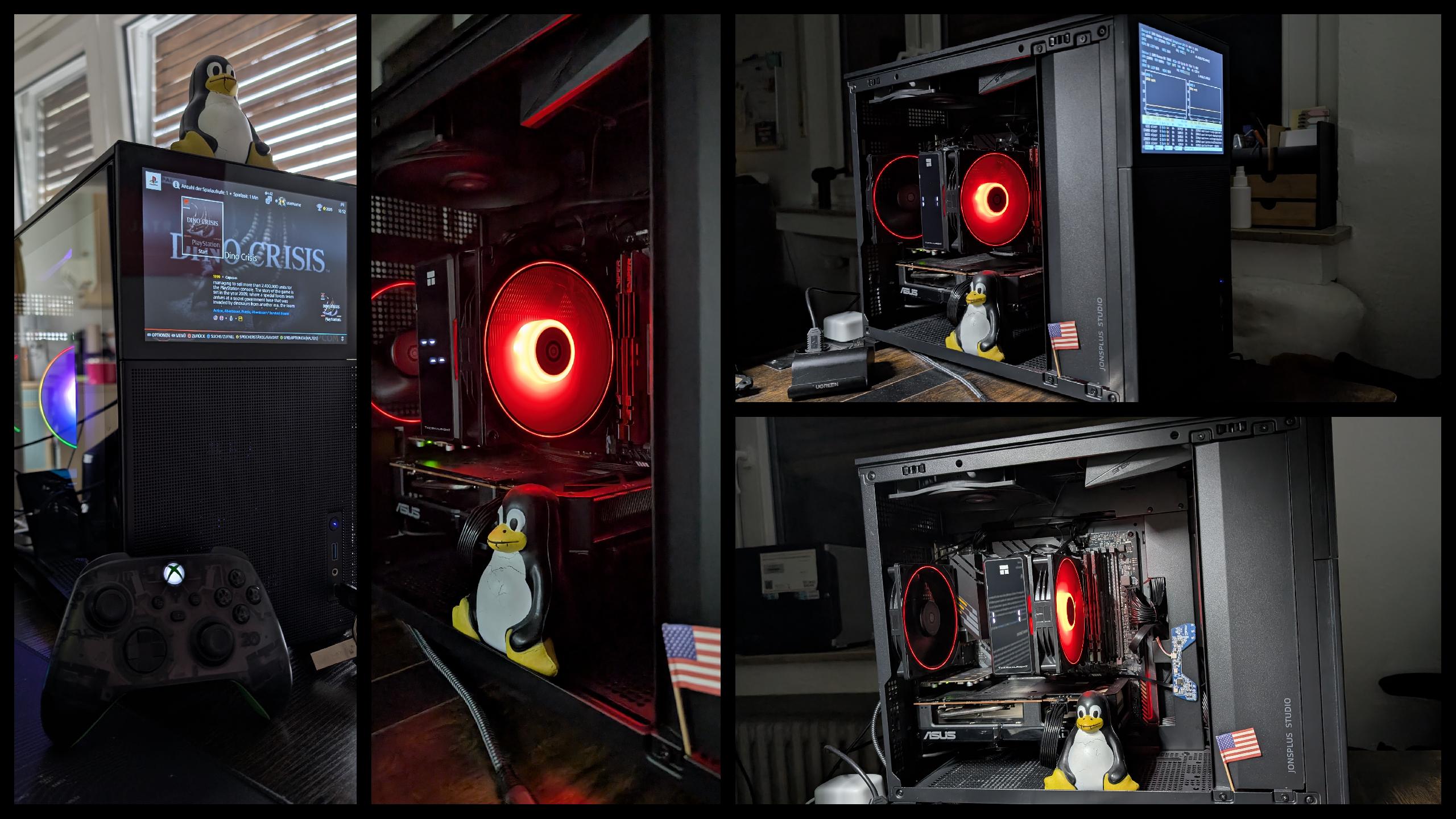
In 2025 I built my first PC ever from the ground up. Normally I am not a big fan of desktop PCs because they tend to take up much space, but I wanted something that I can expand in the future. At first I was looking for some kind of tower case with lots of bays like the THERMALTAKE Level 10 GT. But again my taste is too exotic, so I settled for the Newway NW1. Then in august 2025 I changed my mind again and wanted a smaller case, because I bought an old used Chieftec case I could expand with lots of HDDs and optical drives. I googled for weird and uncommon cases with unique features and immediately fell in love with the first result: the Jonsbo D31 mesh with screen.
For now I am really happy with this case. The builtin screen is perfect for docking messengers or monitoring software or as a backup if my primary monitors aren't working. Currently I have it configured to display btop as a wallpaper (via a KDE plugin).
AMD Ryzen 5 5600G - 6x 3.90 GHz AM4
For the GPU I went with the ASUS Dual Radeon RX 7600 EVO OC Edition 8GB GDDR6 which seemed like a decent middle tier graphics card. It runs even Silent Hill 2 remake pretty well on higher details. As long as you play on Linux of course. On windows the performance was expectedly much worse. It runs smaller LLMs, though not well. For the future I'm planning on getting a GPU with decent vRAM (16GB upwards) to really get good use out of local models.
- Motherboard: ASUS TUF Gaming B550M-PLUS WiFi II
- RAM: Patriot Memory Viper Elite II DDR4 2x32GB
- PSU: Toughpower Gt
- CPU cooler: Thermalright Assassin X 120R Digital Black
- Rear fan: Thermalright TL-S12
- USB PCIe 5 slot expansion card with power delivery
- more powerful GPU for better LLM inference and maybe gaming with raytracing
- Top fans, maybe AIO cooler
- CPU with more powerful iGPU
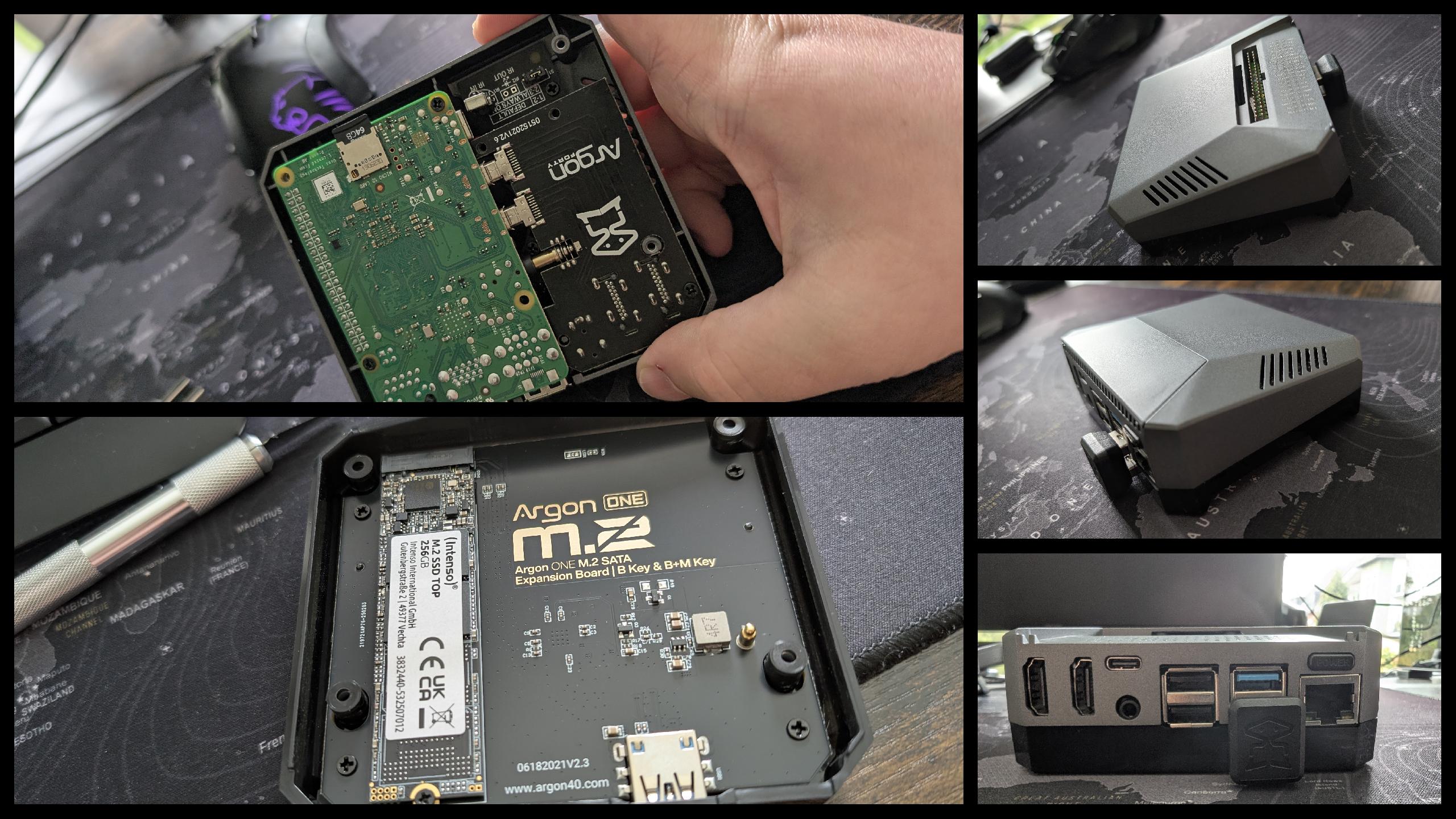
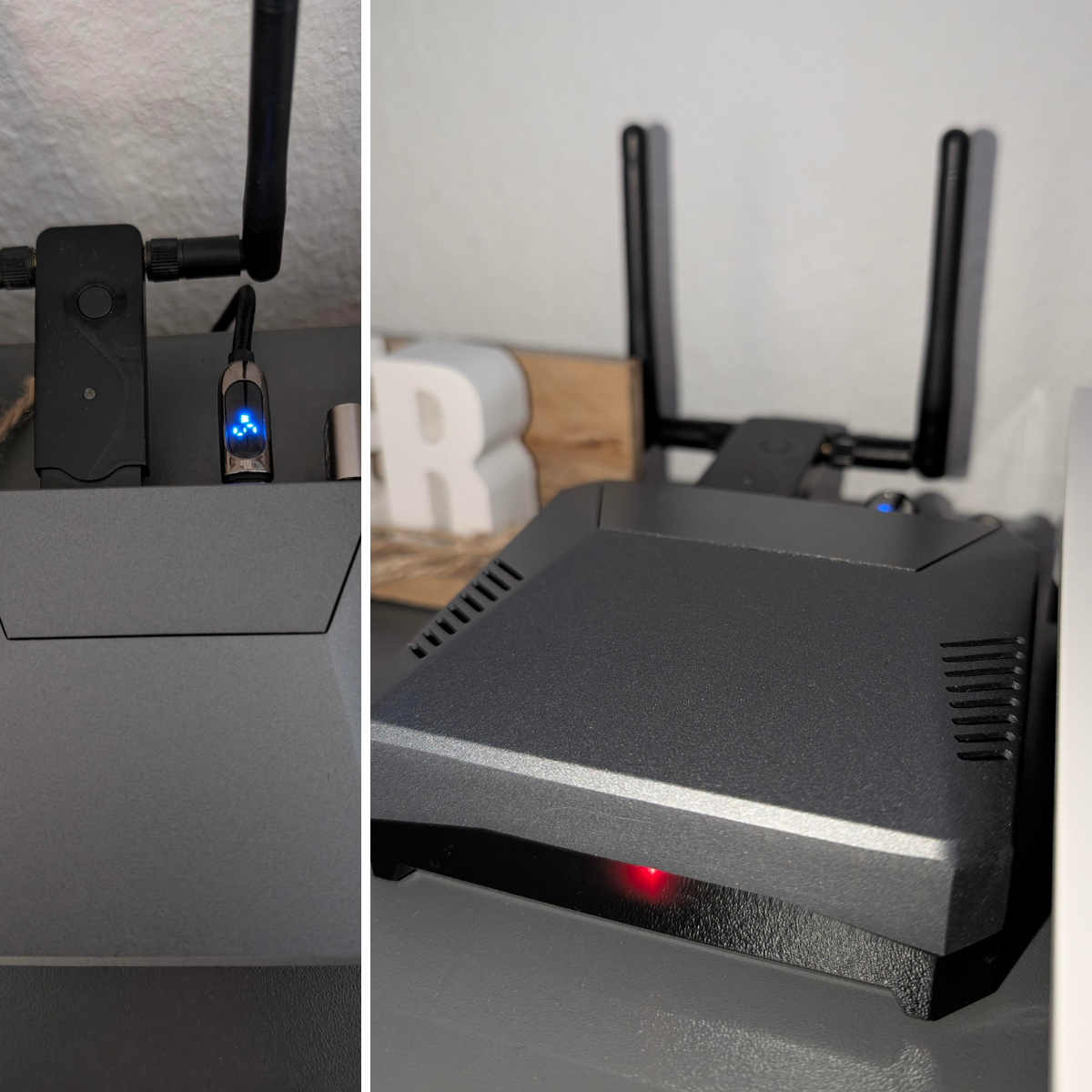
I have two RPis: a Raspberry Pi 3 which is currently not in use and a Raspberry Pi 4b 4GB which I currently use as a BlackArch-based security and lab node. I'm always having trouble finding good use cases, since I can do most stuff with my NAS already. I tried using it as a retro gaming station, but I hardly used it. So for now I have configured it as a server to experiment. I have WiFi antenna with monitor mode plugged in so I can practice a bit of pentesting. It also runs a snowflake proxy.
Case is the awesome GeeekPi Argon One V2 with M.2 expansion and a 240GB NVMe SSD.
I currently run Proxmox on Lenovo ThinkCentre M715q hardware for more demanding services that would otherwise consume too many resources on the NAS.
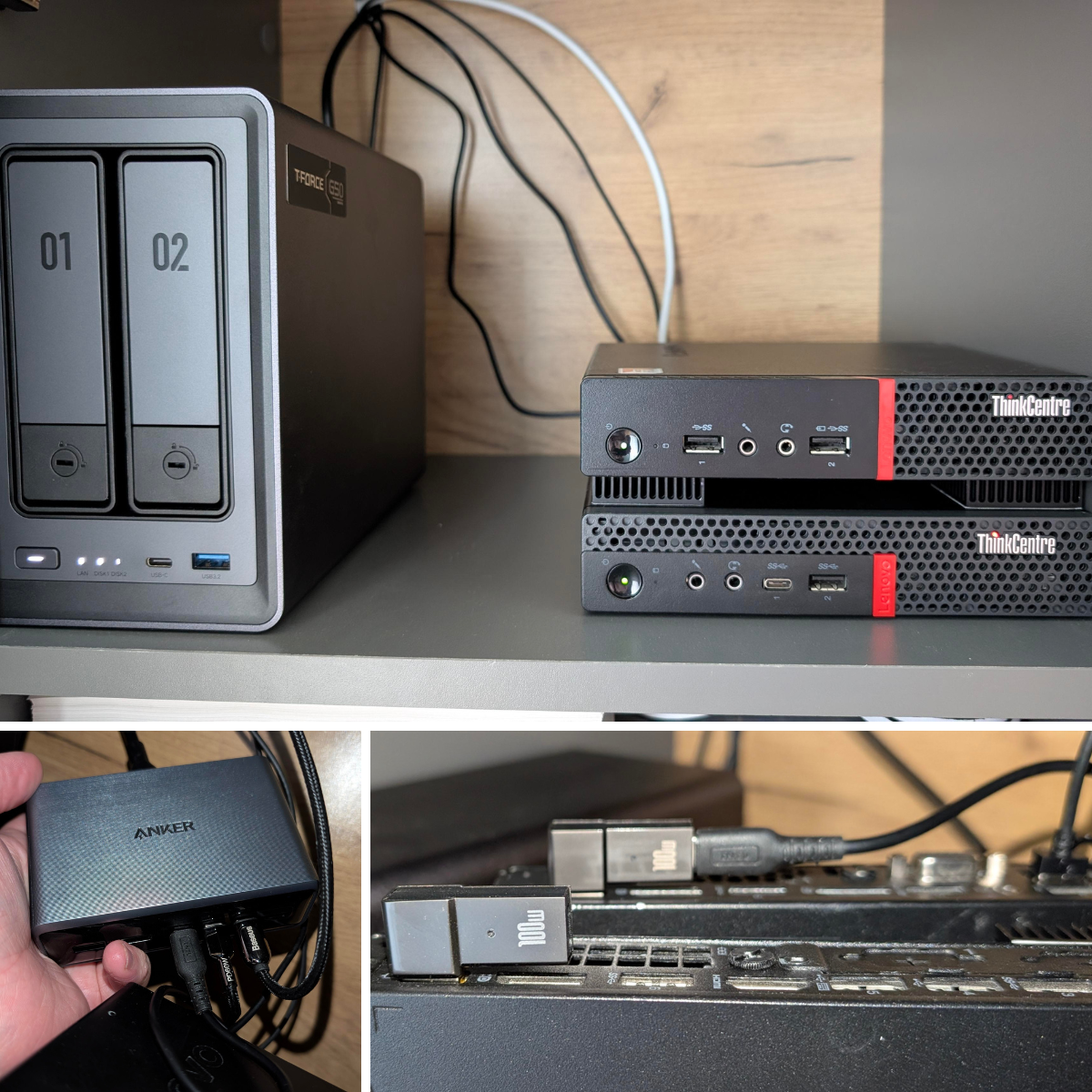
- Lenovo ThinkCentre M715q (AMD PRO A10-9700E)
- 16GB DDR4 RAM
- 1x 512GB NVMe SSD
- 1x 240GB SATA SSD
Current role:
- Hosts memory-intensive services (for example OPNsense and OpenWebUI)
- Runs LXC and containerized workloads depending on use case
- Serves as part of the core homelab compute layer
I previously used Synology devices (DS218j and DS224+), but recently moved my main workload to the Ugreen DXP2800. Main reasons were better hardware value for the price and more flexibility for splitting workloads across HDD and NVMe storage.
Configured Memory & Storage:
- 8GB DDR5 RAM
- 1x 4TB HDD
- 1x 2TB HDD
- 1x 2TB NVMe SSD
Current role:
- Main NAS and service host for always-on workloads
- Storage backend for documents, photos, and media
- Docker/LXC-adjacent services with backup integration into the wider homelab stack
Lenovo ThinkPad T570 — Intel i7-7600U, 16 GB RAM, 512 GB NVMe, running CachyOS (BORE+LTO kernel) with LUKS2 full-disk encryption and AppArmor.
Pixel 8 with GrapheneOS.
Pixel Tablet with GrapheneOS. Tried to use it as a laptop replacement. Not really useful for that, since it's media tablet with limited RAM and GrapheneOS and smart launcher seem to eat a lot of RAM.
FRITZ!Box 7590 AX v2 from my ISP. Will upgrade to one with OpenWRT support once I can afford it.
Public traffic enters through Cloudflare — my first security layer: all three of my domains are proxied, with a wildcard certificate covering every domain and subdomain, so exposing a new service means adding a single proxy host in Zoraxy (the second layer), never touching Cloudflare. Both edges are hardened: Cloudflare runs its WAF, Bot Fight Mode and crawler/geo blocking; Zoraxy adds exploit filtering, search-engine de-indexing and the same country blocks. The router resolves through filtered DNS (family.dns.mullvad.net and family.cloudflare-dns.com), and that filtering follows across the Tailscale tailnet too. Dynamic DNS keeps the public records current — the NAS updates one domain, the Zoraxy container another — and the NAS is also reachable through Cloudflare directly for its mobile app and file sharing.
Behind the FRITZ!Box, the two Proxmox nodes carry almost everything in the hosted services table below — PVE1 (ThinkCentre M630e) leans toward data/infra and utility LXCs (including a ProtonMail bridge that doubles as a mail archive), PVE2 (ThinkCentre M715q) toward databases and user-facing apps (Open WebUI, Gitea, Reactive Resume) — while the NAS handles media, container management (Portainer across three environments) and always-on storage-adjacent services. The Raspberry Pi 4 runs distributed protein folding (Folding@home) and doubles as a sandbox for the ai-hub agents.
Remote access doesn't poke holes in the router: the gaming PC and laptop reach in over a Tailscale overlay (MagicDNS) — encrypted WireGuard tunnels — and the servers themselves are all on the tailnet. The phones stay off Tailscale and ride ProtonVPN instead, reaching public services through the Cloudflare path like any outside client. Wired hosts (PC, both Proxmox nodes, NAS) sit on Ethernet; the laptop, Pi and phones are on WiFi.
Mapped with Scanopy, a self-hosted network-discovery daemon I run here — it's systemd-managed now with a weekly scheduled scan, keeping this diagram honest against what's actually live instead of my memory of what I set up months ago.
flowchart TB
    WAN(["Internet"])

    subgraph ENTRY["Entry points"]
        direction LR
        CF["Cloudflare — Security Layer 1<br/>proxied · wildcard TLS · WAF<br/>Bot Fight Mode · crawler + geo blocks"]
        TSCALE["Tailscale · private overlay<br/>encrypted WireGuard · MagicDNS"]
    end

    FRITZ["FRITZ!Box 7590 AX v2 · router<br/>DNS: family.dns.mullvad.net<br/>+ family.cloudflare-dns.com"]
    ZORAXY["Zoraxy — Security Layer 2<br/>single TLS entry · wildcard certs<br/>blocks exploits · crawlers · geo"]

    subgraph PVE1G["PVE1 · ThinkCentre M630e · Ethernet"]
        PVE1APPS["Homebox · PatchMon · Pi.Alert<br/>iVentoy PXE · Domain Monitor · Speedtest Tracker<br/>ProtonMail Bridge + mail archive"]
    end

    subgraph PVE2G["PVE2 · ThinkCentre M715q · Ethernet"]
        PVE2APPS["ai-hub · LLDAP · OAuth2 Proxy · Gitea<br/>Open WebUI · PostgreSQL · MariaDB<br/>MongoDB · Zabbix · Scanopy · Reactive Resume"]
        WINVM["Windows Server 2022 VM"]
    end

    subgraph NASG["NAS · Ugreen DXP2800 · Ethernet"]
        NASAPPS["Jellyfin · Portainer (3 envs)<br/>Home Assistant · Databasus<br/>Proxmox QDevice"]
    end

    subgraph RASPI["Raspberry Pi 4 · WiFi"]
        PIROLE["Protein folding (Folding@home)<br/>sandbox for ai-hub agents"]
    end

    GAMINGPC["Gaming PC<br/>Ethernet · Tailscale"]
    LAPTOP["ThinkPad T570<br/>WiFi · Tailscale"]
    PHONE["Pixel 8<br/>WiFi · ProtonVPN"]
    TABLET["Pixel Tablet<br/>WiFi · ProtonVPN"]

    CF ~~~ TSCALE

    WAN --> ENTRY --> FRITZ --> ZORAXY
    ZORAXY --> PVE1G
    ZORAXY --> PVE2G
    ZORAXY --> NASG

    FRITZ --- RASPI
    FRITZ --- GAMINGPC
    FRITZ --- LAPTOP
    FRITZ --- PHONE
    FRITZ --- TABLET

    PVE1G ~~~ GAMINGPC
    PVE1G ~~~ LAPTOP
    PVE2G ~~~ PHONE
    PVE2G ~~~ TABLET

    classDef wan fill:#868E96,color:#fff,stroke:#495057
    classDef cf fill:#F59F00,color:#000,stroke:#E67700
    classDef proxy fill:#F76707,color:#fff,stroke:#D9480F
    classDef node fill:#0CA678,color:#fff,stroke:#087F5B
    classDef remote fill:#E64980,color:#fff,stroke:#A61E4D
    classDef vm fill:#4C6EF5,color:#fff,stroke:#364FC7
    classDef ts fill:#7048E8,color:#fff,stroke:#5F3DC4

    class WAN,FRITZ wan
    class CF cf
    class ZORAXY proxy
    class PVE1APPS,PVE2APPS,NASAPPS,PIROLE node
    class GAMINGPC,LAPTOP,PHONE,TABLET remote
    class WINVM vm
    class TSCALE ts
- 2in1 LightBar from 4smarts - Webcam and monitor lamp combined
- Cherry secure board 1.0 - haven't figured out how to configure the certificate for keylogger blocking, but I love the card reader
- The full peripheral/gadget inventory (~69 items) is tracked in my self-hosted Homebox instance, so this section stays intentionally short
This is a list of services I host at the moment:
| Status | Service | Type | Description | Host | Exposure |
|---|---|---|---|---|---|
| ✅ | Alpine-Nextcloud | 📦 | Nextcloud instance for file sync and collaboration. | PVE2 | 🔒 |
| ❌ | Apprise API | 📦 | Notification API for Apprise. | PVE1 | — |
| ✅ | APT-Cacher NG | 📦 | Caching proxy for APT package downloads | PVE1 | 🔒 |
| ✅ | Auth | 📦 | Authentication/SSO support | PVE2 | 🔒 |
| ✅ | Autocaliweb | 📦 | Calibre-Web fork for self-hosted ebook library management | PVE2 | 🔒 |
| ✅ | BentoPDF | 📦 | Browser-based PDF toolkit | PVE2 | 🔒 |
| ✅ | Bon Importer | 📦 | Receipt (Bon) importer, own project. Hope to publish it soon! | PVE2 | 🔒 |
| ✅ | ByteStash | 📦 | Self-hosted code snippet manager | PVE1 | 🔒 |
| ✅ | ConvertX | 📦 | Self-hosted file format conversion tool | PVE1 | 🔒 |
| ✅ | Databasus | 📦 | Database backup tool (accessible SQL dumps alongside daily DB LXC backups). | PVE2 | 🔒 |
| ✅ | Domain Monitor | 📦 | Domain and SSL certificate monitoring | PVE1 | 🔒 |
| ✅ | DrawDB | 📦 | Database schema diagram designer | PVE1 | 🔒 |
| ✅ | Drawio | 🐳 | Diagramming and flowchart tool | NAS | 🔒 |
| ✅ | Excalidraw | 🐳 | Collaborative whiteboard/sketching tool | PVE2/AI-Hub | 🔒 |
| ✅ | Gitea | 📦 | Lightweight Git service for self-hosted repositories. I like to mirror repos there that run the risk of being censored, like VPN and encryption protocols. |
PVE1 | 🌐 |
| ❌ | Gramps Web | 📦 | Genealogy record web app (currently stopped) | PVE2 | — |
| ❌ | Grav | 📦 | Flat-file CMS | PVE1 | — |
| ✅ | Hister | 📦 | Personal browsing history search and document index | PVE1 | 🔒 |
| ✅ | Homarr | 📦 | Personal homelab dashboard. From all the dashboards I tried, this one is the easiest to configure, because it can be done interactively and not via some backend yaml. | PVE2 | 🌐 |
| ✅ | Home Assistant | 🐳 | Home automation platform. Currently only serving as a CalDav bridge for homarr, since I don't have the money for the hardware to build a true homelab. |
NAS | 🔒 |
| ✅ | Homebox | 📦 | Self-hosted home inventory and asset tracker. Tried and worked with snipeIT before, but that's overkill for individuals. Homebox is much more fitting here (and has a prettier UI). |
PVE1 | 🌐 |
| ✅ | InfluxDB | 📦 | Time-series database | PVE2 | 🔒 |
| ✅ | IT-Tools | 🐳 | Collection of developer utilities | NAS | 🌐 |
| ❌ | iVentoy | 📦 | Network PXE boot deployment tool. | PVE1 | — |
| ✅ | Jellyfin | 🐳 | Free media system for streaming music, movies, and TV shows. I also have a plugin for ebooks installed, so I have all kinds of media in one app. |
NAS | 🌐 |
| ✅ | Karakeep | 📦 | Bookmark and link manager. Another favorite. The chaotic filing system in this app is much more effective than rigid hierarchies. Just throw links in there and retrieval is enabled through (AI-)tagging and full-text search. A browser extension and an Android app are also included. |
PVE2 | 🌐 |
| ✅ | Kiwix | 🐳 | Offline wiki/content reader | NAS | 🔒 |
| ❌ | Koillection | 📦 | Collection management tool (currently stopped) | PVE1 | — |
| ✅ | LinkStack | 📦 | Personal link-in-bio hub | PVE2 | 🔒 |
| ✅ | LM Studio | 💻 | Local LLM inference, OpenAI-compatible API server. Headless systemd service on the gaming PC (shared model/config storage across both CachyOS installs). Small titles model is NAS llama.cpp only — llama.cpp / llmster / Piper on ai-hub are off. | PC + NAS | 🔒 |
| ✅ | Mail Server | 📦 | Mail server for local mail handling. | PVE1 | 🔒 |
| ✅ | MariaDB | 📦 | Relational database server | PVE2 | 🔒 |
| ✅ | Mini QR | 📦 | QR code generator | PVE1 | 🔒 |
| ✅ | MongoDB | 📦 | Document database | PVE2 | 🔒 |
| ✅ | MyIP | 📦 | Public IP / connectivity check utility | PVE1 | 🔒 |
| ✅ | OmniTools | 📦 | Collection of self-hosted web utilities | PVE2 | 🔒 |
| ✅ | Open WebUI | 📦 | AI chat interface with local and remote LLMs. | PVE2 | 🌐 |
| ✅ | Orb | 📦 | Self-hosted Orb LXC service | PVE1 | 🔒 |
| ✅ | PatchMon | 📦 | Linux patch/update monitoring | PVE1 | 🔒 |
| ✅ | Portainer | 🐳 | Docker management UI. I have a free business license with GitHub SSO support. It manages three environments: NAS (docker, host), AI-Hub (podman, various MCPs) and RPi4 (also podman). |
NAS | 🌐 |
| ✅ | PostgreSQL | 📦 | Relational database server. My main DB I point every compatible app to. |
PVE2 | 🔒 |
| ✅ | Proxmox QDevice | 🐳 | Quorum device for the Proxmox cluster | NAS | 🔒 |
| ✅ | PVE Scripts Local | 📦 | Community-scripts local development/testing environment. LOVE that thing! | PVE2 | 🔒 |
| ✅ | Reactive Resume | 📦 | Open-source resume builder | PVE2 | 🌐 |
| ✅ | Scanopy | 📦 | Network discovery and inventory daemon | PVE2 | 🔒 |
| ✅ | Search | 📦 | SearXNG metasearch engine. | PVE1 | 🔒 |
| ✅ | SnowShare | 📦 | File, text and link sharing service. I use it for file requests since Ugreens solution doesn't allow for no-expiration of file request links. |
PVE2 | 🔒 |
| ✅ | SparkyFitness | 📦 | Self-hosted fitness tracker | PVE1 | 🔒 |
| ✅ | Sure | 📦 | Personal finance manager | PVE2 | 🔒 |
| ✅ | Tor Snowflake | 📦 | Donates bandwidth to help Tor users bypass censorship. Highly recommend to install the browser extension wherever possible. |
PVE1 | n.A. |
| ❌ | Tracktor | 📦 | Vehicle / fleet tracking helper | PVE1 | — |
| ✅ | Uptime Kuma | 📦 | Uptime and availability monitoring. | PVE1 | 🔒 |
| ✅ | Web Check | 📦 | Website OSINT and analysis toolkit | PVE1 | 🔒 |
| ✅ | Yt-dlp WebUI | 📦 | Web UI for yt-dlp media downloads | PVE1 | 🔒 |
| ✅ | Zoraxy | 📦 | Reverse proxy with automatic SSL. Very nice UI, much faster and easier to learn than the alternatives I tested. |
PVE2 | 🔒 |
| Symbol | Meaning |
|---|---|
| ✅ | Currently in use and running |
| ❌ | Stopped / not in use |
| 🐳 | Docker container |
| 📦 | LXC container / system package |
| 💻 | Desktop application |
| 🖥️ | Virtual machine |
| NAS | Ugreen DXP2800 NAS |
| PC | Desktop/Gaming PC |
| PVE1 | Proxmox Node 1 (ThinkCentre M630e) |
| PVE2 | Proxmox Node 2 (ThinkCentre M715q) |
| Raspi | Raspberry Pi 4 |
| 🌐 | Publicly accessible |
| 🔒 | Private/locally accessible |
| n.A. | Not applicable |
The AI stack lives on one LXC on PVE2, with a shared code-execution sandbox offloaded to the Raspberry Pi 4. Open WebUI is the front door — reached via browser or the Conduit Android app. Hermes sits behind it, reachable over Signal (gateway/delivery channel), Tailscale SSH and its own dashboard (Nous Portal auth). The CLI agents (Claude Code, Grok, Copilot, vibe) are driven from the Claude Android app and from code-server — a browser IDE I reach over Tailscale from the laptop when away.
Open WebUI keeps its messages, users and config in a PostgreSQL container on Proxmox and uses Redis for cache/RAG. Two stores are shared across Open WebUI, Hermes and the CLI agents: the Notion knowledgebase (retrieval/RAG; a pgvector store is planned but not yet configured) and Honcho (managed-cloud long-term memory). Code execution runs in a shared sandbox on the Raspberry Pi 4, with a separate sudo user per agent.
The diagram below is generated from the actual live service/port state on the box, not from what I remember configuring, so it stays accurate and up to date.
flowchart TB
    subgraph CHANNELS["Channels"]
        direction LR
        CONDUIT(["Conduit · Android"])
        HERMESDESK(["Hermes · desktop app"])
        SIGNAL(["Signal"])
        OFFICIALAPPS(["Official Android apps"])
        VSCODE(["VS Code · via Tailscale"])
    end

    subgraph APP["Frontend & agents"]
        direction LR
        OWU["Open WebUI"]
        HERMES["Hermes · orchestration / management<br/>sessions · routing · cron store"]
        CLIAGENTS["CLI agents<br/>Claude Code · Grok · Copilot · vibe"]
        OWU <--> HERMES
        HERMES <--> CLIAGENTS
        CLIAGENTS -. "can control" .-> OWU
    end

    subgraph MCPL["MCP tool layer"]
        direction TB
        JUNGLE_GW["MCPJungle gateway · self-hosted MCPs<br/>baikal · dbhub · homarr · homebox<br/>karakeep · patchmon · portainer · protonmail<br/>proxmox · reactive-resume · sure"]
        MCPO_GW["mcpo bridge · remote MCPs<br/>tavily · firecrawl · notion · sequential-thinking"]
        JUNGLE_GW ~~~ MCPO_GW
    end

    subgraph PROVIDERS["Model providers"]
        direction TB
        LMSPC["gaming PC · LM Studio · large"]
        LMSNAS["NAS · Intel N100 iGPU · llama.cpp · small"]
        XAI["xAI Grok · cloud"]
        CLAUDE["Claude API · cloud"]
        NOUSPORTAL["Nous Portal · cloud"]
        MISC["Mistral, Ollama cloud & any other API key :p"]
        LMSPC ~~~ LMSNAS ~~~ XAI ~~~ CLAUDE ~~~ NOUSPORTAL ~~~ MISC
    end

    subgraph SHARED["Shared memory & knowledge"]
        direction TB
        HONCHO["Honcho · managed cloud memory"]
        NOTIONKB["Notion · knowledgebase (+ pgvector, planned)"]
        HONCHO ~~~ NOTIONKB
    end

    subgraph OWUBACK["Open WebUI services"]
        direction TB
        POSTGRES["PostgreSQL<br/>messages · users · config"]
        REDIS["Redis · cache/RAG"]
        POSTGRES ~~~ REDIS
    end

    SANDBOX["Sandbox · Raspberry Pi 4<br/>per-agent sudo users"]

    %% Access channels
    CONDUIT --> OWU
    HERMESDESK --> HERMES
    SIGNAL -. "gateway" .-> HERMES
    OFFICIALAPPS --> CLIAGENTS
    VSCODE -. "SSH" .-> CLIAGENTS

    %% Reduced connections (to keep layout clean)
    OWU --> MCPL
    HERMES --> MCPL
    CLIAGENTS --> PROVIDERS
    APP -. "memory · KB" .-> SHARED

    OWU --> OWUBACK

    HERMES --> SANDBOX
    CLIAGENTS --> SANDBOX

    %% Layout: middle band side by side, sandbox below
    MCPL ~~~ SANDBOX
    PROVIDERS ~~~ SANDBOX
    SHARED ~~~ SANDBOX
    OWUBACK ~~~ SANDBOX

    classDef channels fill:#E64980,color:#fff,stroke:#A61E4D
    classDef frontend fill:#4C6EF5,color:#fff,stroke:#364FC7
    classDef agent fill:#F76707,color:#fff,stroke:#D9480F
    classDef mcp fill:#0CA678,color:#fff,stroke:#087F5B
    classDef mcpremote fill:#868E96,color:#fff,stroke:#495057
    classDef provider fill:#7048E8,color:#fff,stroke:#5F3DC4
    classDef backing fill:#868E96,color:#fff,stroke:#495057

    class CONDUIT,HERMESDESK,SIGNAL,OFFICIALAPPS,VSCODE channels
    class OWU frontend
    class HERMES,CLIAGENTS agent
    class JUNGLE_GW mcp
    class MCPO_GW mcpremote
    class LMSPC,LMSNAS,XAI,CLAUDE,NOUSPORTAL,MISC provider
    class HONCHO,NOTIONKB,POSTGRES,REDIS,TTS,SANDBOX backing