CAVI Scripts
The initialization of the rtsutils package provides a template script (cumulus.py) that can be used as-is or copied. Any local modifications to template scripts will be overwritten when rtsutil_init.py or rtsutil_update.py are executed; configurations for template scripts are also overwritten. It is recommended to rename a script to keep any local modifications. A configuration file for each script is created, read, and written by the executing script. Script and config are linked by name and only managed by the executing script.
Basic execution of the Cumulus script does not require any code modification. The default behavior (invoke) is to present the user with a GUI to select a watershed, products, DSS file destination, save configurations, and execute the download request. There is an option to execute the download request with pre-defined configurations without seeing the GUI, HEADLESS mode. The HEADLESS option is controlled by one line in the code changing HEADLESS = False to HEADLESS = True.
Note: A configuration, using the GUI, must be created before running HEADLESS
Invoke the GUI
# headless run True takes predefined configurations and
# False gives the user a UI to define the configurations
HEADLESS = False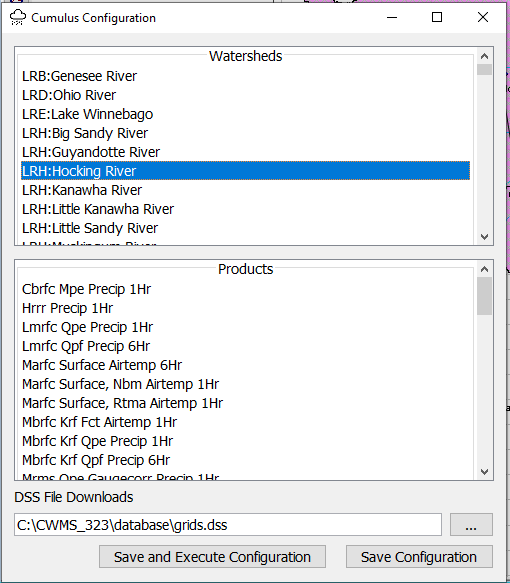
Execute Headless
# headless run True takes predefined configurations and
# False gives the user a UI to define the configurations
HEADLESS = TrueThese parameters can be modified but typically when troubleshooting with developer(s). Timeout can be increased to facilitate long download times or completely left out of the configuration, default = 300 seconds. Host should already be set properly. The Scheme should not be modified.
params_ = {
    "Host": "cumulus-api.corps.cloud",
    "Scheme": "https",
    "Timeout": 150  # default is 300
}
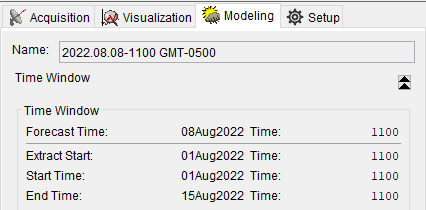
The time window is determined by the CAVI's active tab. If the active tab is Modeling and no forecast open, an exception is raised and the program stops.
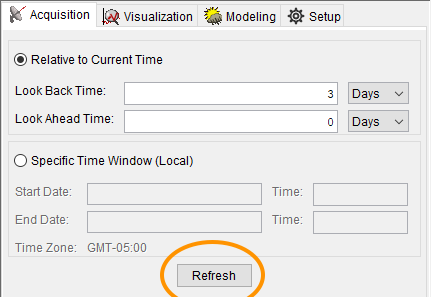
Note: If a time window is changed in any way, Refresh the time window before initiating scripts.
The initialization of the rtsutils package provides a template script (extract.py) that can be used as-is or copied. Any local modifications to template scripts will be overwritten when rtsutil_init.py or rtsutil_update.py are executed; configurations for template scripts are also overwritten. It is recommended to rename a script to keep any local modifications. A configuration file for each script is created, read, and written by the executing script. Script and config are linked by name and only managed by the executing script.
This script is in development and only downloads specific USGS time series data.
Basic execution of the extract script does not require any code modification. The default behavior (invoke) is to present the user with a GUI to select a watershed, DSS file destination, save configurations, and execute the download request. There is an option to execute the download request with pre-defined configurations without seeing the GUI, HEADLESS mode. The HEADLESS option is controlled by one line in the code changing HEADLESS = False to HEADLESS = True.
Note: A configuration, using the GUI, must be created before running HEADLESS
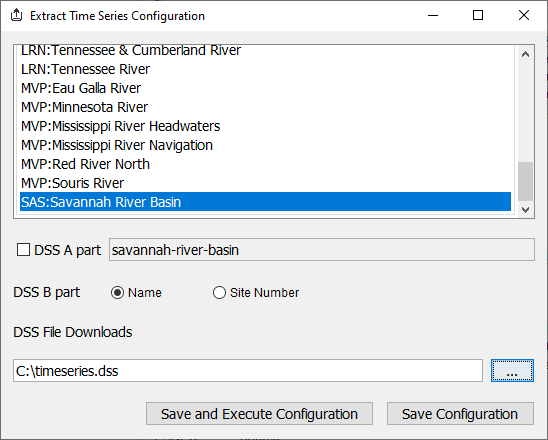
params_ = {
    "Host": "cumulus-api.corps.cloud",
    "Scheme": "https",
    "Timeout": 150  # default is 300
}
Timeout can be increased to facilitate long download times or completely left out of the configuration to default to 300 seconds. Host should already be set properly. The Scheme should not be modified. The time window is determined by the CAVI and active tab. If the active tab is Modeling and no forecast open, an exception is raised and the program stops.
| Method | Modifier and Type | Description |
|---|---|---|
| CwmsRADAR() | Class | Set inputs that are used to build the sys.argv for cwms_data2dss.py |
| CwmsRADAR().begintime | String | Assign time format 'yyyy-MM-ddTHH:mm:00' |
| CwmsRADAR().endtime | String | Assign time format 'yyyy-MM-ddTHH:mm:00' |
| CwmsRADAR().format_datetime(HecTime dt) | String | Input HecTime object returning time format 'yyyy-MM-ddTHH:mm:00' |
| CwmsRADAR().dssfile | String | Assign path and dss pathname |
| CwmsRADAR().set_tsids(tsid[], [dssid[]]) | String[] | Assign list of TSIDs and/or list of DSS IDs |
| CwmsRADAR().set_timezone(String tz) | String | Assign timezone; checked against available IDs |
| CwmsRADAR().run() | void | Build arguments for cwms_data2dss.py and call its main() method |
TSID and DSS ID Lists
"""CWMS Radar Data to DSS
"""

import os

from rtsutils.cavi.jython import status
from rtsutils.cwmsradar import CwmsRADAR

from hec.heclib.util import HecTime
from hec.script import MessageBox

#
tw = status.get_timewindow()
if tw != None:
    st, et = tw
    print("Time window: {}".format(tw))
else:
    MessageBox.showError("No Forecast open or in 'Setup Tab'")
    raise Exception("No Forecast open or in 'Setup Tab'")

tsid_list = [
    'LRN/NAST1-CumberlandR-NashvilleTN.Stage.Inst.30Minutes.0.dcp-rev',
    'LRN/ANTT1-MillCr-AntiochTN.Precip-Inc.Total.30Minutes.30Minutes.dcp-rev',
    'LRN/Anderson.Precip-Inc.Total.15Minutes.15Minutes.CCP-Computed-Rev'
    ]
dssid_list = [
    '//NAST1-CUMBERLANDR-NASHVILLETN/STAGE//30MIN/DCP-REV/',
    '//ANNT1-MILLCR-ANTIOCHTN/PRECIP-INC//30MIN/DCP-REV/',
    '//ANDERSON/PRECIP-INC//15MIN/CCP-COMPUTED-REV'
]
cwmsdat = CwmsRADAR()
cwmsdat.begintime = cwmsdat.format_datetime(HecTime(st))
cwmsdat.endtime = cwmsdat.format_datetime(HecTime(et))
cwmsdat.dssfile = os.path.join(status.get_database_directory(), 'test-data.dss')
cwmsdat.set_tsids(tsid_list)                   # Define TSID only tells the script to define DSS paths
cwmsdat.set_tsids(tsid_list, dssid_list)       # Define TSID and DSS lists defines DSS path names
cwmsdat.run()
TSIDs and DSS IDs Defined by Configuration File
"""CWMS Radar Data to DSS
"""

import os

from rtsutils.cavi.jython import status
from rtsutils.cwmsradar import CwmsRADAR

from hec.heclib.util import HecTime
from hec.script import MessageBox

#
tw = status.get_timewindow()
if tw != None:
    st, et = tw
    print("Time window: {}".format(tw))
else:
    MessageBox.showError("No Forecast open or in 'Setup Tab'")
    raise Exception("No Forecast open or in 'Setup Tab'")

cwmsdat = CwmsRADAR()
cwmsdat.begintime = cwmsdat.format_datetime(HecTime(st))
cwmsdat.endtime = cwmsdat.format_datetime(HecTime(et))
cwmsdat.dssfile = os.path.join(status.get_database_directory(), 'test-data.dss')
cwmsdat.read_config(os.path.join(status.get_database_directory(), 'cwms_radar.config'))
cwmsdat.set_tsids()  # Reading the configutation file defines the lists but they still need to be set
cwmsdat.run()
Example: Configuration file for TSIDs and DSS IDs
*Do NOT leave any trailing commas (,) after the last entry!
{
    "DistrictID/Location.Parameter.ParameterType.Interval.Duration.Version": "/Apart/Bpart/Cpart/Dpart/Epart/Fpart/",
    "DistrictID/Location.Parameter.ParameterType.Interval.Duration.Version": "/Apart/Bpart/Cpart/Dpart/Epart/Fpart/"
}
{
  "LRN/NAST1-CumberlandR-NashvilleTN.Stage.Inst.30Minutes.0.dcp-rev": "//NAST1-CUMBERLANDR-NASHVILLETN/STAGE//30MIN/DCP-REV/",
  "LRN/ANTT1-MillCr-AntiochTN.Precip-Inc.Total.30Minutes.30Minutes.dcp-rev": "//ANNT1-MILLCR-ANTIOCHTN/PRECIP-INC//30MIN/DCP-REV/"
}
| Method | Modifier and Type | Description |
|---|---|---|
| USGSDataRetrieve() | Class | Define parameters for getusgs.py |
| USGSDataRetrieve().run() | void | Initiates getusgs.py |
| USGSDataRetrieve().is_forget() | boolean | Is 'forget' option set |
| USGSDataRetrieve().set_begin_date(String dt) | void | Date or date/time format from HEC library |
| USGSDataRetrieve().set_end_date(String dt) | void | Date or date/time format from HEC library |
| USGSDataRetrieve().set_timezone(String tz) | void | Set the timezone for the start and ending dates; checked against available IDs |
| USGSDataRetrieve().set_dssfilename(String dssfile) | void | Specify the DSS file to use |
| USGSDataRetrieve().set_tzdss(String tz) | void | Specifies time zone to use for data stored to a HEC-DSS file |
| USGSDataRetrieve().set_locations(locations[]) | void | Specify the locations (locations[]) in json format |
| USGSDataRetrieve().set_locations_file(locations_file) | void | Specify the locations file (locations_file) |
| USGSDataRetrieve().set_parameters(String paramters) | void | Specifies parameters input file; Default parameters stored in package |
| USGSDataRetrieve().set_aliases(String aliases) | void | Specifies parameter aliases input file; Default aliases stored in package |
| USGSDataRetrieve().set_working_dir(String working_dir) | void | Specifies the working directory for the 'getusgs.py'; default is the package directory |
Locations Defined in Script
"""Get USGS Data to DSS
"""

import os

from rtsutils.cavi.jython import status
from rtsutils.usgs import USGSDataRetrieve

from hec.script import MessageBox


tw = status.get_timewindow()
if tw != None:
    st, et = tw
    print("Time window: {}".format(tw))
else:
    MessageBox.showError("No Forecast open or in 'Setup Tab'")
    raise Exception("No Forecast open or in 'Setup Tab'")

rts_dss = os.path.join(status.get_database_directory(), 'test-data.dss')
retrieve = USGSDataRetrieve()
retrieve.set_dssfilename(rts_dss)
retrieve.set_begin_date(st)
retrieve.set_end_date(et)
retrieve.set_timezone('GMT')
retrieve.set_tzdss('GMT')
locations = [
    {'[USGS_LOC]': '[03566700]',
        'SHEF_LOC': '',
        'DSS_A-PART': '',
        'DSS_B-PART': 'Ringgold',
        'DSS_F-PART': 'USGS',
        'CWMS_LOC': '',
        'CWMS_VER': '',
        'PARAMETERS': 'Stage,Elevation,Flow,Precip'},
    {'[USGS_LOC]': '[03567500]',
        'SHEF_LOC': '',
        'DSS_A-PART': '',
        'DSS_B-PART': 'SouthChickGage',
        'DSS_F-PART': 'USGS',
        'CWMS_LOC': '',
        'CWMS_VER': '',
        'PARAMETERS': 'Stage,Elevation,Flow,Precip'},
    {'[USGS_LOC]': '[03567340]',
        'SHEF_LOC': '',
        'DSS_A-PART': '',
        'DSS_B-PART': 'WestChickGage ',
        'DSS_F-PART': 'USGS',
        'CWMS_LOC': '',
        'CWMS_VER': '',
        'PARAMETERS': 'Stage,Elevation,Flow'},
    {'[USGS_LOC]': '[02331600]',
        'SHEF_LOC': '',
        'DSS_A-PART': '',
        'DSS_B-PART': 'Chata ',
        'DSS_F-PART': 'USGS',
        'CWMS_LOC': '',
        'CWMS_VER': '',
        'PARAMETERS': 'Stage,Elevation,Flow,Precip'}
    ]
retrieve.set_locations(locations)
retrieve.run()
MessageBox.showInformation('Script Done!', 'Script Done')
Locations Defined by File in Database Directory
"""Get USGS Data to DSS
"""

import os

from rtsutils.cavi.jython import status
from rtsutils.usgs import USGSDataRetrieve

from hec.script import MessageBox


tw = status.get_timewindow()
if tw != None:
    st, et = tw
    print("Time window: {}".format(tw))
else:
    MessageBox.showError("No Forecast open or in 'Setup Tab'")
    raise Exception("No Forecast open or in 'Setup Tab'")

rts_dss = os.path.join(status.get_database_directory(), 'test-data.dss')
retrieve = USGSDataRetrieve()
retrieve.set_dssfilename(rts_dss)
retrieve.set_begin_date(st)
retrieve.set_end_date(et)
retrieve.set_timezone('GMT')
retrieve.set_tzdss('GMT')
loc_file = os.path.join(status.get_database_directory(), 'locations.csv')
retrieve.set_locations_file(loc_file)
retrieve.run()
MessageBox.showInformation('Script Done!', 'Script Done')
Configuration file follows same format as original getUsgs script
[USGS_LOC],SHEF_LOC,DSS_A-PART,DSS_B-PART,DSS_F-PART,PARAMETERS
[03431800],ACST1,,ACST1-SycamoreCr-AshlandCityTN,dcp-rev,"Stage,Elevation,Flow,Precip"
[03415000],ALPT1,,ALPT1-WFkObeyR-AlpineTN,dcp-rev,"Stage,Flow"
[03610200],AMOK2,,AMOK2-ClarksR-AlmoKY,dcp-rev,"Stage,Flow"