Home
Please note, script_downloader has been replaced by the new process below.
rtsutils has been refactored to act more like an installed Python package within the CAVI virtual environment. Code that once added rtsutils to the PYTHONPATH, within each script, has been removed and CAVI configurations modified by the installer placing the package in the PYTHONPATH. This allows for traditional import statements accessing rtsutils modules. A single include statement will be added to the CWMS installation CAVI configuration file during the installation process.
- Copy the contents of rtsutils_init.py
- Create a new script in the CWMS CAVI/HEC-RTS called rtsutils_init
- Paste the contents of Step 1 into the new script, saving the script.
- Run rtsutils_init (recommend running with the CAVI's
Tools | Console Output...in case of errors) - Restart the CAVI to make sure the new package is read into the CAVI's VM
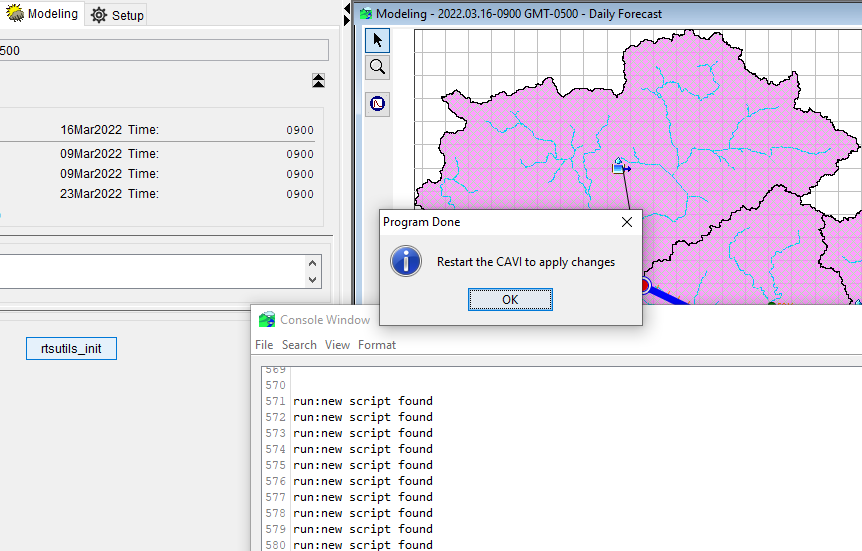
Upon successful setup completion, you should see the following:
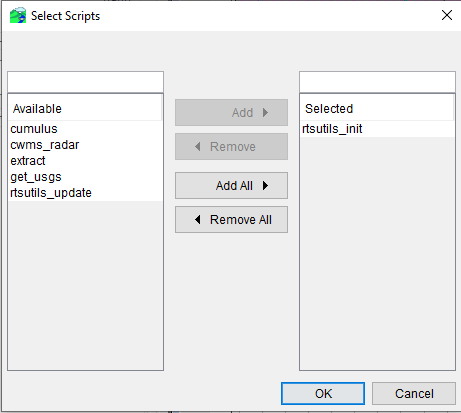
After restarting the CAVI, you should now have the following scripts available:
- Initialization of the rtsutils package provides a script (rtsutils_update.py) to update changes in the
rts-utilslocal git repo - Running rtsutils_update.py executes a
Goimplementation ofgit pullreseting the local git repo and pulling from github - The user is presented with a message dialog returning results but it is good practice to review the
Console Output - What is updated?
- The rtsutils package located in
%APPDATA% - All scripts in the active watershed; local modifications will be overwritten
- The rtsutils package located in
Successful execution with repository up-to-date
2022/03/16 11:16:29 Service up: https://github.com
2022/03/16 11:16:29 Initiating 'git' command
2022/03/16 11:16:30 Repository already up-to-date