Level Creation & Level Layout Tools
Within Rooms > Stages > 00 - Test Stage, exists rm_template. This is the bare minimum required for a blank level. For making new levels, It is recommended you keep rm_template clean so it can be continued to be duplicated for any new levels you want to make.
With your new room created, the layers should look like this:
Utilities (Instance Layer)
Collision (Folder)
> CollisionTriggers (Instance Layer)
> CollisionB (Tilemap Layer)
> CollisionA (Tilemap Layer)
> CollisionMain (Tilemap Layer)
> CollisionSemi (Tilemap Layer)
Objects (Instance Layer)
BackgroundObject (Instance Layer)
Background (Background Layer)
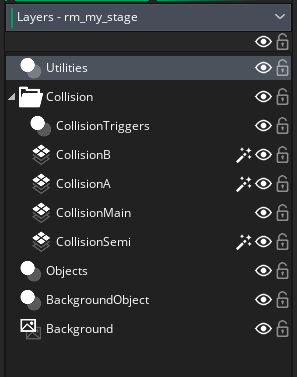
You can add more layers after this, but deleting these preexisting layers can cause the level to crash (especially the collision layers.)
To edit level specific values, your going to head to your room's creation code. This can be found by clicking the "Creation Code" button when you have a room's properties open. If you duplicated rm_template, the creation code should look like this:
//NOTE: Duplicate this room to make levels!
with(obj_level)
{
	//Set stage music and loop points
	stage_music = MUSIC.TECHDEMO_TOWER

	//Set level name
	stage_name = "Template Level";

	//Set stage act
	act = 0;

	//Is next level doing act transition in case if you do a multi-zone level.
	act_transition = false;

	//Animal array
	animal = [A_FLICKY, A_CUCKY, A_RICKY];

	//Next level
	next_level = room;
}
Determines what the music is for the stage. It's recommended that this is set as something from the MUSIC enum.
To add new music, go to game_init_music_list, and insert a new line inside the function game_init_music_list() that runs the function music_add().
music_add(music_id, sound_id, loop_start = 0.00, loop_end = 0.00, loop = true)
-
music_id: ID reference for the music you are going to add. Recommended that this is a value from the
MUSICenum. - sound_id: The GameMaker audio asset assigned to this music ID.
- loop_start (optional): When the audio loops, it restarts back at this position in the track. Default is 0.00. (measured in seconds)
- loop_end (optional): When the audio passes this point, the track loops. If the value is 0, it waits until the end of the track file. Default is 0.00. (measured in seconds)
- loop (optional): Determines if the track actually loops or not. Default is true.
music_add(MUSIC.MARRY_ME, bgm_marry_me)
In game, this would play the audio asset bgm_marry_me to completion before it loops.
If you added this correctly inside game_init_music_list(), you should be able to hear this in the Stage Select sound test. The numerical index of your song would be where you put the songs name in the MUSIC enum.
Then, stage_music = MUSIC.MARRY_ME in your level's creation code will play this song for the stage background music.
The string that the level title card uses. By default, this should not include the word "Zone".
A number that determines the "act" portion of the title card. By default, 0 will display no act number, anything higher would display "Act", then the number inserted.
Determines if the level that the game goes to next will have fade out or be a seamless transition. If set to true, there is a bit more work that needs to be done for it to work.
NOTES:
- The level with
act_transitionset requires that it ends withobj_signpost, using any other method to end the stage without editing the act clear logic may cause issues or crash the game. - You can only have one
obj_act_trans_markerin a room. Multiple of these objects are not supported and can cause unintended results. - For the parallax to look consistent, both rooms MUST include the same background object, otherwise the effect will not work.
The current stage (the room where act_transition is true) and the stage its going to (the room in next_level) needs to have obj_act_trans_marker in the Utility layer. This object position determines the "anchor point" of transition between both stages.
When the game does an act transition (which occurs only once after an act clear), The player, any hidden monitors, and the signpost have their offsets from obj_act_trans_marker stored. These offsets are applied the objects again relative to the new room's obj_act_trans_marker, along with offsetting the parallax background to look like the previous room, so that it looks like the room never changed.
This 1-dimensional array determines what Animal Buddies are used when destroying a badnik (referenced directly by obj_flicky.) Values inside this array are recommended to be the animal macros (macros with the prefix A_.)
This stores the reference of what room the game goes to when you beat a stage (referenced directly by obj_act_clear.) Must be a reference to a GameMaker room asset or room index.
TODO
TODO
TODO
TODO
TODO
TODO
TODO
TODO