

Ever spent 10 minutes looking for that one document you know you saved somewhere? Yeah, we've all been there. That's why I built Foundit.
Instead of remembering exact file names, just ask naturally: "find my resume" or "where's my passport?" The AI actually understands what you're looking for and finds it. Pretty neat, right?
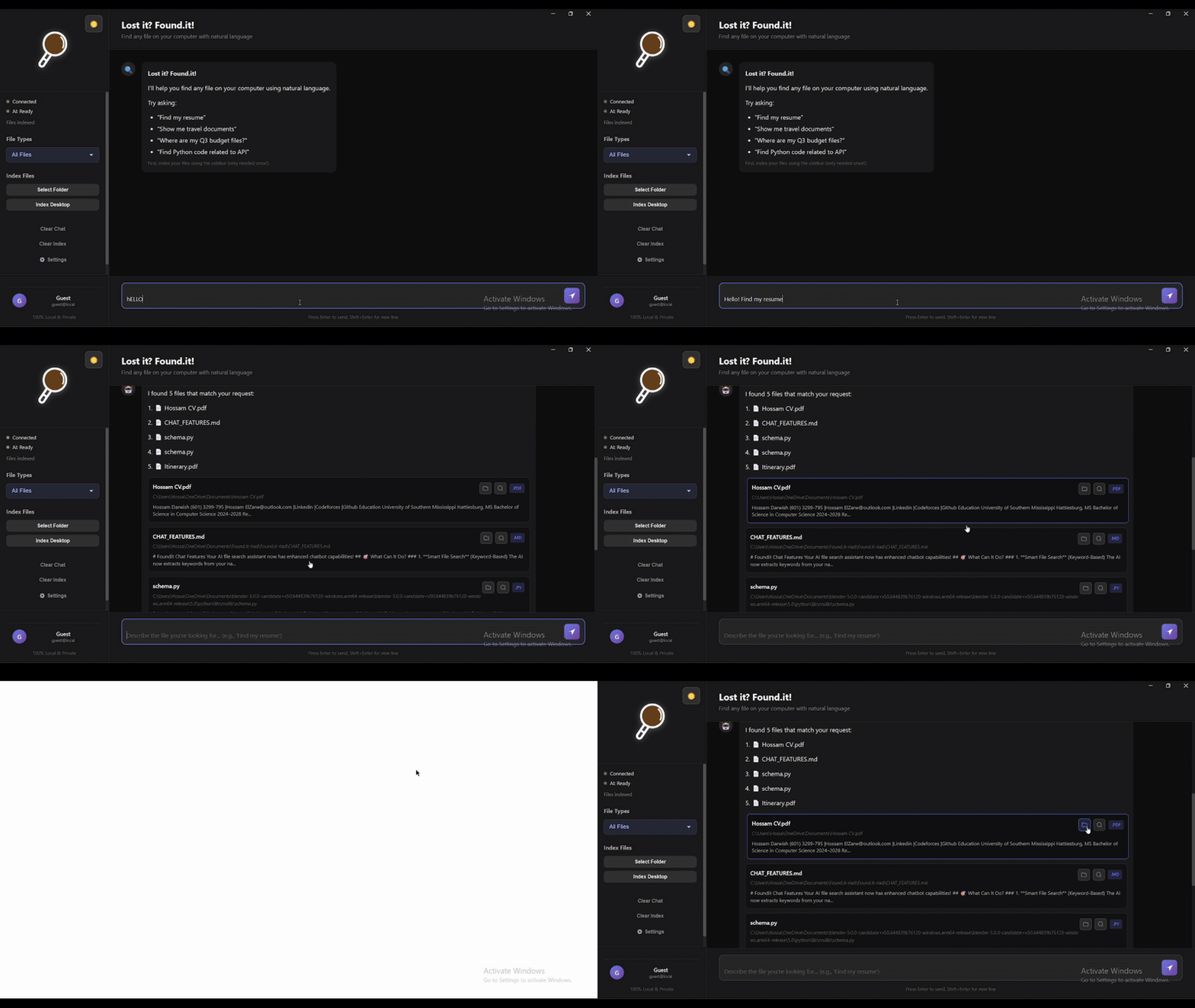
- Talk Like a Human - No more keyword hunting. Just ask "show me my tax stuff from 2023" and it gets it.
- Actually Smart - Knows that "resume" and "CV" are the same thing. Finds your passport when you ask for "travel documents."
- Lightning Fast - Results in under 100ms. No waiting around.
- 100% Private - Everything runs on your computer. Your files never leave your machine.
- Ridiculously Easy - If you can chat with ChatGPT, you can use Foundit.
Just three things:
- Python 3.8 or newer (grab it here)
- Node.js 16 or newer (get it here)
- 5 minutes of your time
If you know Git:
git clone https://github.com/UnknownHacker1/Found.it.git
cd Found.it
If you don't: Just download the ZIP file from GitHub, extract it, and open a terminal in that folder.
Then install the dependencies:
# Install Python stuff
cd backend
pip install -r requirements.txt
cd ..

# Install Node stuff
cd frontend
npm install
cd ..
That's it! The AI model (about 80MB) downloads automatically the first time you run it.
You need two terminal windows:
Terminal 1 - The Brain (Backend):
cd backend
python app.py
Wait until you see "Server ready!" - that means it's good to go.
Terminal 2 - The Face (Frontend):
cd frontend
npm start
The app window pops up and you're ready to search!
I get it. Here's a quick shortcut:
Windows: Create start-foundit.bat:
@echo off
start cmd /k "cd backend && python app.py"
timeout /t 5
cd frontend
npm start
Just double-click it next time.
Mac/Linux: Create start-foundit.sh:
#!/bin/bash
cd backend && python3 app.py &
sleep 5
cd frontend && npm start
Then: chmod +x start-foundit.sh && ./start-foundit.sh
The app needs to know what files you have:
- Click "Quick Index Desktop" - scans your Desktop folder
- Or "Select Folder to Index" - pick any folder you want
It'll chug through your files and build a search index. Depending on how many files you have, this takes a minute or two.
Just type what you're looking for like you're texting a friend:
- "find my resume"
- "show me python code"
- "where's my passport?"
- "tax documents from 2023"
- "that budget spreadsheet"
Hit Enter. Boom. Results.
This is where it gets fun:
You: find my passport
Foundit: Found it! 📄 Passport_2024.pdf

You: what's the expiration date?
Foundit: *reads the file* Your passport expires on June 15, 2034.
Yeah, it actually reads and understands your files.
Here's what people actually search for:
| What You Type | What It Finds |
|---|---|
| "my cv" | Resume_2024.pdf, Professional_CV.docx, Work_History.pdf |
| "python projects" | All your .py files, Jupyter notebooks, Python scripts |
| "important travel stuff" | Passport, visas, boarding passes, hotel bookings |
| "tax things" | W2 forms, 1040s, tax returns, receipts |
| "that presentation from last week" | Recent .pptx files, slide decks |
The AI connects the dots. You don't have to remember exact filenames.
Pretty much everything with text:
- Documents - PDF, Word, PowerPoint, text files, Markdown
- Code - Python, JavaScript, Java, C++, Go, Rust, you name it
- Data - JSON, CSV, XML, YAML
- Basically - If you can open it in a text editor, Foundit can search it
Error: Something breaks when you run python app.py
Try this:
python --version  # Make sure it's 3.8 or higher
pip install --upgrade pip
pip install -r requirements.txtThe Problem: Frontend can't talk to backend
The Fix:
- Make sure the backend terminal is still running
- Look for "Server ready!" in the backend terminal
- Restart both if needed
- Check if something else is using port 8000
Why: Usually means files aren't indexed yet
Solution:
- Click "Quick Index Desktop" first
- Try different search terms
- Make sure your files have actual text (not just scanned images)
This is normal if:
- You're indexing 1000+ files
- You have large PDFs
- You're indexing network drives
Speed it up:
- Start with smaller folders
- Close other programs
- PDFs with just images can't be searched anyway (no text to extract)
Built with:
- Electron - The app wrapper
- Python FastAPI - The backend server
- Sentence Transformers - The AI that understands meaning
- FAISS - Crazy fast vector search (thanks Facebook)
- OpenRouter - For the conversational AI part
It's basically ChatGPT + Google, but just for your files.
Found a bug? Have an idea? Here's how to contribute:
- Fork the repo
- Make your changes
- Test it
- Send a pull request
Or just open an issue and tell me what's broken or what you want.
Stuff I'm working on:
- Auto-detect new files (so you don't have to re-index)
- Search filters (date, file type, size)
- OCR for scanned PDFs
- Search history
- Even faster search
- Maybe a mobile app?
Your files are yours. Nothing gets uploaded. Nothing gets sent to the cloud. Everything happens on your computer. I built this because I was tired of cloud services indexing my personal documents. Your privacy matters.
MIT License - do whatever you want with it.
- Found a bug? Open an issue
- Have a question? Start a discussion
- Want to chat? Email me or find me on Twitter
Made by someone who was tired of losing files. Hope it helps you too.