A Java Swing-Based Chat Application developed as part of the Advanced Programming course at the University of Greenwich.
- Overview
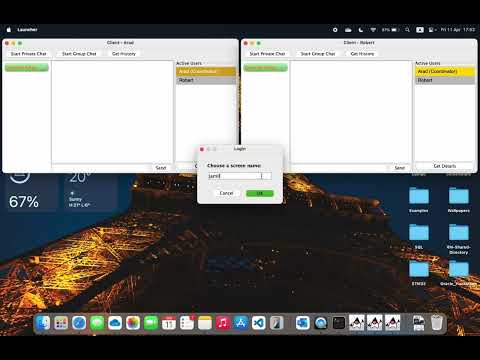
- Demo
- System Workflow
- Sequence Diagram of Server-Client Communication Using Serialization
- UML Diagram
- Features
- Technologies
- Design Patterns
- Getting Started
- Usage
- Project Structure
ChatApp is a desktop chat application built using Java Swing that allows users to communicate in real-time. The application provides a user-friendly interface for text-based conversations with features commonly found in modern chat applications.
flowchart TD
    %% User
    U[User]

    %% GUI View Components
    subgraph "GUI View Components"
        CD[Chat Display]
        CL[Chat List]
        AUL[Active Users List]
        MF[Message Field]
        BTN[Buttons]
    end

    %% GUI Components
    subgraph "MVC Design Pattern"
        CTR[Controller]
        V[View]
        M[Model]
    end

    %% Event Listeners
    subgraph "Event Listeners"
        L1[Window Listener]
        L2[Private Chat Button Listener]
        L3[Group Chat Button Listener]
        L4[Send Button Listener]
        L5[Chat List Listener]
        L6[Get Details Button Listener]
        L7[Message Field Action Listener]
    end

   %% Server-Client Communication Using Serialization
   SCC[Server-Client Communication Using Serialization]

    V --> |Updates| CD
    V --> |Updates| CL
    V --> |Updates| AUL
    V --> |Updates| MF
    V --> |Updates| BTN

    %% User Interactions
    U --> |Interacts| L1 --> |Sends Signal| CTR
    U --> |Interacts| L2 --> |Sends Signal| CTR
    U --> |Interacts| L3 --> |Sends Signal| CTR
    U --> |Interacts| L4 --> |Sends Signal| CTR
    U --> |Interacts| L5 --> |Sends Signal| CTR
    U --> |Interacts| L6 --> |Sends Signal| CTR
    U --> |Interacts| L7 --> |Sends Signal| CTR

    %% MVC Interactions
    CTR <--> |Gives Resources/Updates| M
    CTR <--> |Gives GUI Components/Updates| V
    CTR <--> |Communicates| SCC
Users interact with various components of the GUI, such as buttons, chat lists, and message fields. These interactions are captured by event listeners, which then send signals to the controller:
- Window Listener: Tracks window events.
- Private Chat Button Listener: Handles private chat initiation.
- Group Chat Button Listener: Manages group chat creation.
- Send Button Listener: Captures message sending actions.
- Chat List Listener: Responds to chat list selections.
- Get Details Button Listener: Fetches user details.
- Message Field Action Listener: Detects actions within the message input field.
The GUI is composed of several view components that provide a user-friendly interface:
- Chat Display: Shows the messages exchanged in a chat.
- Chat List: Displays the list of available chats.
- Active Users List: Shows the list of active users.
- Message Field: Input area for typing messages.
- Buttons: Various buttons for different actions (e.g., send, create chat).
The application architecture follows the MVC design pattern:
- Controller: Manages the interactions between the model and the view. It processes signals from event listeners and updates the model and view accordingly. It is also responsible for communicating with the client.
- View: Represents the GUI components and updates them based on the controller's instructions.
- Model: Maintains the application's data, such as chat history, user information, and active chats.
The communication between the client and server involves the serialization of messages for transmission and deserialization upon receipt. This process ensures efficient data exchange and synchronization between the client and server. The details of this communication will be covered in Sequence Diagram of Server-Client Communication Using Serialization.
sequenceDiagram
    participant U as User
    participant C as Client
    participant S as Server
    participant SER as Serialization
    participant DES as Deserialization

    U->>C: Interact (Send Message)
    C->>SER: Serialize Message
    SER->>C: Serialized Message
    C->>S: Send Serialized Message
    S->>DES: Deserialize Message
    DES->>S: Deserialized Message
    S->>SER: Serialize Response
    SER->>S: Serialized Response
    S->>C: Send Serialized Response
    C->>DES: Deserialize Response
    DES->>C: Deserialized Response
    C->>U: Process Response
In the ChatApp, communication between the client and server involves serializing messages for transmission and deserializing them upon receipt. When a user sends a message, the client serializes it and sends it to the server. The server then deserializes the message, processes it, serializes the response, and sends it back to the client. The client deserializes the response and processes it. This ensures efficient and synchronized data exchange.
classDiagram
    %% Abstract Classes
    class Chat {
        <<abstract>>
        # String id
        # String name
        # LocalDateTime timestamp
        # Set~User~ participants
        + Chat(String name)
        + String getId()
        + void setId(String id)
        + String getName()
        + void setName(String name)
        + LocalDateTime getTimestamp()
        + void setTimestamp(LocalDateTime timestamp)
        + void addParticipant(User participant)
        + void removeParticipant(User participant)
        + Set~User~ getParticipants()
    }

    class Communication {
        <<abstract>>
        # String messageId
        # LocalDateTime timestamp
        # CommunicationType type
        + Communication(CommunicationType type)
        + String getMessageId()
        + void setMessageId(String messageId)
        + LocalDateTime getTimestamp()
        + void setTimestamp(LocalDateTime timestamp)
        + CommunicationType getType()
        + void setType(CommunicationType type)
    }

    %% Concrete Classes
    class PrivateChat {
        - boolean active
        + PrivateChat(String chatName)
        + boolean isActive()
        + void setActive(boolean active)
        + void displayChatInfo()
        + ChatType getType()
    }

    class GroupChat {
        + GroupChat(String chatName)
        + void displayChatInfo()
        + ChatType getType()
    }

    class TextMessage {
        - Chat chat
        - User sender
        - String content
        + TextMessage(Chat chat, User sender, String content)
        + Chat getChat()
        + void setChat(Chat chat)
        + User getSender()
        + void setSender(User sender)
        + String getContent()
        + void setContent(String content)
    }

    class UserUpdateMessage {
        - User user
        - UserStatus status
        + UserUpdateMessage(User user, UserStatus status)
        + User getUser()
        + void setUser(User user)
        + UserStatus getStatus()
        + void setStatus(UserStatus status)
    }

    class SystemMessage {
        - String content
        - SystemMessageType systemMessageType
        + SystemMessage(SystemMessageType systemMessageType, String content)
        + String getContent()
        + SystemMessageType getSystemType()
    }

    class User {
        - String id
        - String username
        - LocalDateTime createdAt
        - boolean isCoordinator
        + User(String username)
        + String getId()
        + void setId(String id)
        + String getUsername()
        + void setUsername(String username)
        + LocalDateTime getCreatedAt()
        + void setCreatedAt(LocalDateTime createdAt)
        + boolean getIsCoordinator()
        + void setIsCoordinator(boolean isCoordinator)
    }

    %% Utility Classes
    class IDGenerator {
        <<utility>>
        + String generateUUID()
    }

    class MessageSerializer {
        <<utility>>
        - static Gson gson
        + static String serialize(Communication message)
        + static Communication deserialize(String json)
    }

    %% Enums
    class ChatType {
        <<enumeration>>
        + PRIVATE
        + GROUP
    }

    class CommunicationType {
        <<enumeration>>
        + TEXT
        + USER_UPDATE
        + SYSTEM
    }

    class UserStatus {
        <<enumeration>>
        + ONLINE
        + OFFLINE
    }

    class SystemMessageType {
        <<enumeration>>
        + ID_TRANSITION
        + IP_TRANSITION
        + IP_REQUEST
        + COORDINATOR_ID_TRANSITION
        + SERVER_SHUTDOWN
        + HEARTBEAT
    }

    %% Inheritance
    Chat <|-- PrivateChat
    Chat <|-- GroupChat
    Communication <|-- TextMessage
    Communication <|-- UserUpdateMessage
    Communication <|-- SystemMessage

    %% Associations & Dependencies
    Chat "1" o-- "*" User : participants
    TextMessage --> Chat : references
    TextMessage --> User : sender
    UserUpdateMessage --> User : user
    UserUpdateMessage --> UserStatus : status
    SystemMessage --> SystemMessageType : systemType
    Communication --> CommunicationType : type
    PrivateChat --> ChatType : type
    GroupChat --> ChatType : type

    %% Utility Usage
    Chat ..> IDGenerator : uses
    Communication ..> IDGenerator : uses
    User ..> IDGenerator : uses
    MessageSerializer ..> Communication : (de)serializes
- Real-time messaging
- Private and group chat
- Chat history and message persistence
- User-friendly graphical interface built with Swing
- Java: Core programming language
- Swing: GUI framework for creating the user interface
- Maven: For dependency management and build automation
- Gson: For JSON serialization/deserialization
- Socket Programming: For network communication
- Multithreading: For handling concurrent connections
- JUnit 5 & Mockito: For unit testing
The ChatApp implementation leverages several design patterns to enhance maintainability, readability, and extensibility of the codebase.
In this chat application, the Adapter Pattern is used to enable compatibility between custom objects and the JSON serialization/deserialization process powered by Gson. This is particularly important when dealing with polymorphic types and non-standard Java types like LocalDateTime.
The Adapter Pattern is implemented in the MessageSerializer class to:
- Adapt different message and chat types for polymorphic deserialization.
- Serialize and deserialize LocalDateTime, which Gson does not support by default.
-
RuntimeTypeAdapterFactory (for polymorphism) Gson’s
RuntimeTypeAdapterFactoryis used as an adapter to preserve the actual runtime type of abstract base classes likeCommunicationandChat. This allows Gson to reconstruct the correct subclass during deserialization based on thetypefield.RuntimeTypeAdapterFactory<Communication> communicationAdapter = RuntimeTypeAdapterFactory.of(Communication.class, "type") .registerSubtype(TextMessage.class, CommunicationType.TEXT.name()) .registerSubtype(UserUpdateMessage.class, CommunicationType.USER_UPDATE.name()) .registerSubtype(SystemMessage.class, CommunicationType.SYSTEM.name());
Without this adapter, Gson would not be able to properly deserialize JSON back into the appropriate subclass.
-
Custom Adapter for LocalDateTime Java’s
LocalDateTimedoes not serialize/deserialize out of the box with Gson. A custom adapter is used to bridge this incompatibility.private static class LocalDateTimeAdapter implements JsonSerializer<LocalDateTime>, JsonDeserializer<LocalDateTime> { private static final DateTimeFormatter formatter = DateTimeFormatter.ISO_LOCAL_DATE_TIME; @Override public JsonElement serialize(LocalDateTime localDateTime, Type type, JsonSerializationContext context) { return new JsonPrimitive(localDateTime.format(formatter)); } @Override public LocalDateTime deserialize(JsonElement json, Type type, JsonDeserializationContext context) { return LocalDateTime.parse(json.getAsString(), formatter); } }
This adapter converts LocalDateTime to a standard string format for JSON and back again when reading.
- Interoperability: Smooth integration between Java-specific types and JSON.
- Polymorphism Support: Preserves the actual object type during serialization.
- Cleaner Serialization Logic: Encapsulates complex logic away from main business code.
In this chat application, the Factory Method design pattern is used to decouple the message handling logic from the core networking code. This approach improves scalability and maintainability by allowing new message types to be easily introduced without modifying the existing control flow.
The Factory Method pattern is implemented in both the client and server components through ClientMessageProcessorFactory and ServerMessageProcessorFactory, respectively.
Each message type (e.g., TEXT, USER_UPDATE, SYSTEM) requires a different handler logic. Instead of using if-else or switch statements scattered throughout the codebase, we centralize message creation using factories that return the appropriate MessageProcessor subclass based on the message type.
public void processMessage(String jsonMessage) {
    Communication message = MessageSerializer.deserialize(jsonMessage);
    ClientMessageProcessor processor = ClientMessageProcessorFactory.getProcessor(message.getType());
    processor.processMessage(message, controller);
}ClientMessageProcessoris an abstract class.- Subclasses like
ClientTextMessageProcessor,ClientSystemMessageProcessor, andClientUserUpdateMessageProcessorimplement the actual behavior. - The factory
ClientMessageProcessorFactoryreturns the right subclass based on the CommunicationType.
public void processMessage(String jsonMessage) {
    Communication message = MessageSerializer.deserialize(jsonMessage);
    ServerMessageProcessor processor = ServerMessageProcessorFactory.getProcessor(message.getType());
    processor.processMessage(message, this.server, out, this);
}- Similar to the client side,
ServerMessageProcessoris abstract. - Concrete implementations like
ServerTextMessageProcessor,ServerSystemMessageProcessor, andServerUserUpdateMessageProcessorencapsulate logic for specific message types. ServerMessageProcessorFactoryhides the instantiation logic behind a clean interface.
- Open/Closed Principle*: Add new message types without modifying existing processing logic.
- Separation of Concerns: Each processor class handles a single responsibility.
- Cleaner Code: Avoids large conditional blocks in the message handlers.
Please refere to MVC Design Pattern explained earlier.
- Java Development Kit (JDK) 23 or higher
- Maven 3.6+ (for dependency management and building)
The project uses the following main dependencies:
- Gson (2.12.1): For JSON processing
- Gson-extras (0.2.2): Additional Gson functionality
- JUnit 5 (5.9.2): For unit testing
- Mockito (5.3.1): For mocking in tests
All dependencies are managed through Maven and specified in the pom.xml file.
- Clone the Repository
Start by cloning the project repository from GitHub:
git clone https://github.com/UoG-Advanced-Programming/ChatApp.git- Navigate to the Project Directory
Change your working directory to the cloned project:
cd ChatApp- Build the Application with Maven
Use Maven to build the application and install its dependencies:
mvn clean install- Run the Server
Start the server application using the following command:
mvn exec:java -Dexec.mainClass="com.example.server.network.Server"- Run the Client
In a new terminal window or tab, execute the client application with the following command, passing localhost as an argument:
mvn exec:java -Dexec.mainClass="com.example.client.network.Client" -Dexec.args="localhost"- Launch the application
- Enter your username
- Enjoy real-time communication!
src/main/java/- Source code filessrc/test/java/- Test source files