This is a short example of an app that uses a phone camera to scan a barcode or anything of the like in order to inventorise and keep track of due dates, to decrease products in shelf that are past their date.
The app has only been tested on android specifically a samsung s10+
Switch to the "Scanner" tab on the fly-out.
Click on Start scannen to open up your camera and scan a barcode! This will automaticaly fill in the barcode field and make it read only to prevent tampering.
Clicking the plus button on the bottom will add the product to the database and reset the input fields.
product naam: The name of the product
dd-mm-yyyy: Current date is automaticaly displayed on the input field, input is done in a long string of numbers and automatically converted to a date format (i.e. 30082022 becomes 30-08-2022)
Aantal stuks: The amount of product that is due (optional)
Welke categorie: Product category (i.e. Soda, snacks, etc.)

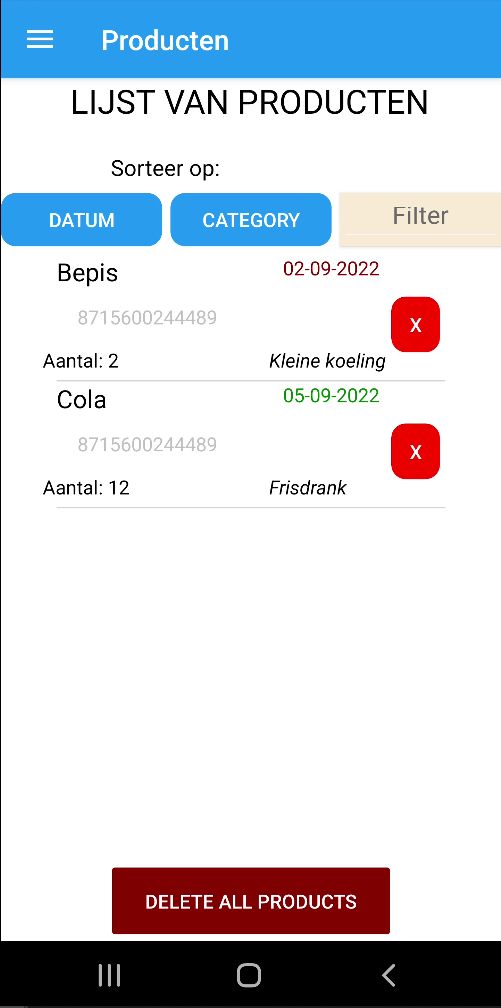
Switch to the "Producten" tab on the fly-out.
This will automatically display all the products based on their due date. The earliest date being on top. It displays all the data from the product that is stored in the database.
Furthermore you can sort on date and category WIP and filter on category.
Lastly there is a red X to remove objects from the database or by pressing the big red button on the bottom you can remove all the products from the database following a confirmation prompt.
Switch to the "Controle" tab on the fly-out.
There is a button that does nothing at this point WIP
