


Fork created and maintained by Zar
Java 25 · Paper 26.x · MySQL index · per-world config · access audit · pet protection · auto-backup · ownership transfer · statistics TP
Block protection plugin for Paper/Spigot servers. Players lock chests, furnaces, and other blocks through a modern GUI — no commands to memorize. This fork extends the original NBT core with production-grade features for large or long-running servers.
- Screenshots
- Installing
- File Layout
- GUI Overview
- Commands
- Permissions
- Features
- Configuration Reference
- Integrations
- Compatibility
- Translating
- Roadmap
- Contact / Support
- License
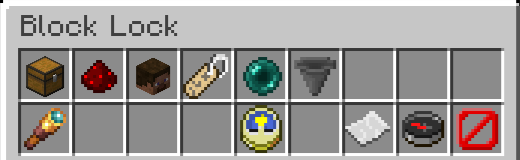
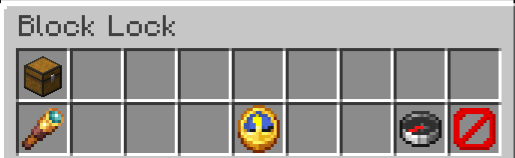
The main interface for locking blocks. Sneak + right-click any lockable block to open. Two-row inventory with functional buttons (top) and utility buttons (bottom).
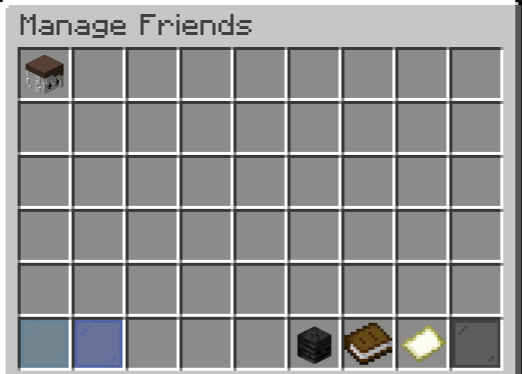
Manage friends with different permission levels (Read, Write, Manager). Add or remove friends from your protected blocks.

Configure personal preferences: lock-on-place behavior, hint toggles, and manage your global friends list.
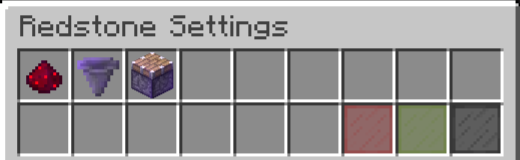
Control redstone behavior for your protected blocks. Toggle redstone, piston, and hopper interactions.
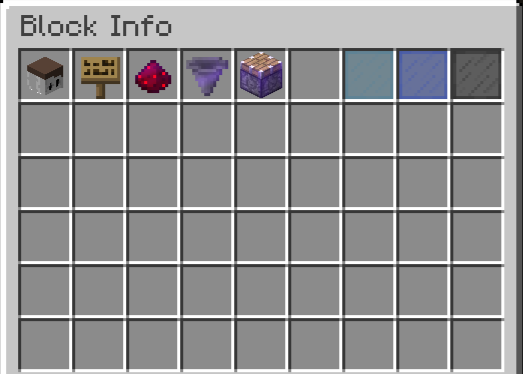
View detailed information about the current block: owner, friends, protection status, and additional metadata.
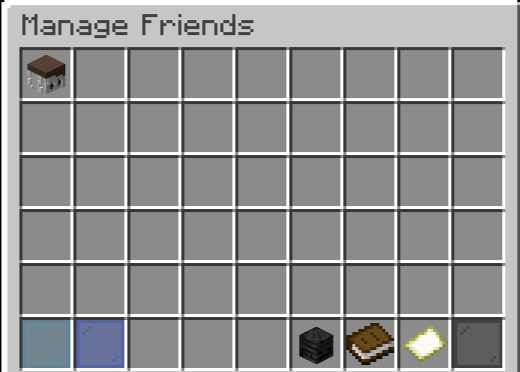
See a summary of all access attempts to your protected blocks. View when friends opened or interacted with your blocks.
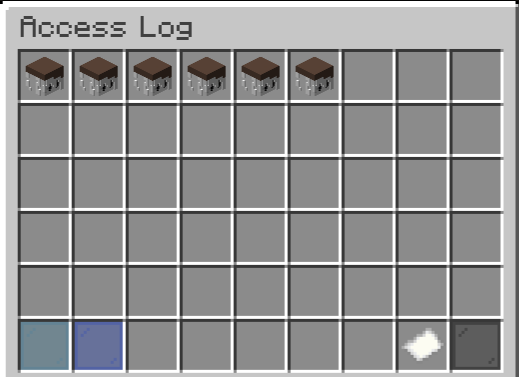
Deep dive into individual access records with timestamps, player names, and action types (opened, item taken, item placed, access denied).
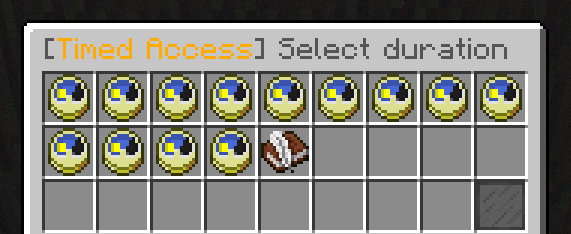
Grant temporary access to friends. Set a time limit and access is automatically revoked when the timer expires.
Admin tool to view all blocks owned by any player. Click to teleport to each block. Shows real block icons and lock timestamps.
Download the latest JAR from Releases or from Modrinth
and drop it in your plugins/ folder. Requires Java 25 and Paper/Spigot 1.20+.
git clone https://github.com/VictorGugug/BlockProt-Reloaded.git
cd BlockProt-Reloaded
./gradlew :blockprot-spigot:shadowJar
# Windows
.\gradlew.bat :blockprot-spigot:shadowJar -PversionSuffix=SNAPSHOTOutput → spigot/build/libs/BlockProt-VERSION.jar
Version suffix (-PversionSuffix=... or edit versionSuffix in gradle.properties):
| Value | Output |
|---|---|
| (blank) | BlockProt-1.3.1.jar — stable release |
SNAPSHOT |
BlockProt-1.3.1-SNAPSHOT.jar |
alpha.1 |
BlockProt-1.3.1-alpha.1.jar |
beta.1 |
BlockProt-1.3.1-beta.1.jar |
rc.1 |
BlockProt-1.3.1-rc.1.jar |
exp |
BlockProt-1.3.1-exp.jar — experimental |
plugins/BlockProt/
├── config.yml                          ← Main configuration
├── blocks.yml                          ← Lockable block lists (generated on first start)
├── worlds.yml                          ← Per-world overrides (optional)
├── mysql/
│   ├── mysql.yml                       ← MySQL/Storage configuration
│   └── blockprot_audit.sqlite          ← SQLite access audit log
├── lang/
│   └── translations_*.yml              ← 15 bundled language files
├── logs/
│   ├── blockprot-current.log           ← Active log file (shared across restarts)
│   └── blockprot-YYYY-MM-DD--YYYY-MM-DD.log  ← Rotated archive (created after 24 h)
└── backups/
    └── config-backup-YYYY-MM-DD_HH-MM.yml   ← Created on plugin version upgrade
blocks.yml is generated automatically on first start. If your existing config.yml contained lockable block lists, those values are migrated to blocks.yml and removed from config.yml automatically.
Two-row inventory. Top row holds functional buttons; bottom row holds utility buttons.
Top row (slots 0–8):
| Slot | Item | Function |
|---|---|---|
| 0 | Block icon | Lock / Unlock toggle |
| 1 | Redstone | Redstone / piston / hopper settings |
| 2 | Player Head | Manage friends |
| 3 | Name Tag | Set custom block name |
| 4 | Ender Pearl | Transfer block ownership |
| 5 / 6 | Hopper or Lime Dye | Protection Expiry management (only when enabled) |
Bottom row (slots 9–17):
| Slot | Item | Condition |
|---|---|---|
| 9 | Spyglass — Inspect contents | Admin + non-owner + block has inventory |
| 13 | Clock — Access log | Owner or admin + audit logger active |
| 14 | Knowledge Book — Paste config | Manager + clipboard has data |
| 15 | Paper — Copy config | Manager |
| 16 | Compass — Block info | Manager |
| 17 | Barrier — Back | Always |
Copying sends "Configuration copied." in the action bar. Pasting sends "Configuration pasted." in the action bar. Pasting replaces the friend list entirely rather than appending — this matches the expected behavior and resolves upstream issue #268.
Each entry displays the real block icon (White Shulker Box, Barrel, Copper Chest, Shelf, etc.) with a title showing the block type and coordinates, plus how long ago the block was locked (e.g. Locked 3 days ago) when a timestamp is available. Click any entry to teleport to that block (requires blockprot.blocks.tp). Stale entries (blocks that no longer exist at that location) are automatically filtered out.
Three-row inventory. Items centred in the middle row:
| Slot | Item | Material | Action |
|---|---|---|---|
| 11 | My Settings | Writable Book | Lock-on-place, hints, access notifications, global friends |
| 12 | Friends | Player Head | Default friend list |
| 13 | Statistics | Book | Block statistics |
| 14 | About | Nether Star | Plugin / fork information |
Three-row inventory. Items in the middle row:
| Slot | Item | Action |
|---|---|---|
| 11 | Comparator | Reload config and translations |
| 12 | Spyglass | Check for updates |
| 13 | Chain | List active integrations |
| 14 | Book | Open server statistics |
| 15 | Command Block | Run diagnostics (/bp debug run) |
| 16 | Player Head | Open player block-list GUI |
Six-row GUI listing every block owned by the selected player. Each entry shows the real block icon with coordinates and time since locking. Click any entry to teleport (requires blockprot.blocks.tp). Supports pagination. Back button (Barrier, slot 53) returns to the admin menu when opened from there.
Works for offline players — reads their stats directly from the NBT file. Requires blockprot.user.admin.
All commands are aliases for /blockprot as well. The command visibility is controlled by the use_menus config option:
use_menus: false(default) — CLI Mode: All subcommands below are active and visible in tab-complete;/bp userand/bp adminare hidden and blocked.use_menus: true— GUI Mode: Only/bp userand/bp adminare active and visible; all other subcommands are hidden from tab-complete and blocked.
Note on
/bp timed:TimedAccessCommandexists in the codebase but is not registered as a direct CLI subcommand. In CLI mode, timed access is initiated via the User Menu hint (slot 14 of the/bp userGUI), which instructs the player to look at a block and type/bp timed <player> <seconds>in chat. The command string itself is processed through the chat input system, not via/bp timedas a tab-completable subcommand.
| Command | Permission | Description |
|---|---|---|
/bp user |
blockprot.user |
Open User Menu (settings, friends, stats, transfer hint, timed hint, about) |
/bp admin |
blockprot.user.admin |
Open Admin Menu (reload, update, integrations, stats, debug, player block-list) |
Running /bp with no arguments in GUI mode opens the Admin Menu for ops and the User Menu for all other players.
| Command | Permission | Description |
|---|---|---|
/bp help |
blockprot.user |
Show all available commands based on current permissions and active mode |
/bp about |
blockprot.user |
Display plugin version, maintainers, and fork information |
/bp settings |
blockprot.user |
Open personal settings GUI |
/bp friends |
blockprot.user |
Open the friend-list management GUI |
/bp friends addall <player> |
blockprot.user |
Add a player as a friend on every block you own in a single operation |
/bp stats |
blockprot.user |
Open your block statistics GUI |
/bp transfer <player> |
blockprot.user |
Transfer ownership of the looked-at block to another player (original owner is kept as a friend) |
/bp transfer all <player> |
blockprot.user |
Transfer every block you own to another player in one operation |
/bp disablehints |
blockprot.user |
Toggle first-time protection hints |
| Command | Permission | Description |
|---|---|---|
/bp info <player> |
blockprot.user.admin |
View all blocks owned by a player; opens a GUI for in-game senders and prints to chat for console; works for offline players |
/bp unlock <player> |
blockprot.user.admin |
Open a six-row GUI listing all blocks protected by the target player. Left-click: inspect contents read-only. Right-click: remove the protection. Works for offline players. |
/bp reload |
op | Create a version-aware backup, then reload config.yml, blocks.yml, worlds.yml, mysql/mysql.yml, and all translation files |
/bp update |
op | Check for plugin updates; notifies only the sender, not all online admins |
/bp integrations |
op | List all currently active plugin integrations with their names |
/bp debug <subcommand> |
blockprot.debug |
Run diagnostics (subcommands: run, placeDebugChest, placeDebugShulker, clearSearchHistory) |
/bp aboutand/bp helpare registered as CLI commands and are therefore hidden in GUI mode (use_menus: true). In GUI mode, version information is accessible via the Nether Star slot (slot 16) in the/bp usermenu.
The following permissions are declared in plugin.yml:
| Permission | Default | Description |
|---|---|---|
blockprot.user |
true |
All standard user actions: lock/unlock, manage friends, settings, stats, transfer, hints |
blockprot.user.admin |
op |
Admin actions: view player block-lists, run the unlock GUI, and all op-guarded commands |
blockprot.bypass |
false |
Bypass all block protections — the player can interact with any protected block without restriction |
blockprot.blocks.tp |
op |
Teleport to blocks from the statistics menu or the admin block-list GUI |
The following permission nodes are checked at runtime but are not declared in plugin.yml (no automatic default assignment — grant manually via a permissions manager):
| Permission | Description |
|---|---|
blockprot.debug |
Access to /bp debug diagnostics |
blockprot.lockmax |
Enable per-player lock count limits via blockprot.locklimit.<number> |
blockprot.locklimit.<number> |
Set the maximum number of blocks a player may lock (e.g. blockprot.locklimit.100); requires blockprot.lockmax to be granted |
Permission Hierarchy:
blockprot.useris the base permission for all player actions.blockprot.user.admincovers all admin GUI and audit features. Console and ops always have full access regardless of permission nodes.blockprot.bypassis independent — players with this permission skip all protection checks.
- Sneak + right-click any lockable block to open the protection GUI.
- Add friends with Read / Write / Manager permission levels.
- Redstone, hopper, and piston protection toggles per block.
- Copy / paste protection settings between blocks (paste replaces, not appends).
- Per-player default friend list applied to all new locks.
Compiles against the Paper/Spigot 1.20.6 API and runs on any version from 1.20 through 26.1.x. Detects both 1.x and year-based 26.x server version schemes at runtime. APIs introduced after 1.20.6 (typed inventory views in 1.21.4, native sign editor in 1.20) are accessed via VersionCompat checks and reflection — zero NoClassDefFoundError on older servers. Validates Java version, Paper availability, and typed inventory view support on startup.
One active log file (blockprot-current.log) is reused across server restarts. When the file exceeds 24 hours it is rotated: renamed to blockprot-YYYY-MM-DD--YYYY-MM-DD.log (start–end timestamps) and a fresh blockprot-current.log is created. Rotation also happens mid-session if the server stays up for more than 24 hours. Console output remains clean.
NBT remains the source of truth. MySQL/MariaDB is an optional index for fast lookups via a HikariCP connection pool. All SQL operations are fully asynchronous with an in-memory trust cache. Configured in mysql/mysql.yml.
Lockable block lists live in blocks.yml rather than config.yml. Old lists are migrated automatically. Edit the file and run /bp reload — no server restart is required.
/bp friends addall <player> adds a player to every block you own in a single operation.
Stored at mysql/blockprot_audit.sqlite. Records ACCESS_DENIED, ACCESS_GRANTED, OPENED, ITEM_TAKEN, and ITEM_PLACED events. All writes are asynchronous; automatic pruning activates at 50,000 entries. In-game GUI is accessible from the block lock menu (Clock button, slot 13). Owner access is never logged — only friends and unauthorized players appear in the log.
A configuration backup is created under plugins/BlockProt/backups/ only when the plugin version changes (upgrade). No backup is created on routine restarts. The stored version is tracked in config.yml as last_known_version.
inactivity_cleanup_days: -1 (disabled by default). Removes protections from blocks owned by long-inactive players on startup. Execution is asynchronous to prevent main-thread hang.
Each world can override lockable block lists and enable or disable protection entirely. Missing worlds are added automatically on startup. This addresses upstream issue #318, which requested the ability to configure what blocks can be locked on a per-world basis.
Watches config.yml, worlds.yml, blocks.yml, mysql/mysql.yml, and lang/*.yml. Auto-reloads on change, debounced by 2 seconds to prevent race conditions.
| Key | Default | Description |
|---|---|---|
protect_locked_blocks_from_explosions |
true |
Explosions cannot destroy locked blocks |
block_protected_block_piston_movement |
true |
Pistons cannot move locked blocks |
allow_break_protected_blocks |
false |
Allow any player to break a protected block (protection data is cleared on break) |
respect_spawn_protection |
true |
Prevent locking blocks inside the spawn-protection radius |
clear_protection_on_shulker_break |
false |
Remove protection data when a shulker box is broken (the dropped item has no lock) |
allow_break_protected_blocks addresses upstream issue #324 (reinforcement plugin compatibility). clear_protection_on_shulker_break addresses upstream issue #346 (shulker gifting workflow).
Auto-locks unprotected blocks near a //paste origin. Disabled by default (worldedit_paste_autolock.enabled: false). Configurable radius and maximum blocks per paste.
Configurable bedrock_username_prefixes for Bedrock player name resolution. Players joining via Bedrock clients are correctly identified without triggering Mojang UUID lookups.
Missing keys are added from JAR defaults on every startup and on /bp reload. Obsolete keys are removed automatically. Translation files are auto-updated with missing entries from the reference English file.
Lock → green dust ring + sound. Unlock → red dust ring + sound. Shulker boxes use shulker open/close sounds. Toggleable independently via block_lock_effects and block_lock_sounds.
Protects tamed animals (wolves, cats, parrots, horses, llamas, etc.).
| Toggle | Description |
|---|---|
enabled |
Master switch (default false) |
auto_protect_on_tame |
Protect automatically when tamed |
no_damage |
Prevent other players from damaging the pet |
no_interact |
Prevent right-click interactions (feeding, naming, sitting) |
no_leash |
Prevent leash / unleash by other players |
no_pickup |
Prevent parrot shoulder-pickup by other players |
Right-click your pet while holding the configured menu_item (default: Stick) to open the settings GUI.
Queries the GitHub Releases API once per session. Detects SNAPSHOT, alpha, beta, rc, and experimental builds. Issues a console warning when outdated. When /bp update is run, only the requesting player (or console) receives the notification — other online players are not notified.
/bp transfer <player> — look at any block you own and run the command. The target player becomes the new owner; the original owner is added as a friend automatically.
/bp transfer all <player> — transfers every block in your stats list to the target player in one operation. Useful when handing over an entire base.
Pasting replaces the friend list rather than appending to it, matching expected behavior. The owner is never overwritten during a paste operation.
/bp timed <player> <seconds> — grants temporary access to a looked-at block. Access is revoked automatically when the timer elapses. The maximum configurable duration is controlled by timed_access_max_duration_days.
Opens a full-page GUI showing every block the target player currently owns, with the correct block icon, coordinates, and time since locking. Click any entry to teleport. Works for offline players. Requires blockprot.user.admin.
Also accessible from the admin menu (Player Head button, slot 16) via an in-game name search.
The statistics list reads the live block type at each stored location. Shulker boxes display their correct coloured icon; copper chests, barrels, trapped chests, shelves, decorated pots, and all other block types display their real material. Each entry shows how long ago the block was locked when a timestamp is available. Blocks locked before this feature was introduced show no time. Stale entries are filtered automatically.
When a shulker box or any protected block is broken by its owner, the corresponding statistics entry is removed immediately. No stale entries accumulate in the statistics file.
# config.yml
use_menus: false   # default
use_menus |
/bp user, /bp admin (GUI) |
Extra CLI commands (transfer, timed, stats, etc.) |
|---|---|---|
false (default) |
Disabled and hidden from tab-complete | Active |
true |
Active | Disabled and hidden from tab-complete |
When renaming a block (Name Tag button in the Block Lock menu), an anvil GUI is used as input across all supported versions (1.20.6 through 26.x). The current block name is pre-filled in the input slot. No XP cost is required — the repair cost is forced to 0 via a version-aware fallback that works on both pre-1.21.4 and post-1.21.4 servers.
BlockProt Reloaded protects every storage and interactable block in the game, covering all versions from 1.20 through 26.1.x. All lists are defined in blocks.yml and can be changed without restarting — just run /bp reload.
Storage blocks (tile entities):
| Category | Blocks |
|---|---|
| Standard chests | Chest, Trapped Chest, Ender Chest |
| Copper chests (1.21.9 / 26.1+) | Copper Chest + Copper Trapped Chest × 4 oxidation stages × waxed/unwaxed = 16 variants |
| Shulker boxes | All 17 variants (undyed + 16 colours). Protection data survives breaking and re-placing. |
| Furnaces | Furnace, Smoker, Blast Furnace |
| Transport | Hopper, Dispenser, Dropper |
| Misc storage | Barrel, Brewing Stand |
| Shelves (1.21.9 / 26.1+) | Oak, Spruce, Birch, Jungle, Acacia, Dark Oak, Mangrove, Cherry, Pale Oak, Bamboo, Crimson, Warped — 12 variants |
| Decorated Pot (1.20+) | Stores 1 item stack; hopper-compatible |
| Chiseled Bookshelf (1.20+) | Stores up to 6 books; redstone-readable slot access |
| Crafter (1.21+) | Automated crafting block; full 3×3 item grid |
| Jukebox (1.21+) | Stores 1 music disc; hopper-accessible |
| Lectern | Holds and displays a single book |
| Beehive / Bee Nest | Protects honey and honeycomb production |
Interactive blocks (non-storage):
| Block | Reason to Protect |
|---|---|
| Dragon Egg | Right-clicking teleports it — locking prevents theft or unwanted teleportation |
| Composter | Prevent other players from depositing items or stealing bone meal |
| Cauldron (all variants) | Prevent filling or draining by other players |
| Bell | Prevent unwanted ringing |
| Note Block | Protect creative music builds from pitch changes |
| Enchanting Table | Prevent other players from using your table and spending your XP levels |
| Grindstone | Prevent disenchanting of items by other players |
| Stonecutter | Prevent use by other players |
| Loom | Prevent banner design changes by other players |
| Cartography Table | Prevent map editing by other players |
| Smithing Table | Prevent use by other players |
| Anvils (all damage stages) | Anvil, Chipped Anvil, Damaged Anvil |
Doors, trapdoors, and fence gates:
| Category | Variants |
|---|---|
| Wooden doors | All 12 wood variants |
| Iron door | Iron Door |
| Copper doors (1.21+) | 4 oxidation stages + waxed/unwaxed = 9 variants |
| Wooden trapdoors | All 12 wood variants |
| Iron trapdoor | Iron Trapdoor |
| Copper trapdoors (1.21+) | 4 oxidation stages + waxed/unwaxed = 9 variants |
| Fence gates | All 12 wood variants |
All blocks added in versions newer than 1.20 are registered via
Material.matchMaterial()at startup. The plugin never crashes on older servers where those materials do not exist — unknown names are silently skipped. This addresses upstream issues #295 (trapdoors and iron doors) and #343 / #345 (modern version support).
Shulker boxes and other configured items drop directly into the owner's inventory when broken, preventing item theft on break. Configurable per-block type in the auto_drop_to_inventory section of blocks.yml.
Hoppers and other transport blocks fully respect block protections. Event caching with a configurable TTL prevents lag on hopper-intensive setups. This directly addresses the server lag reported in upstream issue #306, which identified HopperEventListener as the primary performance bottleneck.
The plugin is Folia-compatible, enabling asynchronous chunk handling on modern Paper forks that implement the Folia scheduler.
Exposes block lock statistics and protection status as PlaceholderAPI placeholders for use in scoreboards, tab lists, and other plugins. Requires PlaceholderAPI to be installed.
Available Placeholders:
| Placeholder | Scope | Description |
|---|---|---|
%blockprot_global_block_count% |
Global | Total blocks locked on the entire server |
%blockprot_own_block_count% |
Per-player | Number of blocks locked by the requesting player |
%blockprot_default_friends% |
Per-player | Comma-separated list of the player's default friends |
Usage Examples:
# Scoreboard line
%blockprot_own_block_count% blocks locked | Server total: %blockprot_global_block_count%

# Friends list display
Friends: %blockprot_default_friends%
Respects town and nation permissions, WorldGuard region flags, Lands claim ownership, and ClaimChunk claim restrictions. Players cannot lock blocks in areas they do not own. ClaimChunk integration addresses upstream issue #298.
Displays correct player head icons in offline-mode servers using SkinsRestorer's skin cache. Player skins are pre-fetched asynchronously on login so that the first time a head appears in a GUI it is already skinned — no more blank heads on the first open.
All translatable messages support the MiniMessage format (<red>, <gold>, <gradient:...>, etc.) in addition to legacy color codes (&a, §6). This addresses upstream issue #334, which requested configurable prompt message colors. Both formats are accepted in the lang/*.yml files.
Block owners can set an optional expiry date on their own lock. When the timer elapses the block auto-unlocks — useful for temporary community chests, server events, or time-limited storage.
- Open the Block Lock menu (sneak + right-click), then click the Hopper slot in the top row and type a duration:
| Suffix | Unit | Max (default) |
|---|---|---|
s |
seconds | 60s |
m |
minutes | 60m |
h |
hours | 24h |
d |
days | 28d |
mo or mon |
months (28-day) | 12mo |
y |
years (365-day, not recommended) | configurable |
Units can be combined freely: 1d12h, 2mo3d, 1y6mo. The maximum per unit is enforced by DurationLimits and is configurable in config.yml.
- A green dye slot replaces the hopper when an expiry is already active — click it to clear the expiry immediately.
- Expired blocks are cleared on next player interaction, or at startup when
expiry_scan_on_startup: true(requires MySQL index enabled).
# config.yml
enable_protection_expiry: false
expiry_scan_on_startup: true # requires mysql.enabled: trueBlock owners receive an action-bar notification when another player accesses their block. Toggle in My Settings (Bell slot). Rate-limited per the configured cooldown to prevent farm spam.
# config.yml
access_notifications_default: false
access_notifications_cooldown_seconds: 30Sends a Discord embed alert when a monitored audit action fires at a block. All HTTP I/O is asynchronous. A per-block cooldown prevents repeated notifications.
# config.yml
discord_webhook_url: ""                 # empty = disabled
discord_webhook_events:                  # actions that trigger alerts
  - ACCESS_DENIED
discord_webhook_min_count: 1             # how many matching events before the first alert fires (1 = every event)
discord_webhook_cooldown_minutes: 10     # per-block cooldown between alerts
Supported event names: ACCESS_DENIED, ACCESS_GRANTED, OPENED, ITEM_TAKEN, ITEM_PLACED, ADMIN_UNLOCK.
On first boot after renaming the plugin, BlockProt Reloaded automatically copies data from the old plugin folder (BlockProt or BlockProtPlus) into the new BlockProtReloaded folder. Existing files are never overwritten. The source folder is left intact with a .migrated marker so the migration never runs twice. A migration summary is printed to the session log.
/bp unlock <player> — opens a six-row GUI listing every block currently protected by the target player.
- Left-click any block: opens its inventory contents in read-only mode. Items cannot be taken or placed — this is purely for inspection.
- Right-click any block: removes the protection from that block entirely. The action bar immediately shows the block's name, the player it was removed from, and the coordinates.
Supports pagination for players with many protected blocks. Works for offline players. Requires blockprot.user.admin.
The statistics list shows the contents of each container block in the item tooltip. Shulker boxes, chests, barrels, and any other block with an inventory display up to 5 item types with counts. A blank separator line divides the block info from the contents. Blocks that are empty show "Empty". Blocks without inventories (doors, fence gates, etc.) show no contents section.
# -- 1. General
language_file: translations_en.yml
fallback_string: "Unknown translation"
replace_translations: true
notify_op_of_updates: false
localized_command_aliases: true
excluded_worlds: []
worlds_config_enabled: false
bedrock_username_prefixes: [".", "*", "_"]
inactivity_cleanup_days: -1          # -1 = disabled

# -- 2. Player & Protection Defaults
lock_on_place_by_default: true
public_is_friend_by_default: false
player_max_locked_block_count: -1    # -1 = unlimited
lock_hint_cooldown_in_seconds: 10
friend_search_similarity: 0.5        # 0.0 - 1.0
disable_friend_functionality: false
redstone_disallowed_by_default: false

# -- 3. Safety & Protection Behavior
protect_locked_blocks_from_explosions: true
block_protected_block_piston_movement: true
clear_protection_on_shulker_break: false
allow_break_protected_blocks: false
respect_spawn_protection: true

# -- 4. Pet Protection
pet_protection:
  enabled: false
  auto_protect_on_tame: true
  menu_item: STICK

# -- 5. Effects
block_lock_effects: true
block_lock_sounds: true

# -- 6. Timed Access
timed_access_max_duration_days: 90

# -- 7. WorldEdit Integration
worldedit_paste_autolock:
  enabled: false
  radius: 24
  max_blocks_per_paste: 5000
  delay_ticks: 20

# -- 8. Menus & Commands
use_menus: false

# -- 9. Discord Webhook
discord_webhook_url: ""
discord_webhook_events:
  - ACCESS_DENIED
discord_webhook_min_count: 1
discord_webhook_cooldown_minutes: 10

# -- 10. Access Notifications
access_notifications_default: false
access_notifications_cooldown_seconds: 30

# -- 11. Protection Expiry
enable_protection_expiry: false
expiry_scan_on_startup: true # requires mysql.enabled: truemysql:
enabled: false
host: "127.0.0.1"
port: 3306
database: "blockprot"
username: "blockprot"
password: ""The full default file is generated at plugins/BlockProt/blocks.yml on first start. Sections include:
lockable_tile_entities:
  - CHEST
  - TRAPPED_CHEST
  - ENDER_CHEST
  - COPPER_CHEST                        # 1.21.9+
  # ... (all copper chest and trapped chest variants)
  - OAK_SHELF                           # 1.21.9+
  # ... (all 12 shelf variants)
  - FURNACE
  - SMOKER
  - BLAST_FURNACE
  - HOPPER
  - DISPENSER
  - DROPPER
  - BARREL
  - BREWING_STAND
  - DECORATED_POT                       # 1.20+
  - CHISELED_BOOKSHELF                  # 1.20+
  - CRAFTER                             # 1.21+
  - JUKEBOX                             # 1.21+
  - LECTERN
  - BEEHIVE
  - BEE_NEST

lockable_shulker_boxes:
  - SHULKER_BOX
  - WHITE_SHULKER_BOX
  # ... (all 17 shulker box variants)

lockable_blocks:
  - DRAGON_EGG
  - COMPOSTER
  - CAULDRON
  - WATER_CAULDRON
  - LAVA_CAULDRON
  - POWDER_SNOW_CAULDRON
  - BELL
  - NOTE_BLOCK
  - GRINDSTONE
  - STONECUTTER
  - LOOM
  - CARTOGRAPHY_TABLE
  - SMITHING_TABLE
  - ENCHANTING_TABLE
  - ANVIL
  - CHIPPED_ANVIL
  - DAMAGED_ANVIL
  - OAK_FENCE_GATE
  # ... (all 12 wood fence gate variants)
  - OAK_TRAPDOOR
  - IRON_TRAPDOOR
  - COPPER_TRAPDOOR                     # 1.21+
  # ... (all trapdoor oxidation variants)

lockable_doors:
  - OAK_DOOR
  - IRON_DOOR
  - COPPER_DOOR                         # 1.21+
  # ... (all door variants)

auto_drop_to_inventory:
  enabled: true
  blocks:
    - SHULKER_BOX
    - WHITE_SHULKER_BOX
# ... (all 17 shulker variants)# Per-world overrides. If worlds_config_enabled: false in config.yml, this file is ignored.
world:
enabled: true
lockable_tile_entities: [] # empty = use global blocks.yml
lockable_blocks: []
lockable_doors: []
lockable_shulker_boxes: []| Plugin | Notes |
|---|---|
| Towny | Respects town and nation permissions |
| WorldGuard | Honors region flags |
| PlaceholderAPI | Exposes stats and protection status as placeholders |
| Lands | Supports Lands claim permission checks |
| ClaimChunk | Prevents locking blocks in chunks you do not own |
| SkinsRestorer | Correct player heads in offline-mode servers |
| WorldEdit / FAWE | Optional paste auto-lock |
| Floodgate / Geyser | Bedrock player name resolution |
| Folia | Asynchronous chunk handling support |
| Minecraft | 1.20, 1.20.x, 1.21, 1.21.x, 26.1.x |
| Server software | Paper, Spigot, Folia |
| Java | 25+ required |
| MySQL | MySQL 8+, MariaDB 10.5+ (optional) |
| Languages | EN, ES, DE, FR, IT, PT-BR, RU, JA, KO, ZH-CN, ZH-TW, CS, SK, PL, TR |
Language files are located in spigot/src/main/resources/lang/. All values support both legacy color codes (§a, §l) and the MiniMessage format (<gold>, <bold>). The English file (translations_en.yml) is the reference — all other files are auto-updated with missing keys on startup and on /bp reload.
Pull requests for new or improved translations are welcome.
The following items are tracked as open issues in the upstream spnda/BlockProt repository. Items marked as implemented have been resolved in this fork.
| Issue | Description | Status |
|---|---|---|
| #346 | Option to remove protection when a shulker box is broken (clear_protection_on_shulker_break) |
✅ Implemented |
| #334 | Configurable message colors via MiniMessage formatting in translation files | ✅ Implemented |
| #324 | Option to allow breaking protected blocks (allow_break_protected_blocks) |
✅ Implemented |
| #318 | Ability to configure which blocks can be locked per world (worlds.yml) |
✅ Implemented |
| #306 | Server lag caused by HopperEventListener |
✅ Mitigated via event caching with TTL |
| #303 | Respect vanilla spawn-protection radius (respect_spawn_protection) |
✅ Implemented |
| #298 | ClaimChunk integration | ✅ Implemented |
| #295 | Lock trapdoors and iron doors | ✅ Implemented |
| #282 | MySQL support | ✅ Implemented (hybrid NBT/MySQL backend) |
| #344 | Console spam from NbtApiException when a shulker box does not yet have a BlockEntity |
🔧 Planned — guard check before NBT write on placed blocks |
| #345 | Official 26.1.x support | ✅ Implemented |
| #343 | 1.21.11 support | ✅ Implemented |
Maintained by Zar. Open an issue for bugs or feature suggestions.
Licensed under the GNU General Public License v3. See LICENSE for details.
Based on BlockProt by spnda — original copyright notices preserved as required by GPL v3.