This plugin will reset the Camera to a saved direction relative to the world, and NOT relative to the direction that the character is facing.
This is primarily useful for multiboxing purposes and other activities where you want your camera to be synced up with the exact same coordinates across all clients at the press of a button. As an example, you can point your camera to face True North perfectly.
Add:
https://raw.githubusercontent.com/Vueren/ResetCamera/main/repo.json
to your list in Settings -> Experimental -> Custom Plugin Repositories.
Remember to Enjoy!
Type /rcsave to save the current camera direction for resetting.
Type /rcsave NAME to save the direction to a specified name.
Type /rcconfig to further tweak the saved camera direction data.
All directions saved with /rcsave NAME can be edited in the config window.
For Some Examples:
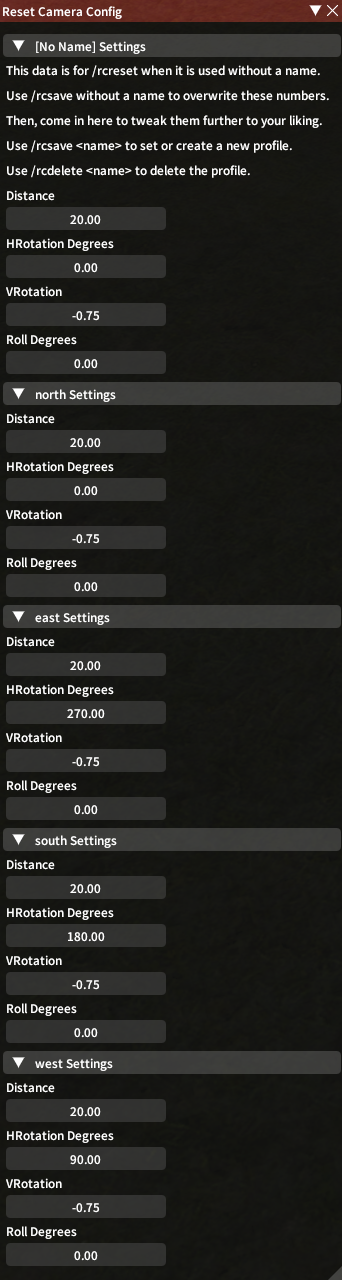
HRotation Degrees can go from 0 to 360 counterclockwise from True North.
- This is the cardinal direction (e.g. North).
- 0 and 360 points North and 180 points South.
- 90 points West and 270 points East.
VRotation can go from 0.79 to -1.49.
- This is the vertical direction.
- -1.49 points top/down and 0 points horizontally.
For example, for True North looking 45 degrees downward:
- "Distance": 20.0,
- "HRotation Degrees": 0.0,
- "VRotation": -0.75,
"Roll Degrees" is mostly just included as a joke. Feel free to have fun with it.
Type /rcreset to reset the camera direction.
Type /rcreset NAME to reset the camera direction to the specified saved direction.
This may be used inside of a macro to assign a keybind to this command for easy access.
Type /rcdelete to reset the default unnamed saved direction back to its default parameters.
Type /rcdelete NAME to delete the specified saved camera direction.
Thanks for using this plugin! It's my very first one for FF14.
-
1.0.2.3
- Updated for Patch 7.5 and therefore also Dalamud API 15
-
1.0.2.2
- Updated for Patch 7.4 and therefore also Dalamud API 14
- My apologies for the delay
- Updated for Patch 7.4 and therefore also Dalamud API 14
-
1.0.2.1
- Updated for Patch 7.3
- Completely removed Pan and Tilt
- Past-me said that I originally kept it for backwards compatibility
- Worked fine for me in Dev, so clearly past-me was a liar and should be ashamed
-
1.0.2.0
- Added the ability to save and reset to multiple directions at once
- The default /rcsave and /rcreset retain their functionality thanks to the default unnamed saved direction
- /rcsave and /rcreset can now be used with a name after the command
- /rcdelete has been added to remove names added by /rcsave and to reset the default unnamed saved direction back to its defaults
- /rcconfig can edit all saved directions including the default unnamed saved direction
- Fixed a couple of minor backend bugs and cleaned up some code smell
- Added defaults for the default unnamed saved direction based on a fresh Lala's /rcsave data after a "Return Camera to Saved Position" is used
- This should prevent a condition wherein using /rcreset before doing anything else will trigger first person mode
- Cleaned up text to emphasize "direction" instead of "position", as the camera is still centered on the player at the end of the day
- Added the ability to save and reset to multiple directions at once
-
1.0.1.0
- Added a Config window! Open with /rcconfig
- The following options will NOT have a Config UI, but will remain behind-the-scenes for the sake of backwards compatibility:
- ZoomFoV
- GposeFoV
- Pan (seemingly does nothing)
- Tilt (seemingly does nothing)
- Updated this README's tutorial section
-
1.0.0.3
- Updated to API 12 for 7.2
- (Also finally fixed the icon image)
-
1.0.0.2
- Updated to API 11 for 7.1
-
1.0.0.1
- Updated to API 10 for 7.0
- Now uses the FFXIVClientStructs camera instead of a static address, which hopefully means no more address hunting upon a game update
-
1.0.0.0
- Initial Release