Skip to content

Use Metrics Visualisations from GrandPrix#42

Merged
camillobruni merged 48 commits intoWebKit:mainfrom
camillobruni:2022-12-22_grand_prix_metrics
Mar 13, 2023
Merged

Use Metrics Visualisations from GrandPrix#42
camillobruni merged 48 commits intoWebKit:mainfrom
camillobruni:2022-12-22_grand_prix_metrics

Conversation

@camillobruni
Copy link
Copy Markdown
Contributor

@camillobruni camillobruni commented Jan 25, 2023

  • Use bar-chart to show totals of each iteration
  • Use scatter-plots for each metrics and submetrcs
  • Use more CSS color variables
  • Update scrollbar to match existing color scheme

@camillobruni camillobruni marked this pull request as draft January 25, 2023 12:27
@camillobruni
Copy link
Copy Markdown
Contributor Author

camillobruni commented Jan 25, 2023

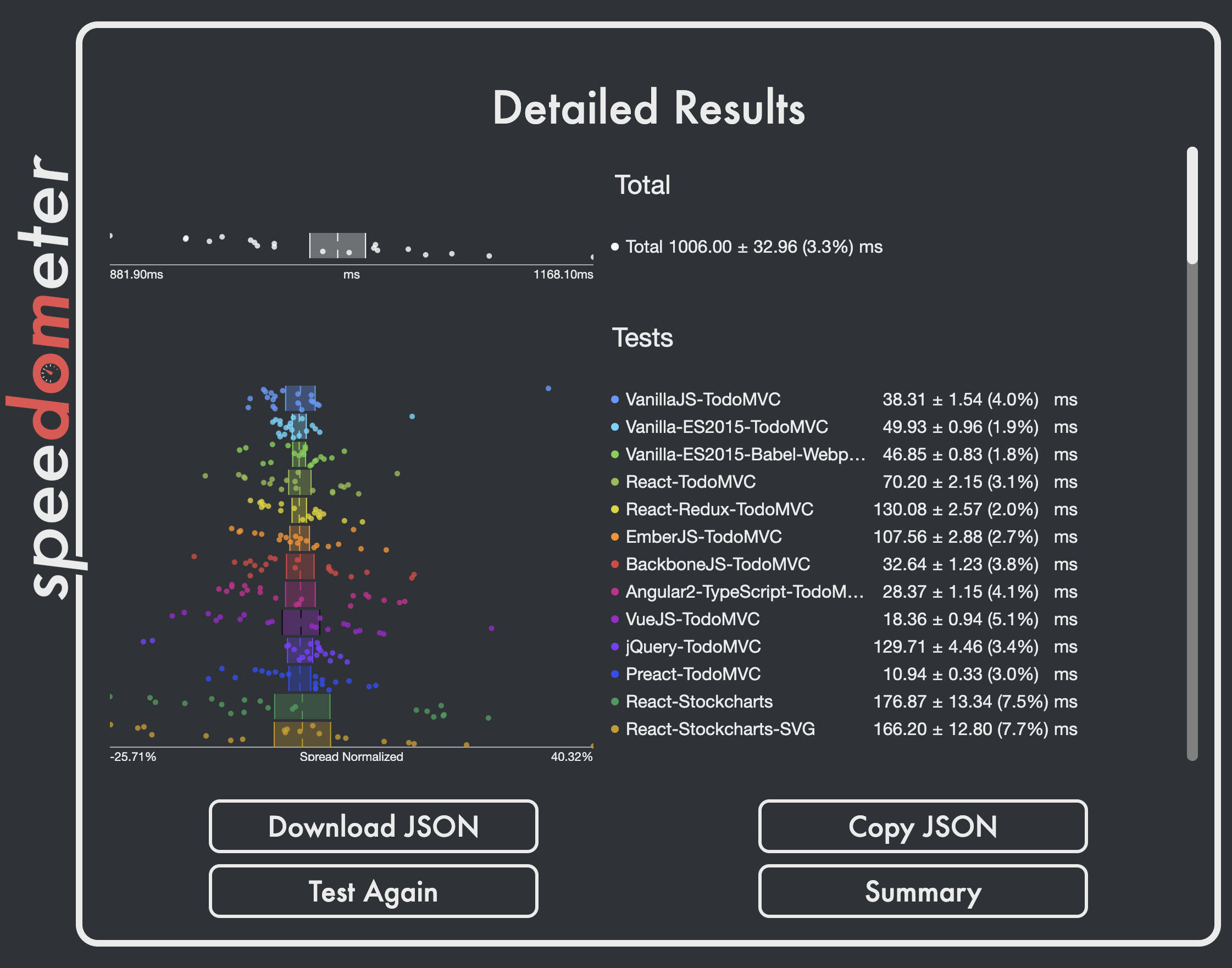
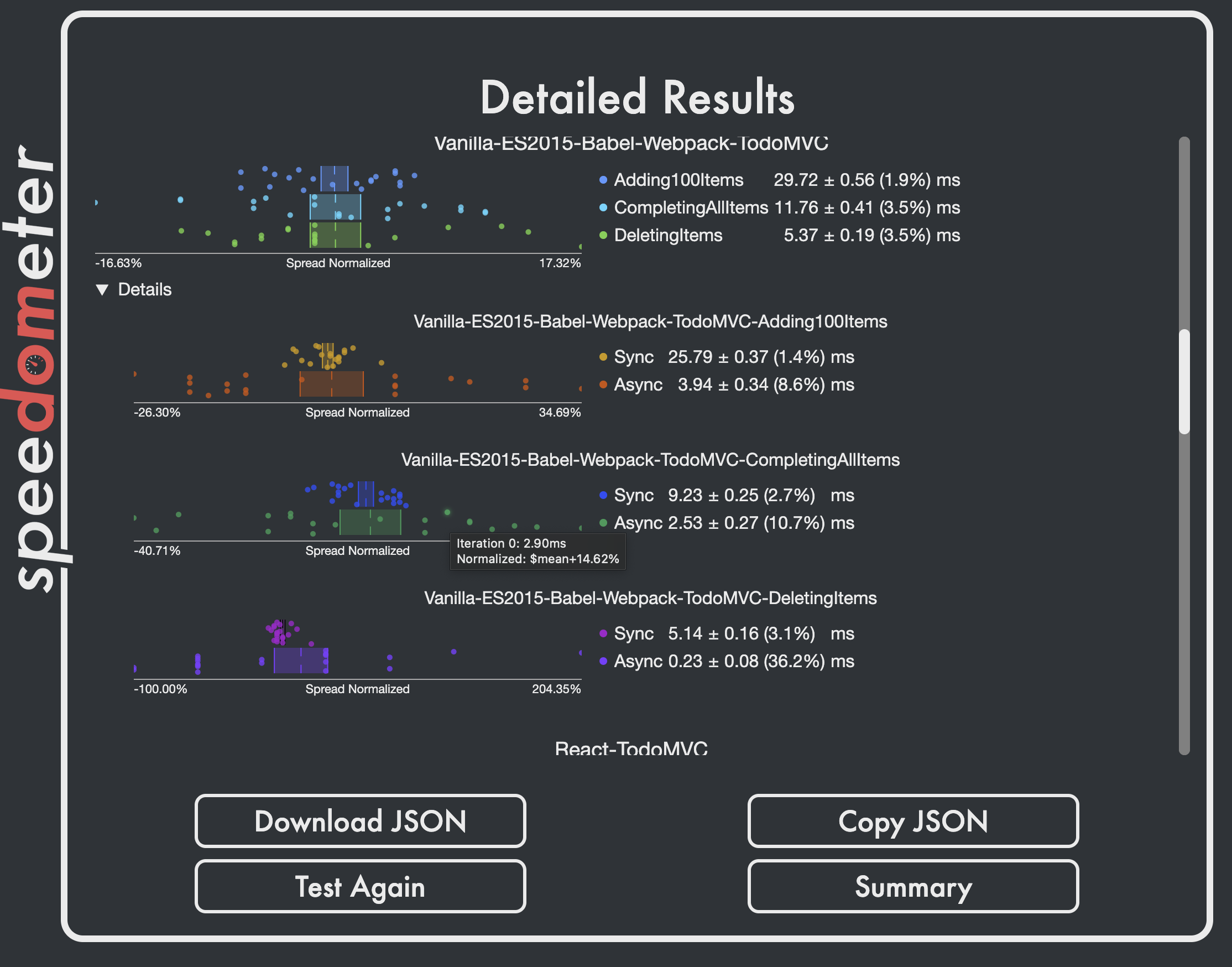
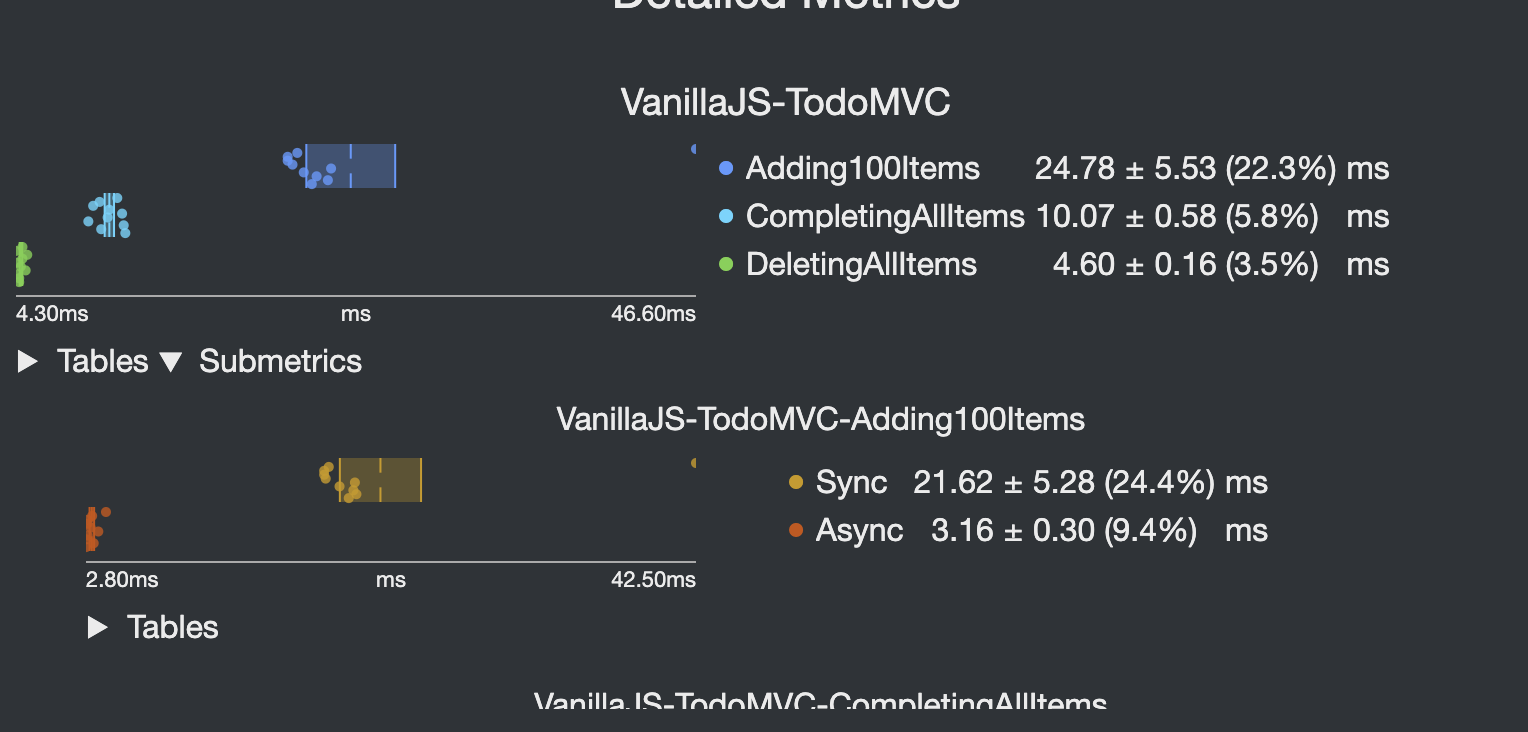
Example graphs:
Screenshot 2023-02-21 at 15 15 40
Screenshot 2023-02-21 at 15 15 52

camillobruni added a commit that referenced this pull request Feb 11, 2023
- Use buttons for "about" links
- Make sure about text is readable on all view sizes (adding optional scrollbar)
- Add button-row to allow for more complex buttons in the upcoming details view (see PR "Use Metrics classes from GrandPrix" #42 )
- Add `--foreground-color` and `--text-width` CSS variables
- Hide screen-size warning on startup to avoid flickering
- Fix main view centering by using more detailed calc(...)
@camillobruni camillobruni changed the title Use Metrics classes from GrandPrix Use Metrics visualisations from GrandPrix Feb 16, 2023
@camillobruni camillobruni changed the title Use Metrics visualisations from GrandPrix Use Metrics Visualisations from GrandPrix Feb 16, 2023
@camillobruni camillobruni marked this pull request as ready for review February 16, 2023 17:15
@camillobruni
Copy link
Copy Markdown
Contributor Author

This should be ready for review now. Happy to take feedback.

@rniwa
Copy link
Copy Markdown
Member

rniwa commented Feb 22, 2023

  • Switched to absolute values by default
  • Clicking on any charts toggles all of them between absolute and normalized values

Nice. Being able to switch between two modes is useful. Hovering over each data point to see each data point's raw value seems too hard to do in practice though. Many points are overlapping one another or at the edges.

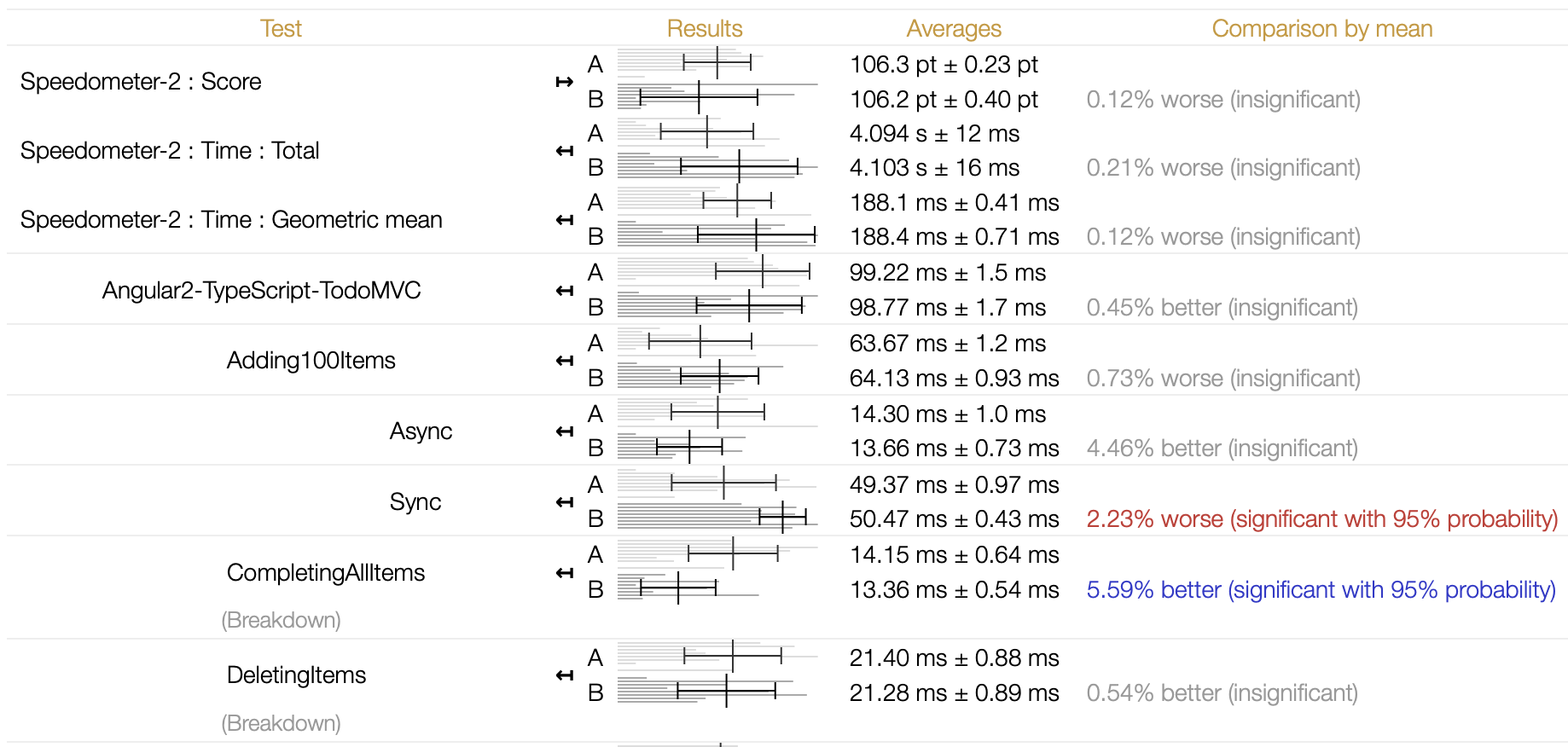
How about toggling between scatter plots & tabular view. We have an internal performance dashboard, which uses horizontal bar graphs to show variance across different subtests:
Screenshot 2023-02-21 at 9 59 55 PM

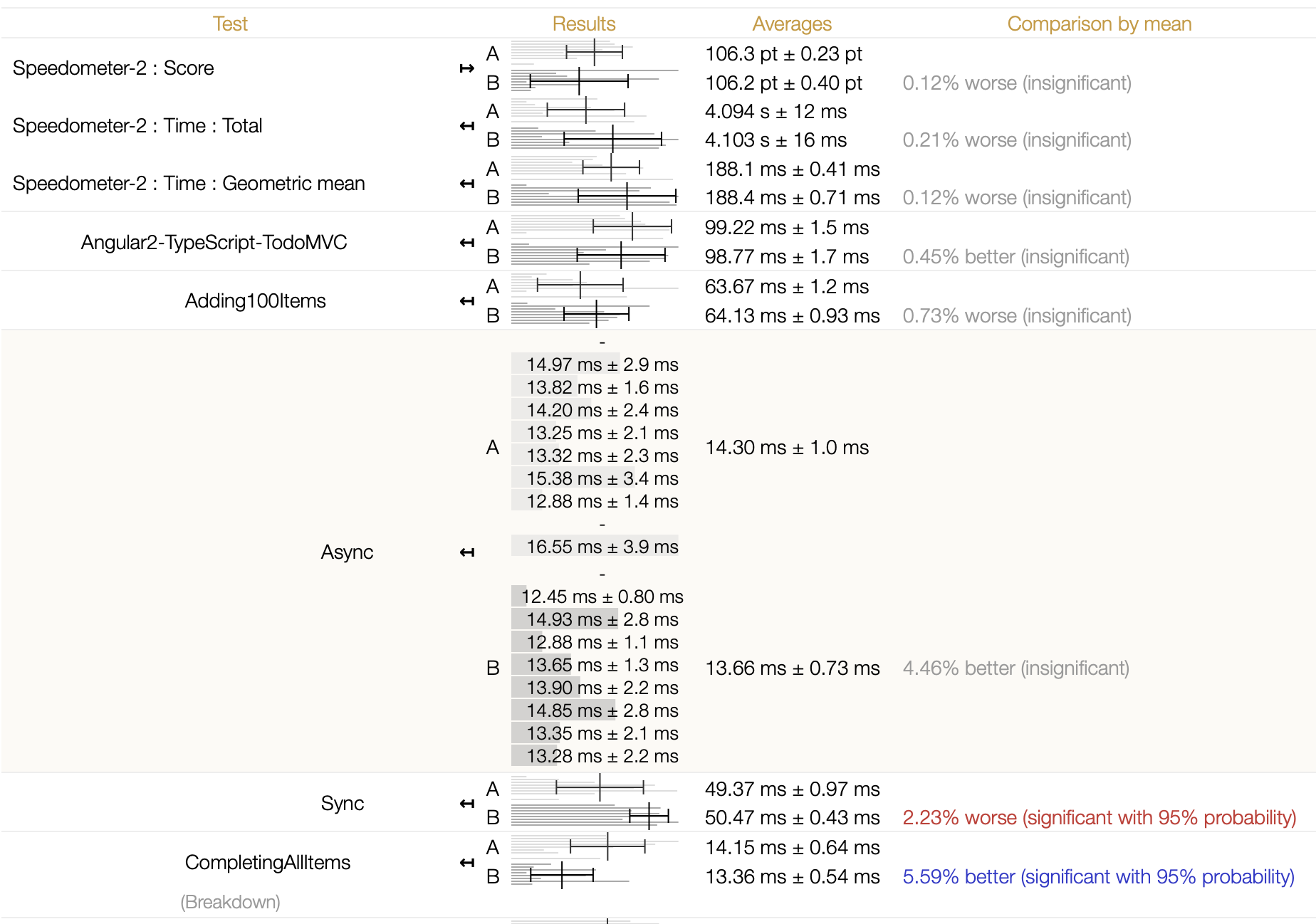
Clicking on one of those charts expand it to show the data in tabular form:
Screenshot 2023-02-21 at 10 00 48 PM

This UI is more optimized for comparing two results (A vs B here) but I find this way of visualization & ability to drill down to individual iteration's data to be highly useful.

@bgrins
Copy link
Copy Markdown
Contributor

bgrins commented Feb 24, 2023

I think this looks like a great improvement, thanks @camillobruni!

How about toggling between scatter plots & tabular view. We have an internal performance dashboard, which uses horizontal bar graphs to show variance across different subtests

I agree that looks quite nice, but I wouldn't want to prevent incremental improvements from landing before a new UI was developed. Can this be moved into a follow up issue, where we can discuss in more detail (including the idea of a compare UI)?

@bgrins
Copy link
Copy Markdown
Contributor

bgrins commented Feb 24, 2023

Another idea we could discuss in a follow up is using a dialog element or another overlay to present the detailed info (so that it's not constrained within the default viewport for the runner itself). I did this in a prototype used to research data grids at https://bgrins.github.io/data-ui-tests/?autorun and found it was a nice way to surface more detailed info than trying to fit it into the rest of the page.

@camillobruni
Copy link
Copy Markdown
Contributor Author

I like rniwa's suggestion, I definitely use this approach on a separate evaluation page to compare between multiple runs.

Given that we can easily download the data now, the details page should mostly help with assessing the run quality (aka how much noise there is and how data is dstributed).
The scatter plots compress a lot of information into a small area:

  • It's easy to see whether we get quantized data

  • It's easy to see if you get outliers

  • It's easy to see if there is a drift over time

  • Maybe a CSV (or tab-separate) download to be easily pasted into a sheet would help with detailed analysis as well?

  • I can add a collapsable inline table as well to address the lack of easily reading individual data points

@camillobruni
Copy link
Copy Markdown
Contributor Author

camillobruni commented Mar 7, 2023

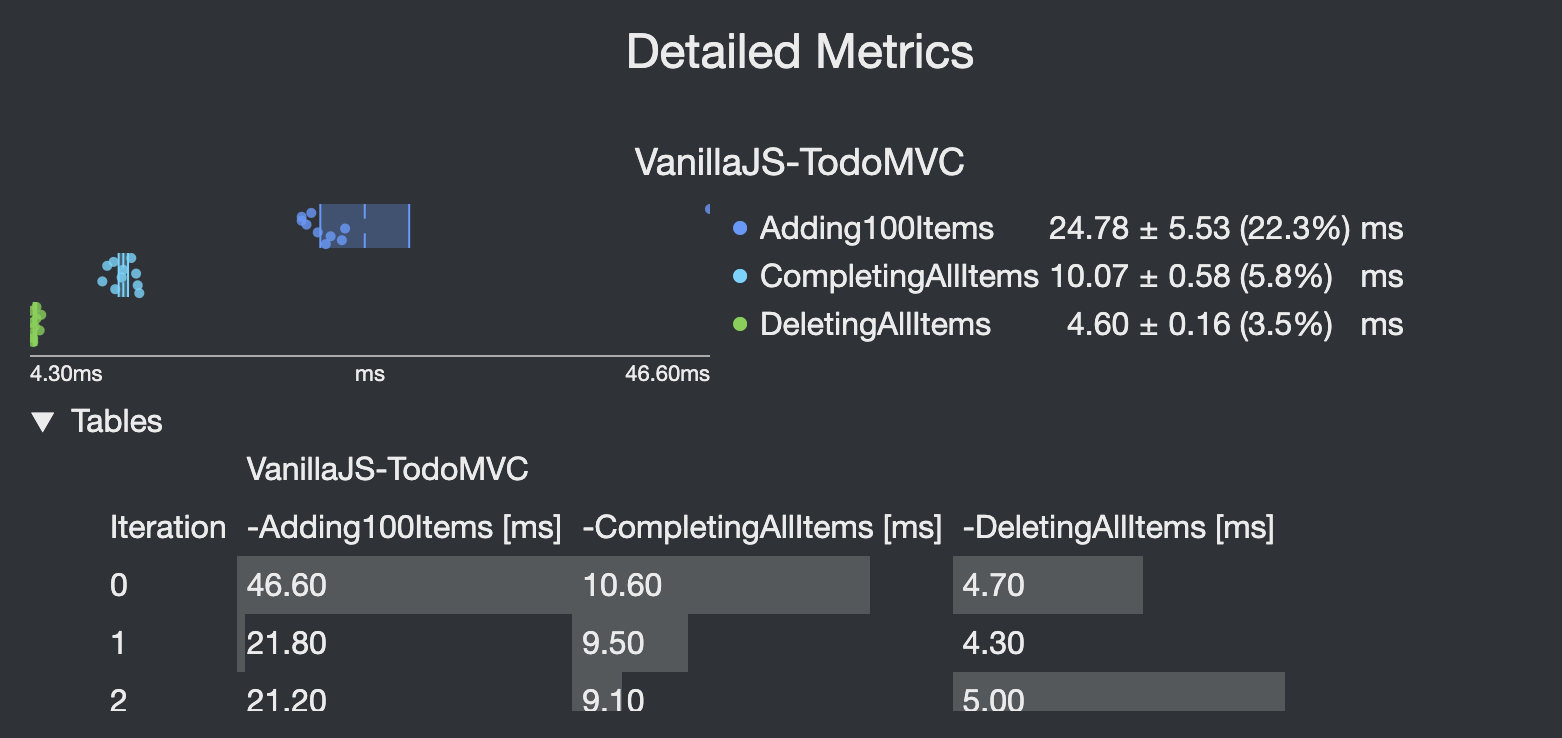
  • I've added individual table views
  • Common prefixes are used as table headers to make the column headers more compact
  • Tables and Sub-metrics views can be opened individually Screenshot 2023-03-07 at 12 54 18
  • The background color corresponds to the fraction within [min, max] of each metric Screenshot 2023-03-07 at 12 51 49

@rniwa
Copy link
Copy Markdown
Member

rniwa commented Mar 9, 2023

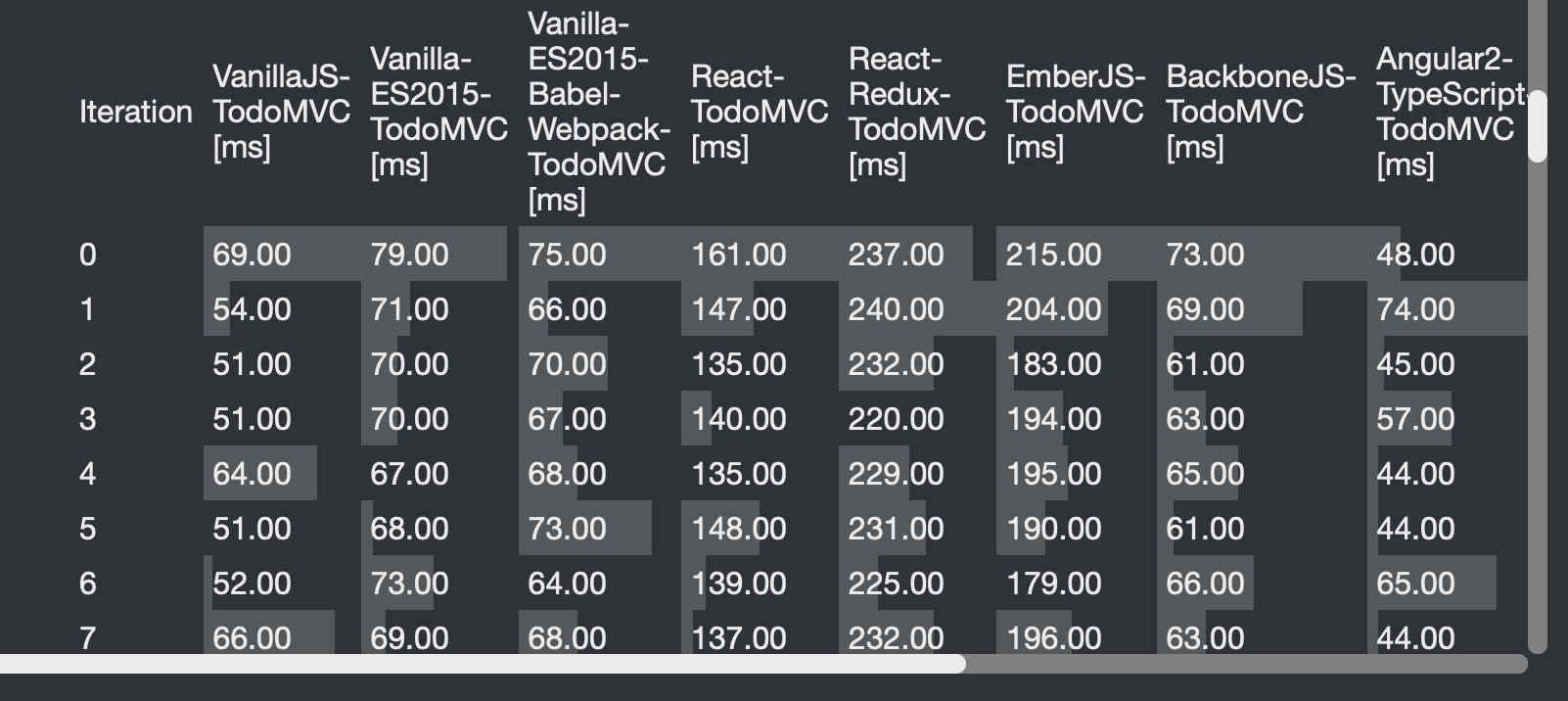
Hm... can we flip the rows & columns of the tables? Test names are too compressed & horizontal scrolling bar is quite painful to use.

Screenshot 2023-03-08 at 4 58 45 PM

Comment thread resources/metric-ui.mjs Outdated
.map(
(metric, i) => `
<tr >
<td class=${colors[i % colors.length]} >●</td>
Copy link
Copy Markdown
Member

Choose a reason for hiding this comment

The reason will be displayed to describe this comment to others. Learn more.

Are we sure all these values come from trusted sources and not via query parameters, etc...?
I don't want us to have XSS vulnerabilities.

Copy link
Copy Markdown
Contributor Author

@camillobruni camillobruni Mar 9, 2023

Choose a reason for hiding this comment

The reason will be displayed to describe this comment to others. Learn more.

  • I've now renamed params to viewParams to make a bit more clear that they are not related.
  • params.mjs parses all input data (except for params.suites ) to int and bool
  • params.suites is checked against a known list of Suites.keys() in runBenchmark

The input values to renderMetricView are only extracted from the metrics themselves which have values coming only from the runner.

@bgrins
Copy link
Copy Markdown
Contributor

bgrins commented Mar 9, 2023

Test names are too compressed & horizontal scrolling bar is quite painful to use.

Another thing we could do is when in the details view set --viewport-width: 90vw; --viewport-height: 90vh. I did this locally when looking at the PR and it's much easier to use than when stuck in the test frame size.

@camillobruni
Copy link
Copy Markdown
Contributor Author

  • I've now prepared PR Allow custom section sizes #92 to make the details view easier to customise in size (and maximise it)
  • I'd prefer the current table layout, so I can easily double check what the outlier values are by scanning across the cell backgrounds
  • Hopefully the larger details view should fix this issue

Comment thread resources/metric-ui.mjs Outdated
Copy link
Copy Markdown
Member

@rniwa rniwa left a comment

Choose a reason for hiding this comment

The reason will be displayed to describe this comment to others. Learn more.

I think we want to do a bunch of style tweaks but that can be done separately.

camillobruni added a commit that referenced this pull request Mar 13, 2023
This PR makes each runner section independent to allow custom sizes.
This is in preparation for PR #42 to allow more space for the details view.

- Move border layout from `main` to each `section`
- Copy logo into every `section`
- Use grid-layout for header/content/footer in about and details view
@camillobruni camillobruni merged commit 6523f66 into WebKit:main Mar 13, 2023
@camillobruni camillobruni deleted the 2022-12-22_grand_prix_metrics branch March 13, 2023 13:43
Sign up for free to join this conversation on GitHub. Already have an account? Sign in to comment

Labels

None yet

Projects

None yet

Development

Successfully merging this pull request may close these issues.

4 participants