Demo-friendly local MVP for a slide-aware AI sales presenter with live voice and HeyGen avatar video.
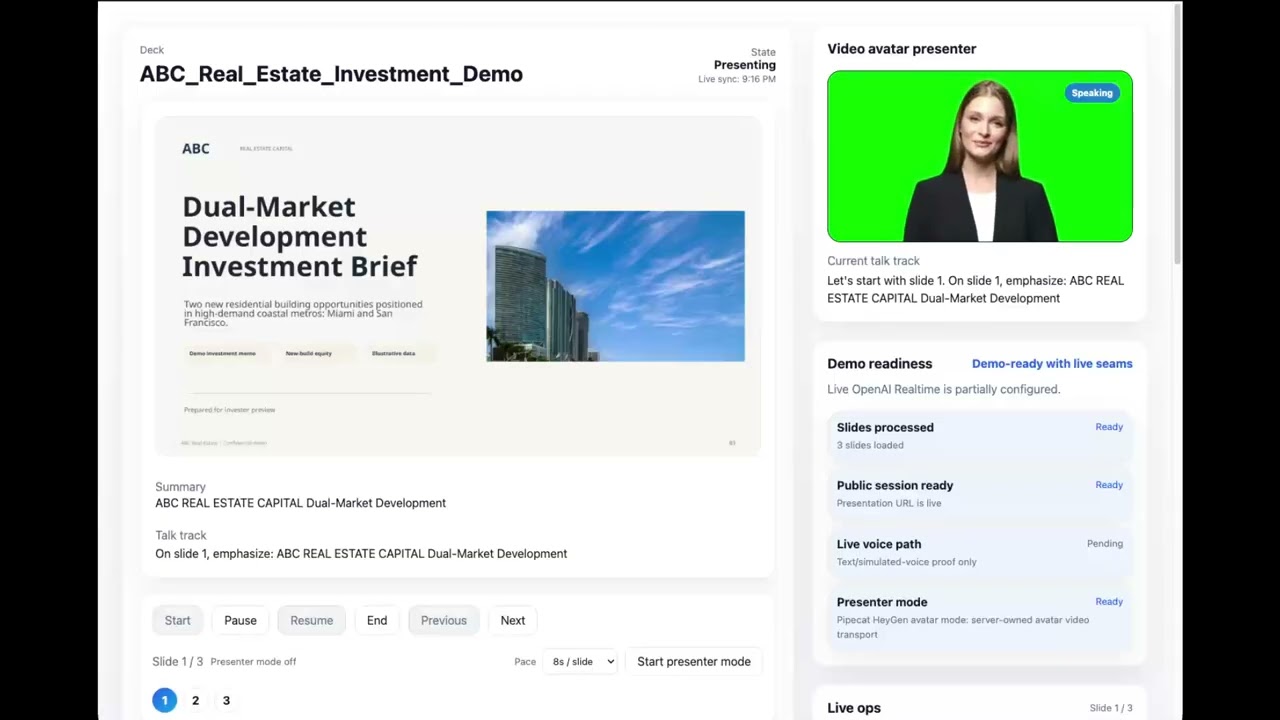
Watch the demo: AI Video Avatar Sales Presenter Demo: Live Voice, Slides, and Q&A
Previous voice-only walkthrough: AI Sales Presenter Demo: Voice-Controlled Slide Deck with Live Q&A
- Upload a PDF deck or use the built-in sample deck.
- Turn the PDF into slide images, extracted text, summaries, talk tracks, and Q&A context.
- Create a public presentation session with deterministic slide state.
- Serve a Next.js operator/presentation UI backed by FastAPI.
- Run a Pipecat/OpenAI Realtime voice path when
OPENAI_API_KEYis configured. - Render a HeyGen LiveAvatar video avatar through Pipecat
HeyGenVideoServiceon the existing simple WebRTC path whenHEYGEN_LIVE_AVATAR_API_KEYandHEYGEN_AVATAR_IDare configured. - Keep slide navigation, transcript, and Q&A grounded in the FastAPI session state.
flowchart LR
  Operator[Operator / presenter browser] --> Web[Next.js web app]
  Audience[Audience voice / typed questions] --> Web

  Web -->|deck upload, session controls, Q&A| API[FastAPI app]
  API -->|store session, slides, transcript| DB[(SQLite)]
  API -->|write generated assets| Storage[(storage/decks)]
  API -->|PDF pages + text extraction| Pipeline[PDF preprocessing pipeline]

  Web -->|voice/avatar start + WebRTC offer| Pipecat[Pipecat media orchestrator]
  Pipecat -->|session contract + tool calls| API
  Pipecat -->|Realtime audio + function calling| OpenAI[OpenAI Realtime]
  Pipecat -->|avatar audio/video session| HeyGen[HeyGen LiveAvatar]

  API -->|grounded answers + slide actions| Web
  Pipecat -->|audio + avatar video + transcript events| Web
Core ownership:
- Next.js (
apps/web): operator UI, public presentation page, controls, voice connection client. - FastAPI (
apps/api): source of truth for decks, sessions, transcript, grounded Q&A, and slide tools. - Pipecat (
apps/pipecat): live media orchestration, WebRTC audio/video handshake, OpenAI Realtime integration, HeyGen LiveAvatar video service, and tool execution against FastAPI. - SQLite +
storage/decks: local dev persistence and generated deck assets.
This repo should be run through Docker Compose by default.
cp .env.example .env
npm run setup
Notes:
.envis local-only and must never be committed or pushed.setuppreferspython3.13automatically when available, which avoids currentpydantic-corebuild issues on Python 3.14.
npm run docker:upnpm run docker:downCanonical local endpoints:
- Web app:
http://localhost:3012 - API:
http://localhost:8025 - Pipecat voice/avatar service:
http://localhost:8110
Use the Docker stack as the source of truth for routine development, validation, and demos.
Use this only when intentionally debugging outside Docker or when working on a targeted inner loop.
npm run devThat starts the API, Pipecat voice service, and web app together on host processes. If a preferred port is busy, the launcher selects the next free port and prints the exact URLs to use.
- Start the stack with
npm run devornpm run docker:up. - Open the web URL printed by
npm run dev, orhttp://localhost:3012for Docker. - Click Use default attached deck or upload a PDF.
- Wait for preprocessing to finish and skim the slide preview.
- Click Create live demo session.
- Open the generated presentation link.
- Click Start and run the deck with the controls.
- Use text Q&A, simulated voice questions, or live voice/avatar when Pipecat, OpenAI Realtime, and HeyGen are configured.
apps/web: Next.js operator and presentation UI.apps/api: FastAPI backend for deck ingestion, sessions, grounding, transcript, and slide assets.apps/pipecat: media orchestrator for Pipecat/OpenAI Realtime plus HeyGen LiveAvatar video,/ask, and WebRTC transport proof.storage/decks: local generated deck files.
Run this validation sequence before calling meaningful changes done.
npm run test:apinpm run build:webReplace the ports with the exact URLs printed by npm run dev if the launcher picked alternates:
PLAYWRIGHT_BASE_URL=http://127.0.0.1:13000 \
PLAYWRIGHT_API_BASE_URL=http://127.0.0.1:8025 \
PLAYWRIGHT_PIPECAT_BASE_URL=http://127.0.0.1:8110 \
npm run test:voice-proof
This proves the default-deck/session path, Pipecat bootstrap, transcript-driven /ask loop, current-slide answer, one slide-navigation tool call, one grounded deck answer, SDP answer, ICE exchange, and remote browser audio receiver. When HeyGen is configured, the live WebRTC path also negotiates a remote avatar video track.
For the Docker path:
PLAYWRIGHT_BASE_URL=http://127.0.0.1:3012 PLAYWRIGHT_REUSE_EXISTING_SERVER=1 npm run test:e2eFor the host npm run dev path, point Playwright at the exact printed web URL instead of assuming 3000.
Note: the build script intentionally clears apps/web/.next first. That avoids stale Next cache/runtime state that can otherwise surface as missing vendor-chunks/next.js or other stale server bundle errors on /present/[token].
- Read this README first.
- Check
git status. - Prefer Docker for running services.
- Implement cleanly and update docs with workflow changes.
- Run relevant tests/builds.
- Keep
.env, DBs, caches, generated deck storage, and secrets out of git/GitHub.
- The active finish line is the proven voice/session loop plus a server-orchestrated HeyGen video avatar surface using Pipecat
HeyGenVideoService; the old GPT realtime orb visualization has been replaced by avatar video on the existing simple WebRTC stream. - Pipecat owns the voice/avatar path:
/bootstrap,/live/create,/live/join,/live/ice,/ask, and slide/navigation tools. - Text Q&A and simulated voice are available for non-live proof; live voice requires Pipecat plus OpenAI Realtime credentials; avatar video additionally requires HeyGen credentials.
- Set
PRODUCTION=trueto hide non-live testing controls such as text Q&A and simulated voice in the presentation UI. Leave it false/empty for local proof and demo validation. text-embedding-3-smallsupport is currently a placeholder: the API client has an embedding helper and slides have anembedding_reffield, but embeddings are not generated or used yet. The intended use is semantic slide retrieval during preprocessing/Q&A, so questions can match related slide meaning even when keywords differ.- Best demo experience is still with relatively small PDF decks.