


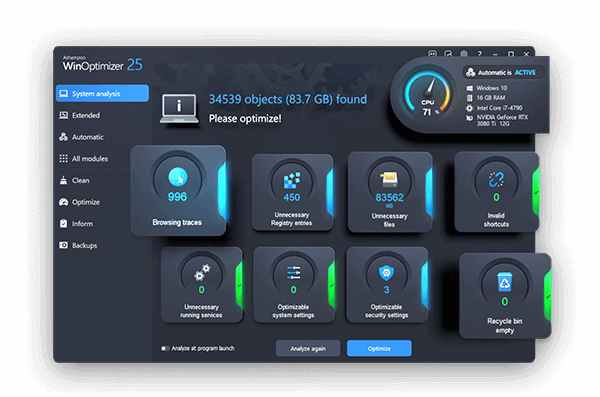
Ashampoo WinOptimizer is a comprehensive system utility suite designed to clean, optimize, and protect your Windows PC. Over time, systems accumulate junk files, broken registry entries, and privacy traces that slow down performance and compromise stability. Ashampoo WinOptimizer addresses these issues with a powerful set of tools that help maintain your computer in peak condition.
With Ashampoo WinOptimizer, users can benefit from:
- Deep System Cleaning: Remove temporary files, cache, and other unnecessary data that clog your system.
- Registry Optimization: Find and fix invalid registry entries to improve system stability and boot times.
- Privacy Protection: Erase your digital footprints, browser history, and activity logs to safeguard your privacy.
- Performance Tweaks: Access advanced settings to customize Windows for maximum speed and responsiveness.
- Startup Management: Control which programs launch at startup to reduce boot time and free up resources.
Ideal for both novice and advanced users, Ashampoo WinOptimizer combines an intuitive interface with powerful features. Whether you're looking to speed up an older machine or maintain a new one, this software provides a reliable, all-in-one solution for PC maintenance and optimization. Its regular updates ensure compatibility with the latest Windows versions, including Windows 10 and Windows 11.
| Feature | Description |
|---|---|
| 🧹 System Cleaner | Removes junk files, temporary data, and unnecessary cache to free up space. |
| 🔧 Registry Optimizer | Scans and repairs registry errors for improved stability and speed. |
| 🛡️ Privacy Protector | Erases traces of your activity to enhance your privacy and security. |
| ⚡ Performance Tuner | Applies tweaks to optimize Windows settings for faster performance. |
| 🚀 Startup Manager | Controls auto-start programs to reduce boot time and resource usage. |
| 💽 Disk Defragmenter | Optimizes file arrangement on your hard drive for quicker access. |
| 🌐 Browser Cleaner | Cleans history, cookies, and cache from multiple web browsers. |
| 🖥️ Windows Tools | Provides easy access to built-in Windows system utilities and features. |
- Enhanced Windows 11 compatibility and support for new system features.
- Improved cleaning algorithms for more thorough junk file removal.
- Updated privacy protection modules to cover more applications and data types.
- New performance tweaks for gaming and productivity scenarios.
- Revamped user interface for easier navigation and better user experience.
- PC Maintenance Enthusiasts – Keep your system clean and fast with regular optimization.
- Privacy-Conscious Users – Protect your personal data from being tracked or recovered.
- Gamers and Streamers – Optimize system resources for smoother gameplay and streaming.
- IT Professionals – Use advanced tools for managing multiple systems and troubleshooting.
- Download Ashampoo WinOptimizer from the official website or GitHub.
- Install and launch the application on your Windows PC.
- Run the initial system analysis to identify issues.
- Select the optimization modules you want to use (e.g., Cleaner, Tuner, Protector).
- Apply the changes and restart your computer if recommended for best results.
| Parameter | Requirement |
|---|---|
| OS | Windows 10/11 |
| Processor | 1.5 GHz Intel/AMD or higher |
| RAM | 2 GB (4 GB recommended) |
| Storage | 200 MB free space |
| GPU | DirectX 9 compatible graphics card |
| Display | 1280x720 minimum resolution |
ashampoo winoptimizer • ashampoo winoptimizer system cleanup • ashampoo winoptimizer performance boost • ashampoo winoptimizer registry cleaner • ashampoo winoptimizer privacy protection • ashampoo winoptimizer disk defragmenter • ashampoo winoptimizer startup manager • ashampoo winoptimizer windows 10 • ashampoo winoptimizer windows 11 • ashampoo winoptimizer free • ashampoo winoptimizer pro • ashampoo winoptimizer review • ashampoo winoptimizer download • pc optimization software • windows optimization tool • system cleanup utility • privacy protection software