Some oddities in the behavior of the VS editor when creating automatic indents #1143


Description

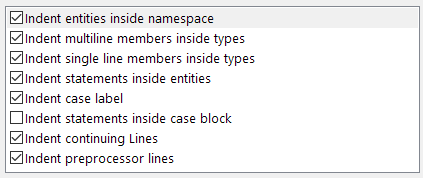
When editing text in the VS editor, there are some oddities when creating automatic indents with the Tabs = Smart setting enabled. To visually show what happens, I recorded a short video (attached). The video shows the pressed keys (for better analysis, it is recommended to turn on slow playback). Also attached a screenshot of the settings.
IDE: VS 2019 (16.11.19)
X#: 2.13.2.2
Indentation Settings (Tabs = Smart):
Video:
ScreenRecorderProject1.zip
Discussion topic on the X# forum:
https://www.xsharp.eu/forum/welcome/3186-indentation