ScreenX is a DIY telemetry display for the Moza ES Lite wheel. It streams Assetto Corsa data over WiFi to an ESP32 + 2.08" OLED mounted on your wheel, powered by a desktop companion app.
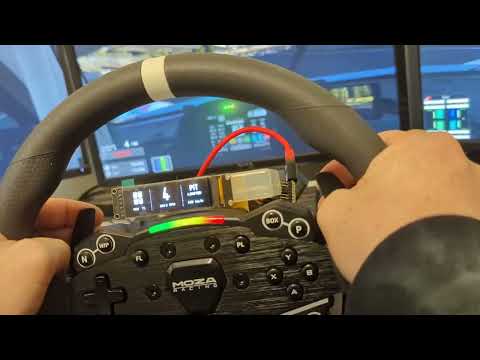
- Real-time telemetry (speed, RPM, gear, temps, etc.)
- One-click flashing and WiFi setup from the companion app
- Wireless ESP32 connection (no extra wires to the PC)
- Optional PCB workflow (coming soon)
- Seeed Studio XIAO ESP32 (C6 recommended; C3/S3 supported)
- 2.08" 256x64 SPI OLED (7-pin)
- Jumper wires
- Windows 10/11
- Linux is NOT supported because of Asseto Corsa not running natively on linux and needing a emulator to run, thus making it so the companion app cannot access the AC shared memory.
- Python 3.9+ (only if running from source)
- Assetto Corsa
- Download the latest release from the GitHub releases page.
- Run
companion.exe. - Follow the in-app onboarding (detect device, flash firmware, send WiFi).
- Enter the ESP32 IP shown on the display in the Dashboard tab.
View the readme files inside of companion/ and firmware/
If you are building or flashing manually, you can use firmware.ino or the prebuilt firmware.bin. The companion app can flash .bin files directly.
See the HTML docs in docs/, or on the website to the right of this repo, for full wiring, setup, and troubleshooting.
- Code auto completions
- Debugging help (Sparsely)
- Cleaning up the ESP32 gui after I made the original version
- Cleaning messy code and some frontend gui
- Parts of documentation, I have since verified all information inside the docs is correct