Stripe API Payment Gateway Middleware
Learn how to use SDKs, API keys, and integration tools.
Get familiar with the Stripe CLI and our server-side SDKs.
Stripe’s server-side SDKs and command-line interface (CLI) allow you to interact with Stripe’s REST APIs. Start with the Stripe CLI to streamline your development environment and make API calls.
Use the SDKs to avoid writing boilerplate code. To start sending requests from your environment, choose a language to follow a quickstart guide.
stripe-java Java client library for the Stripe API.
Runtime & Framework
We support LTS versions of the JDK. Currently, that's Java versions:
REQUIRED:
├─ Java 8+ (Java 8, 11, 17 all supported)
│  └─ LTS versions recommended: (LTS for stability)
│     ├─ Java 11 LTS (Long Term Support)
│     ├─ Java 17 LTS (Latest LTS)
│     └─ Java 8: Yes, supported but older
Maven users: Add this dependency to your project's POM:
<dependency>
  <groupId>com.stripe</groupId>
  <artifactId>stripe-java</artifactId>
  <version>32.1.0</version>
</dependency>
Configuring automatic retries: The library can be configured to automatically retry requests that fail due to an intermittent network problem or other knowingly non-deterministic errors. This can be enabled globally:
StripeClient client = StripeClient.builder()
        .setMaxNetworkRetries(2)
.build();The Stripe API uses API keys to authenticate requests. You can view and manage your API keys in the Stripe Dashboard.
Test secret keys have the prefix sk_test_ and live mode secret keys have the prefix sk_live_. Alternatively, you can use restricted API keys for granular permissions.
Best practices for managing secret API keys
Secret API keys are a form of account credentials, like a username and password. Unlike publishable keys, which are safe to include in webpages and apps, secret keys must stay in your server environment. If an unauthorized party obtains your secret API key, they can make unauthorized charges, access customer data, or disrupt your integration.
Best practice: Never expose secret or restricted API keys in source code or client-side applications; store them securely using a server-side secrets vault or environment variables instead.
- Rotate secret API keys periodically: Define and practice a process for rotating your Stripe API keys. Periodic rotation confirms that you know where each key is used and that your team can replace a key on short notice.
Use your API key by passing it when creating StripeClient. The client then automatically sends this key in each request.
// Initialize StripeClient - Test mode key; don't put live keys in code. use secrets-vault/environment-variables
StripeClient client = new StripeClient("sk_test_tR3PYbcVNZZ796tH88S4VQ2u");.
Customize API access with restricted API keys: Instead of using secret API keys with broad access, create restricted API keys to assign specific privileges to the components of your applications. For example, you can give your invoicing system the ability to manage invoices and nothing else.
Limit the IP addresses that can send API requests: If your service sends API requests from stable IP addresses, you can restrict your secret or restricted API keys to those addresses.
Make all API requests over HTTPS. Calls made over plain HTTP fail. API requests without authentication also fail.
Error Types: The type of error returned. One of api_error, card_error, idempotency_error, or invalid_request_error
api_error |
API errors cover any other type of problem (e.g., a temporary problem with Stripe’s servers), and are extremely uncommon. |
card_error |
Card errors are the most common type of error you should expect to handle. They occur when the user enters a card that can’t be charged. |
idempotency_error |
Idempotency errors occur when an
Idempotency-Key is reused on a request
that doesn’t match the original request’s endpoint
and parameters.
|
invalid_request_error |
Invalid request errors occur when your request contains invalid parameters. |
HTTP Status Code Summary
| Status Code | Status | Description |
|---|---|---|
| 200 | OK | Everything worked as expected. |
| 400 | Bad Request | The request was unacceptable, often due to a missing required parameter. |
| 401 | Unauthorized | No valid API key was provided. |
| 402 | Request Failed | The parameters were valid but the request failed. |
| 403 | Forbidden | The API key doesn’t have permission to perform the request. |
| 404 | Not Found | The requested resource doesn’t exist. |
| 409 | Conflict | The request conflicts with another request, possibly due to using the same idempotency key. |
| 424 | External Dependency Failed | The request couldn’t be completed because of a failure in an external dependency. |
| 429 | Too Many Requests | Too many requests were sent too quickly. Use exponential backoff when retrying requests. |
| 500, 502, 503, 504 | Server Errors | Something went wrong on the server side. These errors are rare. |
Error handling: Catch and respond to declines, invalid data, network problems, and more.
Payment Intents : A PaymentIntent guides you through the process of collecting a payment from your customer. We recommend that you create exactly one PaymentIntent for each order or customer session in your system.
Create a PaymentIntent: Creates a PaymentIntent object.
StripeClient client = new StripeClient("sk_test_tR3PYbcVNZZ796tH88S4VQ2u");

PaymentIntentCreateParams params =
  PaymentIntentCreateParams.builder()
    .setAmount(2000L)
    .setCurrency("usd")
    .setAutomaticPaymentMethods(
      PaymentIntentCreateParams.AutomaticPaymentMethods.builder()
        .setEnabled(true)
        .build()
    )
    .build();

PaymentIntent paymentIntent = client.v1().paymentIntents().create(params);
Checkout Sessions: A Checkout Session represents your customer’s session as they pay for one-time purchases or subscriptions through Checkout or Payment Links. We recommend creating a new Session each time your customer attempts to pay.
Once payment is successful, the Checkout Session will contain a reference to the Customer, and either the successful PaymentIntent or an active Subscription.
You can create a Checkout Session on your server and redirect to its URL to begin Checkout.
POST /v1/checkout/sessionsStripeClient - creates a Checkout Session
line_items array of Maps Required conditionally: A list of items the customer is purchasing. Use this parameter to pass one-time or recurring Prices. The parameter is required for payment and subscription mode.
mode enum (Possible enum values payment, setup, subscription) Required: The mode of the Checkout Session. Pass subscription if the Checkout Session includes at least one recurring item.
StripeClient client = new StripeClient("sk_test_tR3PYbcVNZZ796tH88S4VQ2u");

SessionCreateParams params =
  SessionCreateParams.builder()
    .setSuccessUrl("https://example.com/success")
    .addLineItem(
      SessionCreateParams.LineItem.builder()
        .setPrice("{{PRICE_ID}}")
        .setQuantity(2L)
        .build()
    )
    .setMode(SessionCreateParams.Mode.PAYMENT)
    .build();

Session session = client.v1().checkout().sessions().create(params);
return_url string Required conditionally: The URL to redirect your customer back to after they authenticate or cancel their payment on the payment method’s app or site. This parameter is required if ui_mode is embedded_page or elements and redirect-based payment methods are enabled on the session.
For cancel_url, success_url: This parameter is not allowed if ui_mode is embedded_page or elements.
cancel_url string: If set, Checkout displays a back button and customers will be directed to this URL if they decide to cancel payment and return to your website.
success_url string Required conditionally: The URL to which Stripe should send customers when payment or setup is complete. If you’d like to use information from the successful Checkout Session on your page, read the guide on customizing your success page.
ui_mode enum(Possible enum values hosted_page,embedded_page,elements): The UI mode of the Session. Defaults to hosted_page.
currency enum Required conditionally: Three-letter ISO currency code, in lowercase. Must be a supported currency. Required in setup mode when payment_method_types is not set.
customer_email string: If provided, this value will be used when the Customer object is created. If not provided, customers will be asked to enter their email address. Use this parameter to prefill customer data if you already have an email on file. To access information about the customer once a session is complete, use the customer field.
Use Stripe to start accepting payments.
Payment options:
- Most popular (Accept online payments): Build a payment form or use a prebuilt payment page to accept online payments.
- Online (Build a checkout page): Use Checkout to set up a Stripe-hosted page, embed a payment form, or embed components.
Build a payments page : Create a payments page with prebuilt UIs using the Checkout Sessions API.
Stripe Checkout You can use three different payment UIs with the Checkout Sessions API The following images highlight which aspects of the checkout UI Stripe hosts in each option.
|
FULL PAGE
Recommended Full page Customers enter their payment details in a fully-featured payment page, either embedded on your site or via a redirect to a Stripe-hosted page. 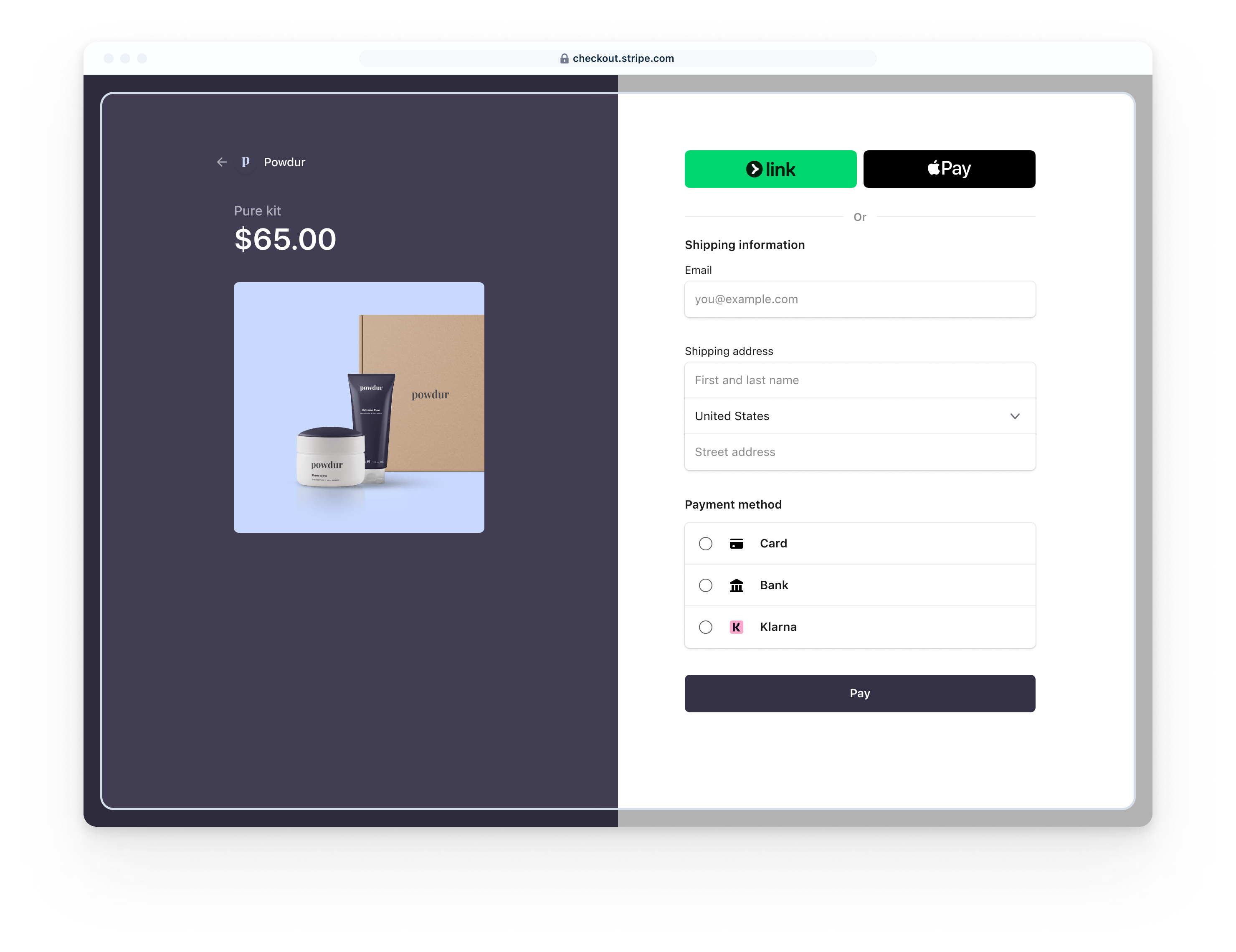
|
EMBEDDED FORM
Private preview Embedded form Customers enter their payment details in an embedded form on your site without redirection. 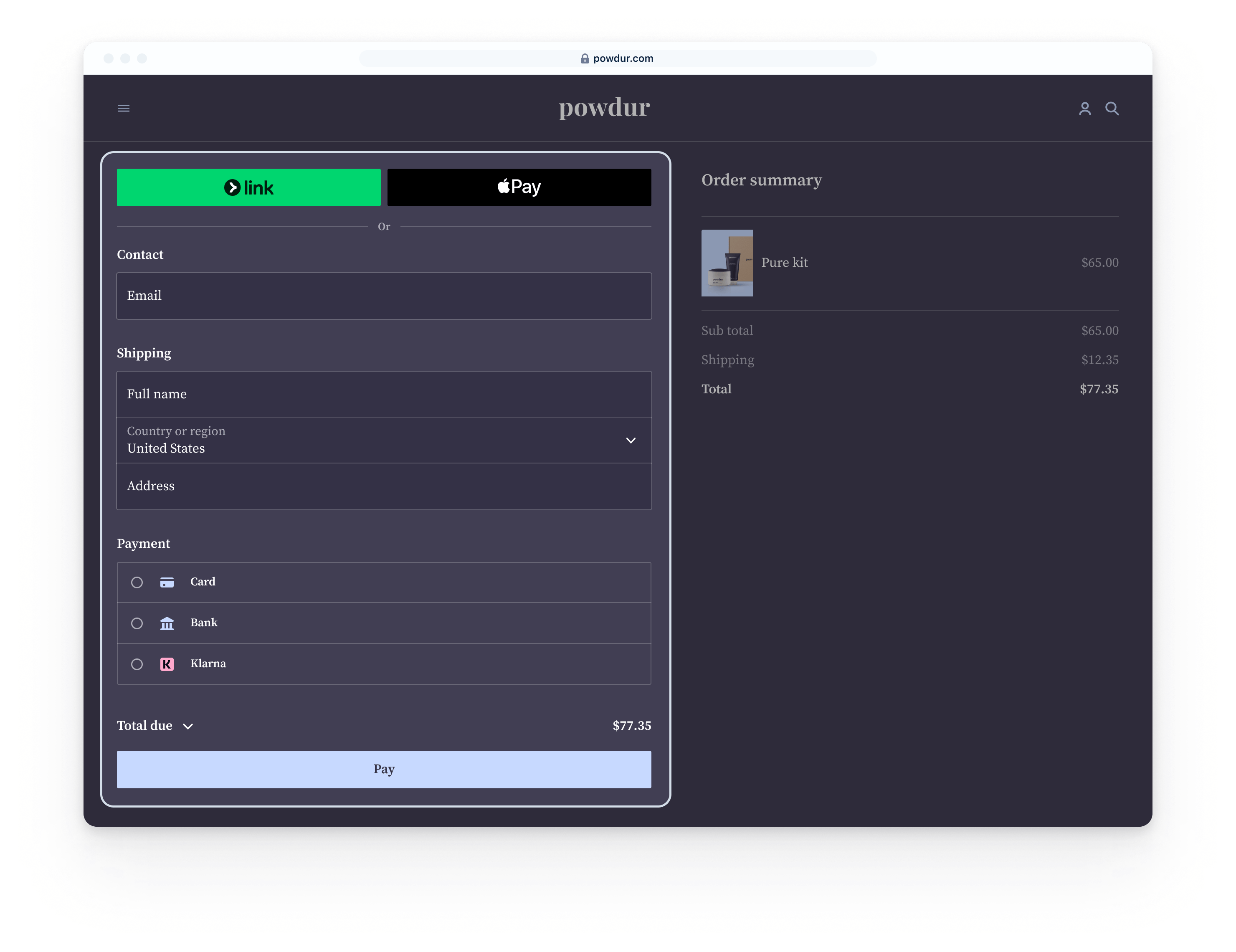
|
ELEMENTS
Elements Build a fully customized payment page using elements 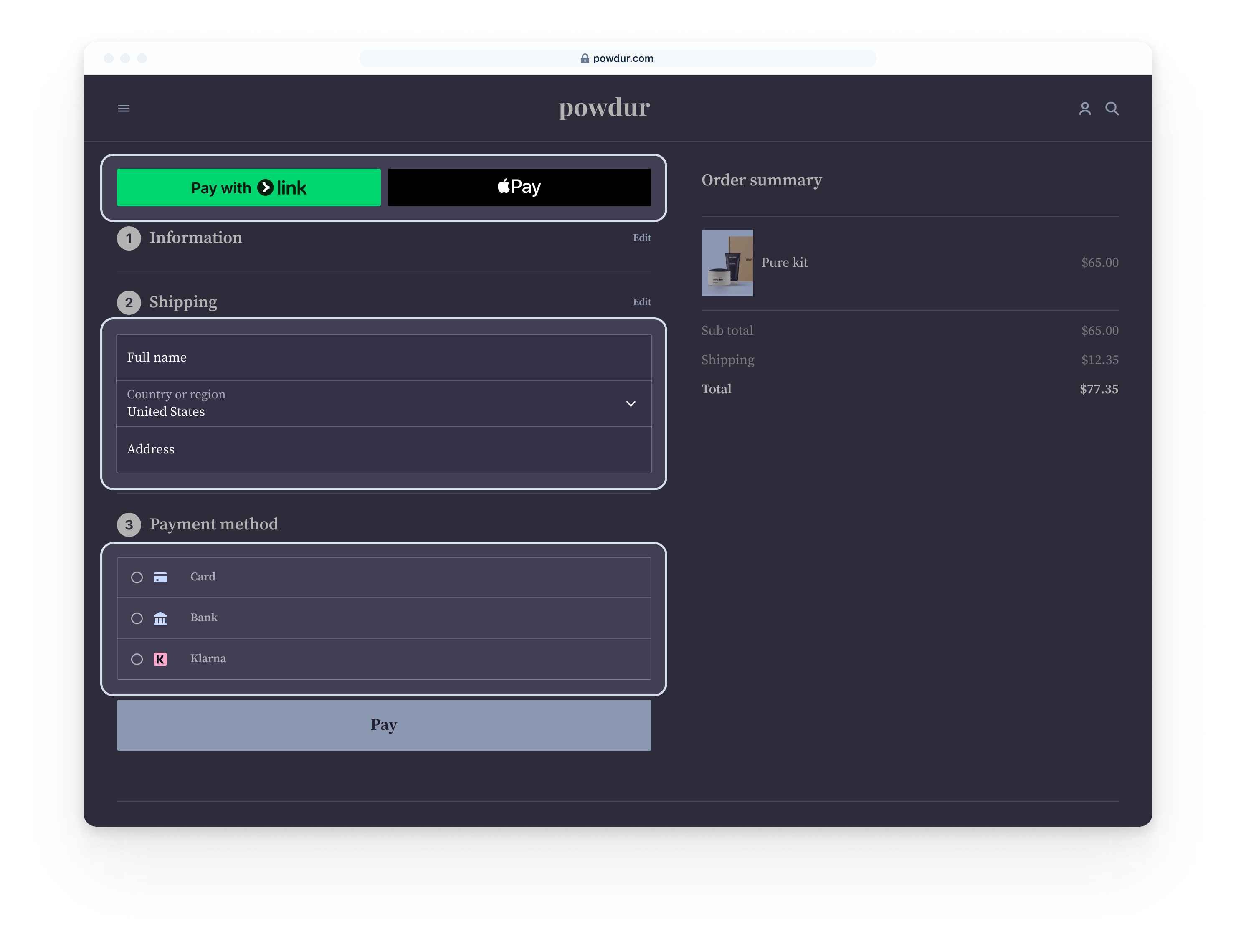
|
|
|---|---|---|---|
| API | Checkout Sessions | Checkout Sessions | Checkout Sessions |
| Feature list | Built-in UI support for Billing, Tax, Adaptive Pricing, Stripe Managed Payments, Link, dynamic payment methods, Surcharging, Split-tender | Built-in UI support for Billing, Tax, Adaptive Pricing, Stripe Managed Payments, Link, dynamic payment methods, Surcharging | Built-in UI support for Adaptive Pricing, Link, dynamic payment methods |
| Order summary | Includes full order summary with subtotals (including tax and shipping costs), cross-sells & upsells, free trials, discounts and promo codes | Limited order summary with subtotals (including tax and shipping costs), discounts and promo codes | No order summary |
| Ongoing maintenance required | Low | Some | Most |
| Hosting | Hosted or Embedded | Embedded | Embedded |
| Complexity | Low | Some | Most |
| Customization | 15 configurable settings via brand settings | 70 configurable settings via the Appearance API | Full CSS customization via the Appearance API |
stripe-samples checkout-one-time-payments - Accept payments with Stripe Checkout
| USD Cards Demo | EUR Cards & iDEAL Demo | MYR Cards & FPX Demo |
 |
 |
 |