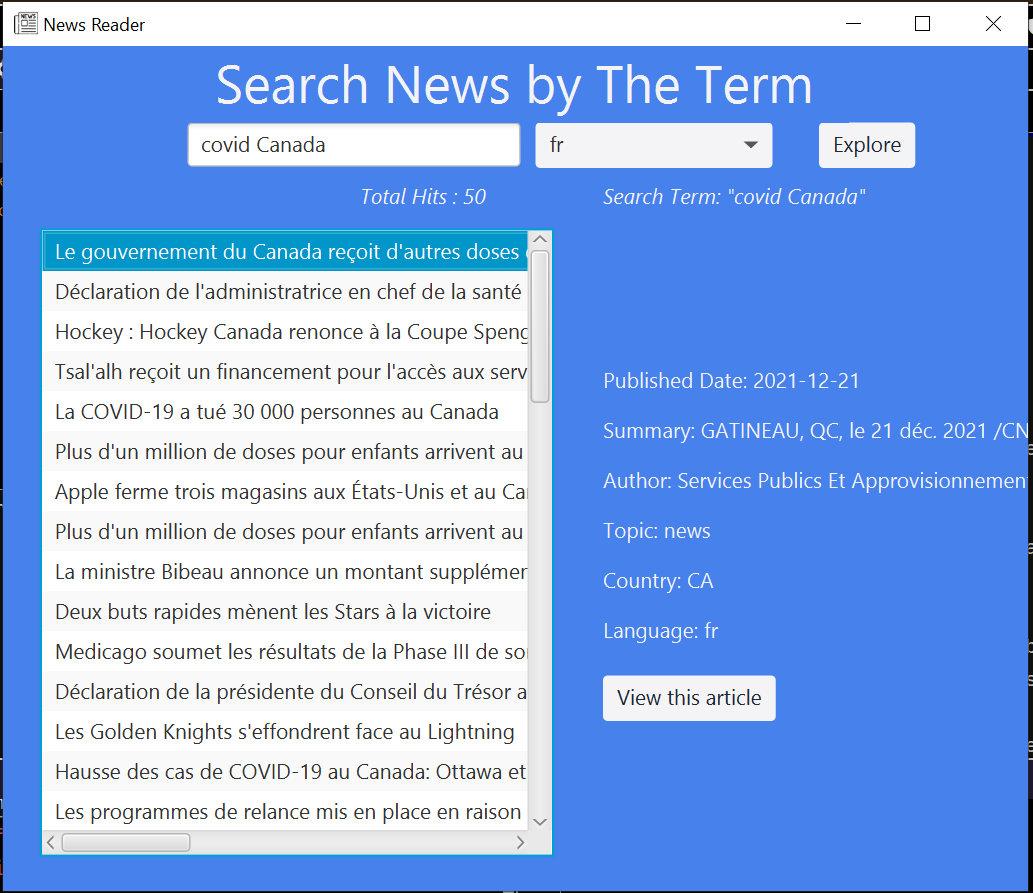
[How to search]
- Enter any word you want to search in the text field.
- (optional) Select the specific language you want. All languages are searched by default.
- Click the "Explore" button.
- Then, you will see the list of news titles below the "Explore" button filtered by your input. The number of search results and the search term you entered just now are also shown in Italic.
[How to see the article information]
- Click any article from the list you want, once you get the news list by the above operation.
- The article information will be shown on the right side of the list, such as published date, title, author, country, topic, language.
- If you want to see another article's information, click it in the same way.
[How to read the entire article]
- Before viewing the whole news article, make sure your device connects to the Internet.
- Click the "View this article" button below the news information once you find the article you are interested in.
- You'll see the entire article you selected on the next page.
- To go back to the news search page, click the "Back to article list."
It is highly recommended to use this application with the stable and powerful internet as this application will search the real news on the internet. Otherwise, it may seem to show a blank page or take time to load the news detail page, even if you click the "View this article" button on the news search page.