
An independent security audit fork of ZCode
简体中文 | English · Project site
This repository is forked from zai-org/ZCode, open-sourced by Zhipu on September 21, 2026. The name follows the same pattern as Chrome → Chromium and VS Code → VSCodium: ZCode → ZCodium. Everything here is backed by code and reproducible checks.
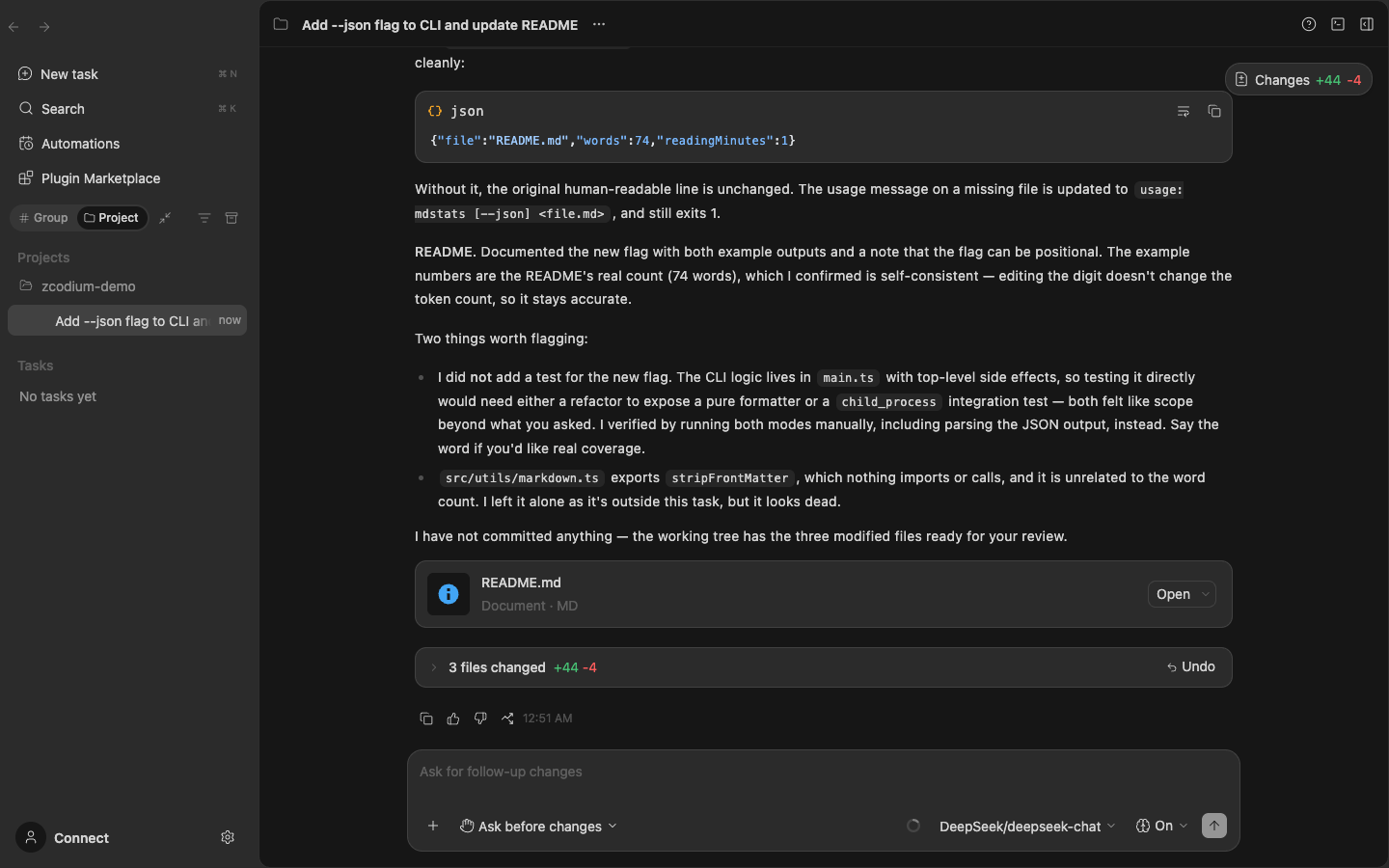
ZCodium keeps the product itself — an AI coding workspace for desktop, browser and terminal — and rebuilds it from the public source with monitoring and telemetry removed and vendor services off by default.
- One Agent, three interfaces: the Electron desktop app, the browser workspace and the
zcodeterminal TUI share the same Agent runtime and sessions; you can also connect to a remote host over SSH, or drive the same desktop agent from your phone's browser. - Plans, edits, runs, verifies: file changes arrive as diffs, terminal commands carry their context, the agent checks its own work by running commands and tests, and a built-in browser plugin drives a real browser for web tasks.
- Asks before it touches your project: every edit, command and tool call can require approval — allow once, always in this project, or full access.
- Multi-agent collaboration and orchestration: sub-agents, dynamic workflows, skills and scheduled automations.
- Plugins, skills and MCP: built-in skills plus a plugin system; official MCP and the plugin marketplace stay off by default, each with its own switch.
- Bring your own model: built-in presets for DeepSeek, OpenAI, Anthropic, Moonshot Kimi, MiniMax, Z.AI (GLM), Alibaba, xAI, Xiaomi MiMo and OpenRouter, plus fully custom endpoints (Chat Completions, Responses, Anthropic Messages).
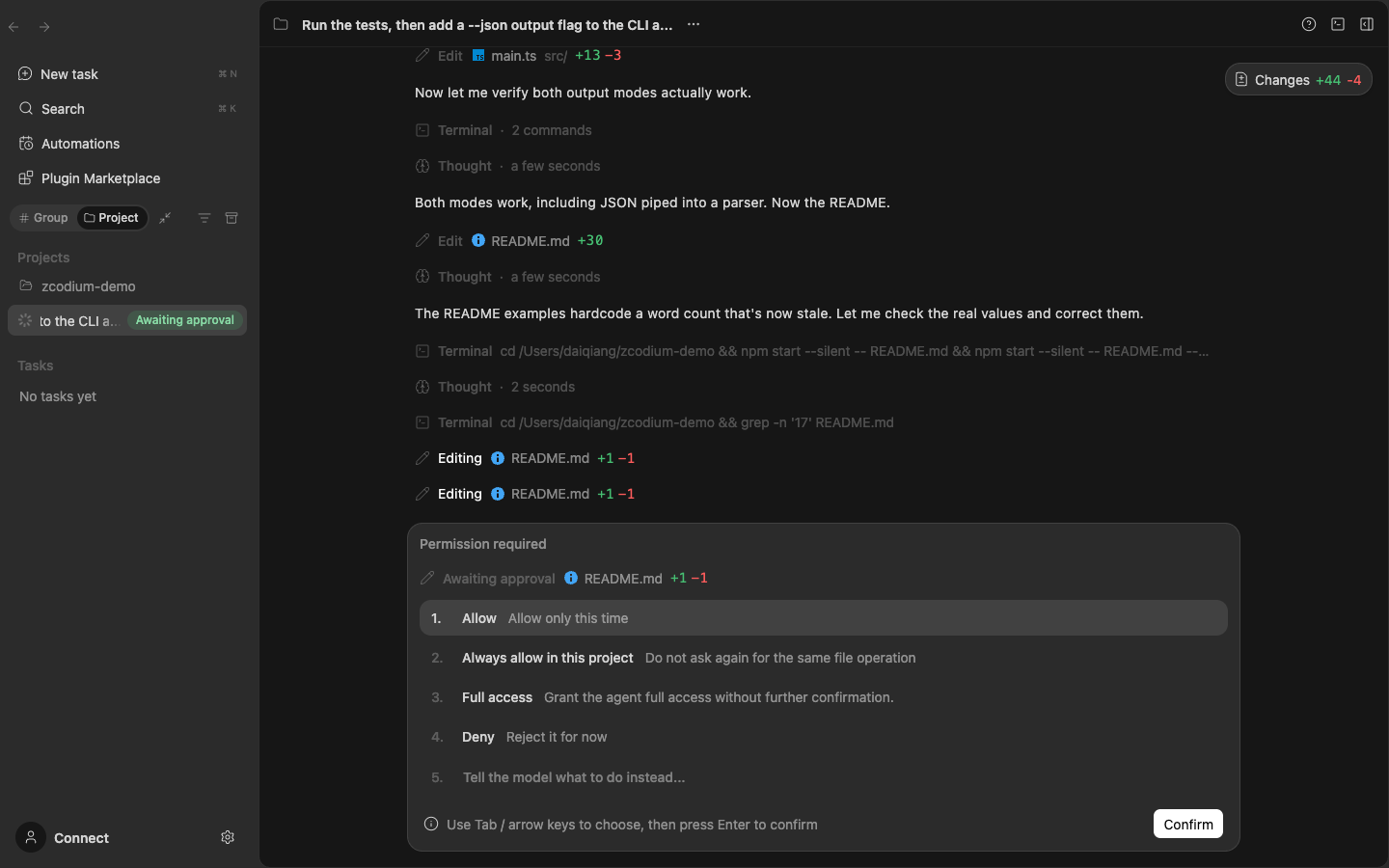
Approval-first: the agent stops and asks before it edits a file, runs a command or calls a tool.
| Item | ZCodium (this repo) | Official client (closed source) | Official open source |
|---|---|---|---|
| Monitoring and telemetry | All removed (~26k lines), with regression checks | Everything on by default; the switches never stopped packaging or uploads | Same as the closed-source client |
| Repository upload logic | Removed | Present (until the 2026-09-18 report) | Removed (since 2026-09-21) |
| Historical versions | Full history and releases kept for audit trail | Old download links pulled | Old download links pulled |
| Build transparency | GitHub Actions builds transparently from this repo; artifacts ship with releases | Vendor binaries, not reproducible | No public build |
| Issues and collaboration | Open — issues and discussions welcome | Not open | Closed |
Compared with the upstream open-source release:
- Vendor services off by default: account sign-in, feedback, coding plans, official MCP and the plugin marketplace are all off by default, each with its own switch in Settings. Turning one on connects to ZCode's official servers — keep them off unless you need them.
- Deleted all monitoring and telemetry, about 26k lines: ARMS RUM, OTLP reporting, crash collection, resource and network sampling, UI instrumentation. Regression checks keep those exits from coming back (see "What we removed" below).
- Searched the sensitive paths: snapshot packaging, encryption, and direct-upload code was reviewed across the repository; this version has no unconsented data egress.
- Wired up builds and releases: GitHub Actions builds the installers and deploys this site; in-app updates point at this repo's GitHub Releases.
The audit is a static code search, not full dynamic forensics. Findings and limits will be updated.
- Every commit in zai-org/ZCode gets a diff audit, not just releases.
- Only risk-free changes are synced. Code that does data egress, monitoring/telemetry, or permission expansion is stripped or rejected, with the reason recorded.
- Every sync is followed by a rebuild and a new audited release (see Releases).
- Audit methods and conclusions stay in this repository and on the project site. Review and challenge are welcome.
For the background and details, read the external coverage below; this repository makes no finding of fact about it:
| Source | Link |
|---|---|
| ferstar's original technical analysis | https://blog.ferstar.org/posts/zcode-silent-workspace-snapshot-upload/ |
| Independent reproduction | https://blog.margrop.net/post/zcode-silent-git-upload-investigation/ |
| Official open-source repository (upstream) | https://github.com/zai-org/ZCode |
| The Paper coverage | https://www.thepaper.cn/newsDetail_forward_34111815 |
| Jiemian News coverage | https://www.jiemian.com/article/15120609.html |
| ITHome coverage | https://www.ithome.com/1/005/046.htm |
| Huxiu coverage | https://www.huxiu.com/article/4892416.html |
| ifeng coverage | https://tech.ifeng.com/c/8waIS4X7FAe |
Compared with the upstream open-source release, this repository contains no monitoring or telemetry implementation:
| Area | Removed |
|---|---|
| Client monitoring SDK | Alibaba Cloud ARMS RUM (@arms/rum-electron), its patch, initialization, route instrumentation, and renderer bridges |
| Usage and network telemetry | Network metric aggregation and reporting, API event ingestion, host/scheduler forwarding, remote-session usage sampling |
| Resource and performance | Periodic resource sampling, memory diagnostics, data-size stats, TTFT export, MCP telemetry |
| Crash collection | Crash dump reporting, OOM annotations, stability telemetry |
| CLI telemetry | The entire @zcode/telemetry package (OTLP export, model API recording, agent metrics and traces) |
| UI instrumentation | All session-open, subscription-error, automation, prompt-template, and user-action instrumentation, plus the platform reporting methods and IPC bridges |
| Protocol and configuration | Telemetry event protocols and reporting paths; added filtering so legacy telemetry environment variables cannot re-enter the agent |
Kept on purpose: local logs (for troubleshooting), user-initiated feedback, and normal business requests (model calls, update checks). The device identifier is used only for business identity and local locks.
Verification: the change passes pnpm typecheck, pnpm lint (0 errors), and per-module regression tests. Full lists and verification limits are in the removal reports: desktop, CLI, UI.
The Releases page ships desktop clients (macOS / Windows / Linux) and the CLI distribution.
About signing: the builds are not signed by ZCode, so the operating system blocks the first launch. That is expected — allow it once per platform as below. Before allowing it you can verify the download against the sha256.txt on the release page — it covers every installer, the CLI package and install.sh (update metadata and remote runtime assets carry their own checksums). Compute the file hash with shasum -a 256 <file> (macOS), sha256sum <file> (Linux) or certutil -hashfile <file> SHA256 (Windows) and compare it with the matching line.
-
Download
ZCodium-*-mac-arm64.dmg(Apple Silicon) orZCodium-*-mac-x64.dmg(Intel), open it and drag ZCodium into Applications. -
The app is not signed by ZCode, so Gatekeeper will say the developer cannot be verified (or that the app is damaged). After dragging the app into Applications, run the command below (enter your login password when asked; nothing is shown while typing):
# One-time command (unblocks and launches; it exits immediately):
sudo /usr/bin/xattr -rd com.apple.quarantine "/Applications/ZCodium.app" && open -a "ZCodium"
The absolute
/usr/bin/xattrpath avoids shadowing by other tools with the same name (for example the Python xattr package), which fail with "option -r not recognized". Alternatively, right-click (Control-click) the app in Finder → Open → click Open again in the dialog. Afterwards it launches normally with a double-click.
-
Download
ZCodium-*-win-x64.exeand double-click it. -
The installer is not signed by ZCode, so SmartScreen shows the "Windows protected your PC" warning. Click More info → Run anyway and finish the installer.
This is the expected prompt, not a sign of corruption; you can also verify the installer against the
sha256.txtfrom the release page first, e.g.certutil -hashfile ZCodium-<version>-win-x64.exe SHA256compared with the matching line.
Pick the build that matches your CPU architecture: ZCodium-*-linux-x86_64.AppImage (Intel / AMD) or ZCodium-*-linux-arm64.AppImage (arm64 / aarch64).
# x86_64 (Intel / AMD)
chmod +x ZCodium-*-linux-x86_64.AppImage
./ZCodium-*-linux-x86_64.AppImage

# arm64 (aarch64)
chmod +x ZCodium-*-linux-arm64.AppImage
./ZCodium-*-linux-arm64.AppImageThe CLI distribution is a self-contained bundle (TUI + Web + Agent) and needs Node.js 24; the install script and runtime code can both be reviewed in this repository:
tar -xzf zcodium-*.tar.gz
cd zcodium
./install.sh        # installs the zcode command (defaults to ~/.zcode/runtime, entry in ~/.local/bin)
zcode --help # or run directly: node bin/zcode.mjs --help- GitHub builds: audited code is built in this repository with GitHub Actions. CLI distributions are published to Releases, and the project site is built in its own repository and served at https://zcodium-project.github.io/. Every artifact comes from the audited source in this repository and contains no unsynced upstream changes.
- Release flow: run the Release workflow manually in Actions. Enter
3.14.0with pre-release checked to get3.14.0-audit.<date>(repeat builds on the same day get.2,.3, …; the full form3.14.0-audit.20260922[.2]is also accepted). With pre-release unchecked it publishes the stablev3.14.0(clean tag, GitHub Latest, so/releases/latestworks). Release notes always lead with "what changed vs ZCode", then the install steps — the English block first, an exact Chinese mirror below — and the downloads list last. Every artifact is uploaded into a draft release first; the release is published only after the CLI and all desktop platform artifacts are uploaded, and a failed build leaves it as a draft, so download pages never resolve to a still-building version. - Upstream sync: review the change first, diff-audit it per version, and merge only the risk-free parts; conclusions go into the audit record.
Join the community for discussions and feedback:
| Discord | QQ group |
|---|---|
 |
 |
| https://discord.gg/HeDkhY9nV | Group ID: 344502652 |
This repository is community-driven open source and is not affiliated with any existing commercial company. All facts come from public reporting and independent code audits, with sources cited. If any party believes something is inaccurate, please open an issue.
Other similar community distributions: ZCodium
Note: the sections below come from the official upstream repository zai-org/ZCode README and describe the upstream project itself. Its community links, services, and commitments are maintained by upstream and are not part of this audit fork.
ZCode is an AI coding workspace with desktop, browser, and terminal interfaces. This repository contains the clients, backend services, shared UI, and Agent CLI and runtime source code.
| Interface | Purpose | Development command |
|---|---|---|
| Desktop | Electron desktop application | pnpm dev:desktop |
| Web / ZCode CLI distribution | Terminal and browser workspace; packages the TUI, Web client, backend, and Agent together | pnpm dev:web |
| Agent CLI | The zcode terminal interface, which also provides the Agent runtime for Desktop and Web |
pnpm --filter @zcode/cli dev |
Install Git, Node.js 24.14.0, and pnpm 10.33.2. mise.toml is the source of truth for tool versions. Run all development and packaging commands below from the repository root.
pnpm bootstrappnpm bootstrap installs workspace dependencies, prepares local desktop runtime assets, and runs build:bootstrap.
The Agent CLI and runtime source code lives in apps/zcode-cli/ as a regular directory included when you clone this repository. No separate checkout or Git submodule initialization is required.
Additional setup and build commands:
| Command | Purpose |
|---|---|
pnpm install |
Install dependencies |
pnpm prepare:desktop-runtime |
Prepare desktop runtime assets, including remote assets by default |
pnpm prepare:remote-assets |
Prepare remote runtime assets separately |
pnpm bootstrap:with-remote |
Set up dependencies and local and remote assets, then build the relevant packages sequentially; skip the desktop application bundle |
pnpm build |
Recursively run each workspace package's build script, including its asset preparation steps |
The default bootstrap skips remote asset preparation and is suitable for local desktop development. Run the corresponding preparation command when working with remote workspaces or validating remote distribution assets.
pnpm dev:desktop

# Use the test environment
pnpm dev:desktop:test
pnpm dev:desktop defaults to pnpm dev:desktop:prod and uses production service configuration. The startup script prepares local runtime assets, builds the desktop Agent, then starts Electron and source watchers.
Set ZCODE_DATA_BASE_DIR to use a separate development data directory. For example, on macOS / Linux:
ZCODE_DATA_BASE_DIR="$HOME/.zcode-dev-home" pnpm dev:desktop:testUse development mode when editing Web or backend source code:
pnpm dev:web

# Set the backend workspace (macOS / Linux)
ZCODE_SERVER_WORKSPACE=/path/to/project pnpm dev:web
This starts both the Web development server (default: http://localhost:5173) and the backend (default: http://localhost:3030). Open the Web development server in your browser. /ws and general /api requests are proxied to the local backend; /api/v1/oauth/token is proxied separately to the configured product service.
After changing Agent source code, run pnpm --filter @zcode/cli... build and restart the service. To validate the complete distribution, extract and run it as described under Packaging → ZCode CLI distribution below.
The command-line distribution includes the TUI, Web client, and Agent behind one zcode command. With no arguments it starts the TUI; a leading --web starts Web mode; all other arguments go to the existing Agent CLI. Both modes run locally without Electron.
# Start the terminal UI by default
zcode

# Start the Web interface
zcode --web

# Set the project and port without opening a browser automatically
zcode --web --workspace /path/to/project --port 3030 --no-open

# Show CLI or Web options
zcode --help
zcode --web --help
In Web mode, it uses the current directory as the workspace, listens on 127.0.0.1 without token authentication by default, selects an available port, and opens a browser. Use the URL printed in the terminal and press Ctrl+C to stop the service. For LAN access, use --host 0.0.0.0; listening on a non-local address generates an access token by default. Use the token-bearing URL printed in the terminal. Set a token with --token, or disable token authentication with --no-token.
When starting the general Web service's HTTP entry directly, configure API/WebSocket authentication with ZCODE_SERVER_AUTH_TOKEN. When creating the service programmatically, use the authToken option.
See Packaging below for build instructions. pnpm build:zcode only creates the distribution; it does not replace an existing zcode on PATH. If the command still points to an older installation or another checkout, check it with command -v zcode on macOS / Linux or where.exe zcode on Windows.
Use the source entry when developing the TUI or Agent:
pnpm --filter @zcode/cli dev --help
pnpm --filter @zcode/cli dev

# Build the CLI and its workspace dependencies
pnpm --filter @zcode/cli... build
node apps/zcode-cli/packages/cli/dist/zcode.cjs --help
This entry runs the Agent CLI directly and does not handle the distribution's --web switch. Use pnpm dev:web for Web development, or the extracted bin/zcode.mjs shown below to test the unified command.
The root .env.example provides sample service URLs and build configuration. Copy it to .env as needed and place local overrides in .env.local. Select the Desktop development environment with dev:desktop:test or dev:desktop:prod.
| Setting | Purpose |
|---|---|
ZCODE_DATA_BASE_DIR |
Base directory for application data, stored under its .zcode/ subdirectory |
ZCODE_SERVER_WORKSPACE |
Workspace path for the Web backend |
ZCODE_BUILTIN_PROVIDER_CONFIG_FILE |
Path to a local provider configuration file; uses the built-in configuration when unset |
ZCODE_DIST_BASE_URL |
Download base URL used by the CLI distribution installer |
Runtime variables can be set explicitly in the environment of the startup command. See config/README.md for the default configuration shipped with the client.
See third-party/README.md for notice generation, distribution checks, and where the notices are included in each distribution.
pnpm bundle:desktop

# Set the target platform and CPU architecture
pnpm bundle:desktop -- --os win --arch x64

pnpm bundle:desktop -- --help
The default target is macOS arm64, and the default output directory is packages/desktop/dist/. --os accepts mac, win, or linux; --arch accepts x64 or arm64. Packaging and signing require the tools and configuration for the target platform.
Run pnpm build:zcode to build the CLI/TUI, backend, and Web client, collect the TUI native libraries, workers, and runtime dependencies, then assemble the distribution. Running the distribution still requires Node.js; use the version specified in mise.toml.
Before packaging, set the download base URL with ZCODE_DIST_BASE_URL in .env, .env.local, or the process environment, or pass it through --base-url. The URL below is a placeholder; replace it with your hosting URL when publishing:
pnpm build:zcode --base-url https://downloads.example.com/zcode/

# When ZCODE_DIST_BASE_URL is already configured
pnpm build:zcode

# Repackage existing Agent, backend, and Web build outputs
pnpm build:zcode --skip-build

# Show options for the version, output directory, and more
pnpm build:zcode --help
The version defaults to the root package.json version. Output is written to dist/zcode/:
releases/<version>/zcode-<version>.tar.gz: runtime package.releases/<version>/sha256.txt: checksum file.latest.jsonandinstall.sh: version index and installer.
Upload the entire directory to the configured download base URL. The installer downloads the runtime package from that URL, installs it to ~/.zcode/runtime by default, and creates the zcode command in ~/.local/bin. Override these directories with ZCODE_DIST_HOME and ZCODE_DIST_BIN_DIR, respectively.
Existing Lite users should switch to the new build command, environment variables, and installer. Installation does not remove old Lite directories or migrate/delete session data.
To test a packaged build locally, extract and run it directly without uploading or installing it:
zcode_version=$(node -p "require('./dist/zcode/latest.json').version")
mkdir -p dist/zcode/debug
tar -xzf "dist/zcode/releases/$zcode_version/zcode-$zcode_version.tar.gz" \
  -C dist/zcode/debug
# Start the TUI by default
node dist/zcode/debug/zcode/bin/zcode.mjs

# Start Web mode
node dist/zcode/debug/zcode/bin/zcode.mjs --web \
  --workspace "$PWD" --port 3030 --no-open
Open http://127.0.0.1:3030 to validate the complete flow, with one backend serving the Web pages and running the Agent. The port must be available; if pnpm dev:web is already running, choose another --port.
| Directory | Responsibility |
|---|---|
packages/desktop |
Electron Main, Host, Renderer, and desktop packaging |
packages/web |
Web client |
packages/server |
HTTP / WebSocket services and remote connections |
packages/zcode-server-cli |
Standalone server startup and process management |
packages/ui |
Shared React components, hooks, and Zustand state |
packages/services |
Business services and persistence |
packages/shared, packages/rpc, packages/client |
Shared protocols and types, RPC framework, and Agent client SDK |
packages/provider, packages/provider-node |
Common provider capabilities and Node implementations |
apps/zcode-cli |
Agent CLI, TUI, runtime, and tools |
scripts, config, third-party |
Build and maintenance scripts, built-in configuration, and third-party notice materials |
The project site source lives in the zcodium-project.github.io repository, built with Vite + Svelte + Tailwind CSS v4 and deployed with GitHub Actions to https://zcodium-project.github.io/.
First-party code (including all audit and modification work) is licensed under MIT (see LICENSE). The repository contains upstream code from zai-org/ZCode, which stays under Apache-2.0 (full text in LICENSE-APACHE), with the original copyright and attribution notices retained. Third-party component licensing is listed in NOTICE.md.
See NOTICE.md for feature and promotion scope, maintenance policy, execution and data risks, licensing, and third-party copyright information.