- A simple Python script that updates and optimizes the Kali Linux VM upon startup.
-
Open your Kali Linux Virtual Machine terminal.
-
Create a new Python script using the following command:
'nano update_kali-linux_vm.py'
-
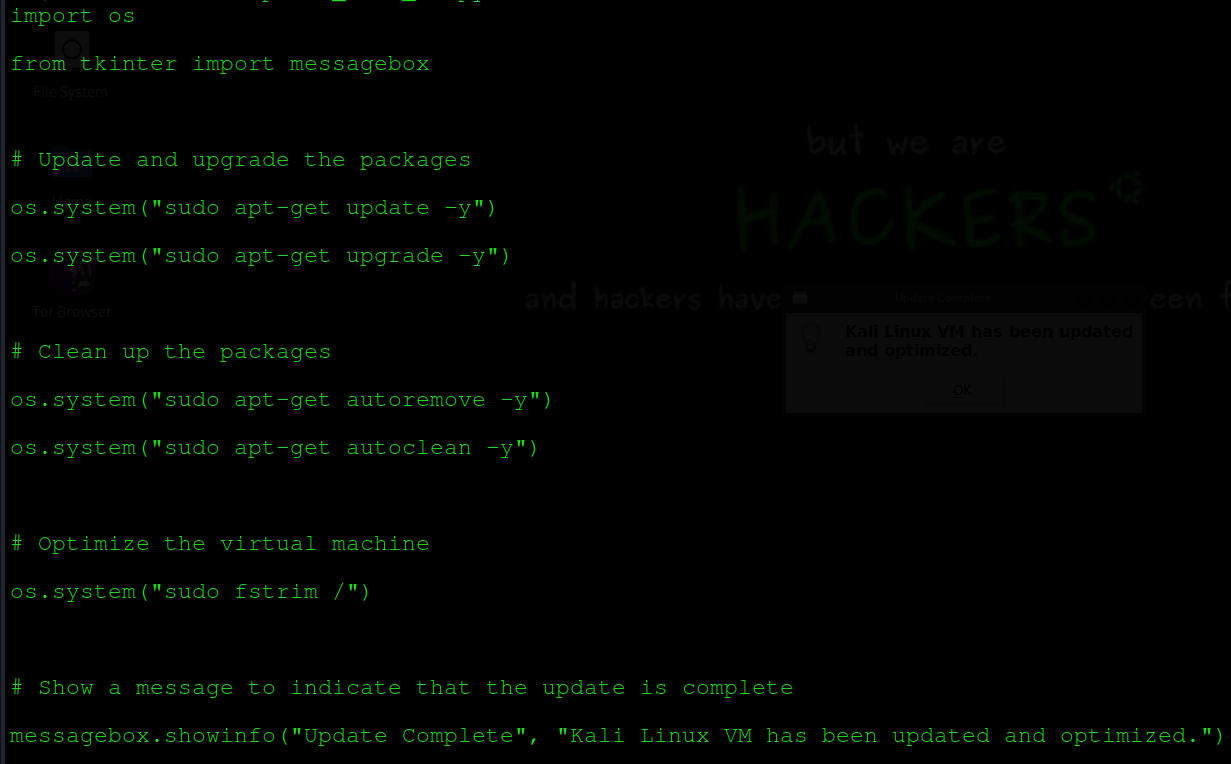
Add the following code to the script:
-
Save the script by pressing 'Ctrl+X', then 'Y', and finally 'Enter'.
-
Make the script executable using the following command:
'sudo chmod +x update_kali-linux_vm.py'
-
Add the script to your startup programs by following these steps: (Example is using VMWare. Other VM managers may differ.)
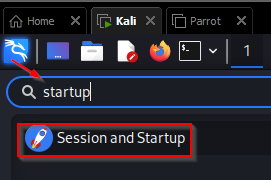
Click on the Kali blue button, type 'startup' in the search bar and select 'Sessions and Startup'
Click on 'Application Autostart' and then '+Add'

After you click +Add, a popup box will appear to fill out the information for the startup process.
- Name: Here you will name your startup process
- Description: Optional but you can describe your process here briefly
- Command: python3 <PATH TO YOUR SCRIPT .py FILE> (I placed mine in my /usr/bin directory)
- Trigger: on login
- Click 'OK' and then 'Close'

-
Restart your virtual machine to see if the script is executed successfully at startup. If successful, you will see your customized message popup appear.

Description
-
The above script will update and upgrade the packages, clean up unnecessary packages and optimize the virtual machine by using the 'fstrim' command. To add a message to the script to pop up and notify you that the machine has been updated, we have imported the 'messagebox module from the 'tkinter' library, which provides a simple way to create message boxes. The 'showinfo' function from this module is used to create a message box with the title "Update Complete", "Kali Linux VM has been updated and optimized." The message box will pop up after the update and optimization process is complete.
-
Note that you may need to install the 'tkinter' library if it is not already installed on your system. You can do this by running the following command:
'sudo apt-get install python3-tk'.
Finally, you can modify the script according to your needs.