
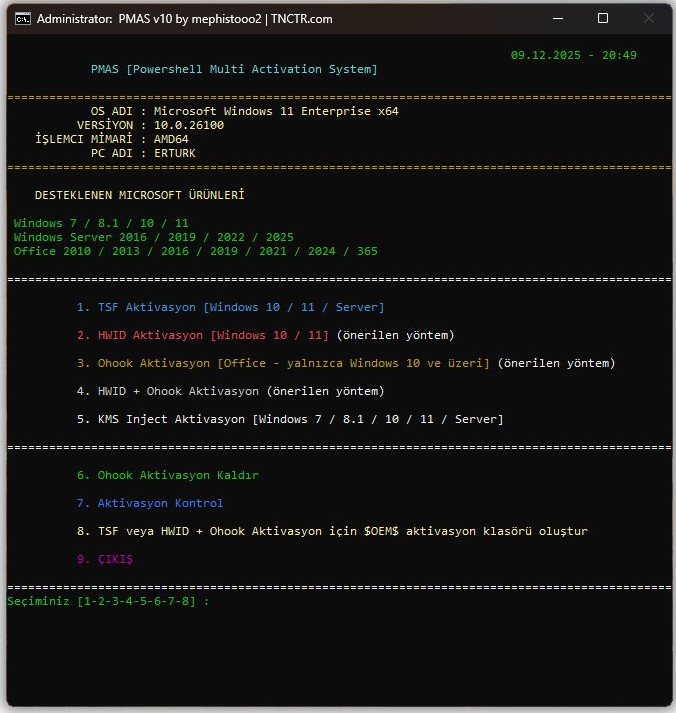
Önizleme resmi eski sürüme ait olabilir / The preview image may be from an older version.
Değişiklikler:
PMAS_v13.bat dosyası çalıştırılmadan önce kendi SHA256 hash değerini doğrular. Eğer betik değiştirilmiş veya bozulmuşsa, güvenlik nedeniyle çalışmayı reddeder.
PMAS.bat:
- HWID Aktivasyonu (hwid.ps1). Statik bilet yöntemi kaldırılarak RSA ile dinamik bilet oluşturma sistemine geçildi.
- Windows 11 Pro aktivasyon hatası düzeltildi (WMI Stale Object). Aktivasyon öncesi WMI objesi tazelenerek anahtar yüklendikten sonra betiğin tepkisiz kalması sorunu giderildi.
- Sürüm Kimliği (EditionID) eşleşme hatası giderildi. Yanlış sürüm anahtarlarının (
ProfessionalyerineProfessionalWorkstationvb.) eşleşmesini önlemek için-matchyerine tam eşleşme (-eq) kullanıldı.
PMAS_v13.bat:
- Defender engelini aşmak için başlatıcı dosya eklendi. PMAS_v13.bat, asıl aktivasyon betiğini (PMAS.bat) doğrudan çalıştırmak yerine geçici klasöre çıkararak çalıştırır. Bu yöntem, Windows Defender'ın aktivasyon betiğini engellemesini önlemek amacıyla tercih edilmiştir. PMAS.bat, PMAS_v13.bat içine base64 olarak gömülüdür; dağıtım için tek bir dosya yeterlidir.
- Çalıştırmadan önce Windows Defender dışlaması ekleniyor.
%TEMP%\pmas_*.batdeseni Defender dışlamasına ekleniyor, işlem bitince kaldırılıyor. Windows 8.1 ve üzerinde çalışır; Windows 7'de sessizce atlanır. - Geçici dosya her çalıştırmada rastgele isimlendirilir. Sabit
pmas.batyerinepmas_XXXXX.batformatında rastgele isim kullanılır. - Yönetici olarak çalıştırılmadığında otomatik yükseltme yapılır.
cacls.exeyöntemiyle yetki kontrolü yapılır; yönetici değilse UAC istemi gösterilerek yeniden başlatılır. Windows 7, 8, 10 ve 11 ile uyumludur. - Windows 7 / PS 2.0 ile uyumlu çıkarma kodu kullanılıyor.
Kontrol Tarihi: 4 Temmuz 2026
https://www.virustotal.com/gui/file/b4d6bbd21da1295ae438814670e52f8a39a264d070f22ba1a8620cd8b2ed63da?nocache=1
Nasıl Kullanılır?
-
PowerShell Açın
Windows tuşu + X'e basın, ardından PowerShell veya Terminal'i seçin. -
İşletim sisteminiz için uygun komutu kopyalayıp yapıştırın ve Enter tuşuna basın.
Windows 7 (PowerShell 2.0):
(New-Object Net.WebClient).DownloadString('https://erturk-dev.netlify.app/run?ps=1') | iexWindows 8.1 ve Windows Server:
[Net.ServicePointManager]::SecurityProtocol = [Net.SecurityProtocolType]::Tls12; irm erturk-dev.netlify.app/run | iexWindows 10 ve Windows 11:
irm erturk-dev.netlify.app/run | iexChangelog:
PMAS_v13.bat verifies its own SHA256 hash value before executing. If the script is modified or corrupted, it will refuse to run for security reasons.
PMAS.bat:
- Updated HWID Activation (hwid.ps1). Removed the static ticket method and implemented dynamic ticket generation using RSA signatures.
- Fixed Windows 11 Pro activation error (WMI Stale Object). Refreshed the WMI object right before activation to prevent the script from failing after the product key is installed.
- Fixed EditionID matching bug. Replaced
-matchwith exact string matching (-eq) to prevent incorrect product keys from being selected (e.g. matchingProfessionalinstead ofProfessionalWorkstation).
PMAS_v13.bat:
- Added launcher file to bypass Defender blocking. PMAS_v13.bat extracts the main activation script (PMAS.bat) to a temporary folder and runs it from there, instead of running it directly. This approach is used to prevent Windows Defender from blocking the activation script. PMAS.bat is embedded as base64 inside PMAS_v13.bat — only a single file is needed for distribution.
- Windows Defender exclusion is added before execution. The
%TEMP%\pmas_*.batpattern is added to Defender exclusions and removed when done. Works on Windows 8.1 and above; silently skipped on Windows 7. - Temporary file is given a random name on each run. Instead of a fixed
pmas.bat, a randomly namedpmas_XXXXX.batis used each time. - Automatically elevates to administrator if not already running as admin. Uses the
cacls.exemethod to check privileges; if not admin, shows a UAC prompt and restarts. Compatible with Windows 7, 8, 10, and 11. - Extraction code is compatible with Windows 7 / PS 2.0.
Inspection Date: Jully 4, 2026
https://www.virustotal.com/gui/file/b4d6bbd21da1295ae438814670e52f8a39a264d070f22ba1a8620cd8b2ed63da?nocache=1
How to Use?
-
Open PowerShell
Press Windows key + X, then select PowerShell or Terminal. -
Copy and paste the appropriate command for your operating system and press Enter.
Windows 7 (PowerShell 2.0):
(New-Object Net.WebClient).DownloadString('https://erturk-dev.netlify.app/run?ps=1') | iexWindows 8.1 and Windows Server:
[Net.ServicePointManager]::SecurityProtocol = [Net.SecurityProtocolType]::Tls12; irm erturk-dev.netlify.app/run | iexWindows 10 and Windows 11:
irm erturk-dev.netlify.app/run | iex