
Replies: 5 comments 16 replies

|
Very helpful - thank you for sharing! |

|
To be clear, is this an effort to replicate nYNAB's CC handling in Actualbudget? |

|
Nope, its replicating YNAB4 |

|
I was playing with this last night and came up with something similar, or maybe even the exact thing. I don't have old credit card debt, but I understand the problem. If someone has old debt on a card they are not using, they could just keep it off budget and make payments on it each month (much like a mortgage). The problem arises when someone has old debt and they are still continuing to use the same card that debt is on, while also paying off all spending done on the current month. Like you said, the struggle is to keep the balance on that card the actual balance and not eat into the money that is available to budget. When you start a budget with a positive amount in your accounts, then add debt...Actual immediately takes the positive amount and subtracts the debt. What is left over is what you have to budget. This is impossible if you never planned to pay off that old debt in one month! Like I said, I think I did the same thing as you. I made a fake file and started the process of what I did. I wanted to add some screenshots to help people understand. Hopefully this helps because I'm not trying to steal your workflow or thread. Here I added a checking account with $2000.
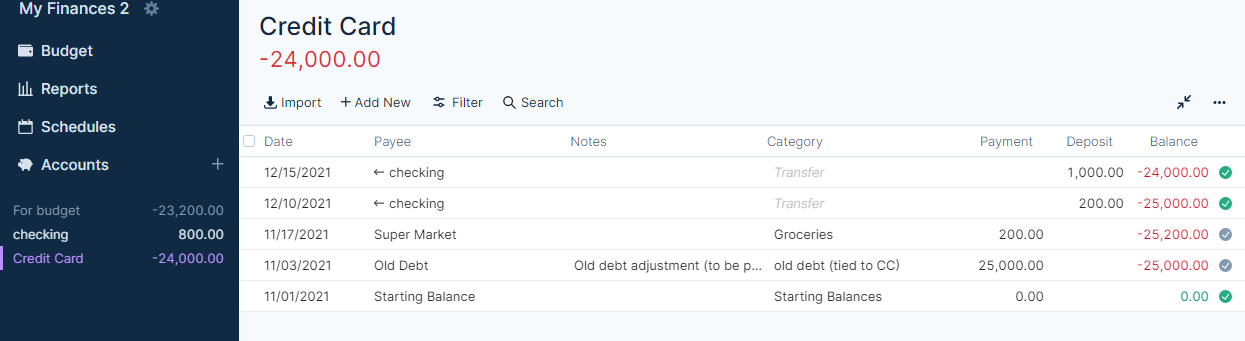
Then I added a Credit Card Account with a starting balance of zero. I want to pretend I have $25k in debt, but I don't want to start the account with that much because it will steal the money from my available to budget cash. After the account is established, I made a transaction for a $25000 debit tied to a category called "old debt". This makes the credit card balance -$25000, but leaves my budget ready cash at $2000.
Finally, this is a picture of my budget for the starting month (November) and next month. As you said, you need to check on overspending rollover, which I did. Now you can see that everything works together as it's supposed to. There is the original $2000 available for budgeting, there is a $25000 old debt that will continue to carry over until it's gone. Finally, the balance of the credit card will always total the old debt plus any current category spending each month (that will be paid off entirely). Interest can just be added into the account as a transaction. Payments made for the monthly spending will just come out of the categories they were spent in and any extra payments will be budgeted and come out of the "old debt" category. Again, hopefully this helps. If you believe I'm hijacking I'll be glad to remove.
|
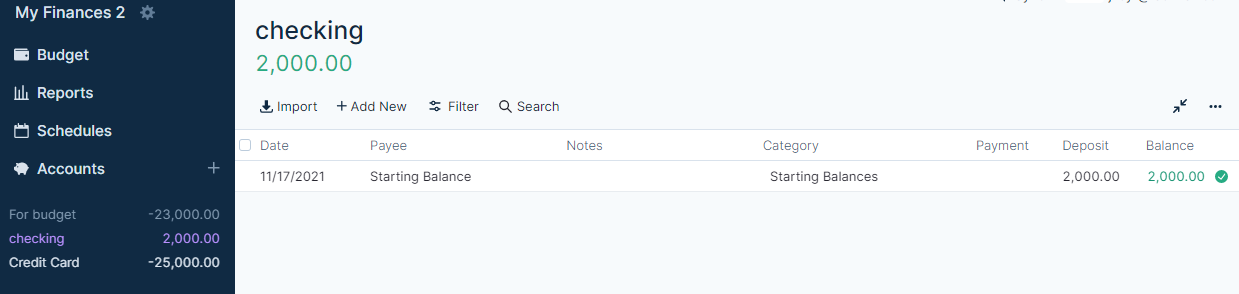
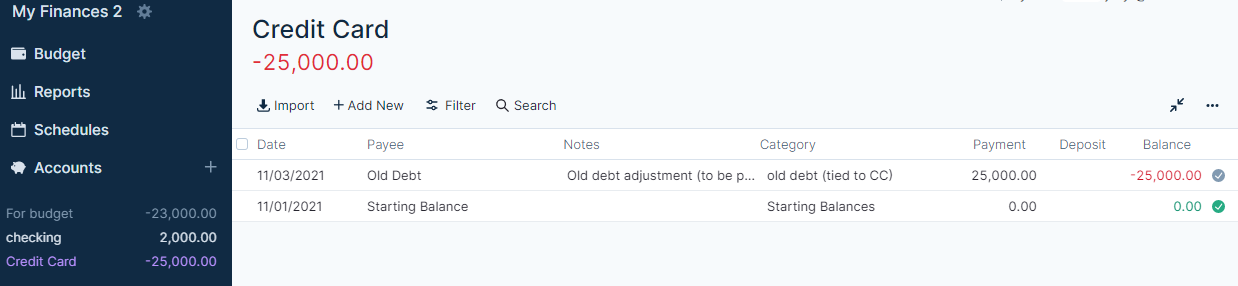
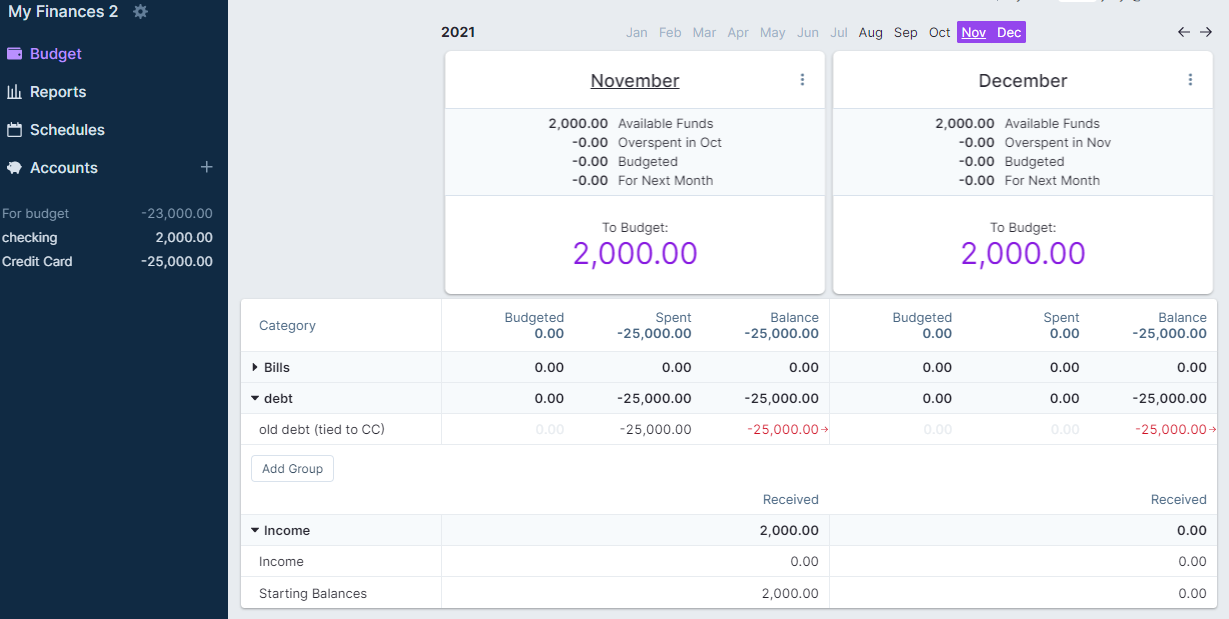

|
It looks like you're budgeting the $1000 a month against the old debt category, though, right? |

|
Exactly, did I miss something? |
|
You didn't miss anything at all. That's the part that people often miss. They make the extra payment toward the old debt, but they don't budget for it and end up thinking they have more available than they do. Your example looks a little like what I used to do when starting a new budget even with PIF cards. I changed the pre-YNAB debt category to income this month and budgeted it against the existing balance. |
|
Gotcha. For what it's worth, I only see 2 problems (besides a little complexity) to what I did. One, there is no categorized transaction under the "old debt" category. The budgeted amount is the theoretical transaction that reduces the budgeted debt. Two, and this is a follow up to the first problem, when you budget the money into the old debt category (in my example, $1000) there is a temporary unlink between that old debt category and the CC Balance. They aren't balanced until the payments equal what was/is budgeted. This is likely to happen more often, I'm not sure because I only made two transactions. It's just important to realize that the category and the old debt balance don't have to match. You're tracking your old debt in the category, but you always want the CC balance to match what your financial institution says it should be. They work together, but they aren't always necessarily in exact harmony. I hope this helps someone, but if I did miss other issues, I'm all ears. |
|
EDIT- I just played around with it some more. I found that I can make a starting balance with the "old debt" amount if I change the original category to the "old debt" category. A starting balance subtracts debt from your amount "to budget" because it is defaulted into the "starting balance" category, which is treated like "income". It can be changed. No big deal, but it does explain why it works and it will save a transaction because you will start out where you need to be. |
|
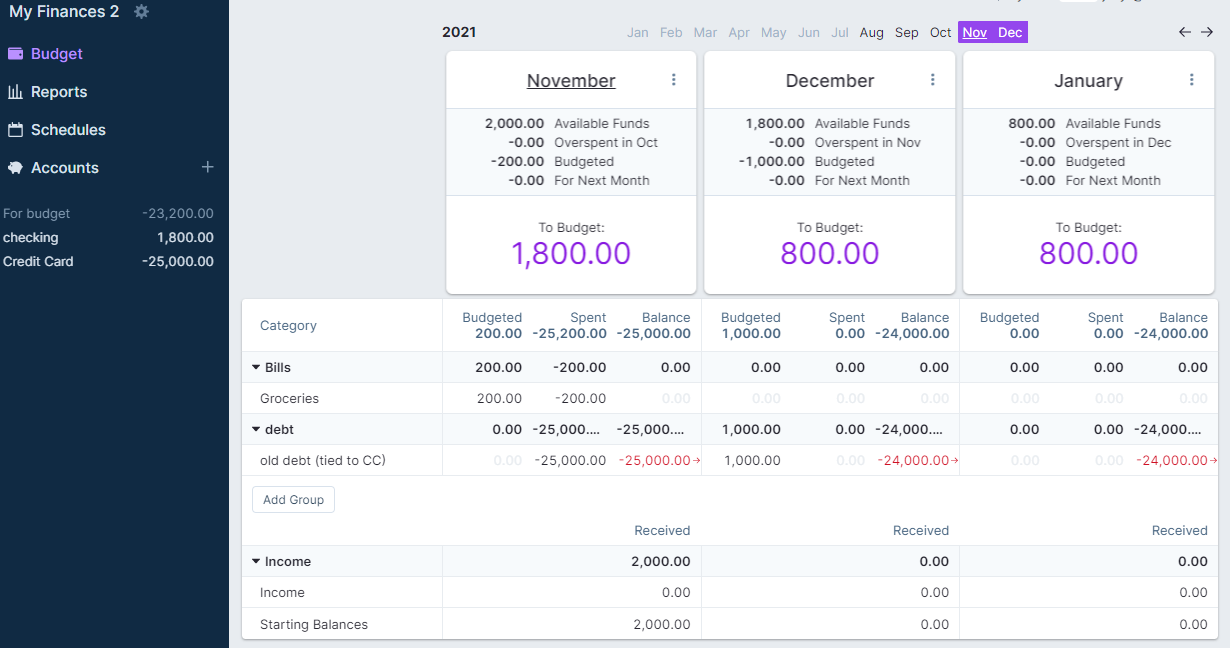
"So are you saying that there's a difference between starting the CC with balance of 0, then creating a transaction and starting with a balance of whatever's on the card?" This is apparently the case. I discovered it by accident. The way the software is set up, a starting negative balance (such as a credit card) immediately reduces the cash available to budget. If you start with a zero balance, then show a negative transaction, it acts like any other transaction in the categories/budget. It subtracts from the category. If debt is created and you want to carry it over, the red arrow/overspending rollover function allows that negative transaction to carry over forever rather than be deducted from the available to budget funds. EDIT- I just played around with it some more. I found that I can make a starting balance with the "old debt" amount if I change the original category to the "old debt" category. A starting balance subtracts debt from your amount "to budget" because it is defaulted into the "starting balance" category, which is treated like "income". It can be changed. No big deal, but it does explain why it works and it will save a transaction because you will start out where you need to be. "I started with the starting balance of what's on the card, and then on the 2 cards that have "old debt", I just budgeted the amount of the old debt to the categories that "match up with" the CC accounts." If I'm understanding what you did here, the problem would be with what you have available to budget. If you have $1000 in cash and start a credit card with $500 of old debt, your "to budget" would now by $500. Try making the starting balance zero, then making a transaction for the amount of debt you have. You can always "undo". Better yet, start a fake file and play around with it. Once it clicks you can mess with your real file. "But I'm still not sure how I would show the payment, because it would be a transfer (in the case of the card that I'm still using) but that doesn't reduce the amount of "old debt" held in the category. (Do I just manually "unbudget" the appropriate amount from the "old debt" category?)" I added some transactions and budgeting to my fake file. Hopefully I can explain this, if not ask another question and I'll try again. So in this picture I have my updated budget. I added a $200 budget in November for groceries. I also "spent" $200 on the credit card at the super market, making my grocery budget $0 and my "To Budget" in November $1800. In December I budgeted $1000 for "old debt". In December, I made a $200 payment to the card to cover last month's expenses. I also made a $1000 transfer to the card from my checking. I haven't added any income. So, my credit card now has a balance of $24000 and I have a "to budget" amount of $800. (which is also my checking account balance). This accounts for an original cash balance of $2000, an old debt balance of $25000, and two payments totaling $1200. One was categorized from groceries and one went to "old debt". I now have totals of $800 in cash, and $24000 in debt. This should work out in perpetuity until the $24000 is paid off.
The next two pics just show my account ledgers to help fill in the blanks of the budget....
"Also, the other card that I have, I just realized probably SHOULD be Off budget, since I'm just paying it off, but I don't see any way of converting it to Off budget. Guess I'll add that as a feature request." I'm not sure of a way to convert it, my guess is you can't because the editable features of accounts after the fact seems to be spartan. I believe it's worth making a new account and terminating the old one because keeping old debt in unused accounts off budget is just more simple. |

|
You're welcome. We can all keep playing with it if there are issues. |

|
So, what category should it go to when I transfer the money to the off budget account? The category that the debt is in? Because when I do that, it clears out the debt, and it looks like there's nothing to pay. Is that what it should be doing? EDIT: The "old debt" account, that I want to move off budget. If I put the transaction to category of "old debt" then it clears the old debt. But I still have that to pay. Or is that just going to be a transfer to off budget account, to the category of "old debt" and I budget to the "old debt" each month to pay it off? |
|
I tweaked my fake budget for you a little. Hopefully this answers your questions. There are 2 scenarios. One you are dealing with a card that you are continuing to use every month (and pay off current charges, but not the old debt). This situation I've talked about above. In that situation, you budget an amount that you'd like to pay on the old debt. If you configure it how I've shown, as soon as you budget that amount, the old debt category will be decreased by that amount. The credit card balance will not show a decrease until a payment is made. At some point you will do a transfer from checking to the on budget credit card. You will not pick a category, just a transfer of the amount you budgeted for "old debt". The on budget credit card balance will now match the amount budgeted in the "old debt" category. No category was need for the transfer. It isn't possible to do so, but you're also talking about old debt so a category isn't even needed. Any new purchases will be categorized and when you make that payment, the balances on the on budget card and the "old debt" category will still be in sync. (This is because when you made the purchase on the credit card the CC balance went up, but the "old debt" category did not). The second scenario is an off budget card that has old debt. In this situation you simply make another category for old debt (separate from any other on budget debt). Then you budget an amount for that category. When it's time for you to make a payment you will still make a transfer. The transaction will be a transfer to the off budget credit card. You WILL need a category this time because you are moving money off the budget. You will use the off budget debt category and you will see the available balance in that category go to zero. Everything should be balanced at that point. Here I kept the amount for old debt at $1000. I just budgeted $800 for the on budget "old debt" and $200 for the off budget old debt. I have screen shots of the budget and all three accounts.
|
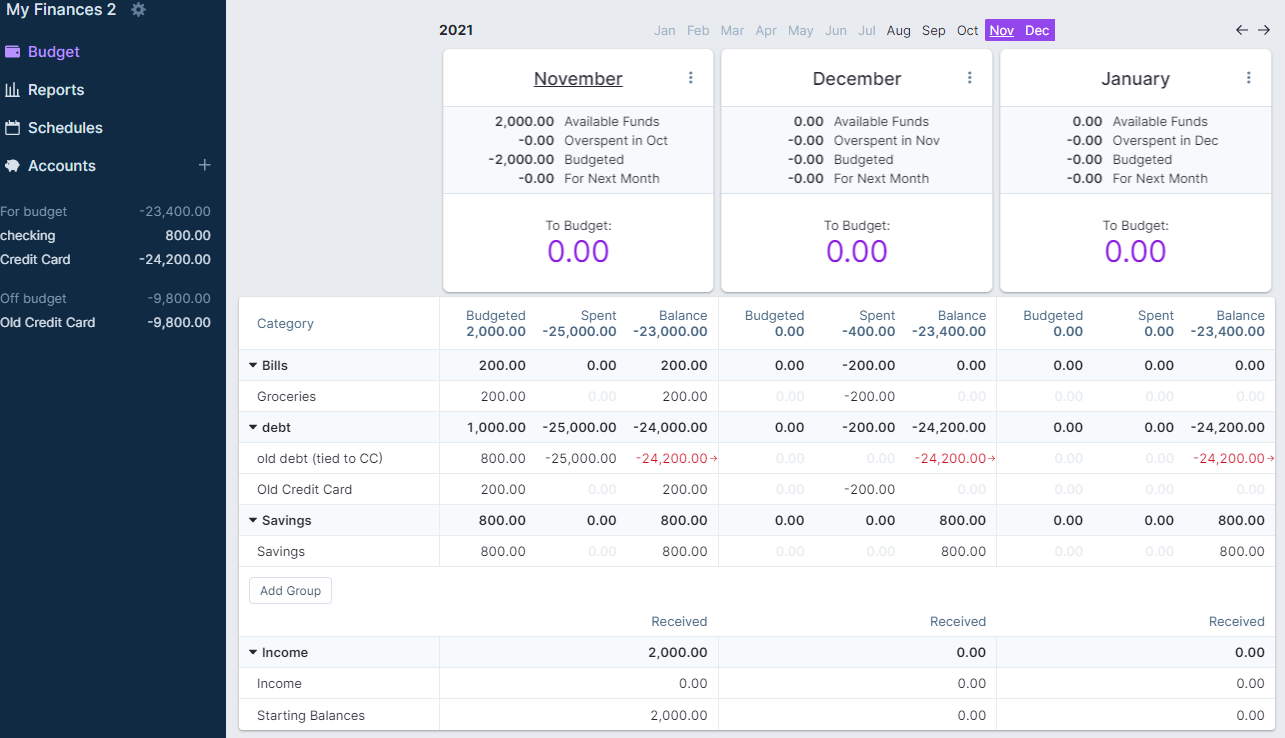
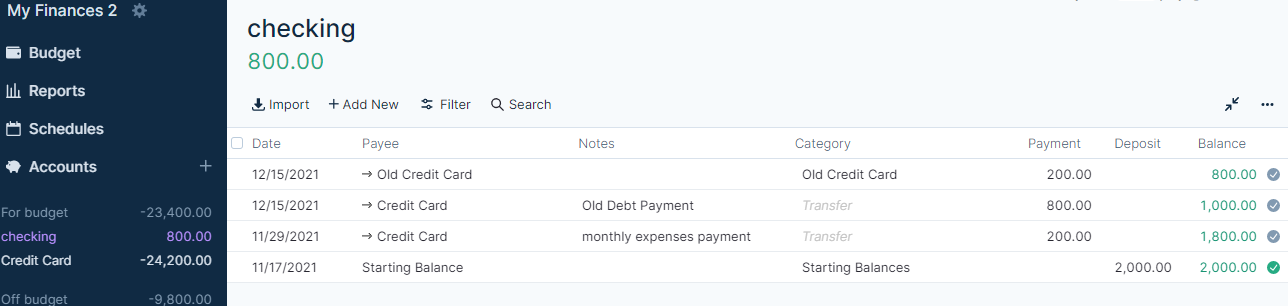
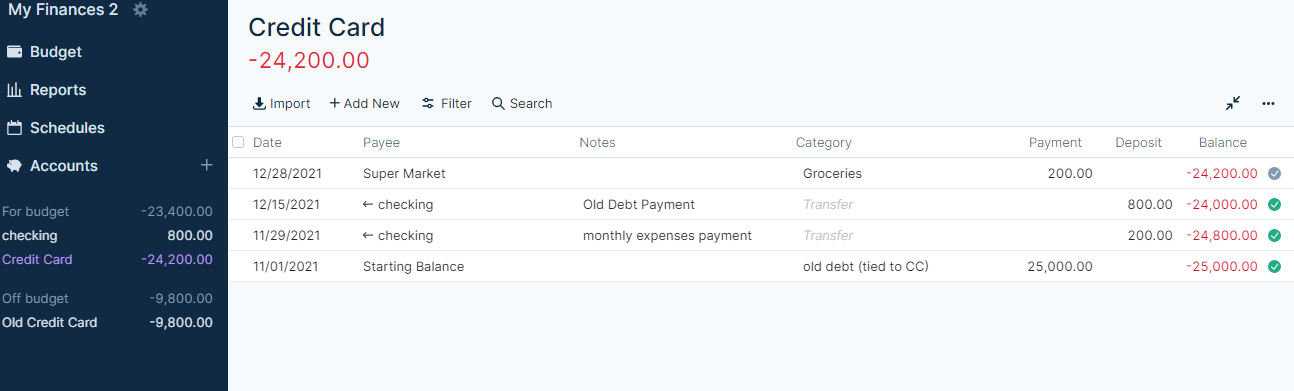
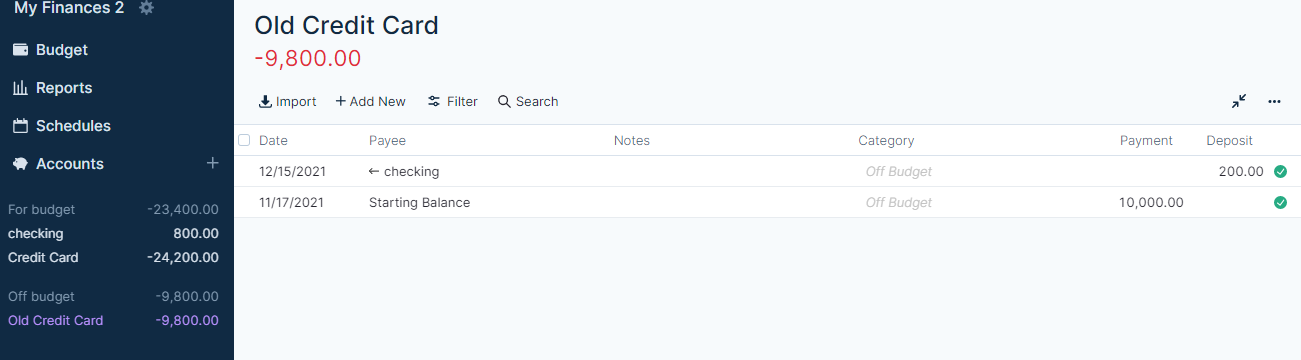
|
I think I'm getting it. Arrgh! I got the off budget one squared away, and think I'm good on the other one. I'll just keep transferring money and budgeting to the account for the off budget debt until it's gone. And the on budget one, as long as the negative balance on that category is less than what I owe (riding the CC float) I'll whittle it down too, budgeting various extra $'s here and there to it, until I'm all caught up. |
|
Well, that issue is purely budgeting and finances. I did that about 13 years ago and I feel your pain. It is such a relief when the yoke is gone though, so stay motivated! Hopefully you can figure out the software enough to make it flow well too. I think once you've got it set up, it shouldn't be too much work. |


Uh oh!
There was an error while loading. Please reload this page.
Uh oh!
There was an error while loading. Please reload this page.
I've noticed a few people getting confused with Credit Cards so I decided to post how I got it working for me. My method is different to what @jlongster showed in his dev video but I feel it works a little cleaner.
Now that you've got it setup you'll likely be wondering how you start paying down the debt. This is how I do my workflow:
When you make purchases on the Credit Card, you can simply use the category of the purchase. Then you know it can be paid off as it's already budgeted for. You basically want your credit card balance to match the balance shown in "Credit Card 1" when you make a payment (pay the difference between the current balance in the account and the amount shown on the budget tab) and then book this as a transfer.
If I make a purchase that I want to carry forward as a debt. I enter the category as "Credit Card 1" which then increases the balance again and I follow the paydown workflow above to then pay it down again over time.
I'll update this guide in future with some screenshots but I hope this helps!
All reactions