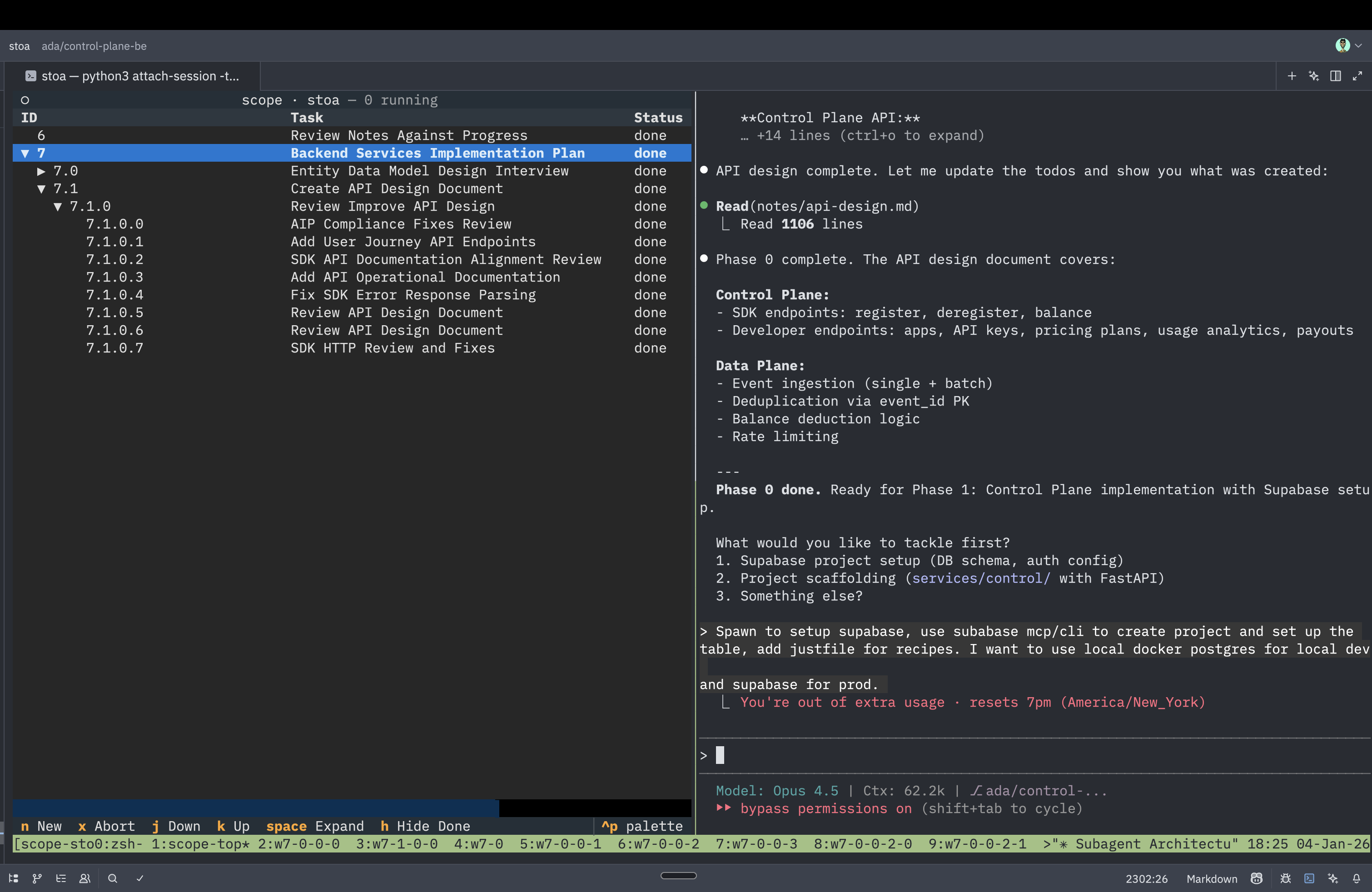
Launch Claude in fresh sessions. Stop context rot.


Scope is a substrate for building orchestration patterns, not an orchestrator itself. It provides primitives (
spawn,wait,poll) and visibility—you build the intelligence layer.
Your context is rotting.
Every task you give Claude Code accumulates baggage: file contents, failed attempts, exploratory tangents. When compaction kicks in, critical details vanish. Your main session becomes a diluted mess.
Main Session Context Over Time:

Start:    [████████████████████████████████████████] 100% relevant
After 3   [████████░░░░░░░░░░░░░░░░░░░░░░░░░░░░░░░░] 20% relevant
  tasks:  ↑ file reads, dead ends, tangents, old completions

After     [██░░░░░░░░░░░░░░░░░░░░░░░░░░░░░░░░░░░░░░] 5% relevant
compaction: ↑ critical details lost in summarization
This is context rot. Single-session workflows are fundamentally broken.
Spawn purpose-specific subagents with fresh context.
With Scope:

Main:     [████████████████████████████████████████] orchestration + results only
          ↓ spawn
Subagent: [████████████████░░░░░░░░░░░░░░░░░░░░░░░░] does one job, returns summary
          ↑ fresh context, focused task, clean result
Each subagent:
- Starts with fresh context (no accumulated baggage)
- Has a single purpose (no scope creep)
- Returns only what matters (you get the result, not the journey)
Your main session coordinates. Subagents execute.
# Install
uv tool install scopeai

# Or run directly without installing
uvx scopeai# Run setup (installs hooks, checks dependencies)
scope setupWhat this does:
- Installs Claude Code hooks to
~/.claude/settings.json - Verifies
tmuxis installed - Adds Scope documentation so Claude Code knows how to use it
- No API keys needed (uses your existing Claude Code auth)
Verify: Run scope - you should see an empty dashboard.
# Open the Scope dashboard
scope
In the dashboard:
- Press
nto start a new Claude Code session - Give Claude a multi-step task naturally:
- "Research authentication patterns in this codebase and implement JWT"
- "Refactor the API to use async/await"
- "Add comprehensive tests for the user module"
What happens:
- Claude analyzes the task and decides if it needs subagents
- For complex tasks, Claude automatically spawns focused subagents (research, implement, test)
- Watch the dashboard update in real-time as subagents start, run, and complete
- Your main session stays lean—just coordination and results
You don't need to know about scope spawn commands. Just talk to Claude naturally. The dashboard shows what's happening behind the scenes.
Advanced: Want manual control? See the Orchestration Patterns section for CLI usage.
# Update to latest version
scope update

# Or install a specific version
scope update 0.1.3
That's it. You're now orchestrating subagents with transparent visibility.
Scope is a protocol. Here's how to build common patterns on top:
# Each task depends on the previous
id1=$(scope spawn "research auth patterns")
scope wait $id1

id2=$(scope spawn "implement auth based on research from session $id1")
scope wait $id2

id3=$(scope spawn "write tests for auth implementation")
scope wait $id3
Pattern: Linear pipeline. Each step waits for the previous.
# Spawn multiple independent tasks
id1=$(scope spawn "audit codebase for security issues")
id2=$(scope spawn "research modern auth patterns")
id3=$(scope spawn "analyze test coverage")

# Wait for all to complete
scope wait $id1 $id2 $id3

# Now synthesize results
echo "All research complete. Aggregating findings..."
Pattern: Fork multiple subagents, join when all complete.
# Declare the full DAG upfront using --id and --after
scope spawn "research auth patterns" --id research
scope spawn "audit current codebase" --id audit
scope spawn "implement auth" --id impl --after research,audit
scope spawn "write tests" --id tests --after impl
scope spawn "update docs" --id docs --after impl

# Wait only on leaf nodes—dependencies auto-resolve
scope wait tests docs
Pattern: Directed acyclic graph. --after encodes dependencies. Scope validates the DAG but doesn't schedule—your shell does.
How it works:
--after research,auditmeansimplsession receives metadata about what to wait for- Your orchestration code (bash, or the parent Claude session) enforces the wait
- Scope just tracks state—it doesn't run a scheduler
# Map: Spawn N workers
files=$(find src/ -name "*.py")
for file in $files; do
  scope spawn "analyze $file for type errors" --id "worker-$file" &
done

# Reduce: Wait for all, aggregate results
scope wait worker-*
echo "Aggregating type errors from all files..."
cat .scope/sessions/worker-*/result | jq -s 'add'
Pattern: Spawn many workers, aggregate results.
Subagents can spawn children. Each child gets a namespaced ID.
# Inside session 0, this creates 0.0
scope spawn "Extract JWT helpers"

# Inside session 0.0, this creates 0.0.0
scope spawn "Parse token format"
Tree structure:
0           ← top-level
├ 0.0       ← child of 0
│ └ 0.0.0   ← grandchild
└ 0.1       ← child of 0
Rules:
- A session completes only when all children complete
- Aborting a parent aborts all descendants
- Each session is independently attachable
Pattern: Fractal decomposition. Let Claude recursively break down complex tasks.
Scope is NOT an orchestrator. It doesn't schedule tasks, manage dependencies, or auto-parallelize work.
Scope IS a substrate that provides:
spawn— Launch a subagent, get an IDwait— Block until completepoll— Check status (non-blocking)- Visibility — Real-time dashboard of all sessions
- Control — Attach, steer, abort anytime
You build the orchestration layer using these primitives. Scope is the medium. Your code (or Claude's reasoning) is the intelligence.
Other tools (Task, Explore) are opaque orchestrators—they decide how to parallelize, when to spawn, what to pass between steps. You get a black box.
Scope gives you transparent building blocks. Want DAG scheduling? Encode it yourself with --after. Want map-reduce? Spawn N subagents and aggregate results. Want actor model? Each session is an actor.
The orchestration pattern is YOUR code, not Scope's.
While Claude uses spawn/wait/poll, you observe and control via the dashboard:
scope┌─ scope ────────────────────────────────────────────────── 3 running ─┐
│ │
│ ▼ 0 Refactor auth to JWT ● running waiting on children │
│ ├ 0.0 Extract JWT helpers ● running editing token.ts │
│ └ 0.1 Update middleware ✓ done ─ │
│ ▶ 1 Write tests for user module ● running jest --watch │
│ │
├──────────────────────────────────────────────────────────────────────┤
│ n new ↵ attach x abort d hide done │
└──────────────────────────────────────────────────────────────────────┘
| Key | Action |
|---|---|
n |
New session (opens Claude Code in split pane) |
enter |
Attach to selected session |
x |
Abort selected (and descendants) |
j/k |
Navigate |
h/l |
Collapse/expand |
d |
Toggle completed sessions |
Key insight: The dashboard is read-only observation of state that lives in .scope/sessions/. Scope doesn't orchestrate—it renders.
For Claude Code users wondering why not use the built-in Task/Explore agents:
| Task Tool | Scope | |
|---|---|---|
| Visibility | Opaque black box | Real-time dashboard |
| Intervention | None—wait and hope | Attach, steer, abort anytime |
| Context | Shares parent context | Fresh context per agent |
| Parallelism | Sequential only | Spawn many in parallel |
| Nesting | Limited | Unlimited hierarchy |
| Debugging | Results only | Full session inspection |
| Philosophy | Orchestrator (opinionated) | Substrate (bring your own logic) |
Task is an opinionated orchestrator. Scope is a transparent protocol for building orchestration.
Without Scope (single session):
Task 1: "Refactor auth module to use JWT"

Context after completion:
├─ Your original request:           2K tokens
├─ File reads (15 files):          45K tokens  ← bloat
├─ Failed approach 1:              12K tokens  ← bloat
├─ Successful implementation:      18K tokens
├─ Test code:                       8K tokens
└─ Total:                          85K tokens

Result: Implementation works ✓

─────────────────────────────────────────────

Task 2: "Now add rate limiting"

Context before this task:
├─ Compacted summary:              25K tokens  ← auth details lost!
├─ Your new request:                2K tokens
└─ Total available:                27K tokens

Problem: Critical JWT implementation details were summarized away.
Claude has to re-read files and re-explore the auth system.
With Scope (orchestrated subagents):
Task 1: "Refactor auth module to use JWT"

Main session context:
├─ Your original request:           2K tokens
├─ Orchestration commands:          1K tokens
├─ Subagent results (concise):      5K tokens  ← only the essentials
└─ Total:                           8K tokens

Each subagent runs independently with fresh 200K context.
Main session never sees the 15 file reads, failed attempts, or exploration.

Result: Implementation works ✓ + main session stays lean ✓

─────────────────────────────────────────────

Task 2: "Now add rate limiting"

Main session context:
├─ Full task 1 context:             8K tokens  ← nothing lost!
├─ Your new request:                2K tokens
└─ Total:                          10K tokens

Claude has complete context of JWT implementation via clean results.
No re-reading. No re-exploration. Just forward progress.
The difference: WITHOUT Scope, your second task starts with 27K of fragmented context. WITH Scope, it starts with 10K of complete, relevant context.
- Each session is a real Claude Code process in tmux
- State lives in
.scope/sessions/(inspectable withcat,tail,watch) - Hooks track activity automatically via Claude Code's hook system (PostToolUse, Stop)
- The dashboard watches
.scope/sessions/for changes and updates instantly - Nesting is automatic via
SCOPE_SESSION_IDenvironment variable
You can inspect state directly:
cat .scope/sessions/0/task           # What's it doing?
cat .scope/sessions/0/state          # running | done | aborted
tail -f .scope/sessions/0/activity   # Live activity feed
cat .scope/sessions/0/result         # Final output
The entire Unix toolkit works. The filesystem is the IPC layer.
See docs/02-architecture.md for technical details.
No black boxes. The subagent's state is your state. .scope/sessions/ is world-readable.
Intervention is a first-class feature, not an escape hatch. Attach and steer anytime.
Scope provides primitives. You encode the intelligence.
One command to spawn (scope spawn). One interface to observe (scope). Zero configuration to start.
See docs/00-philosophy.md for the full design philosophy.
5 minutes: Install → setup → first spawn → see result 15 minutes: Parallel spawns → DAG dependencies → dashboard mastery 30 minutes: Hook integration → recursive decomposition → custom workflows
- Single atomic tasks — Don't spawn for a quick file read or one-line fix. Just do it inline.
- Tight back-and-forth dialogue — If the task requires iterative refinement, keep it in your main session.
- Tasks requiring your running state — If the subagent needs access to variables or state in your current context, don't spawn.
Rule of thumb: If the task would consume >30% of your context window, spawn. Otherwise, do it yourself.
Scope requires tmux to manage background sessions.
Install tmux:
- macOS:
brew install tmux - Ubuntu/Debian:
sudo apt install tmux - Arch:
sudo pacman -S tmux
Then re-run scope setup.
Check hooks are installed:
cat ~/.claude/settings.json | grep scopeYou should see PostToolUse and Stop hooks pointing to scope hook.
Fix:
scope setup # Re-run setup to reinstall hooksIf a session shows as running but Claude has crashed:
scope  # Open dashboard
# Navigate to stuck session and press 'x' to abort
Or manually:
cat .scope/sessions/0/tmux_session  # Get tmux session name
tmux kill-session -t scope-0 # Kill it manuallyThe dashboard watches .scope/sessions/ for changes. If it's frozen:
- Press
Ctrl+Cto quit and re-runscope - Check file permissions:
ls -la .scope/sessions/ - Verify hooks are running:
tail -f .scope/sessions/*/activity
When using --after, ensure parent sessions have written their results:
# Wait for dependencies before spawning
scope wait research audit
scope spawn "implement based on research + audit" --id impl- Python 3.10+
- tmux
- Claude Code
MIT

