This repository is used to store all the unit icons used in the game AFK Arena. You can use this repository as a CDN. Since the assets provided by Lilith are rather small, they have all been upscaled by using waifu2x. New units are automatically added when they are pushed to Lilith's CDN. All the assets have been converted to the webp format to reduce their size.
The file index.json (or index.min.json) contains the lists of all the assets available in this repository. You can fetch it to know if an asset exists or not before making a request.
https://raw.githubusercontent.com/afk-mine/cdn/main/index.json
There is also unit.json (or index.min.json) file that contains the list of every unit available in the game. It contains the ID and the code names that you might need to use the CDN.
https://raw.githubusercontent.com/afk-mine/cdn/main/unit.json
Then, there are two folders that contain the original assets unit_icon and unit_icon_by_id. The first folder contains the assets with their original names, while the second folder contains the assets with their ID as names.
A third folder, framed_unit_icon, contains all the heroes and pets icons framed the same way as in the game.
The URL of an asset is
https://raw.githubusercontent.com/afk-mine/cdn/main/unit_icon/<internal_unit_name>.webp
https://raw.githubusercontent.com/afk-mine/cdn/main/unit_icon_by_id/<unit_id>.webp
For example, the URL of the asset unit_icon/Admiral.webp is https://raw.githubusercontent.com/afk-mine/cdn/main/unit_icon/Admiral.webp.
And if you know each unit ID, you can also use this URL: https://raw.githubusercontent.com/afk-mine/cdn/main/unit_icon_by_id/171.webp.
Many variants exist for the icons:
<name>.webp: the original icon<name>_Battle.webp: the in battle icon (only for heroes)<name>_<ID>.webp: the ID is usually for skins<name>_basic.webp: the basic form icon (only for pets)
The framed icons are a reconstruction of the in-game icons with all the hero investments. The goal was to reproduce as much as possible the imperfection of the original icons. Like the stars overflowing the frame, or the faction circle not fitting in the SI circle. Those imperfections are even more visible with the upscaling. To use the framed icons, you need to specify in the name multiple parameters: unit ID, ascension, signature item level, furniture level and engravement level. Here is how to build the name:
<unit_id>_<ascension>[_si<signature_item_level>][_f<furniture_level>][_e<engravement_level>][_2x].webp
All the investments should respect this order. The investments between [] are optional. Here are the possible values:
| Ascension | Short name |
|---|---|
| Common | c |
| Rare | r |
| Rare plus | rp |
| Elite | e |
| Elite plus | ep |
| Legendary | l |
| Legendary plus | lp |
| Mythic | m |
| Mythic plus | mp |
| Ascended | a |
| Ascended one star | a1 |
| Ascended two star | a2 |
| Ascended three star | a3 |
| Ascended four star | a4 |
| Ascended five star | a5 |
- SI level: no value, 0, 10, 20 or 30
- Furniture level: no value, 3, 9 or 36
- Engravement: no value, 30, 60 or 80
Here are some examples:
178_c.webp
178_a2_f3.webp
178_a1_si0_f9.webp
178_a_si30_f36_2x.webp
Heroes with skins have additional framed icon variants. The skin ID is added after the ascension level with the _sk prefix:
<unit_id>_<ascension>_sk<skin_id>[_si<signature_item_level>][_f<furniture_level>][_e<engravement_level>][_2x].webp
The available skins for each hero are listed in the skins field of unit.json. For example, Brutus (ID 9) has 3 skins:
9_a5_sk901_si30_f9_e80.webp     (Lone Guardian skin)
9_a5_sk902_si30_f9_e80.webp     (Blazefury skin)
9_a5_sk903_si30_f9_e80.webp     (Mighty Guardian skin)
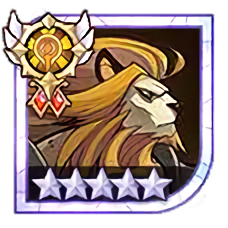
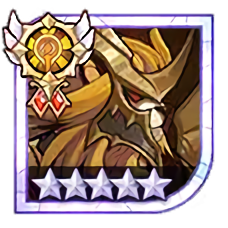
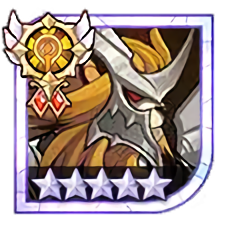
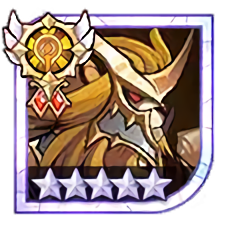
With all the combinations possible, 437 icons were generated per hero (plus additional variants per skin). With the 2x upscaling, 874+ icons are available per hero.
An example script to generate the name is available in the scripts folder.
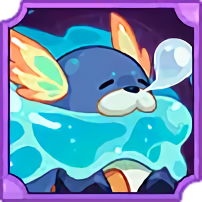
For the pets, a blue or purple frame is added the same way as in the game. For each pet, four icons are available:
<id>.webp
<id>_2x.webp
<id>_lvl18.webp
<id>_lvl18_2x.webp
The collection icons are a reconstruction of in-game collection icons with the various investments. To use the collection icons, you need to specify in the name multiple parameters: collection ID, the skill level, the number of mythic stat, and whether the class icon is added.
<id>[_lvl<skill_level>][_ms<number_of_mythic_stats>][_cl][_2x].webp
The parameters between [] are optional. Here are the possible values:
- Skill level: no value, 1, 2 or 3
- Number of mythic stats: no value, 1, 2, 3, 4, 5, 6, 7 or 8
Here are some examples:
1.webp
2_lvl1.webp
3_ms4.webp
4_lvl1_ms2_cl_2x.webp
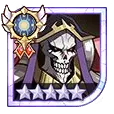
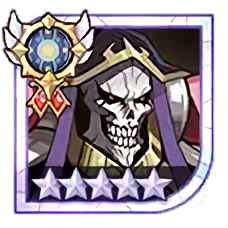
The assets have been upscaled by using waifu2x. For unit_icon or unit_icon_by_id, you just need to specify the _2x or _4x suffix to the asset name to get the upscaled version. For framed_unit_icon, only _2x is available. Demo:




- 2,319 unit icons
- 3,127 unit icons by id
- 382,499 framed unit icons
- 2,880 collection icons