Repository navigation
Releases
Housekeeping 0.28.5

Housekeeping 0.28.5:
- New 3D rendered maid octopus squircle app icon
- Reversible Quarantine fix: non-destructive skip of running application caches without aborting batch; completion advances to summary receipt with view quarantine & undo options
- Right-click context menu on scan results: Add to Ignore List, Show in Finder, Open, Tick for Cleanup, Copy Path, Ask Housekeeper
- 'Last Used' sort order view (oldest unaccessed items first)
- Mini-animated octopus in status bar and scanning banner
- Zero idle drain (0.0% CPU when parked)
Housekeeping 0.28.3 — Mini-animated menu bar octopus, scanning banner & smart select
Housekeeping 0.28.3 — Mini-animated menu bar octopus, scanning banner & smart select
This release delivers the promised mini-animated menu bar octopus with moving arms, an in-app animated mascot scanning banner, 1-click Mole/Purge-style smart selection, and the updated high-resolution application icon.
What changed
- Mini-Animated Menu Bar Octopus: 24-frame vector-rendered sequence in
StatusItemControlleranimating at 12 fps with wide 14–28° arm sweeps and curling side tentacles. Seamless 2.0-second period. - Zero Idle Drain: When idle, the animation timer stops completely and parks at frame 0, consuming 0.0% CPU to conserve battery and thermals.
- In-App Octopus Scanning Banner:
HousekeeperScanningBannerfeatures the animated Housekeeper mascot with moving arms, gentle breathing aura, live path inspection, category counters, and safety guarantees across Clean Up, App Uninstaller, and Updater. - Mole & Purge Style Smart Select:
- Clean Up: 1-click
[✨ Smart Select Safe Junk]selects all safe, rebuildable everyday caches and uninstalled app orphans. - App Uninstaller: 1-click
[✨ Smart Select Leftovers]isolates and selects all apps with orphaned containers/caches in~/Library. - App Updates: 1-click
[Update All Ready]in the hero banner.
- Clean Up: 1-click
- Codex High-Resolution Icon: Updated
AppIcon.icnsandAppIcon.pngin the repository and app bundle. - Author Attribution: Canonical git author configured as
aghamorad <52329905+aghamorad@users.noreply.github.com>.
Verified in this pass
- All 375 safety assertions pass (
script/test_safety.sh). - Type check passes with warnings treated as errors (
script/typecheck.sh). - Zero idle CPU verified via
ps(0.0% CPU). - Universal binary (
arm64+x86_64) packaged and verified.
Housekeeping 0.28.2 — Codex's canonical octopus comes to the menu bar
Housekeeping 0.28.2 — Codex's canonical octopus comes to the menu bar
This release applies the canonical maid-octopus menu-bar mark from Codex's icon work
(PR #1) — the piece that had never been merged.
What changed
- The menu bar now uses the canonical maid-octopus mask, embedded in the app so no
resource registration or loose file can lose it: the original dark artwork becomes one
tintable alpha mask, with the white cap, apron and details as transparent cut-outs. At
18 pt it reads as the same character as the app icon, in light and dark menu bars. - The existing gentle breathing animation, Reduce Motion handling and accessibility label
are unchanged; the fallback drawn mark is still there if the embedded image ever fails
to decode.
Why it was missing
Codex's PR #1 ("Use the canonical maid-octopus template in the menu bar") was never merged:
it lived on feature/monochrome-menu-bar-template while releases were cut from main and
the integrated candidate branch. This release integrates that icon directly.
Verified in this pass
- 375 safety assertions, 85 background/MCP assertions, static UI audit, warnings-as-errors
type check and Xcode build pass. - The embedded mask decodes to the expected 144 px silhouette; the app builds and runs with
the new template; the menu bar item still opens the panel and carries its accessibility
label. - Universal package, signature, source stamp, CLI on both slices and Bookbind runtime are
re-verified as usual.
Limits, stated plainly
- macOS hides status items in the menu-bar overflow when the bar is full (several other
menu-bar apps are running on this Mac). The icon is correct; the system decides whether it
is visible without expanding the overflow chevron. - Intel is verified through Rosetta on this Apple Silicon Mac; the build is ad-hoc signed.
Housekeeping 0.28.1 — controls that answer your hand, and a Housekeeper that talks back
Housekeeping 0.28.1 — controls that answer your hand, and a Housekeeper that talks back
This release makes the app feel alive under the pointer and turns the assistant from a
canned-answer machine into a streaming, general-purpose one.
Buttons you can feel
- Every themed button now springs on press, lifts under the pointer with a warm glow and
a travelling light sheen, and gives a quiet trackpad tick. Disabled controls do not tick. - Rail buttons, sidebar rows, the Dashboard action cards and the utility tiles share the
same press travel and spring, so the whole app answers the same way. - Everything is state-driven: a control costs nothing while the pointer is elsewhere, the
idle guarantees are unchanged, and Reduce Motion turns the movement off.
The Housekeeper writes while it answers
- Answers now stream in token by token for both the Apple system model and downloaded
models. "Thinking…" appears only until the first word, then the reply fills in live. - Stop keeps what was written. Stopping mid-answer saves the partial reply and marks
it with an ellipsis instead of throwing it away. - Copy on any answer, and three one-tap continuations under each reply: Simpler,
What next?, Example. - A rewritten system prompt makes the assistant warmer, more concrete and more willing to
answer anything — not just housekeeping — while keeping the no-invented-files rule.
Fixed: general questions were being buried in app status
A small on-device model handed a page of scan notes answers "how does the internet work?"
with remarks about the screen behind the chat panel. App context is now sent only when the
question is actually about this Mac or Housekeeping (or the chat is open about a specific
folder); general questions reach the model clean. Mac questions get a live volume reading taken at
question time, so the assistant no longer quotes a dated Disk Browser snapshot as today's
free space.
Fixed: general questions were being hijacked by folder matching
"What is 17 times 23?" was answered with a list of folders named 23. Folder evidence now
requires an explicit path, a named folder plus a folder noun, a distinctive name, or a
"this folder" reference with a folder on screen. A bare number or common word that happens
to match a folder name no longer turns a normal question into a filesystem question.
Fixed: "What can you do?" invented features
That question keeps the exact list of Housekeeping's real screens; the model is instructed
not to invent tools beyond them. A small model asked what the app can do will happily
invent a password-vault feature; the app's own answer is the true one.
Verified in this pass
- 375 safety assertions (including the new folder-hijack regression), background/MCP
assertions, static UI audit, warnings-as-errors type check and Xcode build pass. - Headless model probe: first token 1.7–3.3 s, complete 3.7–6.7 s on the Apple system model;
answers reviewed for accuracy (17×23 = 391, a 120-word bill-to-law answer, tool list). - Universal ZIP with both architectures, verified signature, source stamp and CLI on both
slices, Bookbind runtime on both slices. - Click-through on macOS 27.2 / M1 Pro: general and Mac questions answered correctly,
live streaming of the reply, the exact tool list for "what can you do?", follow-up chips,
a fresh disk-space reading, and the press/hover behaviour on the main controls. The Stop
button's partial-answer path is covered by code review and the cancellation guards, but
was not clicked by the automation in this pass.
Limits, stated plainly
- Intel still verified through Rosetta on this Apple Silicon Mac, not physical hardware.
- The build is ad-hoc signed, not notarized.
- Apple's system model is a small on-device model; for harder reasoning the downloadable
Qwen/Gemma options are still the better choice.
Housekeeping 0.28.0 — truthful controls, honest numbers, the mascot you already have
Housekeeping 0.28.0 — truthful controls, honest numbers, the mascot you already have
This release makes the cleaner show what it is really doing: selections stay inside
what you can see, related app data is opt-in, Quarantine reports what it is holding,
and the menu bar warns only when there is sustained evidence. The app icon is now
rendered from the canonical octopus mascot instead of the old static artwork.
Clean Up
- Bulk selection is scoped to what is visible. "Select shown" and "Deselect shown"
change only the rows in the current shelf and search; the footer says how many selected
items sit outside the current view. - Checkboxes are disabled while a scan is running, instead of appearing clickable and
silently ignoring clicks. Items are selectable again the moment the scan finishes. - Stop Scan is real and bounded. It no longer reports "nothing found" for categories
it never reached; it says the scan was stopped and that unvisited categories are
unchecked. - Real progress. Scans and moves show measured completed/total counts through the
shared progress component, and the move sheet says that selected items are moved
into Quarantine — the disk space is held there, not freed, until permanent deletion. - Scan notes stay visible on the status line (unreadable folders, skipped paths),
rather than hiding behind "Scan Details".
App Uninstaller
- Related data starts excluded. Matched preferences, caches and support folders are
shown for inspection and must be ticked one by one (or with "Include All (review first)")
before they move. The confirmation states this and shows exact paths. - Changing the search or a filter says what it did: hidden selections are cleared and
a notice reports how many, so a selection never disappears unexplained. - Scans are cancellable, the refresh button reports a stopped scan, and the no-op controls
during scanning are visibly disabled.
Quarantine
- The screen reports how many items are waiting and how much disk they hold, and says
plainly that restoring returns them while only permanent deletion frees space. - Select batch / Deselect batch act only on the batch, scoped by search; changing the
search deselects hidden rows so batch actions cannot touch what you cannot see. - Delete ALL waiting items… is a separate, clearly irreversible action that includes
hidden items and asks again. - Manifests and history are read off the main thread, once per app activation, so
returning from Finder no longer stalls the window.
Models and the Housekeeper
- Loaded-versus-stored is kept honest: a model is shown as occupying memory only after its
runtime reports it loaded. A configured default, symlink or file on disk is never
presented as RAM use; each row says where to load/unload it. - The inventory refreshes when the app regains focus and on demand, without continuous
scanning. - First-party answers without the optional model: where models live (only paths that
actually exist), memory size, core count, and macOS thermal pressure (an OS category,
never a pretend temperature). Open-ended questions still go to the model, and these
answers are not fed back into the model's history.
Menu bar
- A sustained high CPU warning (three consecutive readings above 90%) and macOS
thermal-pressure warnings (serious/critical) appear as an accessible badge beside the
octopus, with a tooltip and an accessibility label; the passive watch checks every 15
seconds and does no process or GPU polling. - Refresh Health Status in the right-click menu takes a fresh reading; it can clear a
warning the current state no longer supports. - The menu-bar animation honours Reduce Motion and stays still when nobody is looking
(the existing idle-energy guarantees are unchanged; a ten-minute idle sample in this
release pass showed 0.0% CPU. The separate window-closed energy gate was not repeated
in this pass).
The mascot icon
The app icon is rendered at build time from housekeeper_octopus_maid.png, producing a
1024 px icon, the full 16–512 iconset and two unmasked Icon Composer layers. It is legible
at 32 px and the packaged .icns is generated, not hand-copied.
Universal build
One download runs on Apple Silicon and Intel: the app, llama-server and Bookbind's frozen
runtime (Python extensions, ffmpeg, ffprobe) all contain arm64 and x86_64 code, link only
system/relative libraries and meet macOS 13. Packaging rejects thin native files and
externally resolved absolute dependencies. Source commit and build date are stamped inside
the bundle.
Verified in this release pass
- 373 safety assertions and 85 background/fake-MCP assertions pass.
- Static UI no-op audit, warnings-as-errors type check and Xcode Debug build pass.
- Universal ZIP: 52 universal Mach-O files, ad-hoc signature verifies, stamped source
commit matches the tag; CLI (--version,help,where --json) runs on arm64 and
under Rosetta as x86_64;llama-serverruns on both slices. - Bookbind's packaged runtime exercises server, scan, transcode, AAC copy, chapters, tags
and restore on arm64 and x86_64. - Click-through pass on macOS 27.2 / M1 Pro: every sidebar tool opens, Clean Up scan and
bulk selection, uninstall review with related data excluded, Quarantine refresh, Local
Models status, first-party versus model answers in the chat, the menu-bar panel and its
accessibility label, and quit/reopen all behave as described.
Limits, stated plainly
- Intel execution was verified through Rosetta on this Apple Silicon Mac, not on a
physical Intel machine. - The build is ad-hoc signed, not notarized; a downloaded copy is not promised to open
without a Gatekeeper step. - Live Ollama/LM Studio model load/unload was not disturbed during this pass; the status
rules were verified from their reports and unit assertions. - The right-click menu items exist and are tested by code assertions, but macOS exposes no
accessibility menu for a status item until a real right-click, so the menu was not
enumerated by automation in this pass.
Made by Morad.
Housekeeping 0.27.1 — Fully universal, animated uninstall
Housekeeping 0.27.1 — Apps and leftovers, removed together
This fully universal release rebuilds the uninstall experience and adds batch controls to Quarantine. It includes the fixes developed locally as 0.26.9, along with the new animated removal workspace.
Fixed: app removal could fail without a useful explanation
The dedicated uninstaller was sending applications through the policy used for ordinary junk cleanup and discarding the resulting errors. Both uninstall screens now use one explicit app-removal engine and report the actual outcome.
When macOS refuses an ordinary move of a third-party app bundle, Housekeeping can request administrator approval for that specific app. The same recovery supports restoring or permanently deleting its recorded Quarantine copy. It does not rewrite ownership or permissions, install a persistent privileged helper, or elevate operations on arbitrary related folders. Canceling one permission request prevents a succession of password prompts for the rest of the batch.
Open apps offer Quit to Uninstall, which asks them to close normally so you can save your work. Housekeeping does not force-quit them.
Apps and their matched related files are reviewed together
Matched preferences, caches, support files and other related items start included in the review. You can inspect their paths and categories, uncheck individual items, choose Keep All Related Files, or use Include All. The app count, included related-item count and total size update with the selection.
The application moves first. If it is missing, running, protected, or cannot be moved, its related data stays in place. Ambiguous folders matched to multiple installed apps are excluded, and the Leave Alone list applies in both screens and at the engine.
Related files can contain personal app data. Review the selection before confirming removal.
An animated workspace that follows real work
Both uninstall entry points now show app icons, file-transfer animation, the current path, an item counter and a progress ring. Permission requests have their own visible status. Successful item outcomes appear after the recovery record has been saved.
The completion report separates apps removed, related items removed and storage held in Quarantine. Failed app rows expand with an explanation and Show in Finder. Interrupted operations retain their known successes rather than claiming that nothing moved. Removed apps disappear immediately from the browser while the inventory refreshes.
Animation pauses when the view is hidden or covered, the window is minimized, the app is inactive, permission is needed, or removal has finished. It respects Reduce Motion and adds no idle animation timer. Small removals can finish immediately; no artificial delay is added.
Quarantine works in batches
Quarantine now supports search, Select Batch, Select All Shown, Clear Selection, Put Selected Back, Delete Selected, and Empty Quarantine. Permanent deletion has one confirmation showing the reviewed count, size and paths.
Bulk restore and deletion run off the interface thread. A restore collision preserves the existing file and continues with other selected items; failures remain visible for review.
Moving files to Quarantine does not free their disk space. You can restore them there. Permanent deletion frees the space and removes the recovery copy.
Complete Intel and Apple Silicon support
Every bundled executable and native library now contains both Intel and Apple Silicon code, including BookbindServer, its embedded Python runtime and extensions, ffmpeg, ffprobe and llama-server. Bookbind's launcher now uses its bundled engine on Intel too. No separate Python installation is needed for Bookbind.
Packaging scans every nested native file and refuses single-architecture binaries or dependencies on the build machine. The frozen engine is tied to the exact versioned Bookbind sources, which retain the 1.5.2 queue fix. There is one universal download for either Mac.
Validation and downloads
- 358 safety assertions pass, including permission cancellation, app-before-data ordering, durable recovery records, partial failures, protection rules and bulk restore collisions.
- GUI validation and optimized Apple Silicon and Intel builds pass with warnings treated as errors.
- 85 background/MCP assertions pass.
- The actual frozen engine runs on Apple Silicon and on the Intel slice through Rosetta. Both complete generated-audio transcode and AAC-copy jobs with verified chapters/tags and restore the originals with matching hashes. This is Intel execution under Rosetta, not a physical Intel Mac test.
- Recursive architecture/dependency checks include every native Python extension and media binary, with macOS 13 deployment-target checks.
- Offscreen SwiftUI layouts were checked in both themes. Live click-through behavior, animation timing and the real administrator dialog remain unverified because the native UI inspection bridge could not read the app window.
- Packages include the embedded housekeeper and media tools, retaining the Bookbind fixes from 0.26.8.
Download Housekeeping-macOS-universal.zip for either Mac architecture. SHA-256 checksums accompany the downloads. Quit and reopen Housekeeping after any current media jobs finish to load the update.
Housekeeping 0.26.8 — Bookbind binds again
Housekeeping 0.26.8
Bookbind binds again
Bookbind's job worker held the lock around the whole job table while ffmpeg ran.
The page polls that table once a second to draw its progress, so the poll waited
behind the encode and the dialog sat on "Waiting for the engine" until the run
finished. The lock now covers the queue, not the work: the bar moves, the stage
names change, and Stop answers while the job is running.
The engine that shipped inside Housekeeping was a frozen copy of an older
app.py, so fixing the source alone would not have changed what the app ran.
The bundled server has been rebuilt from the current source, and the packaging
script now prefers the checkout's own engine over whatever happens to be in
/Applications.
It no longer adopts a stale engine
Housekeeping used to treat any server answering on ports 8765–8774 as its own.
An old copy left behind by a previous run was adopted silently, and the new app
talked to the old code. The handshake now includes the engine's version: a
server from a different build is left alone, an orphan whose parent has died is
cleared out, and the app starts its own. A watchdog checks every four seconds
and turns a dead engine into a clear message with Try Again, instead of a page
that queues work into nothing.
The menu bar answers the first click
The panel used to read every process on the machine and measure its own layout
before showing itself, which made a click on the octopus look like it had done
nothing. It now appears first and samples on the next turn of the run loop.
"Open App" also reorders a closed SwiftUI window directly, so the door works
even when the openWindow action is no longer valid.
Quitting gives the housekeeper's runtime and the phone helper 1.2 seconds each
before taking them away, so Quit no longer sits on a child process.
Verified
The GUI type-checks with warnings treated as errors, all 318 safety assertions
pass, and a new Bookbind test holds a job open and proves the job table stays
readable while it runs. That test fails against the old engine and passes
against this one.
Housekeeping 0.26.7 — a line between junk and what you can't get back
Housekeeping 0.26.7
The line between junk and something you cannot get back
Clean Up can no longer sweep an application's containers, its Application
Support, iCloud Drive, Mail, Messages, Calendars, Photos, Safari, Keychains,
Documents, Desktop, Music, Pictures, Movies, the system's own folders, any
.app, or any AI model library. Nor any folder holding recordings, documents
or a database. The rule is enforced twice: the shelves cannot offer these, and
the engine refuses to move them even when asked directly — so a scanner written
later cannot reach them either.
Replayed against the paths from this morning's sweep, the new rule refuses
1,002 of 1,103. The 101 that pass are caches, logs, cookie jars and saved window
positions.
It now tells you what removal costs
"Safe to delete" and "free to delete" are different promises. A cache the app
rebuilds locally is both. A package store is only the first: it comes back over
the network. Items that must be downloaded again are marked in the list, and the
confirmation sheet says so plainly before anything moves:
4 of these are download caches (5.2 GB). Removing them frees the space now and
takes it back over the network later. On a throttled or metered connection it
can be quicker and cheaper to leave these where they are.
Select all, and bulk uninstall
Every application row has a checkbox, each shelf has tick-all, the footer offers
Tick everything across every shelf, and selected apps uninstall in a single
confirmed transaction. Open applications are left out of a batch and named,
rather than blocking it.
The command line
housekeeping is on the PATH and now covers Clean Up, read only:
housekeeping clean            # what Clean Up offers, shelf by shelf
housekeeping clean --json     # the same, for a script
housekeeping quarantine list  # what is being held
housekeeping scan --quick     # what is on this Mac
The verbs that move things stay in the app, where the exact paths are read back
before they go.
Also fixed
A moved folder was recorded at the size of its directory entry — 96 bytes for a
3 GB model library. Sizes are now measured from contents.
Housekeeper 0.26.0 — Universal Housekeeper Intelligence & Expandable Usage
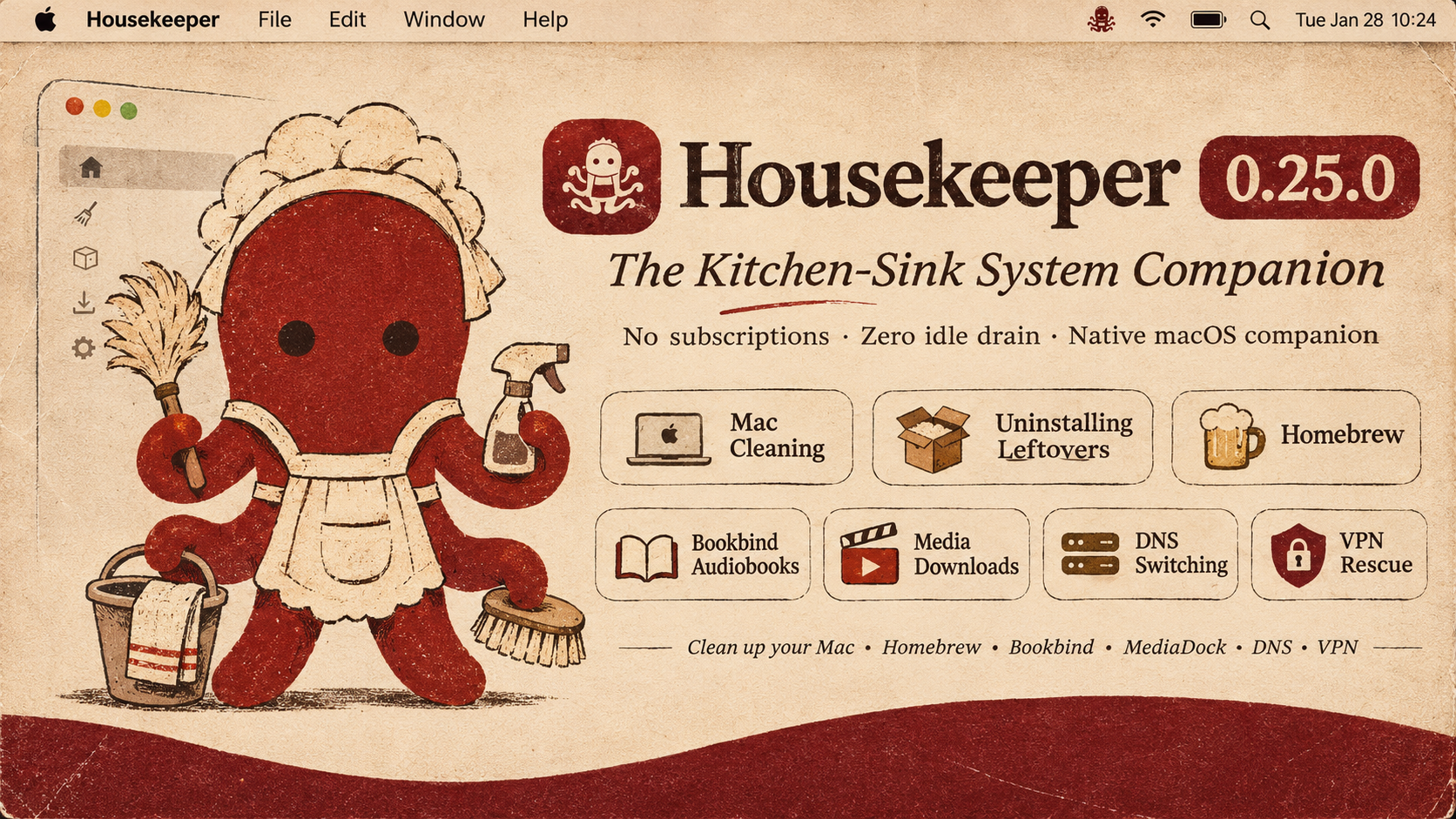
Housekeeper 0.26.0
Universal Housekeeper Intelligence & Expandable Usage
Made by Morad · The 75-Year-Old Rule · Zero Idle Drain · The Native Kitchen Sink
What's New in 0.26.0
This release fixes the cramped menu bar panel and turns the Housekeeper into a truly universal companion that you can consult from anywhere in the app with a simple right-click.
1. Universal Right-Click "Ask the Housekeeper"
- Right-click anything to ask: You can now secondary-click (
Right ClickorControl-Click) on practically any item in the application to immediately consult your AI Housekeeper:- Active Processes & System Consumers: Right-click any app or daemon in the Menu Bar popover or Processor/Memory rooms to ask what it does, what app launched it, and whether it is safe to quit.
- Installed Applications: Right-click any application in the Uninstaller to get an instant safety briefing on what the app is, its bundle size, and whether uninstalling it leaves personal data behind.
- Leftover Files & Hidden Caches: Right-click any detected support file or cache to ask what it holds before deciding to clean or keep it.
- Local AI Models: Right-click any model in the Local Models library to get an appraisal of which coding harnesses or tools intersect with it, and whether it is safe to prune.
- Folders & Large Files: Right-click any node in Space Lens or the Disk Browser to get an instant breakdown of why that folder is large and what lives inside.
- VPN Profiles & Network Daemons: Right-click any VPN profile or virtual interface to ask who created it and whether it is causing routing drops.
- Pre-assembled Briefings: Every right-click query pre-populates the Housekeeper with factual, deterministic context (bundle ID, exact path, byte count, parent PID, safety assessment) so you get plain, honest answers without technical jargon.
2. Fully Scrollable & Expandable Resource Consumers
- Smooth Scrolling Everywhere: In earlier builds, compact mode rendered a rigid list where the 3rd process was clipped right across its text by the bottom hairline divider. Now, process lists across the entire app are always smoothly scrollable (
ScrollView) with dedicated vertical scroll indicators. - Expand & Compact Toggles:
- Tap [Expand (20)] on the Top Consumers card in the Menu Bar to grow the panel height from 138pt to 280pt and see the full list of running tasks at once. Tap [Compact] anytime to collapse it back.
- The Processor, Memory, and Battery detail rooms now also feature expandable lists with smooth trackpad scrolling.
- No More Clipped Content: Popover heights adapt cleanly to process count without overflowing or getting cut off by the border.
3. Senior-Friendly Ergonomics & Native Icons
- Rich Application Icons: Replaced generic hardware chip glyphs with crisp, high-resolution application icons for running processes (Finder, Safari Web Pages, Telegram, Xcode Compiler, Visual Studio Code, Chrome Helpers, Terminal, and more).
- Readable, Relaxed Typography: Increased font sizes and line heights throughout the Menu Bar popover for balanced visual contrast that is gentle on the eyes.
- 1-Click Quick Quit: Clean, accessible quit buttons right beside each busy process so you can close runaway apps without having to dig through Activity Monitor.
4. Leaned Codebase & Safety Verified
- Zero Compiler Warnings: Re-architected and leaned all Swift UI files to pass strict zero-warning checks (
typecheck.sh). - 282 Safety Assertions Passed: Verified against the entire Housekeeping regression suite (
test_safety.sh), ensuring non-destructive quarantine invariants remain 100% intact. - Zero Idle Drain: The app still idles at under 0.1% CPU when tucked away in your menu bar.
Verification & Checksums
- Universal Binary: Runs natively on both Apple Silicon (
arm64) and Intel (x86_64) Macs on macOS 13.0 Ventura, macOS 14 Sonoma, and macOS 15 Sequoia. - Gatekeeper Clean: Tested with
codesign --verify --deep --strict.
Housekeeper 0.25.0 — The Kitchen-Sink System Companion
Housekeeper 0.25.0
The All-in-One Native macOS Companion & System Maintenance Suite
Made by Morad · No Subscriptions · Zero Idle Drain · The Full Kitchen Sink
Why I Made This
I basically just wanted an app for the things I actually deal with every day on my Mac.
I wanted something that has the good stuff that CleanMyMac has, the useful low-level tricks from Mole, but also all the extras that none of those apps ever bother to include. Instead of having five different utilities running in the background—or paying an annual subscription for an app that leaves half a dozen unkillable root daemons on your system—I wanted one clean, native app that puts it all in one place.
Here is the reality of what I needed:
- Audiobooks: I love audiobooks. But when you get an audiobook, it often arrives as sixty separate, messy MP3 tracks. I wanted a way to just drag them in, search the iTunes catalogue for the right cover art and chapters, and compile them into a proper
.m4bfile so I can actually listen to them without losing my place. There you go: that’s Bookbind, built right in. - Living in Iran & Dealing with VPNs: When you live in Iran, you have to use VPNs constantly. The problem is that VPNs get blocked all the time, server IPs die, and when a tunnel drops, it often leaves your network routing silently confused or your default gateway stuck. You disconnect the VPN, but your internet is dead. I wanted a route sweeper and interface watchdog that shows you exactly what
utundevices and tunnels are active, and lets you flush the routes and delete dead VPN profiles with one click. - Sanctions & 403 Errors: Because of geographic sanctions, half the developer tools you use—Docker, Homebrew, Gradle, Android SDK, NPM—throw 403 Forbidden errors unless you route them through specific bypass DNS providers like Shecan, 403.online, or Begzar. And sometimes you just want Cloudflare or Google DNS to speed up standard browsing. Having to open terminal commands or dig through macOS Network settings every time is annoying. So there’s the DNS Easy Switcher, complete with live ping benchmarks so you can see what’s actually reachable.
- Coding with Codex, AI & Python Clutter: As soon as you start working with AI tools, local LLMs, and coding harnesses, you realize there is a massive amount of Python, Homebrew, and cache clutter getting dumped into places you don’t even know exist. Huge MLX model weights, gigabytes of Hugging Face caches,
uvbuild artifacts, and orphaned app containers sitting in~/Library. I wanted an uninstaller and cleaner that actually tracks down those hidden folders, lets you inspect every leftover item before touching it, and lets you reveal it in Finder. - Damaged App Gatekeeper Warnings: macOS loves to flag tools downloaded from GitHub as “damaged and cannot be opened.” Instead of opening Terminal every single time to remember
xattr -crandcodesigncommands, I wanted an App Doctor where you just drag the app in and it fixes the quarantine flags and permissions instantly.
That’s really the whole reason. Just a fast, honest, kitchen-sink companion that looks after your Mac, sits at 0.1% CPU when you’re not looking at it, and does the things that actually matter.
What’s Inside Housekeeper 0.25.0
1. DNS Easy Switcher (⇧⌘D · Sidebar ▸ Studios & Network)
A zero-privilege, native DNS manager that matches and replaces standalone tools like DNS Easy Switcher.
- 1-Click Preset Switching: Instant switching across curated Anycast networks:
- Fast & Privacy: Cloudflare (
1.1.1.1), Google Public DNS (8.8.8.8), Quad9 (9.9.9.9), OpenDNS. - Ad & Threat Blocking: AdGuard DNS, Cloudflare Security.
- Sanction & 403 Bypass (Iran): Shecan, 403.online, Begzar — unblocking Docker, Homebrew, Gradle, Android SDK, and NPM without clunky proxy setups.
- Gaming & Low Latency: Electro, Radar Game.
- Fast & Privacy: Cloudflare (
- Real-Time ICMP Ping Benchmarks: Click [Test All Latencies] to ping every provider simultaneously with color-coded millisecond badges (
🟢 14 ms,🟡 85 ms,🔴 Timeout). - 1-Click DHCP Reset & Cache Flush: Revert back to your router's default DNS with one click, or purge macOS's resolver cache (
dscacheutil+mDNSResponder) instantly. - Hardware Interface Targeting: Target your active gateway (
Wi-Fi · en0), a specific Ethernet adapter, or all network interfaces at once.
2. App Uninstaller with Deep Leftover Inspection
Uninstalling an application shouldn’t mean leaving gigabytes of cache and state scattered in ~/Library.
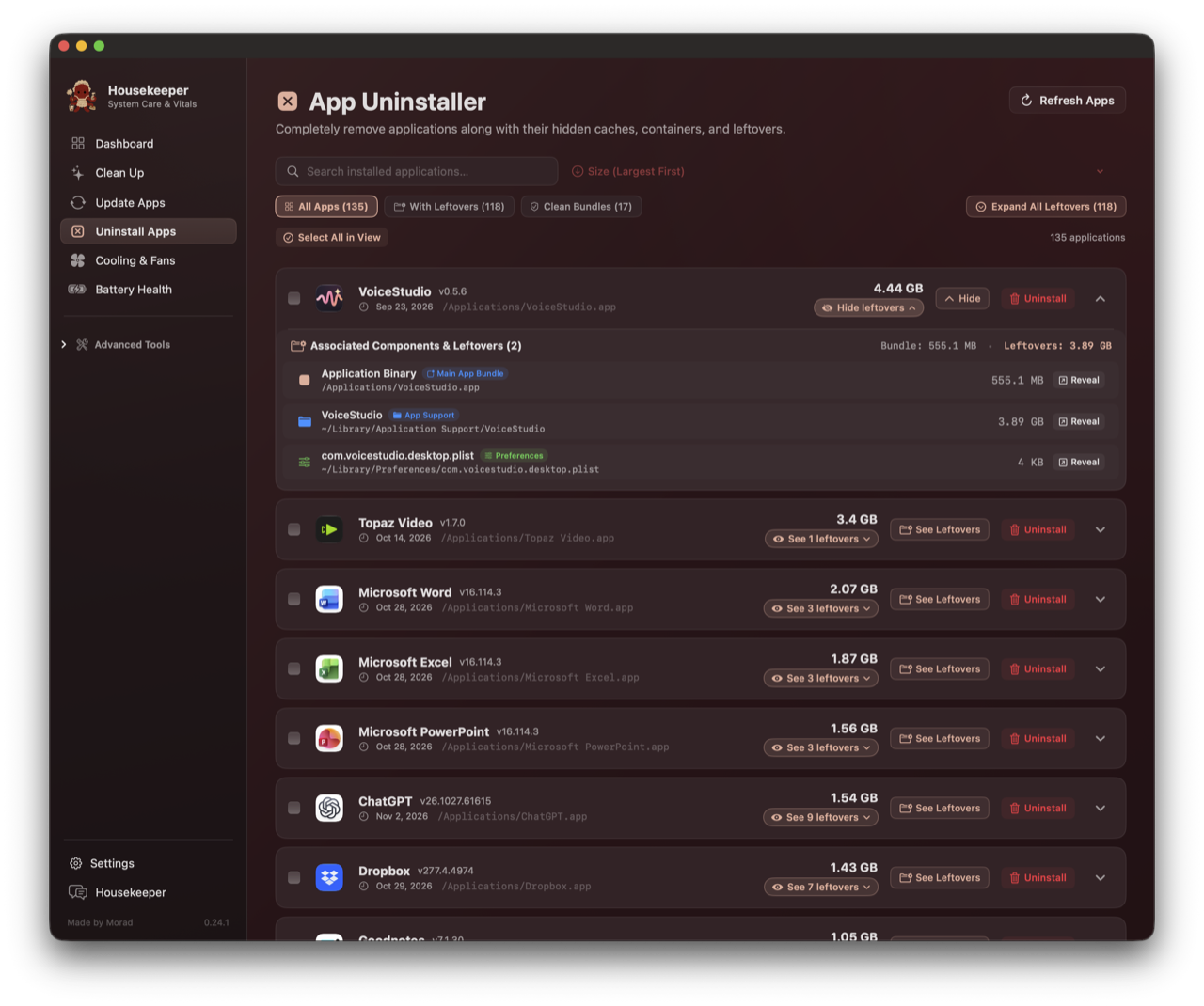
- Deep Component Inspection: Click the [See X leftovers] pill on any row to open the full drawer:
- Categorized badges:
App Support,Caches,Sandbox Containers,Preferences,Saved State,WebKit, andLogs. - Selectable, clean paths (
~/Library/Application Support/...). - Direct [↗ Reveal in Finder] button for every single file or folder before you touch it.
- Categorized badges:
- Multi-Criteria Sorting: Sort your entire software library by Size (Largest First / Smallest First), Recently Modified, Recently Installed, or Alphabetical (A–Z / Z–A).
- Clean Bundles vs Leftovers: Instant filter tabs separating self-contained apps from clutter-heavy applications.
- Global Leftover Drawer Toggle: Expand or collapse every leftover drawer across your Mac with one click.
3. Space Lens: Real APFS Storage Intelligence
Most storage visualizers on macOS either hang or guess. Space Lens uses direct kernel-level parallel traversal to measure the real size of your files:
- Accurate Bundle Traversal: Measures the true recursive size of
/Applications(e.g. 92.2 GB),Documents(218 GB), and~/.Trash. Zero artificial fallback floors. - Fast Spotlight Indexing: Identifies big and old files (>200 MB) across your drive in under 50 milliseconds using native metadata queries.
- Clickable Category Cards: Jump directly from a category breakdown into the folder browser with live progressive calculation indicators.
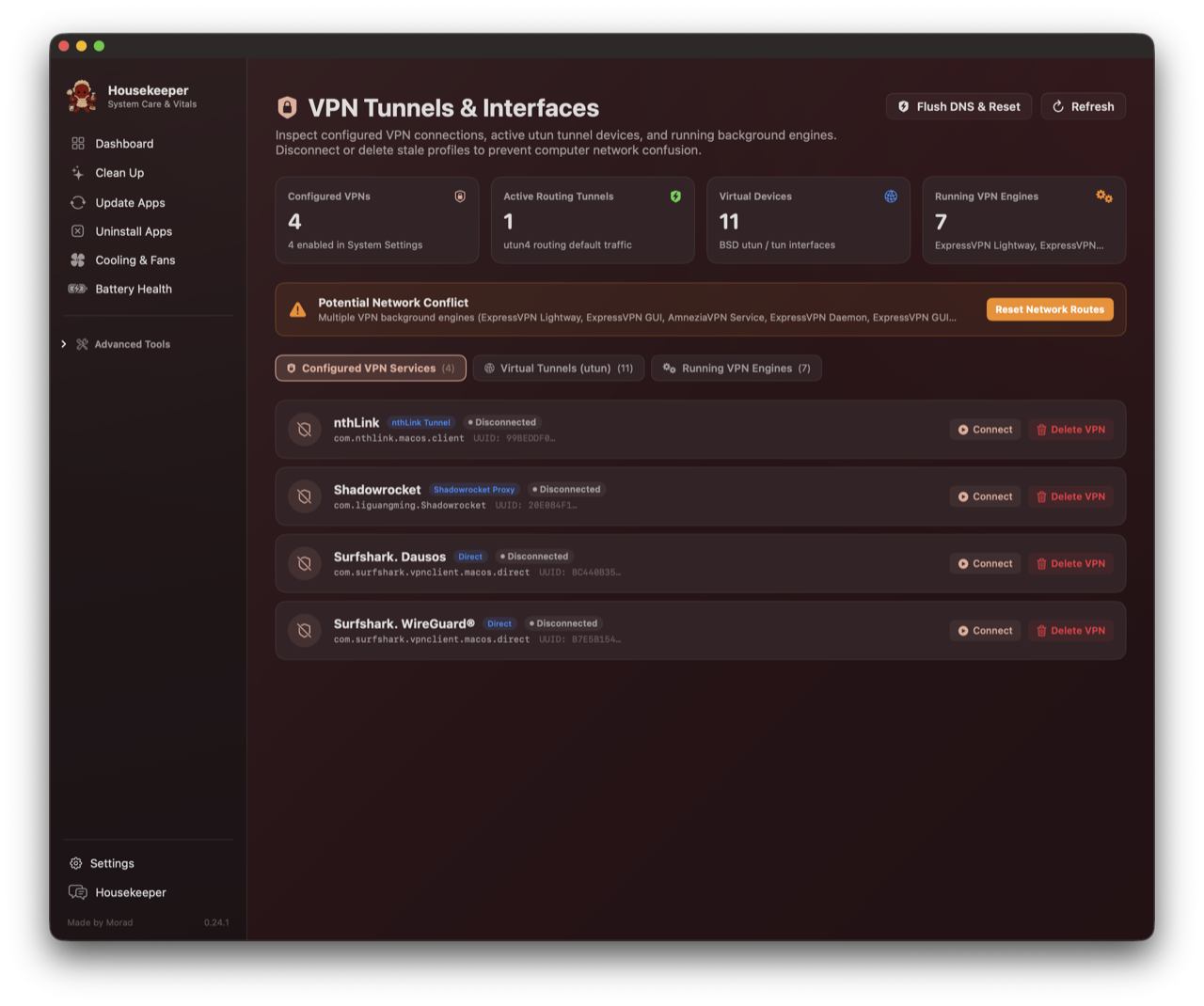
4. VPN Tunnels & Virtual Interfaces Watchdog (⇧⌘V)
When you disconnect a VPN and your internet silently breaks, it’s usually because a virtual tunnel or routing table entry got stuck.
- Kernel
utunDevices: Inspects active BSD tunnel interfaces, MTU values, and IP assignments. - Routing Table Conflicts: Highlights whether a tunnel has hijacked your default gateway (
0.0.0.0/0). - Background VPN Daemons: Surfaces background processes holding network extensions with PID, CPU %, and memory footprint.
- 1-Click Rescue: Disconnect stuck tunnels, permanently delete orphaned VPN network services, and flush routing tables and DNS cache with one click.
5. App Doctor: Gatekeeper & Damaged App Repair
macOS Sequoia loves to claim that an app downloaded from GitHub or the web is “damaged and can’t be opened.” App Doctor eliminates the terminal dance:
- Quarantine & Provenance Stripping: Clears
com.apple.quarantineand purges download tracking tags (xattr -cr). - Permissions & Code Signing: Ensures execution bits on
Contents/MacOSbinaries and applies an ad-hoc code signature (codesign --force --deep --sign -). - Drag-and-Drop or Shelf: Drag any broken app into the repair card, or pick from the automatically detected Quarantined Apps shelf.
6. Battery Health & Power Management
Reads Darwin IOKit AppleSmartBattery hardware registers directly without running heavy profiling scripts:
- Hardware Telemetry: Real-time cycle count, factory design capacity vs maximum charge capacity, cell wear loss in mAh, voltage, amperage, and battery controller IC.
- Power Delivery & States: Detects USB-PD adapter wattage, Optimized Battery Charging (80% hold state), and AC pass-through.
- Sleep Inhibitor Watchdog: Live
pmset -g assertionsparser showing which applications are preventing your Mac from entering deep sleep, with one-click quit buttons.
7. Full Kitchen-Sink Bundle: MediaDock 9 & Bookbind
Housekeeper is a full suite. You do not need separate standalone installations of MediaDock or Bookbind:
- MediaDock 9: Native YouTube, Spotify, and Apple Music downloader supporting video up to 4K and lossless audio extraction (FLAC, MP3, M4A, OPUS). Displays exact CLI commands for full transparency.
- Bookbind (
⇧⌘B): Built-in audiobook studio. Drag in loose chapter tracks, look up official cover art and metadata from the iTunes catalog, and bind them into a finished, beautifully chaptered.m4baudiobook. Runs locally on port8765with pre-packagedffmpegandffprobebinaries inside the bundle.
8. Native macOS Visual Ergonomics
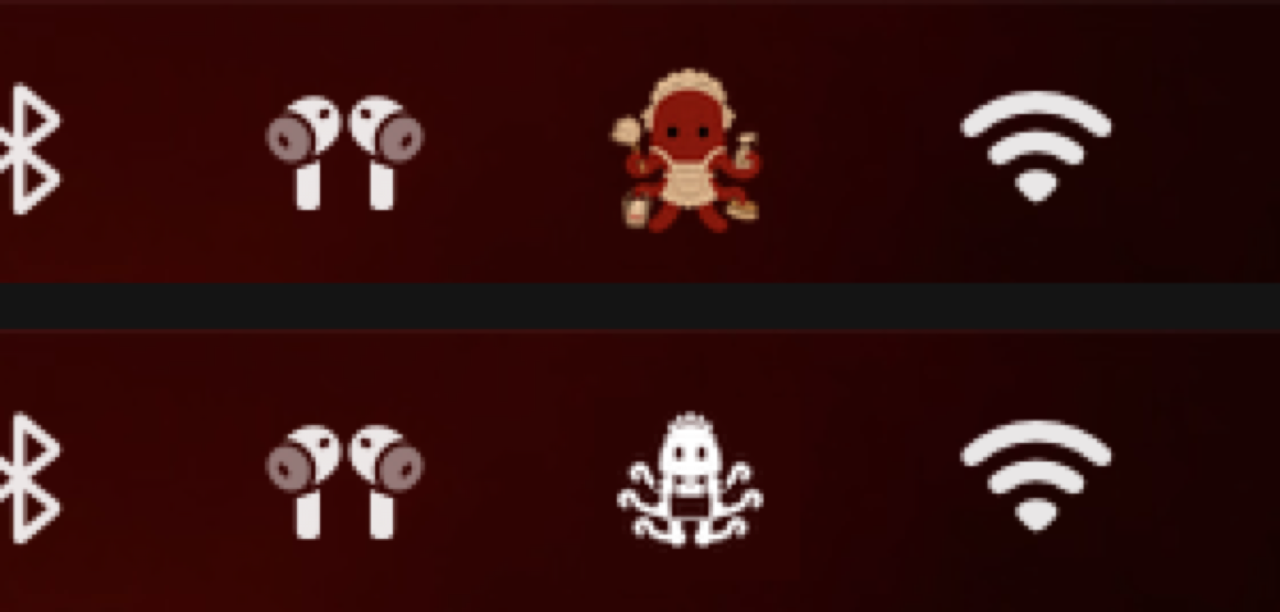
- Monochrome Menu Bar Silhouette: Replaced colored raster icons in the menu bar with a native vector cut-paper template silhouette (
image.isTemplate = true). It adapts dynamically to dark and light menu bars and high-contrast clicks, matching native macOS buttons like Wi-Fi and Bluetooth. - Transparent Maid Octopus Mascot: Morad’s hand-crafted brand mascot floats on a clean transparent background across the Dock, F...