
A Unity 3D Base defense game where players defend their base from incoming enemy tanks and helicopters using a turret-based rocket system.
ZeGunner is a 3D first-person tower defense game built in Unity. Players control a turret/cannon positioned on a base and must destroy waves of enemy tanks and helicopters before they reach the base. The game features realistic tank models, explosive effects, dynamic enemy movement, and a comprehensive scoring system.
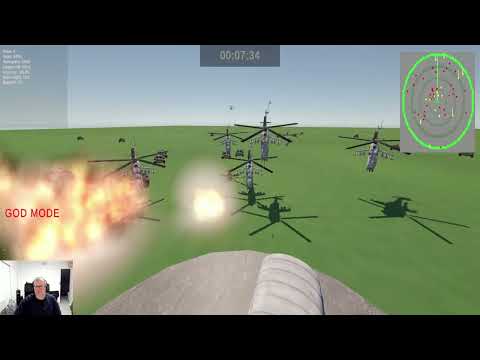
Watch the full gameplay demonstration: https://youtu.be/aaY77fafaHQ
- Tank 3D Model - Military tank with detailed textures and moving parts
- Source: Unity Asset Store (Free)
- Location:
Assets/Isle of Assets/Tank 3D Model/ - Includes: Tank prefab, materials, textures
- WarFX Explosion Pack - Professional explosion effects and particle systems
- Source: Unity Asset Store (Free)
- Location:
Assets/JMO Assets/WarFX/ - Includes: Multiple explosion prefabs, smoke effects, particle systems
- Grenade Sound FX - Realistic explosion sound effects
- Source: Free sound pack
- Location:
Assets/Grenade Sound FX/Grenade/ - Includes: 10 different explosion sound variations
- Unity Input System - Modern input handling for keyboard and mouse
- Unity Particle System - Built-in particle effects for explosions
- Unity UI System - Score display and game interface
- Unity Physics - Collision detection and projectile physics
- First-person turret control with mouse aiming and sensitivity adjustment
- Vertical camera movement using W/S keys with height limits
- Advanced projectile system with sphere and rocket options
- Dynamic enemy spawning with tanks and helicopters
- Wave-based progression with increasing difficulty
- Collision detection for accurate enemy destruction
- Enemy firing system - tanks and helicopters fire when in range
- Screen flash warnings for off-screen threats
- Snake-like tank movement with unique patterns per tank
- Helicopter zigzag flight with lateral sliding movement
- Distance-based zigzag activation for helicopters
- Speed progression system with min/max limits per wave
- Smart enemy targeting - enemies face base while moving
- Dynamic explosion effects with fallback particle systems
- Random explosion sounds for variety
- Global volume control with 5% increments
- 3D spatial audio positioned at explosion locations
- Volume-controlled firing sounds respecting global settings
- Smart rendering pipeline compatibility (detects and fixes purple materials)
- Real-time score tracking with wave progression
- Statistics display (enemies destroyed, accuracy, longest distance)
- Enemy reach base counter with game over conditions
- Modern TextMeshPro UI with consistent styling
- Volume and sensitivity displays with center-screen positioning
- Wave management system with automatic progression
CannonController.cs- Turret control, camera movement, projectile firingTankSpawner.cs- Enemy tank spawning with wave progressionHelicopterSpawner.cs- Helicopter spawning with zigzag movementTank.cs- Snake-like movement, firing, and collision detectionHelicopter.cs- Zigzag flight, lateral movement, and firingWaveManager.cs- Wave progression and enemy speed managementScoreManager.cs- Game statistics, scoring, and base healthVolumeManager.cs- Global audio control with UI displayMouseSensitivityManager.cs- Mouse sensitivity with UI displayScreenFlash.cs- Visual warning system for off-screen threatsExplosionManager.cs- Explosion effects and audio managementRocketCollision.cs- Projectile collision and enemy destruction
- Singleton patterns for managers (ScoreManager, ExplosionManager)
- Component-based design for modular functionality
- Event-driven scoring system
- Resource loading for audio and effects
- Automatic fallback systems for rendering compatibility
- Mouse - Aim turret/cannon
- Left Click - Fire projectile
- W Key - Move camera/turret up
- S Key - Move camera/turret down (with minimum height limit)
- SPACE or Right Click - Start next wave (when wave complete)
- ESC - Pause/Exit game
- +/- Keys - Adjust mouse sensitivity (with UI display)
- , . or < > Keys - Control master volume (5% increments)
- T Key - Test mouse sensitivity display (debug)
- Red Screen Flash - Enemy reached firing range while off-screen
- Volume Display - Shows current volume level when adjusting
- Sensitivity Display - Shows current sensitivity when adjusting
- Enemy Speed Limits - Configurable min/max speed per wave
- Spawn Distance Increments - Progressive enemy spawn distances
- Zigzag Movement - Adjustable enemy movement patterns
- Wave Difficulty - Progressive enemy count and speed increases
Assets/
├── Scripts/                    # C# game scripts
├── Enemies/                    # Tank prefabs
├── Resources/                  # Runtime-loaded assets
├── JMO Assets/                 # WarFX explosion effects
├── Grenade Sound FX/          # Explosion audio
├── Isle of Assets/            # Tank 3D models
└── Scenes/                    # Game scenes
- Open in Unity - Requires Unity 2021.3 or later
- Import Assets - All free components included in project
- Configure Scene - TankSpawner and ExplosionManager are pre-configured
- Play Game - Ready to play with default settings
- Unity Version: 2021.3 LTS or later
- Render Pipeline: Compatible with Built-in, URP, and HDRP
- Platform: Windows, Mac, Linux
- Input: Mouse and Keyboard
- The game includes automatic material fixing for rendering pipeline compatibility
- Explosion effects use intelligent fallback systems for visual consistency
- Enemy movement systems feature unique patterns per enemy for variety
- All audio systems respect global volume controls for consistent user experience
- Modern UI systems use TextMeshPro for crisp, scalable text rendering
- All assets are free-to-use with appropriate licensing
- Project demonstrates advanced Unity development patterns including:
- Singleton manager patterns
- Component-based architecture
- Event-driven systems
- Modern Input System integration
- Progressive difficulty systems
- Dynamic enemy AI with varied movement patterns
Developed with Unity 3D using free asset store components