Pipex is a program that mimics the functionality of the shell pipeline (|).

It takes two commands as arguments and creates a pipe between them, so that the output of the first command becomes the input of the second command. example below 👇👇👇
The program will be executed as follows :
./pipex file1 cmd1 cmd2 file2And should behave like this in the ordinary shell :
< file1 cmd1 | cmd2 > file2 Now here is a visual breakdown of the command and an example for every element of the command :
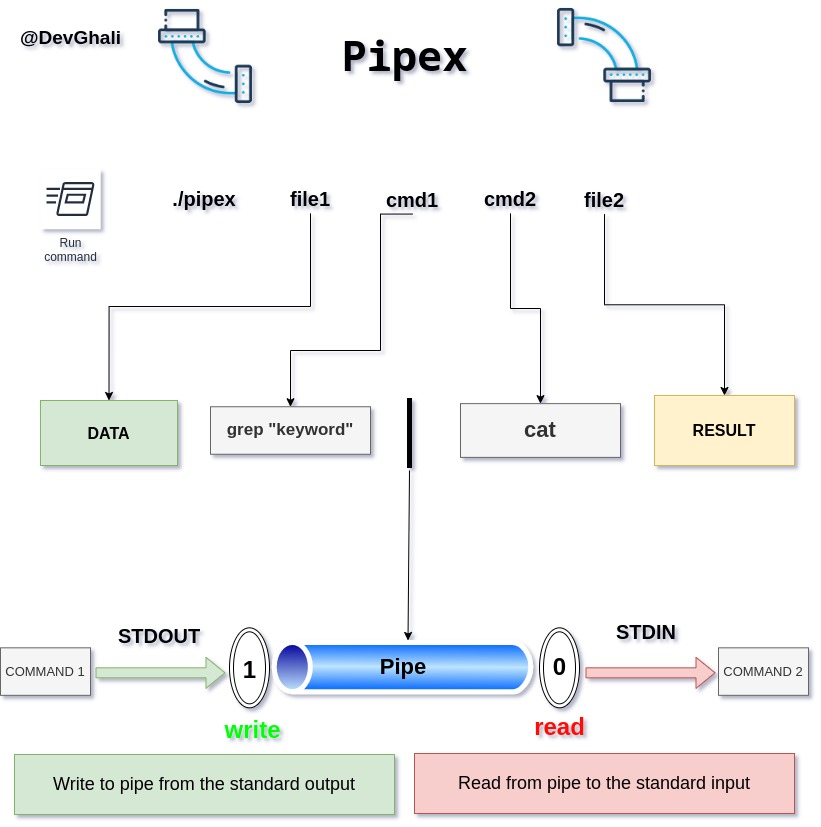
- Pipes in Linux - Here you will find information on pipes and what do they do which is basically what the whole projet is about.
- Processes - Child/Parent Processes - Running a program means running a process and with so two new processes will be created a Parent process and a Child process and what is the Child process for?? you might ask... imagine we want to run two jobs simultaneously and that can be achieved with the help of Parent/Child processes.
- Linux path environment variable - Environmental paths in Linux and why do we need them, mainly when we run a command in the terminal, how does it know where to find the program and execute it? with the help of the 'PATH' variable the system can locate the program's path and execute it. but before we try to execute we need to check if we have permission to execute the program, check the next point below 👇
- The access() function in C - The access() function is a system call used to check wether the calling process has permissions to a file.
- Printing system errors - Whenever an error has occured during one of the system calls, the system should print an error to the Standard Error Stream (STDERR) with a descriptive message describing the error.
- open() - The open() function shall establish the connection between a file and a file descriptor.
- pipe() - pipe() creates a pipe, a unidirectional data channel that can be used for interprocess communication.
- fork() - fork() creates a new process by duplicating the calling process.
- waitpid() - system call used to wait for state changes in a child of the calling process, and obtain information about the child whose state has changed
- access() - check real user's permissions for a file.
- dup2() - duplicate a file descriptor.
- close() - close() closes a file descriptor, so that it no longer refers to any file and may be reused.
- execve() - execute program.
- perror() - print a system error message.
- exit() - cause normal process termination.

- The dup2() function - basically it duplicates a file discriptor to another for instance : dup2(int fd1,int fd2) closes fd2 and duplicates the value of fd2 to fd1 so that fd1 becomes fd2.
The bonus part brings 2 major improvements to the project, 1. that it can handle multiple commands and not be limited to only 2 commands like in the mandatory part, multiple commands means multiple pipes.
as follows :
./pipex file1 cmd1 cmd2 cmd3 cmd4 ... cmdn file2Should behave like (how the original command would look like in the ordinary shell) :
< file1 cmd1 | cmd2 | cmd3 | cmd4 ... cmdn > file2- Support << and >> in other words "heredoc", im not gonna explain heredoc in details you can give it a look :)
as follows :
./pipex heredoc LIMITER cmd1 cmd2 fileShould behave like (how the original command would look like in the ordinary shell) :
cmd1 << LIMITER | cmd1 >> filecompile using the Makefile :
make allfor bonus :
make bonuscreate the infile/outfile :
make filesrun the program :
./pipex infile 'cmd1' 'cmd2' outfile