Repository navigation
Home
 A set of discrete virtual machine appliances to run and monitor research compute environments.
##Overview
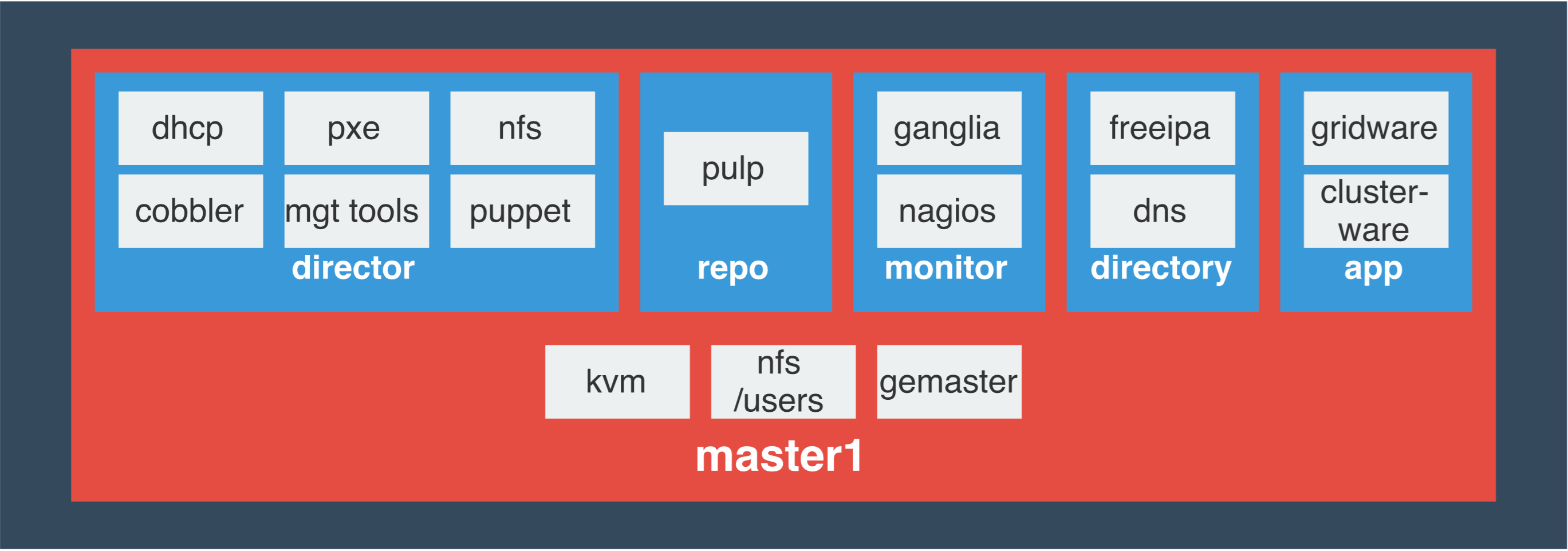
###Symphony-director (software deployment) Based on open-source tools Cobbler and Puppet, the deployment appliance is configured to provision each compute node in the environment. Cobbler allows comprehensive kickstart and DHCP server management, and is capable of deploying a wide range of Linux distributions. Node customization is performed via Puppet, providing an always-up-to-date software configuration management database for all servers in the environment.
Read more about each of the key components in the symphony-director appliance:
###Symphony-repo (repository management) Based on the open-source Pulp tool, the repository management appliance provides advanced software package management, including local caching, automatic update collection and distribution, and customized repository creation. Pulp has recently been selected by RedHat as the core of their Enterprise Satellite software management product.
Read more about each of the key components in the symphony-repo appliance:
###Symphony-monitor (performance and availability monitoring) Performing both out-of-band and OS-level monitoring, this appliance provides administrators with real-time performance data via the popular Ganglia software suite, and availability and alerting capabilities via Nagios software.
Read more about each of the key components in the symphony-monitor appliance:
###Symphony-directory (user authentication, DNS) Implemented using FreeIPA, the directory appliance provides robust name services and user credential management for the cluster. Available with both a graphical web interface and a set of comprehensive command-line tools, IPA implements a secure Kerberos network to manage user accounts, groups and authorization levels. Capable of being integrated with existing LDAP and active-directory environments.
Read more about each of the key components in the symphony-directory appliance:
###Symphony-app (clusterware, gridware) Home to the cluster application repository using both Alces Clusterware and Gridware tools; providing cluster and application management tools to the environment.
Read more about each of the key components in the symphony-app appliance:
##Appliance installation:
| 1 Pre-requisite | 2 Install | 3 Customization |
|---|---|---|
| [[Prepare base os image | INSTALL:-Create-initial-Symphony-VMs]] | [[Build the DIRECTOR node |
| [[Build the REPO node | INSTALL:-Build-Symphony-Repo]] | [[Appliance initial customisation |
| [[Build the MONITOR node | INSTALL:-Build-Symphony-Monitor]] | |
| [[Build the APP node | INSTALL:-Build-Symphony-APP]] | |
| [[Build the DIRECTORY node | INSTALL:-Build-Symphony-Directory]] |
##Administrator guides:
| General How-to's | Content How-to's | Incoming |
|---|---|---|
| [[Symphony kickstarts & Cobbler | HOWTO:-Customise-the-default-symphony-kickstarts-with-ksmeta]] | [[Install and run Alces HPC Stack modules |
| [[Cobbler Recipes | HOWTO:-Common-cobbler-usecases]] | [[Install and run puppet-labs OpenStack modules |
| [[Import Redhat channels to pulp | HOWTO:-Pulp-import-Redhat-channels]] | [[Configure symphony monitor Nagios for an HPC cluster |
| [[OpenVPN Internal Networks | HOWTO:-Setup-openvpn-to-access-internal-networks]] | |
| [[IPA Directory server | HOWTO:-Directory-Server]] |
##User tutorials:
| General How-to's | Content How-to's |
|---|---|
| [[OpenStack Environment Access | TUTORIAL:-OpenStack-Environment-Access]] |
| [[OpenStack User Networking Setup | TUTORIAL:-OpenStack-User-Networking-Setup]] |