💡 This repo consists of basic core concepts of modern javascript or ES6
📕 Index:
- Fat Arrow Function
- Truthy & Falsy
- Ternary Operator
- 👉 A normal function in javascript is:
function name(){
  return "John";
  }
console.log(name());
- In modern javascript we can code the above function in this way:
let name = () => {
  return "John";
  }
console.log(name());
- However, we can reduce the lines in our code by removing the brackets,
{}if there is only one statement to execute.
let name = () => "John";
console.log(name());
💡 Note than we have also removed the return statement since we have only one return statement. In this case we cannot keep the return statement in our code block.
- Incase of handling parameters in fat arrow functions,
let name = (n) => console.log(n);

name("John");
Multiple paramteres:
let intro = (name, age) => {
  console.log(name + " is " + age + " years old");
 }

intro("John", 23);
👉 Problem of this in callback function:
var intro = {
    name: "John",
    hobbies: ["Dog", "Cars", "Travelling"],
    printHobbies: function(){
        this.hobbies.forEach(function(hobby){
            console.log(`${this.name} loves ${hobby}`)
        });
    },
};

intro.printHobbies();
The above code prints:
undefined loves Dog
undefined loves Cars
undefined loves Travelling
- In the above code,
this.namecannot find the name attribute since this is inside a callback function. But we can modify the code by savingthisinside a variable outside the callback function.
var intro = {
    name: "John",
    hobbies: ["Dog", "Cars", "Travelling"],
    printHobbies: function(){
        var self = this;
        this.hobbies.forEach(function(hobby){
            console.log(`${this.name} loves ${hobby}`)
        });
    },
};
- This way the above code will give the correct result. But this is not the most efficient way. This is where fat arrow function comes in. By using arrow function we can solve the problem.
var intro = {
   name: "John",
   hobbies: ["Dog", "Cars", "Travelling"],
   printHobbies: function(){
       this.hobbies.forEach( (hobby) => {
           console.log(`${this.name} loves ${hobby}`)
       });
   },
};

intro.printHobbies();
💡 After using the arrow function, javascript remembers the this function.
👉 Arrow Function does not have the attribute of a constructor
- We cannot create a new object of an arrow function which we can do in a normal function. Normal Function:
function Car(name) {
  this.name = name;
}

var BMW = new Car('BMW');
💡 The above code will give no error Arrow Function:
var Car = (name) => {
  this.name = name;
}

var BMW = new Car('BMW');
💡 The above code will return an error since Arrow function does not have the property of a constructor i.e it cannot build an object.
var test = "HI";

if(test){
  console.log("I am truthy");
}else {
  console.log("I am falsy");
}
This above code returns: I am truthy
- However,
var test = "";

if(test){
  console.log("I am truthy");
}else {
  console.log("I am falsy");
}
This code return: I am falsy
-
So, in javascript, anything accept
false0-00n""''``nullundefinedNandocument.allwill return truthy. -
Even if we give a space inside cotation will return
truthy:
var test = " ";

if(test){
  console.log("I am truthy");
}else {
  console.log("I am falsy");
}
var age = 18;

var type;
if(age >= 18){
    type = "adult";
}else{
    type = "child";
}
console.log(type)
- The above simple code will print "adult". But with
Ternary Operatorwe can further simplify the above code:
var age = 18;

var type = (age >= 18) ? "adult" : "child";
console.log(type);
- In the above code, the statement before
?is the condition and the statement after the?is the value that is being returned. In this example, if the age is above 18 then it will returnadultor elsechild. So, the statement on the left side of:returns if the condition is true and the right side is returned if the condition is false. - 👉 We can also use ternary operator for nested conditions.
var age = 6;

var type = (age >= 18) ? "adult" : (age > 10) ? "child" : "young";
console.log(type);
- The above code will return "young". In the first check if the age is less than 18, then the condition returns
falseand goes to another condition,(age > 10) ? "child" : "young". In our case the second condition returns false and so our code returnsyoung.
- This method returns the value of the first element that passes a test.
var numbers = [10,2,13,4,20,6];

var result = numbers.find( function(currentNumber) {
    return currentNumber > 10;
});

console.log(result);
- In the above code, we took an unsorted array of numbers. Then, we are running a function inside
find()where it iterates the array,numbers[]. In our example, we want the number which is greater than 10. If we look into our array we can see that 20 is the largest number but our code will return13because while iterating the array the first number that is greater than 10 is printed. The iteration breaks when the function finds the first true statement against the given condition. - The function inside
find()method can also take currentIndex and arr[] as parameters:
find( function(currentNumber, currentIndex, arr) {
- 👉 Another important aspect of find() method is
thisstatement.
class Student{
  constructor(name, age){
    this.name = name;
    this.age = age;
  }

  test(){
    console.log("Hello");
  }
  exampleFunction(){
    let array  = [1, 2, 3];
    array.find(function(){
      this.test();
    });
  }
}

let student = new Student("alfi", 23);

student.exampleFunction();
- The above code will throw an error. This happends because the
find()method inside ourexampleFunction()cannot locate the this.test() function. Bythisit searches for thetest()globally. For this, find() method also takes a second parameterthis.
exampleFunction(){
    let array  = [1, 2, 3];
    array.find(function(){
      this.test();
    }, this);
💡 However, we can use arrow function to solve this problem. For this, we dont need to use this.
exampleFunction(){
    let array  = [1, 2, 3];
    array.find(() => {
      this.test();
    });
- If we want to find the index of a number in an array, we can use findIndex() method. Moreover, we can also find if a number exist in an array since
findIndex()returns-1if a number does not exist.
var numbers = [1,2,3,4,5,6,7];
var result = numbers.findIndex((currentValue, index, arr) => {
  return currentValue > 20;
});

console.log(result);
The above code returns -1.
var numbers = [1,2,3,4,5,6,7];
var result = numbers.filter((currentValue, index, arr) => {
  return currentValue > 3;
});

console.log(result);
- The above code will print:
[4,5,6,7] - In the above code, filter() method prints all the numbers that are above 3. This is how it is filtering the array.
💡 But the
filter()method is not likefind()orfindIndex()methods. Those methods break when the condition is true even if the full array is not iterated. But for filter() method the whole array is traversed. We can understand this property if we change the array into an unsorted array like this:var numbers = [11,2,3,34,5,61,7];
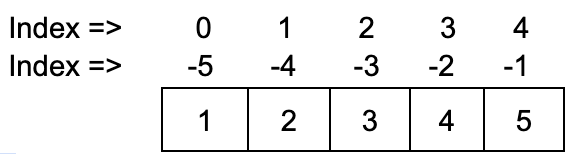
- Usually we start indexing our array with 0. However we can also index array from the end with -1. For example:
- In slice() method, the a portion of the original array is returned from
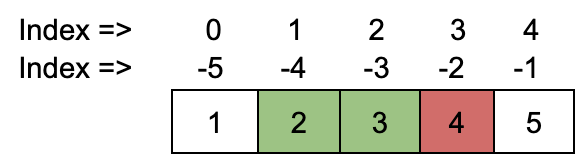
startandend(end indexed number is not included in the new array) parameter that is given to the slice() method.
var numbers = [1,2,3,4,5];
var result = numbers.slice(1, 3)

console.log(result);
- The above code returns
[ 2,3 ]. So, the numbers from index 1 to index 2 is printed and the number in index 3 is not included. If we consider the negative indexing then, slice(1, -2) will also return[ 2,3 ].
- If we want to remove 10 consecutive numbers in an array of length 50 from any given index, then we can easily do this task using splice.
var number = [1, 2, 3, 4, 5, 6];
var result = number.splice(1, 2);

console.log(result);
💡 But the above code gives output: [2, 3]. In the above code, the method splice(1, 2) takes in two paramters. The first parameter is the starting point of the separation and the second one denotes how many consecutive number to be deleted. So, the when we print the result we get the deleted values. To get the modified array we have to print the array itself and we can find that it has been modified.
var number = [1, 2, 3, 4, 5, 6];
var result = number.splice(1, 2);

console.log(number);
- However, we can also insert new values from where we are deleting values in an array using splice(). We just need to add the new values as parameters in the splice() method.
var number = [1, 2, 3, 4, 5, 6];
var result = number.splice(1, 2, 8, 9, 10);

console.log(number);
- The above code returns:
[ 1, 8, 9, 10, 4, 5, 6 ]
- To add two arrays we can use
concat()method.
var array1 = [1, 2, 3];
var array2 = [ 4, 5, 6];
var result = array1.concat(array2);

console.log(result);
- The above code returns:
[ 1, 2, 3, 4, 5, 6 ] - 💡 However if we want to add more than one two arrays:
var array1 = [1, 2, 3];
var array2 = [ 4, 5, 6];
var array3 = [ 7, 8, 9];
var result = array1.concat(array2, array3);

console.log(result);
map()method works the same way as a for loop does.
var array1 = [1, 2, 3];

var result = array1.map((n) => {
    return 2 * n;
});
console.log(result)
- In the above code we wanted to multiply all the numbers in the array with 2. So we called the
map()method where we n represents each number in the array and returns the result.map()method doesnt change the original array so we have to store the result in a variable.
- This method doesnt change the original array. This method takes two parameters previous value and current value. The value that is returned after first iteration becomes the previous value for the current iteration.
var array1 = [1, 2, 3];

var sum = array1.reduce((previousValue, currentValue) => {
    return previousValue + currentValue
}, 0);
console.log(sum);
- The above code returns
6. When the array is in the first index,1is added with0which we have set as the intial value in the end of the reduce() method. The return value of this iteration is the previousValue for the next iteration. So, in the second iteration, 1 =previousValueis added with 2 =currentValue. 💡reduce()method also takes incurrentIndexandarray(original array) as parameters.
- Printing the keys and values of an objects:
var myObj = {
  name: "Alfi",
  age: "23",
  gender: "male"
};

var keys = Object.keys(myObj);
var values = Object.values(myObj);

console.log(keys, values);
- If we want to get keys and values together:
var myObj = {
  name: "Alfi",
  age: "23",
  gender: "male"
};

var entries = Object.entries(myObj);

console.log(entries);
- We can set a default value to the parameter of our function incase we dont send any value to the function.
function func(x = 3){
  return x;
  }
console.log(func());
- The above code will print 3. But if we send
nullas value to the function then it will printnullsincenulla valid to javascript. Whereas, if we sendundefinedto the function then it will print the default value.
var numbers = [1, 2, 4, 5];
var a = numbers;
numbers.push(3);
console.log(numbers);
console.log(a);
- The above code will print the same result for
numbersandaarray. But we added a value to only numbers. When we declarevar a = numbers, then not only the array is copied but also the address of the array. So if we change anything in numbers array then it will also change inaarray. - So, if we want to only copy a seperate array then we can use spread operator. We just have to change this line
var a = numbers;tovar a = [...numbers];. This will give us two different results for the two arrays. - 👉 We can also concat arrays and objects using spread operator.
var numbers = [1, 2];
var numbers2 = [3, 4];
var result = [...numbers, ...numbers2];
console.log(result);
var obj1 = {
    name: "Alfi",
    age: 23
}
var obj2 = {
    gender: "male",
    birthYear: 1998
}
var result = {...obj1, ...obj2};
console.log(result);
- The above code prints:
{ name: 'Alfi', age: 23, gender: 'male', birthYear: 1998 } - 👉 Changing data without Mutation using
spread Operator:
var obj1 = {
    gender: "male",
    birthYear: 1998
}
var result = {...obj1, birthYear: 2000};
console.log(result);