Repository navigation
Error summary #6252

Replies: 65 comments

|
It would be good to have a consistent heading in the summary. "There is a problem" has tested well with users. The "Optional description of the errors and how to correct them" does not add any value to the screen. It does not provide context or help describe what has gone wrong. The heading does the first and the error does the second. |

|
Thanks @stevenaproctor The Working Group will be reviewing this change in the next review session (April) because of lack of time (already have 5 contributions to look at on the 22nd) |

|
We used this component as part of the publishing workflow alpha:
We tested it with 5 users and noted that none of them interacted with the red links in the error summary box. This didn't prevent them from reading the message and they were able to find and fix the errors. This was also true when the error summary was shown on a document summary view, where the errors were in forms on a different page (where we considered the links to be most useful).
|


|
We haven't specifically used the "Optional description of the errors and how to correct them" text in our error summary box in the publishing workflow prototype, but whenever there was some guidance text between a heading and an interactive element on another page, the text tended to be overlooked almost every time. |

|
Thanks both. The intension is that the links are primarily for the benefit of people using screen-readers and keyboards, as it gives them a quick way of jumping to the relevant errors, rather than having to navigate through the whole form. However, I'm not aware that we've validated whether this approach works for these users or not. If you ever do some research with users of assistive tech then this would be something to look out for. |
|
@fofr @BlancaTortajada |
|
@timpaul Thanks Tim! We'll let you know if we find anything about that in our upcoming missions. |
|
@stevenaproctor Yep, we do both. The screenshot is an example of a summary page without any of the fields. Clicking through to the sub-pages shows the relevant error and highlights the field. |

|
Currently:
|

I don't think so, all our components fill their parent containers. This consistency means we make no assumptions on the layouts these components will be used in. For example if someone decided to make their own grid layouts they might be forced to override this max-width. In the most general case we'd want to use the grid layout classes, which will be consistent across our components (or we've talked about having a 'measure' layout wrapper too) |
|
I'd be happy with a measure class (that I could put on a wrapper, or on the
error summary container).
…On Mon, 2 Jul 2018, 18:09 Nick Colley, ***@***.***> wrote:
Should we give the component a max width?
I don't think so, all our components fill their parent containers. So we
can use the grid system here. (or we've talked about having a 'measure'
layout wrapper too)
—
You are receiving this because you commented.
Reply to this email directly, view it on GitHub
<#6028 (comment)>,
or mute the thread
<https://github.com/notifications/unsubscribe-auth/AACRK85Irb8b9aUUdoQy8pFX-C9ixm__ks5uClPSgaJpZM4Rcf5N>
.
|
|
In elements, the error summary was inside a |
|
Yep, so I spoke with Nick about this before. The two-thirds grid acts a little differently to a max-width. The grid 2/3 means it's always two thirds (except for mobile). But that means it's unnecessarily small (unless at full width). The measure (max width) version, would mean it's 100% until it hits X pixels. This is the behaviour I want on quite a lot of components. For me, grid, should only be used when you want things to be next to each other. |
|
Do you have any screenshots for how it would look? For me, the 2/3 grid acts like a measure. When content is outside the measure it can make a screen look disjointed. What do you think? |
|
Note: the width of my prototype is wider than normal. Using grid (full width viewport)This is basically fine.
Using grid (half width viewport)Here the error summary is unnecessarily narrow.
|
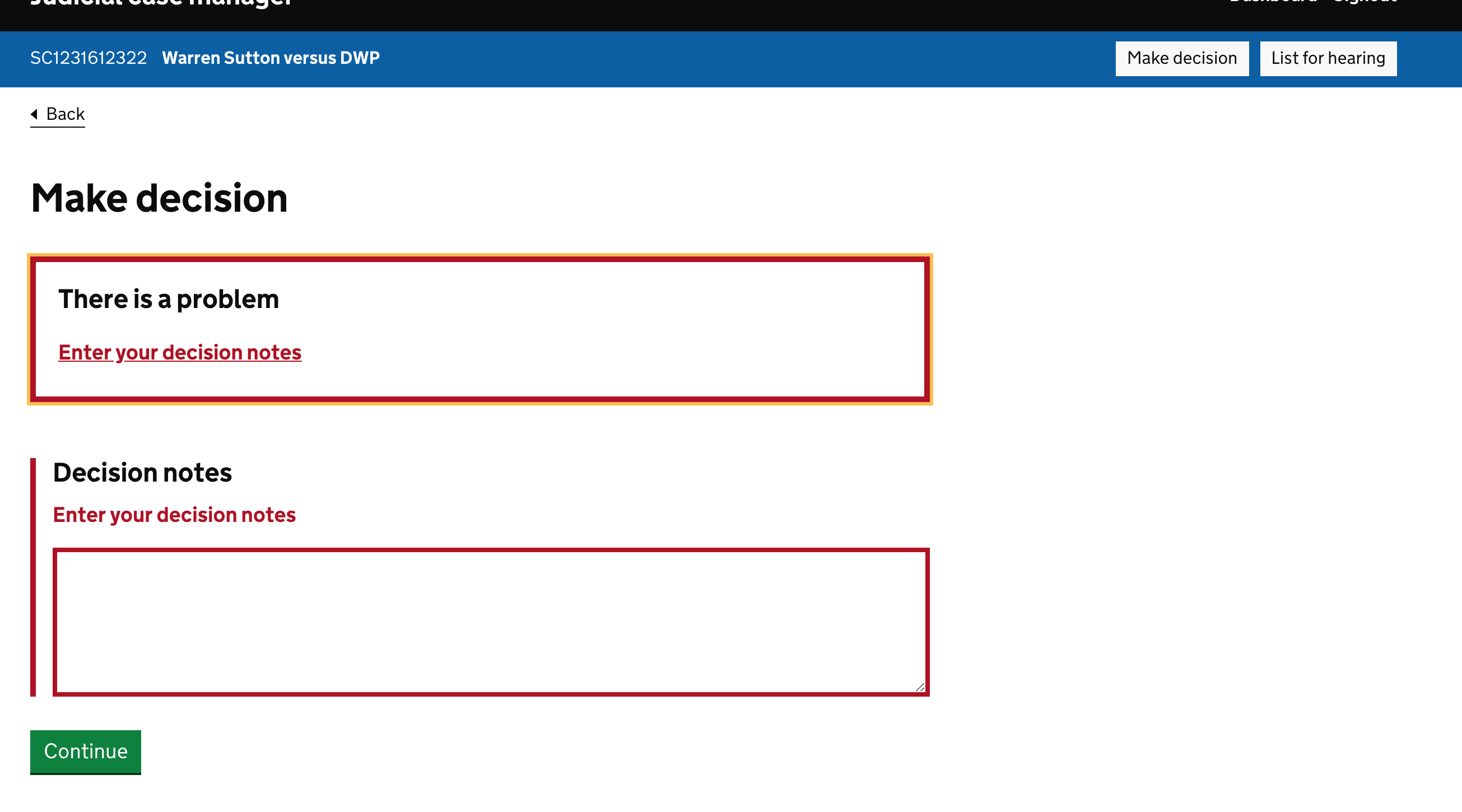

|
@dashouse The error summary uses an alert ARIA role and receives keyboard focus when the page loads - if the summary isn't included you’d need an alternative to clearly announce the error to assistive tech users. I don't know how well alternatives would work if you need to set focus on something that’s not at the top of the page. (The page title also has a clue by including |

|
An example of a page where it might still be worth having the error summary even if there’s only 1 error is where there’s a single question but it is preceded by some lengthy guidance text between the h1 and the question. See example on the Design System website (from the question pages pattern). On these pages, the error on the question itself might not initially be visible, depending on the screen size. |

|
I love this pattern and the red links. Out of curiosity and a need to for understanding rationale, why did you use red links in the error summary? I have my own thoughts but would like to hear how you arrived at this decision. I.e. research. |

|
Has the example post code used in the error messages and summaries (AA1 1AA) been reviewed has in the last few years? As someone with dyscalculia I find the example very hard to read, and also to recognise as a postcode. My colleagues with dyscalculia, dyslexia, dyspraxia and ADHD also finds this example hard to understand. This is because:
A range of neurodiversities can experience visual distortions of numbers and text. Could this example postcode please be reviewed ? Happy to discuss. https://design-system.service.gov.uk/components/error-summary/default/index.html# |

We've updated the example to remove the error relating to postcodes for now. We may want to revisit the example in ‘asking users for addresses’ in the future. If we choose to include an example postcode, we should use a postcode that does not include repeated or visually similar characters. |

|
hey @fofr, You mentioned that the error summary has an alert role but also receives focus. Is there a reason for both? Would you not get duplicate announcements? Is there also any concerns that the live region is not available in the DOM on page load, but rather when the error occurs? Thanks |

|
How should the error summary behave for an error of a text field inside nested radio button when they switch to a different option? |

|
I think the general rule is that, if a user has changed a conditional radio button or checkbox in a way that has hidden nested fields, then the values of those nested fields should be discarded and not validated by your server-side code. The user has consciously chosen a new option, so anything entered underneath a different option is no longer relevant. You should discard this information on the server-side, prior to validation, rather than using JavaScript to empty the fields, as the user may misclick or change their mind and revert back to their previous choice. |

RESOLVED @ 07/04/2025 14:23Hello, I had questions from our developer/BA about the error summary component, and wanted your thoughts, please! Questions They asked the following: (1) When you click on the link in the error summary when the radio option 'Yes' is selected, it will take you to the error field to enter the expiry date - as expected. When a user switches to the 'No' radio, the link in the error summary does not take you back to the expiry date field (as shown in the video). They wondered why this is. (2) They also asked "why the error summary does not disappear after the 'No' option is clicked on?" (i.e. live validation) My response The guidance on validation is outlined here: https://design-system.service.gov.uk/patterns/validation/#:~:text=When%20to%20tell%20the%20user%20about%20validation%20errors For (1), the error message and summary in question relate to the expiry date field, and as the user is on the verge of correcting their error, there is no need for the error summary to take them back there. I think it's fair to say users are unlikely to return to the error summary if they reselected no - but it's not impossible. Not returning focus to a now-hidden field is expected behaviour. From my understanding, this prevents irrelevant focus changes and avoids poor accessibility outcomes, particularly for screen reader users. For (2) the error summary does not disappear after ‘No’ is clicked. This behaviour aligns with GOV.UK Design System standards: error summaries persist until the form is revalidated through submission. This ensures all users, including screen reader users, have a consistent reference to the error. Although switching from ‘Yes’ to ‘No’ is a corrective action, it does not clear the error until the user re-submits the form. Error summary behaviour is not dynamic by default - it reflects the state of the last submission. From my understanding, GOV.UK forms use server-side validation and do not automatically remove error messages based on input changes alone. The guidance says: “Do not validate when the user moves away from a field. Wait until they try to move to the next part of the service - usually by clicking the ‘continue’ or ‘submit’ button...” This reinforces that validation is expected to occur on submission, not live or on field change. Validation messages persist until an explicit action (like submission) confirms that the issue has been resolved. As live/dynamic updates are not the default, unless there is a proven user need (e.g. via user research), we can’t assume client-side validation should replace the standard behaviour [ Error_summary.mov](url) |

|
For screen-readers - Safari decides not to read out list items when styled with none, there are alternative ways to get it to and this seemed like the best way: https://www.matuzo.at/blog/2023/removing-list-styles-without-affecting-semantics Should the error summary list have this accessibility feature fixed for Safari? |

|
When an Error Summary first appears it is focused with the yellow border around it. At that moment the colour contrast between the yellow (#fd0) and the white background (#fff) is <3.1. Is this an issue to address, and if so has it already been identified? 1.4.11: Non-text Contrast (Level AA) For more info on focus indicators: https://www.w3.org/WAI/WCAG22/Understanding/focus-appearance 
|

|
I wondered what the rationale is for moving focus to the error summary and having |

|
What is the guidance with regard to the width of the error component? There was some discussion about this (8 years ago!) but nothing conclusive. Should the error summary:
|
Like most of our components, the error summary does not have a width set, and will always take up all of the space available. The expectation is that components will be contained by the grid system or the other parts of the page layout. Our guidance on layout says:
I'd then expect the error summary to appear within that two-thirds section. In the two examples you linked, example 1 shows the component outside of any context, so it takes up the full width of the page (it's not even within the width container you'd expect to find on most pages). Example 2 shows the component correctly in context. Hope that helps. |

|
Department of Education (DfE) While all users understood the error and successfully recovered, concerns were raised about the presentation and repetition of validation message, especially considering that it was one error on one page. Feedback from users with cognitive impairments

Screen Reader issue
|


 and others
Uh oh!
There was an error while loading. Please reload this page.
Uh oh!
There was an error while loading. Please reload this page.
Use this issue to discuss this component in the GOV.UK Design System.
All reactions