Releases: AlungranPJ/obsidian-multilevel-number-indent
Releases · AlungranPJ/obsidian-multilevel-number-indent
Release list
3.3.12

3.3.12
- The fix from 3.3.11 now holds while you type. 3.3.11 kept Obsidian's Smart lists away from the plugin's own edits, so a new sub-list did start at
1). But the moment you typed the first letter, Smart lists had another go and turned it into4)or6), carrying on from the list under the previous heading. The plugin now checks each thing you type: if the number on that line changed while the depth and the number part were left alone, it puts back the number it works out for that line. Only the number is touched; the indent and the text stay exactly as typed, and one Ctrl+Z still undoes the letter you typed. - A number you retype by hand is left alone by the plugin, so Smart lists may still adjust it. Reset numbering puts the whole list back in order.
3.3.11
3.3.11
- A new sub-list starts at
1)again. Nest a line under1.1.2.after a list under1.1.1.that ran to3), and it came out4), as if the old list had carried on. The plugin had it right: the number was rewritten a moment later by Obsidian's own Smart lists option, which renumbers a freshly nested line to continue the nearest earlier list at that depth. Every edit the plugin makes now goes into the note with the host's list filters switched off, so the numbers you see are the ones the plugin worked out. That covers Tab, Shift+Tab, Enter, Alt+↑/↓, the right-click commands and pasting a list. Smart lists stays on for everything else you type. - One Ctrl+Z still puts each move back, and a selected group still stays selected after the move.
3.3.10
3.3.10
For the directory's build check. No change to how the plugin behaves.
npm run buildis a real build check now. It used to run the test suite, and the directory's build verification reported Build verification failed while running the build script. There is no bundler here, so the build does not generate anything:scripts/build.jschecks that the three release files are ready to ship as committed.main.jsparses and loads as a plugin class with the host modules stubbed,manifest.jsonhas every required field and agrees withpackage.jsonon the version, andstyles.cssis present. It uses no dependencies and fails loudly on a broken file, so the release assets can be compared straight against the committed ones.npm testruns the assertions, and CI runs both steps on every push.
3.3.9
3.3.9: plain names in the right-click menu
Short, plain names in the right-click menu, in the words Word uses where Word has a word for it: Reset numbering, Restart numbering, Continue numbering. Two categories got shorter too: Moving items is now Move, Copying out is now Copy.
Only the names changed. The command ids are the same, so any hotkey you set on a command keeps working.
| Before | Now |
|---|---|
| Renumber multilevel block | Reset numbering |
| Insert multilevel numbering | Add numbering |
| Remove multilevel numbering | Remove numbering |
| Clear list markers and keep the indent | Clear formatting |
| Normalize the outline | Tidy up list |
| Turn the selection into a numbered outline | Convert to numbered list |
| Cut the item with its subtree | Cut item |
| Paste the cut item here | Paste item |
| Move the item to a level | Change list level |
| Copy as clean text | Copy as plain text |
| Save the selection as a clean note | Save as plain text note |
| Copy as formatted text | Copy with formatting |
| Copy as a real nested list | Copy as nested list |
| Number headings in note | Number headings |
| Continue numbering past this heading | Continue numbering |
| Restart numbering at this heading | Restart numbering |
3.3.8
3.3.8: a guide to the right-click menu
A guide to the right-click menu. No change to how the plugin behaves.
- The right-click menu, item by item. A new section in both READMEs walks through every entry under Multilevel list section: when you would reach for it, and what it does to the note. It starts with the one rule that explains most of the menu (select first, then right-click) and says which commands fall back to the whole note.
- Pasting a list that already has numbers. Written down plainly: switch on Format pasted lists and Ctrl+V lays a list out straight away, or paste as usual and pick Turn the selection into a numbered outline. Either way the old numbers do not have to be cleared first. The one thing it cannot guess (an unindented
a)under1)) is spelled out, with the one-key fix.
3.3.7
3.3.7: mixed indentation handled
For notes that are indented one way while the setting says another.
- Tab, Shift+Tab, paste and move to a level read the indent off the note. Before, each move added or removed one unit of the setting's indent. A note indented with two spaces under a one-tab setting then went wrong: Tab under a sibling that already had children dropped the item a level too deep (
1.1.1.came out as1)), Shift+Tab could throw an item all the way out to the top level, and a pasted item landed one level too deep. Now an item that is indented goes to the column its new siblings already use, one that is outdented goes back onto its parent's column, a paste lands on its target's column, and a jump of several levels uses the step the block itself uses. The block is still renumbered in the setting's indent afterwards, the same as before. - Eight new tests cover both directions (a space-indented note under a tab setting, and a tab-indented note under a space setting). Five of them fail against 3.3.6.
- Two lint warnings gone (an unused import and an unused catch binding).
- A
project_summary.mdin the repo maps howmain.jsfits together, for anyone picking the code up.
3.3.6
3.3.6: guides that never cut through the text
The guides step out of the way of the text.
- A guide no longer cuts through a line. A guide hangs on the last digit of its number, but a long number such as
1.1.1)or1.1.over a one-tab indent reaches further right than where its children's text starts, so the rule ran straight through the first letters of the line below. Now each guide checks where the text of every line it passes begins, and when the digit is too far right it slides left to sit just before that text, with a few pixels clear. It never slides left of the start of its own number. The text itself is not moved, so nothing in the note changes. - Measured in the app on a real note: every guide now keeps at least 3.5 px clear of the text it runs past, where two of them used to overlap it by up to 12 px.
- Five new tests for where a guide lands.
3.3.5
3.3.5: a right-click menu you can move around in
The right-click menu, fixed so you can actually move around in it.
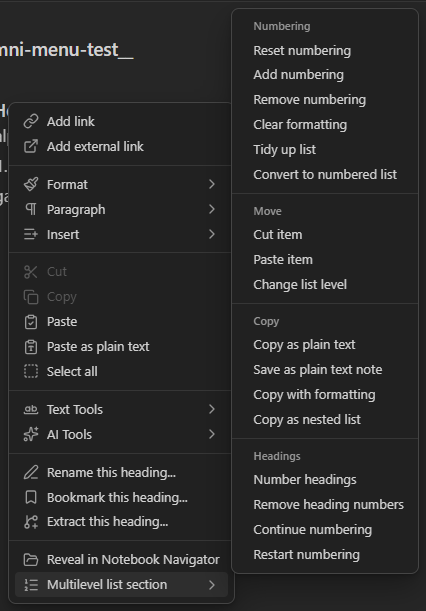
- The categories no longer get stuck. In 3.3.0 each category was its own submenu, two levels deep. Obsidian's menu cannot switch between sibling submenus at that depth: once Headings opened, hovering or clicking Copying out did nothing until you clicked somewhere empty and started over. Now the categories are small headings inside the one Multilevel list section submenu, set off by separators, so every command is one hover and one click away and the pointer can slide straight from one category to the next.
- A new picture of the menu in both READMEs, taken from the real app with the submenu open on a heading line.
- Six new tests build the menu against a double and check its shape: no submenu inside the group, four labels that cannot be clicked, fifteen commands. Five of them fail against 3.3.4.
3.3.4
3.3.4: a blocked key keeps the group together
The rest of the selection fix, found by pressing real keys in the app.
- A key with nowhere to go no longer breaks the group apart. Press Tab twice on a selected group: the second press has no sibling to nest under, and 3.3.3 then fell back to moving just the line under the caret, which pulled that one line out on its own and dropped the selection. The same happened with Alt+↑ at the top of a block. Now the group stays exactly where it is, still selected, and the next key that can move it moves all of it.
- A selection over plain text, with no numbered item at its start, is still left to Obsidian.
- Five new tests; two of them fail against 3.3.3.
3.3.3
3.3.3: the selection stays put
The selection stays put.
- A dragged selection now survives every move key. 3.3.2 kept it after Tab and Shift+Tab, but Alt+↑/↓ still dropped it to a caret, so the second press moved one line instead of the group. Now the selection travels with the group through any mix of the four keys, and only goes away when you click somewhere else. Walk a block into place with as many presses as it takes.
- A single dragged line stays selected the same way. A plain caret stays a plain caret, and Enter behaves as before.
- Five new tests press the keys in a row on an editor double, and four of them fail against 3.3.2.