This code was written in hurry and without care, as assignement for a course at University. That code is hard to read and unprofessional, but i decided to keep it here as it may be of use to someone, someday.
In the present work, it is desired to implement an online chat, this will be done through the implementation of 2 main codes, the Server and the Client, that will exchange messages through the use of Sockets, the programming language chosen for the implementation will be Python 3.6. In addition to Sockets, it will be necessary to use Threads, both on the Server and on the client, this is necessary in the Server so that it can handle several clients at the same time, and in the client so that it can receive and send messages at the same time
The client is considerably smaller (in a matter of code) than the server. The client will only respond to requests from the server and should behave according to what the server requires. Threads will be necessary to send and display other users messages at the same time. As explained on the server, the client will behave according to the requests of the server, ie the server will advise the client if he should listen (00), speak (11), send credentials (01) or talk and listen at the same time (111).
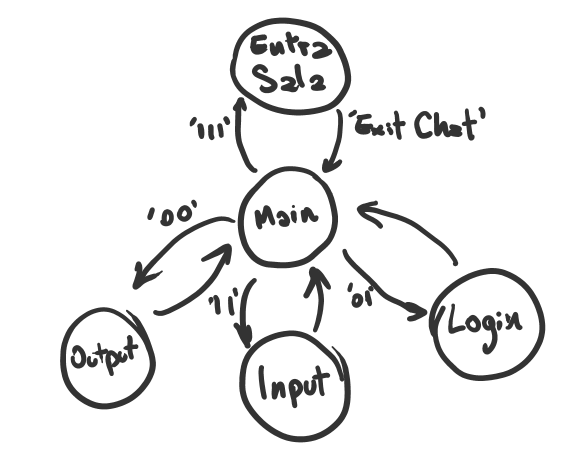
For the server, we need to import sockets for the connection, csv to save the files with users' credentials and log, datatime to put timestamp information in the log and threads to handle multiple users at the same time. In the main menu, the client will be warned that the client must send a string with the request that will be printed to the user, which will then send the data accordingly. In this case, the user must inform which mainmenu item he wants to access. The user will have the option of registering in the chat, logging in, creating or deleting rooms, obtaining information about a room or entering a public room or any other server room. The user will be registered and their credentials will be written to a CSV file, in addition the user will be inserted into a list, and a message will be written to the log file. The login will work similarly, however the list of users in memory will be used to read the user data, this was the most convenient way to do it, since reading CSV files usually causes a lot of errors and before the server closes, just write all the credentials in the file, this makes accessing and checking credentials faster. As users enter public and non-public rooms, their name and connection data will be placed on a specific list for each room, the public room will be a single list, however other rooms will have their users listed within the main list, that is, each room in the room list will have a list of users.
The server receives the messages from the client and sends them to all clients, concatenating the message with the user name passed by the mainmenu function that was provided by the login function, brodcasting. In addition, the client will have the option of Send commands: [patch to .txt] and Exit Chat, the Send command will send the file from the path specified by the client to all other clients in the room, who will save that file to their computers automatically. The Exit Chat command causes the server to remove the client from that chat room.