Development process of my first iOS application
My clients are my mother and my grandmother, and they are currently facing a problem of having to think of what to cook for meals. In the current situation of the COVID-19 pandemic, everyone in their family members now stay in their houses for the whole day. Therefore, they need to cook three meals every day, for all of their family members. In June, 2020 I received a text from my mother on behalf of her and my grandmother (appendix A). She told me that they are in need for something that can help them to come up with different menus for every meal. They don't want to cook the same thing every day, and they are having trouble coming up with non-repetitive menus. Furthermore, they want their family to eat healthily, with balanced nutrition.
The proposed solution to this problem is to create a software that provides an easy way for my clients to search for variety of menus, along with the ingredients, recipe and nutrition data. Both of my clients use an iPhone, however they can only perform basic operations such as texting and seraching on the internet. Hence, the applicatoin should be designed in way that it can be used in these two simple steps:
- Type in a keyword (eg. chicken, tomato)
- Scroll through and tap on the desired recipe to see details
These are the only steps that are required by the users. As for the application, it will have a search bar for users to type in a keyword and the results page users can scroll down to see the search result. After the user has tapped on a specific recipe, it will present the ingredients, recipe, and nutrition data in one glance.
Another function this application should have is a system which notifies the users that the menu has been used recently, to prevent them from making a repetitive recipe unconsciously. This means the system should remember the most recent search history. The search histories will vary with different users, and to this issue, I decided to ceate a login system for each user so that the search history stays within their user page.
| Action Tested | Procedure | Expected Outcome |
|---|---|---|
| User can create their own account | Typing valid information (matching passwords, secure password, and no empty text fields) in the required text fields and checking and confirm a created user account in Cloud Firestore | If all the information entered in the text field is valid, a new document containing user information will be created in the Cloud Firestore |
| User can login & logout from their own account | Type in a registered email and password then tap the login button to see if it navigates to the main page | Once the login button is tapped if email and password are entered correctly, it will move to the main user page |
| Disables the navigation button and various error message is shown whenever registration or login failed | Type in invalid information (non- matching password, insecure password, empty text fields, incorrect login information) to check if it shows error-specific messages, and disables the navigation button | It will show different error messages for each error, and disables the navigation button |
| Search results are shown after keywords are entered | Check by typing in keywords (ex. “tomato”, “chicken”) to see if the results show the corresponding recipes | It will show the corresponding search results (e.g. if chicken was entered, results should show “Chicken wing”, “Garlic Fried Chicken”, etc.) |
| Displays details of recipe when selected | Tap a random recipe from the search result to check the functionality of the navigation link, as well as the contents on the details view | When a recipe is selected, it will take the user to details view, and present information about ingredients, recipe, and nutrition facts |
| Appearance of popup message to remind the user that the recipe has been made recently | For the sake of simplicity, tap on a same recipe from the previous test after a minute or two to check if a reminder would pop up | When the same recipe is tapped more than once within the given time (timer triggered by the first tapped), it will show a message reminding the user |
When the users are registering for the first time, they will be required three personal information: username, email address, and password. In this particlar application the users are required to type in the same password for confirmation. These information must have certain credentials to ensure the correctness and security of user information. Whenever there are any insufficiency or invalid information, the program should return an error message specific to the user's error. The following is a code snippet from the function which is dedicated to this:
func validateFields() -> String? {

        // check if all the fields are filled
        if self.username_su.count == 0 || self.email_su.count == 0 || self.password_su.count == 0 || self.confirmPassword.count == 0 {

            errorMessage = "Please fill in all fields"
            return "error"

        }
        // check if the password is secure
        if isPasswordSecure(password_su) == false {

            // show error message
            errorMessage = "Please make sure you password includes at least one uppercase, one lowercase, one numeric digit and is more than 8 characters."
            return "error"
        }

        // check if the password and confirmed password match
        if self.confirmPassword != self.password_su {

            errorMessage = "Please make sure that your passwords match."
            return "error"

        }

        // if no error is detected return nil (default setting of return value)
        return nil

}Firebase is a development platform for mobile applications, such as iOS and Androids. While there are many features in Firebase, I specifically used Cloud Firestore. This is a real-time database that Google provides us for free. I used this for storing user information as well as the web scraped data.
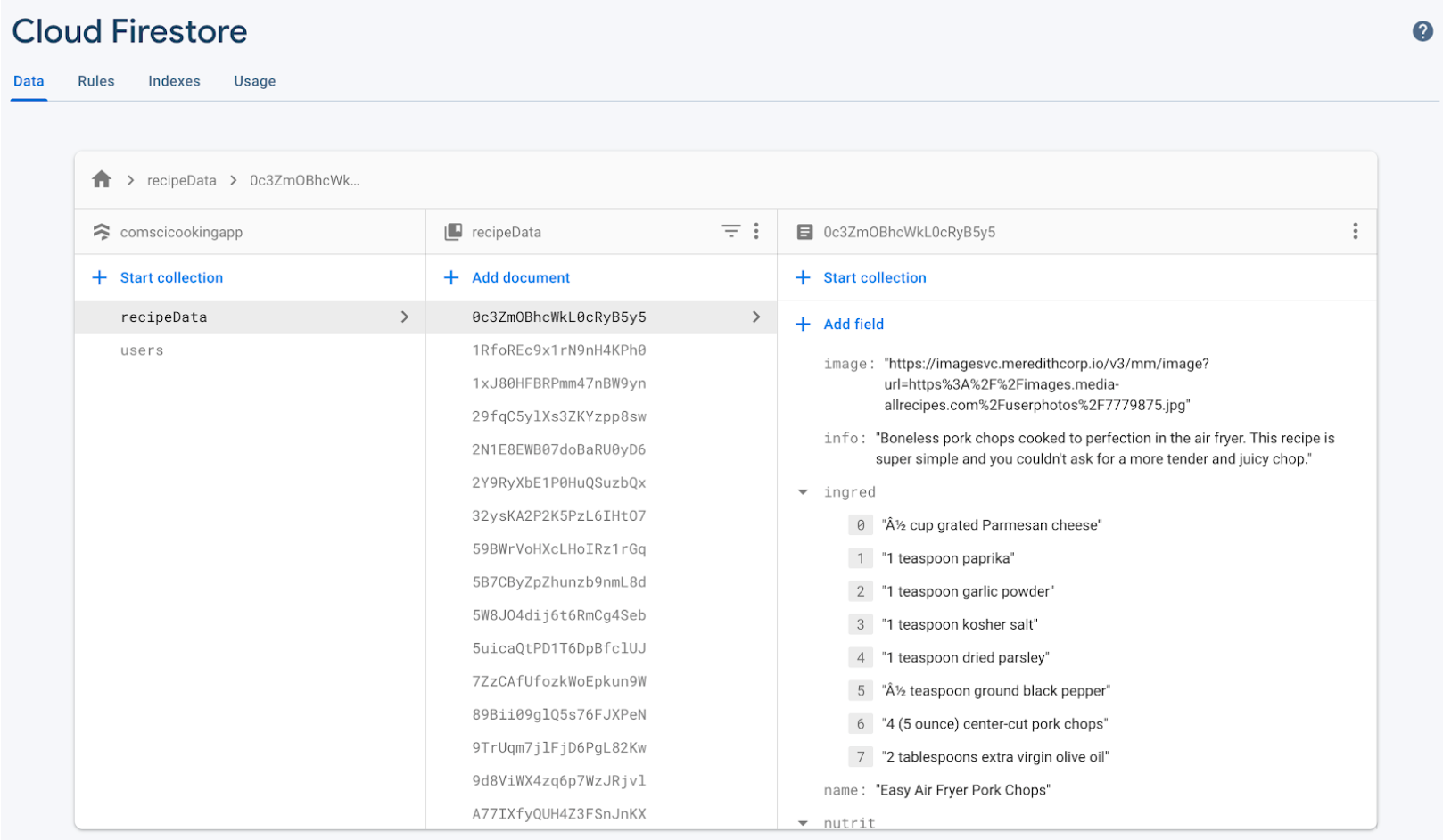
The following code snippet adds the webscraped recipe details into the Firebase Realtime Database, to manage and store the retrieved information.
func addToFirestore() {

        accessSubURL()

        // creating a constant for the database
        let db = Firestore.firestore()

        // loop through the number of links retrieved to create the correct number of documents
        // add all information to firestore
        for i in 0..<recipeLinks.count {
            db.collection("recipeData").addDocument(data: ["name": recipeNames[i], "info": recipeDescs[i], "image": recipeImageLinks[i], "ingred": recipeIngredDict[recipeNames[i]], "nutrit": recipeNutDict[recipeNames[i]]])
        }

    }
Webscraping entails "scraping" through the webpages, and only capturing the necessary information. The webpage I used had a main page, and a sub-page for each recipe, and in the following code snippet it scrapes for the subpage link by looking through all of the tags that can be found on the current page:
// for each "a" check the classname
for i in 0..<a.count {
    // get classname
    let className: String = try a[i].className()
    // <a> with classname of the below containes recipe links
    // append the links contained in a into the recipeLinks
    if className == "tout__titleLink" {
        // add to recipeLinks
        recipeLinks.append(try "https://www.allrecipes.com/\(a[i].attr("href"))")
    }
}
I got the class name "tout__titleLink" by right clicking on the webpage and selecting "Inspect". This shows the HTML of the webpage, and by looking through this I was able to differentiate what information I want to scrape, and what to discard. This is a very small portion of my webscraping code intended only for simple demonstration of how I implemented it. The full code can be seen in Webscrape.swift.
I tested the functionality of my application using the test plan that was shown in the Test Plan section. This was strictly reviewed with the clients to maximize its usability. Here is the link to the video which demonstrates the usage of the application by executing through each test plan.
- User interface of the details view
- Make the ingredients more big and visible especially considering my grandmother whose eye sight may not be as good as others
- Making the entire page scrollable
The size of the texts, and margin of the details section may have caused inconveniences to clients with bad eye-sight. The text sizes can be changed in the "Settings" app in iPhone, however, considering that my target audience only know basic functions, it is best to not assume that they know how to do this. Hence, it is important that we incorporate the ability of changing text sizes and section sizes within the application.
- Result page organization
- Recipes could've been organized in alphabetical order, grouped within the same genre (Italian, Japanese, etc.)
For more clarity and easy access to desired information, in the future, we can implement a new way of organizing the search results. For example, in the current version, the result page displays the results in the webscraped order. However, we could write a short code that alphabetically sorts the webscraped data and then display them. Important thing to note here is that since the amount of data is quite big, the sorting algorithm must be O(nlogn) to provide our clients with smooth usage of the application. Moreover, in the search page, we can add new buttons labeled "Japanese", "Italian", etc. so that if the clients have no idea of what to type in the search box, they still have something to look for.
- More variance in data
- Using more resources to webscrape
- Regulating some menus to appear on the search result if nutrition data appears to be unhealthy
Currently, only one resource is webscraped. In this version of implementation, the application, before starting webscrapes the data on the webpages and stores it in firebase. However, if this resource has issues on its server side, we will also have problems, if we still haven't used that application yet. One way of fixing this issue, is to have more than one resource to rely on. This way even if one resource goes down, there are still other back up resources we can webscrape from. Another good feature to implement maybe to limit the menus the application would display, based on its nutrition data. As of now, it spits out exactly as it webscraped, however with the new feature, it filters the webscraped data based on nutrition information (e.g., calories), so that it only shows "healthy" recipes in the search result.
[1] Firebase Authentication Tutorial 2020 - Custom IOS Login Page (Swift), CodeWithChris, 25 July 2019, www.youtube.com/watch?v=1HN7usMROt8&t=3221s.
[2] Web Scraping in Swift 4 Using SwiftSoup, AG Tutorials, 22 Oct. 2018, www.youtube.com/watch?v=z2Z90aJUXhg&t=1224s.
[3] Custom Search Bar Using Firebase In SwiftUI - Integrating SearchBar With Firebase Using SwiftUI, Kavsoft, 31 Jan. 2020, www.youtube.com/watch?v=wnsSYeJtmYw&t=366s.
[4] Hudson, Paul. “The Ultimate Guide to Timer.” Hacking with Swift, Hacking with Swift, 3 Jan. 2021, www.hackingwithswift.com/articles/117/the-ultimate-guide-to-timer.