Repository navigation
Releases
Mullion 2.5.0 — Performance

Mullion 2.5.0
A Performance tab on every project: per-route timings with budgets and baselines, a PHP profiler with flame graphs (macOS), production-readiness checks, a built-in load test, production-like mode and worker health.
Upgrade: Settings → About & updates → Upgrade · brew upgrade mullion · scoop update mullion
Added
-
PHP profiler: flame graphs for a site's requests (macOS). The
project page's Performance → Profiler tab (andmullion profile <site> on|off|status|list|show|clear) records where PHP requests spend their
time with SPX 0.4.22
(GPLv3 — built on your Mac from source, never shipped by Mullion; about
a minute the first time per PHP version, with the Xcode Command Line
Tools). spx.so is loaded disabled, which costs nothing; turning a site
on passes its SPX settings through Caddy for that site only (other
sites on the same php-fpm are explicitly kept off). Profile only when
asked (SPX's control panel for your browser session, or
?SPX_ENABLED=1&SPX_KEY=…on any URL), the next N requests, requests
matching a path (/api,/orders/*), or every request. Each profile
shows its request, wall time, memory and call count, a zoomable,
searchable flame graph and the top functions by self and inclusive
time, with a link to SPX's own viewer; the newest 100 profiles (at most
256 MB) per site are kept.mullion php updaterebuilds SPX for the new
patch when the old one had it. Not available on Windows yet: SPX has no
Windows build. -
Performance tab on the project page (and
mullion perf <site> routes|check|load|prod|workers). Routes: per-route count,
average, p50/p95/p99, queries, query time, peak memory, error rate and
N+1 from the Watch data (Laravel's route names with Deep on), with
per-site budgets, saved baselines and a regressions-first comparison.
Readiness: a production-readiness audit — debug/env/log settings,
config and route cache readiness, dev packages inrequire, Composer
autoloader, strict models, OPcache, PHP end of life, database indexes
and primary keys (read-only, through the.envconnection), the N+1
and slow queries Watch saw, and the frontend build — each finding with
the why, the exact fix, Run fix/Simulate and Ignore. Load test: a
built-in load tester against the site's own hosts with live RPS,
percentiles, status codes and a latency histogram, results kept and
compared with the previous run. Production-like mode: APP_ENV and
APP_DEBUG passed by Caddy (the .env stays as it is), OPcache
timestamps frozen for the site, optionalartisan optimize, long
cache headers for fingerprinted assets; frontend sites serve their
build. Workers: memory/CPU of each worker sampled every 10 s, leak
detection, restarts, and per-job timings and repeated failures from
queue workers' logs. -
Watch: the request event now carries its query count and total query
time (kept even past the 3,000-events-per-request cap).
Fixed
- Explain: SQL Server on Windows failed with "An unsupported attribute
was designated on the PDO object" (pdo_sqlsrv rejects
PDO::ATTR_TIMEOUT).
Mullion 2.4.0 — Explain slow queries
Mullion 2.4.0
EXPLAIN in the Watch tab — why a query is slow and how to fix it — plus a fix for "Invalid Host header" on Vue CLI / webpack projects.
Upgrade: Settings → About & updates → Upgrade · brew upgrade mullion · scoop update mullion
Added
- EXPLAIN in the Watch tab: why a query is slow, and how to fix it.
Every query row (in Queries and in a request's timeline) has an
Explain button — prominent on slow, N+1 and duplicate ones. It
reads the database's plan with the site's own PHP, using the
project's.envconnection (MySQL, MariaDB, PostgreSQL, SQLite, SQL
Server), and turns it into plain-language findings with a severity, the
why and a concrete fix: full table scans, no usable index or an index
the planner skips, low selectivity, rows read ≫ rows returned,
filesort / temporary tables / sorts and hashes spilling to disk,
LIKE '%x', functions around indexed columns (whereDate,
LOWER(email)),ORacross columns, string columns compared with
numbers,SELECT *on wide tables,ORDER BY RAND(), deepOFFSET
pagination, correlated subqueries, and N+1 with a guess at the relation
to eager-load (->with('posts')). Where an index helps it suggests one
(equality columns, then a range, then ORDER BY) asCREATE INDEXand a
Laravel migration, both copyable — unless an existing index already
covers it; on SQL Server the optimizer's own missing-index hint is
used. The panel shows the plan (MySQL's classic table, PostgreSQL's
node tree with costs, SQL Server's operators), the tables' indexes and
the raw JSON/XML. Only plans are read: Analyze (SELECT only, on
request) runs the query in a read-only transaction that is rolled back
to measure real rows and time. Auto-explain slow queries (off by
default) explains each distinct slow query once and badges its rows
("full scan", "filesort", "no index"…). Also
mullion watch <site> explain "<sql>" [--bindings '[...]'] [--analyze].
Changed
- The project page's tab bar is one row that scrolls sideways (mouse
wheel too) instead of wrapping onto two lines, and Packages and Git
now sit next to Settings at the end.
Fixed
- "Invalid Host header" on webpack-dev-server projects (Vue CLI /
Vue 2, Create React App, Angular, plain webpack): Mullion's proxy now
sends them alocalhostHost, as it already did for Vite.
Mullion 2.3.1 — Windows fixes
Mullion 2.3.1
Windows fixes for frontend projects.
Upgrade: Settings → About & updates → Upgrade · scoop update mullion · brew upgrade mullion
Fixed
- Windows:
npm run devfrom your own terminal failed with
"<project>\mullion.exeis not recognized" whenever a script ran a
package binary (ncp, vite…). The node/npm/npx/corepack shims found
mullion.exethrough%~dp0, which cmd.exe expands to the current
folder when npm runs them; they (and the composer shim) now use
absolute paths, and upgrading rewrites existing shims. - Windows: opening a frontend site no longer pops a console window
runningnpm run dev. The dev server now runs in an invisible
console, so npm and everything it starts stay in the background.
Mullion 2.3.0 — PHP updates
Mullion 2.3.0
Keep PHP up to date: update any installed PHP version to the newest patch of its branch (security releases flagged), with your settings carried over.
Upgrade: Settings → About & updates → Upgrade · brew upgrade mullion · scoop update mullion
Added
- PHP patch updates.
mullion php update [8.4] [--keep-old] [--check]and an Update to 8.4.x button per version on the PHP
page (plus Update all, Check for updates, and a dot on the
sidebar's PHP item) move an installed version to the newest patch of
its branch — e.g. for a security release, which is tagged as such when
php.net marks one. The new patch is installed the normal way (on
macOS LDAP and pdo_dblib are rebuilt for it), the old php.ini is
carried over with every path into the old version's folder re-pointed
(shared modules, the CA bundle), Windows PECL DLLs are carried over,
and the new PHP must start cleanly before the global version, pinned
sites, their workers and thecurrentlink switch to it. The old
patch is removed afterwards unless kept. A failure before the switch
leaves the old version untouched. Checks are cached for 6 hours and
are skipped quietly when offline. mullion php listshows(update: 8.4.x)next to outdated versions.
Changed
- The PHP page's install picker lists branches with the patch they
install ("8.4 → 8.4.27"), and installing a branch you already have at
an older patch offers the update instead of a second, parallel
install.mullion php install 8.4asks the same in a terminal.
Mullion 2.2.0 — SQL Server, Redis, Mail, Watch
Mullion 2.2.0
SQL Server, Redis, a local mail inbox, a live Laravel watcher, OPcache controls, and upgrades from the panel.
Upgrade: brew upgrade mullion (macOS) · scoop update mullion (Windows) — or, from now on, Settings → About & updates → Upgrade.
Added
-
Redis. A new Redis tab on the Database page (and
mullion redis).
On macOS it builds the latest stable Redis from the official,
checksum-verified source with the Xcode Command Line Tools; on Windows
it downloads the portable redis-windows build. It runs on
127.0.0.1:6379(changeable on the Ports page) with RDB snapshots,
a 512 MB cap and dev-friendly defaults, starts with the stack, and the
tab shows memory, keys per database, ops/sec and hit rate, with flush,
backup/restore ofdump.rdb, and the Laravel.envblock.mullion status,doctoranduninstallknow about it. -
phpRedisAdmin at
https://redis.test, opened from the Redis tab
(ormullion redis open), on any database. -
A Cache tab on the project page: the project's own Redis keys
(from its.envprefixes), value previews, delete, flush the project's
cache by prefix, a live command monitor, and "Use Redis in this
project", which edits.envafter showing the diff (the old file is
kept as.env.mullion-backup). -
OPcache controls. The PHP page has an OPcache card per version:
on/off for sites and the CLI, JIT mode and buffer, memory, max files
and timestamp validation, a Reset button, and the live hit rate,
memory and cached scripts from that version's php-fpm/php-cgi.
mullion php opcachedoes the same from the command line. New PHP
installs getrevalidate_freq=0so edits show immediately. -
Microsoft SQL Server. A new SQL Server tab on the Database page
(andmullion mssql) installs SQL Server 2025 Developer edition. On
macOS it runs as Microsoft's official container under OrbStack. If
OrbStack is missing, the tab offers to install it. On Windows it is a
nativeMULLIONinstance. It listens on127.0.0.1:1433(changeable
on the Ports page) with thesalogin and a generated password. The
tab can start and stop the server, create and drop databases, and back
up and restore.bakfiles. It also shows a Laravel.envblock, and
can enable PHP's SQL Server extension when it's missing.mullion doctorchecks OrbStack or the Windows service. -
Adminer, SQL Server's admin tool, served at
https://adminer.test
and opened on the SQL Server login (mullion adminer). -
Upgrade Mullion from the panel or
mullion upgrade. Settings has a
new About & updates section: your version, how Mullion was installed
(Homebrew, Scoop or direct download), the latest release with a
"What's new" link, and an Upgrade button that shows the upgrade's
output live. The panel checks for a new release at most every 6 hours
and marks Settings with a dot when there is one. Homebrew installs run
brew upgrade anabiiil/tap/mullion, Scoop installsscoop update mullion, and downloaded binaries fetch the release, verify its SHA-256
and swap the executable. The agent, the Windows tray and the panel
(Mullion.app included) then restart on the new version.
mullion upgrade --checkexits with 10 when an update is available. -
Pick the charset and collation when creating a database. The
Database page's create forms now offer MySQL/MariaDB character set and
collation, PostgreSQL encoding and locale, and SQL Server collation,
listed from the server itself (common ones first). "Set as default"
remembers your choice per engine, and "Reset" goes back to the
default. The database lists show each database's charset and
collation. On the command line:mullion db create --charset --collation,mullion postgres db create --encoding --localeand
mullion mssql db create --collation. MongoDB has nothing to pick, it
always stores UTF-8. -
Show a database in its admin tool. Every database row has a Show
button, and clicking a database's name does the same. MySQL opens
phpMyAdmin on that database, MongoDB opens mongo-express on it, and SQL
Server opens Adminer on it. If the tool isn't installed yet, it's set
up first. PostgreSQL offers pgAdmin, which has no way to open a given
database, or Adminer on that database when your PHP has thepgsql
extension. -
Mail: a local mail server for testing. A new Mail page (and
mullion mail) installs Mailpit, which
catches every email your apps send on127.0.0.1:1025and shows it in
an inbox — on the page (newest 50 messages, auto-refreshing, with an
unread count on the sidebar) and athttps://mail.test. The page has
copy-ready Laravel.env, nodemailer and SMTP settings; a "Send test
email" form with HTML, text and attachments (mullion mail send);
message previews with headers, source, and Mailpit's HTML and link
checks; "Delete all"; and an Upgrade button when Mailpit has a new
release. "Catch PHP mail()" points every PHP version's php.ini at
Mailpit (sendmail_path, orSMTP/smtp_porton Windows) and
restores the old values when turned off. An optional relay lets you
release a chosen message to a real inbox; nothing goes out otherwise.
Its ports (1025/8025) are on the Ports page, and Mail starts with the
stack and shows inmullion statusandmullion doctor. -
Choose when idle dev servers sleep. Settings → Frontend dev
servers sets how long a dev server may sit idle with no tab open
(default 2 minutes) and with a tab open (default 10 minutes), or
turns sleeping off. A site can override it on its Settings tab. On the
command line:mullion dev idle --no-tab 5m --with-tab 30m,--never,
--site <name>. Changes apply without restarting anything. -
A Watch tab on the project page (and
mullion watch <site>): what
a PHP site does while you use it, live, with nothing added to the
project. Off by default; data stays on this computer.- Requests & logs: every request from Caddy's access log (status,
time, size; slow ones highlighted; filters; headers and query on
click),storage/logs/*.logas it's written (multi-line entries,
colored by level), and exceptions grouped with their stack trace —
anypath:lineopens in VS Code, Cursor, PhpStorm, Zed or Sublime. - Dumps:
dump()anddd()show in Mullion instead of (or as well
as) the page. - Deep (Laravel 10–12): queries with N+1, duplicate and slow flags
and the line that ran them, jobs (including those run by Mullion's
queue workers), cache hits and misses, app events, views, HTTP client
calls, and a timeline per request.
Dumps and Deep load a small PHP file before the site's code through a
per-sitePHP_VALUEfrom Caddy — no Composer package, no php.ini
change. Secrets in headers, query strings and SQL bindings are
redacted. A dot on the project's tab flags new exceptions.
- Requests & logs: every request from Caddy's access log (status,
-
Clear the Watch tab. A Clear menu (with the data size beside it)
clears one view, everything (old lines don't come back after a reload),
or everything plus the project'sstorage/logsfiles.
mullion watch <site> clear [--logs]. -
Choose where setup exports an existing MySQL server's databases.
Whenmullion setupimports from another MySQL (Laragon, XAMPP…), it
asks where to save the export (or takes--backup-dir), checks the
folder is writable and has room, and also checks there's room for the
imported data. Large imports (10 GB+) now export each database once
instead of twice, restore database by database (a failed one doesn't
stop the rest, and the retry command is printed), and run faster.
The panel's backup-location setting uses the same checks.
Changed
- The top bar's admin-tool button follows the Database page's engine
tab: phpMyAdmin (and HeidiSQL) for MySQL, pgAdmin for PostgreSQL,
mongo-express for MongoDB and Adminer for SQL Server. It shows only on
the Database page.
Fixed
- Adding a project no longer hangs on "Linking…". The site is saved
and the panel answers at once; the slow setup (dev servers, the hosts
file's admin prompt, Caddy reload) continues in the background with
live status, and the page always leaves the busy state. - Caddy reloads are bounded: a reload gives up after 30 seconds, and
open connections get a 10-second grace period instead of holding it. - The Watch tab no longer jumps to the top of the page when you click
in it or a new exception arrives.
v2.1.1
v2.1.0
Mullion 2.0 — new look, project pages, terminal, Git, and more
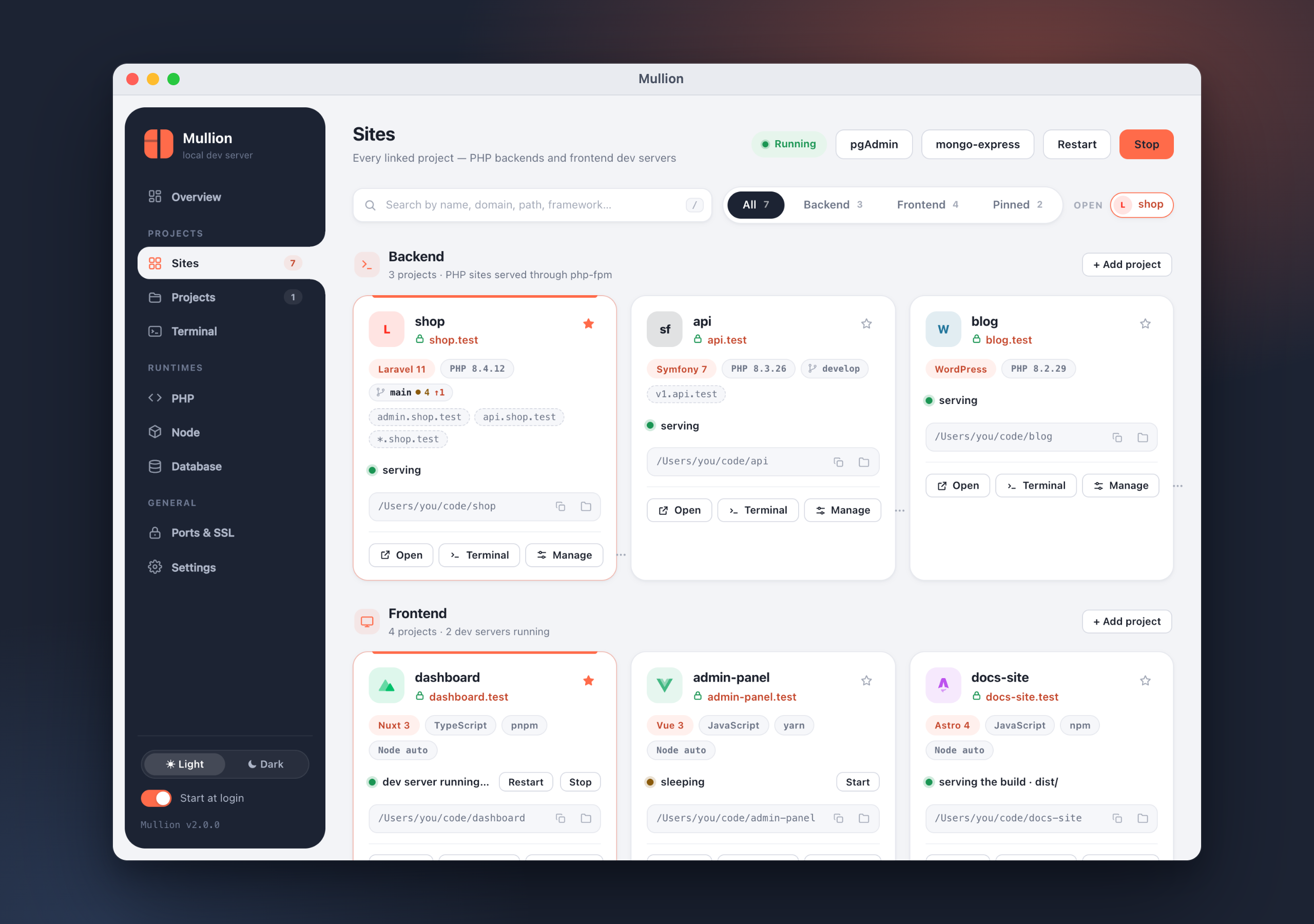
Mullion 2.0 is a big release: a new look, a new identity, and a panel that does almost everything for you. Full docs: https://anabiiil.github.io/mullion/
Install / upgrade
brew upgrade mullion # macOS (Homebrew)scoop update mullion # Windows (Scoop)On macOS, open Mullion.app from Applications (or run mullion app once).
The biggest release so far: a new identity, a native macOS app, a page for
every project (commands, workers, packages, Git, terminal, domains), a
built-in terminal, PostgreSQL and MongoDB next to MySQL, backups, and a
Ports & SSL page.
Highlights
- New look. New logo and app icon, and a redesigned "Midnight + coral"
control panel with a dark mode and in-app dialogs in place of browser
pop-ups. - Mullion.app on macOS. Setup puts a native app in
/Applications
(mullion appreinstalls it). It uses real windows, and those windows
merge into macOS window tabs. On Windows the panel opens in its own app
window. - Sites as cards. Mullion detects each project's framework and
language. The page has search, filters, pinning, and project tabs. - A page for every project, with Commands, Workers, Packages, Git,
Terminal, Domains and Settings tabs. - A built-in terminal with tabs and suggestions as you type. Each
project's own PHP and Node versions are onPATH. - PostgreSQL and MongoDB, alongside MySQL/MariaDB, each with its own
admin tool (pgAdmin 4 and mongo-express). Also new: backups and restore. - Ports & SSL. Shows every port Mullion uses and who holds it. You can
change ports, manage the local certificate authority, and turn on
wildcard DNS.
Added
- Sites page
- Cards detect the framework (Laravel, Symfony, WordPress, Drupal,
CodeIgniter, Yii, CakePHP, Slim, Nuxt, Next.js, SvelteKit, Astro,
Angular, Remix, Vue, React, Svelte, Vite, …) with its major version,
the language, and the package manager. - Search by name, domain, path or framework; filter by Backend, Frontend
or Pinned; pin sites to the top. - Copy path and Show in Finder/Explorer from each card. Cards also show
the Git branch and a count of changes. - Project tabs keep several projects open side by side. A project can
also open in its own window.
- Cards detect the framework (Laravel, Symfony, WordPress, Drupal,
- Project page
- Commands — artisan (Laravel),
bin/console(Symfony), Composer
and npm scripts. Commands run with live output, and you can mark
favorites. Quick actions cover the common tasks. - Workers — supervised queue workers, the scheduler
(schedule:work, no cron needed), Horizon, Reverb, Symfony Messenger,
or any custom command.- A worker can start with the stack (autostart).
- Crashed workers restart with backoff (1s, 2s, 4s… capped at a
minute). After 5 crashes within 2 minutes a worker is marked
crash-looping and retries stop. - Each worker has a log in
~/.mullion/logs.
- Packages — search Packagist and the npm registry, then install or
remove packages. Both can go in as dev dependencies. - Git
- Status, stage/unstage, discard, and a side-by-side diff.
- Commit, amend, and "Commit & Push".
- Fetch, then pull by merge, rebase or fast-forward only.
- Push, publish a new branch, or push with
--force-with-lease. - Branches (create, switch, delete), history, and stashes.
- A banner appears during a merge or rebase with conflicts.
- Domains — subdomain aliases (
api.shop.test) and a wildcard
(*.shop.test). - Terminal and Settings tabs.
- Commands — artisan (Laravel),
- Terminal (xterm.js)
- Tabs.
- Suggestions for paths, commands, npm and Composer scripts, artisan commands
and Git branches; Tab or Enter accepts one. - The project's own PHP, Node and Composer are first on
PATH. - Opens on the Terminal page, in a separate window, or on the project
page, as chosen in Settings.
- Databases
- Tabs for MySQL, PostgreSQL and MongoDB. Each engine installs, starts
and stops on its own, and a stopped engine stays stopped. - Create and drop databases.
- Backups: back up now, restore, delete, and choose a backup folder.
- Uninstalling an engine offers a backup first.
- Admin tools (phpMyAdmin, pgAdmin 4, mongo-express) sit in the top bar
and can be uninstalled.
- Tabs for MySQL, PostgreSQL and MongoDB. Each engine installs, starts
- PHP
- Extension toggles: all extensions on Windows; OPcache and APCu on
macOS, where builds are static. - A php.ini editor for the common settings (memory and upload limits,
execution time, errors, timezone, OPcache timestamps). - On macOS, the LDAP extension is built automatically when a version is
installed. This needs the Command Line Tools. - Uninstall a version, and install or update Composer.
- Extension toggles: all extensions on Windows; OPcache and APCu on
- Node — choose the npm version for each Node install, uninstall
versions, and view diagnostics. - Ports & SSL
- Every port Mullion uses and which process holds it.
- Move database or dev-server ports, with conflict detection.
- Trust or export the local CA, and turn HTTPS on or off for every site.
- Wildcard DNS: a built-in DNS server plus
/etc/resolver(macOS) or an
NRPT rule (Windows).
- Settings — change the TLD, choose where terminals open, set the
backup folder, and run diagnostics (doctor). - New commands:
postgres(pg),mongo,pgadmin,mongo-express,
phpmyadmin uninstall,backups,alias,dns,ports,port set,
port dev,ssl(trust,export,all),worker,run,pkg,
php ini,app.
Changed
- Rebranded panel, app icon, Windows
.exeicon and favicon. - Panel preferences (theme, open project tabs, terminal placement, favorite
commands, …) are now stored inconfig.jsonunderuiinstead of the
browser's storage. - The sidebar has new pages: Sites (backend and frontend together),
Terminal, and Ports & SSL. The old separate Backend and Frontend pages
are gone. - Managed dev servers and a project's commands now trust Mullion's local
CA (NODE_EXTRA_CA_CERTS), so server-side calls to other
https://*.testsites work.
Fixed
- New domains added from the panel or the wake agent work right away.
Background processes were mistaken for an interactive terminal, so the
hosts-file update asked for asudopassword that nobody could type.
Mullion now detects a real terminal and otherwise shows the system
password dialog. - Stopped the bursts of 502 errors on Vite pages that load many modules
at once (max_conns_per_hoston the dev-server proxy). - Config files are written atomically, so a crash in the middle of a
write can no longer corruptconfig.jsonorsites.json. - Stopping a database engine now sticks: Mullion no longer restarts an
engine you stopped on purpose.
Notes for upgrading
- Run
mullion setuponce after upgrading (it's idempotent). On macOS
this installs Mullion.app into/Applications. - Panel preferences start fresh once. They now live in
~/.mullion/config.json
(C:\Mullion\config.jsonon Windows) instead of the browser's storage.
The reason: the panel runs on a random127.0.0.1port each launch, so
anything the browser saved for one launch was lost on the next. - Wildcard aliases (
*.site.test) needmullion dns ononce, which asks
for administrator rights. Named aliases (api.site.test) keep using the
hosts file. - Existing sites, PHP/Node versions and MySQL data carry over unchanged.